
AJAZZ AK029
4.5Editor score
Hall Effect rapid trigger
Eight-kilohertz wired polling
Compact 29-key design
Our expert guide compares the 10 best left handed gaming keyboards, comparing layouts, switches, connectivity, macros, ergonomics, build quality, and value.
Left handed gaming keyboards are less common than standard gaming boards, but they can place frequently used controls closer to the mouse hand while reducing awkward reaches across a full-size layout. The best options balance responsive switches, compact dimensions, programmable controls, comfortable support, and dependable connectivity.
We compared the products in this guide by examining their physical layout, input technology, switch behavior, programmability, lighting, connection method, and intended gaming use. The list includes true left-handed keyboards, compact left-hand gaming keypads, and one-handed devices that may have different handedness, so checking the orientation is essential.
Each review explains the product's strongest features, practical limitations, and best-fit buyer. Ratings reflect the supplied customer feedback, while availability, configurations, and prices can change, making it worthwhile to confirm the current listing and essential compatibility details before purchasing.
4.5Editor score

4.6Editor score

4.6Editor score
The comparison below covers ten distinct approaches to left-side gaming input, ranging from a full southpaw mechanical keyboard to compact Hall Effect keypads. It highlights layout, input technology, programmability, and connectivity so buyers can distinguish a genuine left-handed peripheral from a compact device intended for a different hand.



The RK ROYAL KLUDGE L98 is the clearest conventional keyboard in this guide for a left-handed user, earning a 4.6 customer rating. It moves the numeric keypad to the left, creating a genuine southpaw layout while retaining a full set of gaming-oriented functions, mechanical switch options, RGB lighting, and broad connectivity. Unlike many compact competitors, it can serve as the primary keyboard rather than merely supplementing a standard model.
We may earn a commission when you buy through this link, at no additional cost to you.
Its most impressive feature is the combination of an 8000 mAh battery and tri-mode connectivity. Users can switch among 2.4GHz wireless, Bluetooth 5.0, and a USB-C wired connection, making the board useful across a desktop gaming setup, a laptop, and multiple devices. The gasket-mounted structure, Cherry-profile PBT keycaps, and five internal damping layers are also well suited to long sessions, reducing vibration and hollow sound without sacrificing a mechanical-switch feel.
The hot-swappable PCB accepts both 3-pin and 5-pin switches, and the supplied choices range from pre-lubed linear creams to tactile beige and silent versions. That flexibility is valuable for gamers who want to alter actuation feel, although people using anti-cheat-sensitive games should verify game and tournament rules before substituting switches. As a 98-key, 90-percent board, it still takes up more room than a dedicated one-handed keypad, and its gaming functions remain less specialized than those of a Hall Effect rapid-trigger device.
This is the best overall recommendation for someone who wants one keyboard to support gaming, typing, and number entry from a left-handed position. It balances wireless freedom, mechanical customization, practical ergonomics, and enough traditional keys to avoid constantly reaching for another peripheral. Choose it when a true southpaw layout and everyday versatility matter more than a minimal footprint.
Moving the numpad to the left is the defining advantage here. It leaves more room for the mouse on the right and allows the left hand to remain near the keyboard rather than crossing the chassis to enter numbers.
Tri-mode connectivity, a high-capacity battery, and a hot-swappable PCB create a board that can adapt across gaming and productivity tasks. Switch feel can be tuned later without replacing the entire keyboard.
We may earn a commission when you buy through this link, at no additional cost to you.
The RedThunder One Handed Gaming Keyboard is a 35-key compact peripheral with a 4.4 customer rating, built for players who want gaming controls gathered in one small area. It includes a built-in gaming chip, full-key anti-ghosting across all 35 keys, an integrated wrist rest, and RGB lighting. Its appeal comes from simplicity: it connects without installation and works with major desktop operating systems.
We may earn a commission when you buy through this link, at no additional cost to you.
Macro recording is handled directly through the keyboard. Two shortcut combinations begin and finish recordings, while another clears them, allowing a user to assign repeated sequences without navigating a configuration application. The RGB system supports static and breathing modes across seven colors, which is less elaborate than the per-key and software-controlled lighting found on newer magnetic devices but remains easy to operate.
The chief caveat is that this product is described as one-handed rather than explicitly left-handed. It is a portable 35-key gaming keypad, not a true southpaw keyboard with a relocated number pad. The 3-millisecond response claim and anti-ghosting support make it appealing for ordinary PC gaming, but it does not provide Hall Effect rapid triggers, analog movement, or adjustable actuation. It also cannot replace a conventional keyboard for unrestricted typing.
This is best viewed as a portable supplementary controller for MOBAs, strategy games, macros, or a specific cluster of actions. It may suit a buyer who values simplicity, broad compatibility, and a small footprint more than tournament-level tuning. Confirm its physical orientation and key arrangement before ordering if strict left-handed placement is essential.
Hardware-based recording controls make this keypad approachable for users who do not want to install device software. It remains a basic control deck rather than a deeply programmable competitive board.
The compact 35-key format reduces desk clutter, while plug-and-play operation supports Windows, macOS, Linux, and other listed environments. It is easy to carry between sessions and connect to different systems.
We may earn a commission when you buy through this link, at no additional cost to you.
The AZERON Cyborg II is a programmable 30-input gaming keypad centered on a Hall Effect analog thumbstick, and it carries a 4.3 customer rating. Its list position does not make it a conventional left-handed keyboard: the supplied title explicitly identifies the model as being for right-hand users, with the keypad replacing the keyboard for the left hand while the mouse remains on the right. That unusual arrangement may still appeal to certain competitive players.
We may earn a commission when you buy through this link, at no additional cost to you.
The joystick supports WASD-style or full 360-degree analog movement in compatible games. Users can adjust dead zones, sensitivity, cone angles, eight directional zones, and analog smoothing, while calibration and a middle-click function add further control. Thirty mappable inputs can function as keyboard, controller, mouse, or macro commands, and each button is individually connected without a connection matrix.
The software also handles RGB lighting by game profile and creates a modular main board designed to receive future Cyborg II updates. Six control layouts can be stored directly on the keypad, which helps reduce dependence on the host computer. The adjustable construction and specified hand range of 6.3 to 7.5 inches are important considerations because people with smaller hands may find the medium-sized shape less comfortable.
This is a specialized choice for a gamer who wants analog movement in supported titles and can adapt to its right-oriented design. It is not the safest recommendation for someone specifically seeking a conventional left-handed keyboard. Its value instead comes from extensive thumbstick customization, onboard profiles, and the ability to assign unusual control types.
The magnetic sensor avoids traditional stick drift while providing configurable sensitivity and cone behavior. Compatible games can use either discrete WASD input or analog movement, and a mouse function broadens its utility.
Six onboard layouts and 30 individually connected inputs make it practical to switch between games or workflows. The software is central to advanced configuration, so buyers should confirm that its features suit their preferred titles.
We may earn a commission when you buy through this link, at no additional cost to you.
The AZERON Keyzen combines 32 fully mappable keys with a 360-degree Hall Effect joystick in a premium modular gaming keypad. Its 4.6 rating places it among the strongest products in the guide. The keypad supports keyboard, mouse, and controller inputs, includes macro capability and N-key rollover, and is designed around a hand-shaped form with interchangeable components.
We may earn a commission when you buy through this link, at no additional cost to you.
Cherry MX mechanical switches provide a more conventional tactile foundation than a typical all-magnetic gaming keypad, with Red, Brown, and Blue options available. The listed configuration uses Cherry MX Red, while the DSA-style keycaps create a uniform profile that can be customized. The Hall Effect stick adds true analog control, making the device useful for games that support directional movement beyond a fixed WASD arrangement.
Ergonomics receive considerable attention through two included palm rests, adjustable finger angles, and swappable keycaps. The recommended wrist-to-fingertip length is 20 to 21 centimeters, or 7.9 to 8.3 inches, or more, which indicates that comfort may vary significantly across users. Six onboard RGB profiles are available, while software expands profile and lighting customization. The 3D-printed body and modular replaceable parts also support long-term ownership better than a disposable mini keypad.
This is the premium recommendation for a buyer who wants analog movement, extensive mapping, mechanical switch feel, and a highly adjustable form in one device. It is less suitable for a buyer seeking a conventional left-handed keyboard or a tiny accessory with no learning curve. Its combination of software tools and physical adjustability makes it especially appropriate for committed competitive and enthusiast users.
Cherry MX switch choices give buyers familiar linear, tactile, or clicky feedback. That makes the Keyzen accessible to users who prefer mechanical keyboard feel while still wanting analog gaming controls.
Swappable caps, adjustable finger angles, and two palm rests let the fit evolve with the user. The stated size recommendation should be checked carefully, because a premium ergonomic design still cannot accommodate every hand equally well.
We may earn a commission when you buy through this link, at no additional cost to you.
The AJAZZ AK029 is a compact 29-key one-handed gaming keypad with a 4.5 rating, offering one of the most competitive feature sets in the guide. Hall Effect magnetic switches support rapid trigger behavior, and the stated actuation precision reaches 0.01 millimeters without a bottom dead zone. That makes it particularly relevant to first-person shooter players who value quick resets and tightly controlled side-to-side inputs.
We may earn a commission when you buy through this link, at no additional cost to you.
Its 8KHz polling rate, 128KHz full-key scan rate, and claimed response latency as low as 0.125 milliseconds target high-frequency competitive play. Snap Key, the listed SOCD implementation, and Dynamic Key Switch, or DKS, allow one key to perform more complex actions. The compact layout also leaves considerably more room for mouse movement than a full-size board, while an integrated wrist rest follows the palm's natural curve.
The construction goes beyond a lightweight plastic novelty. An aluminum alloy plate and five-layer acoustic structure combine PO cotton, IXPE switch pads, PET pads, EPDM bottom cotton, and silicone. RGB lighting includes 20 preset effects. On the other hand, the design is wired and limited to 29 keys, so it should be viewed as a competitive supplement rather than a complete typing solution.
This is the best budget-oriented choice for a player seeking rapid-trigger features without moving to the premium end of the category. The AK029 is particularly compelling for FPS, MOBA, and other fast-paced games where mouse space and input latency matter. Players who need extensive typing, wireless freedom, or a full conventional keyboard will need a different device.
Rapid trigger, adjustable magnetic actuation, and high polling rates target games in which a quick reset and precise opposing movement can influence performance. Support for SOCD and DKS adds more ways to bind demanding actions.
Twenty-nine keys and an integrated palm rest reduce desk occupation while preserving a mechanical structure. The five damping layers help create a steadier, quieter feel than a bare membrane mini board.
We may earn a commission when you buy through this link, at no additional cost to you.
The A4tech Ergonomic Left Handed Keyboard is designed for business, accounting, and general productivity rather than competitive gaming, and it carries a 4.4 rating. Its defining feature is a numeric keypad placed on the left, allowing a left-handed user to enter numbers without moving the dominant hand away from the mouse or reaching across a standard keyboard.
We may earn a commission when you buy through this link, at no additional cost to you.
The patented Natural_A key structure and laser-inscribed legends form the core of its ergonomic design. Rather than using a gaming switch system, the product focuses on splitting numerical and alphabetic work across the hands. Eight multimedia hotkeys and dedicated software for managing those functions add everyday convenience for compatible Windows and Mac systems.
Its dimensions are listed as 18.72 by 8.1 by 0.98 inches, giving buyers a concrete idea of its desktop footprint. Connectivity depends on the selected PS/2 or USB version. It does not offer modern gaming features such as Hall Effect actuation, per-key RGB, anti-ghosting claims, dedicated macro buttons, or high-frequency polling, so competitive performance should not be its primary expectation.
This keyboard is best for a left-handed office worker, accountant, or data-entry user who also wants mouse access and needs the number pad. It can complement a gaming system, but it is not the strongest choice for a fast shooter. Its value lies in a practical left-handed layout, special key shapes, and multimedia convenience rather than competitive input technology.
A left-side numeric keypad is particularly useful for accounting, spreadsheets, and data entry. It lets the left hand work in its natural position while the right hand remains available for a mouse.
Natural_A keycaps and laser-inscribed legends distinguish this model from a conventional split keyboard. Multimedia shortcuts provide additional value for general work, although they do not replace dedicated gaming controls.
We may earn a commission when you buy through this link, at no additional cost to you.
The Keychron C0 HE 8K is a 35-key one-handed gaming keypad built around Hall Effect magnetic switches, rapid trigger behavior, and an 8KHz polling rate. Its 4.2 rating reflects a newer product with a more specialized feature set. Each key can register based on real-time travel, with the listed adjustment reaching 0.01-millimeter precision.
We may earn a commission when you buy through this link, at no additional cost to you.
One of its most practical distinctions is browser-based configuration. Key mapping, actuation settings, and per-key RGB can be changed through a web-based configurator without installing a traditional desktop application. Windows and macOS compatibility makes it practical for users who move between operating systems, while 35 keys offer more room for macros and game commands than the smallest one-handed pads.
The device is positioned not only for competitive shooters but also for streamers, editors, and power users. OBS scene changes, push-to-talk, editing shortcuts, and timeline commands can all be assigned to the keypad. Rapid Trigger remains the central gaming advantage, allowing the keys to reset without requiring a conventional fixed upward travel, which can help with quick repeated actions.
The C0 HE 8K is a strong choice for a buyer who wants fast magnetic keys and browser-based setup in one compact peripheral. It is wired, so it cannot be positioned as a wireless solution, and 35 keys still do not make it a complete replacement for normal typing. It best serves a user with a separate conventional keyboard who wants a focused control deck.
The browser-based configurator reduces installation friction and makes the keypad accessible across Windows and macOS. It also allows users to refine mapping, trigger behavior, and lighting for different workflows.
Macro-style commands can control streaming software, push-to-talk, editing functions, and other recurring tasks. The generous 35-key arrangement makes it more versatile than a minimal action pad.
We may earn a commission when you buy through this link, at no additional cost to you.
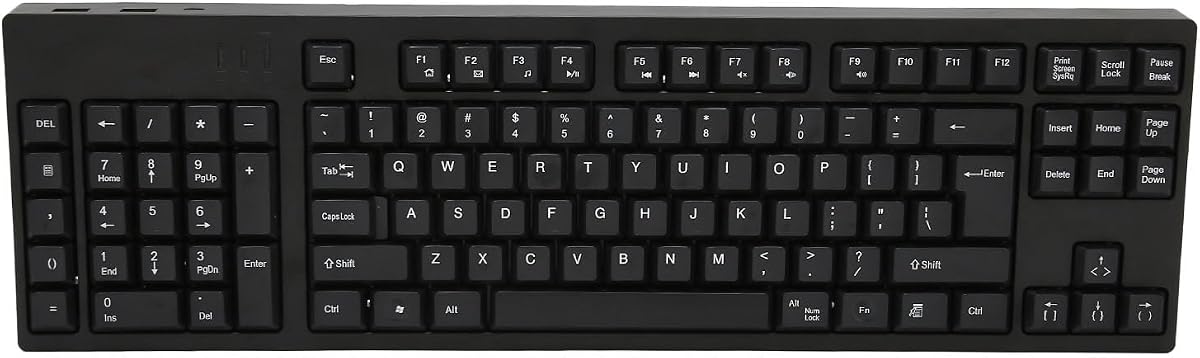
The Left Handed 109-Key Keyboard has the highest supplied customer rating in the guide at 5.0. It is a conventional full-size keyboard with the numeric keypad relocated to the left, making it a direct option for a left-handed user who wants standard typing, navigation, and number entry without assembling a separate control surface.
We may earn a commission when you buy through this link, at no additional cost to you.
The ABS construction provides a stable platform for everyday use, while the plug-and-play approach eliminates driver installation and complicated setup. A micro-USB connection supplies power, and two additional USB interfaces offer convenient access for compatible peripherals. The 109-key arrangement preserves a broad selection of traditional keys, which makes the product substantially more versatile than a one-handed gaming keypad.
The product description focuses on business, accounting, and design work rather than competitive gaming. It does not specify mechanical switches, Hall Effect actuation, per-key lighting, anti-ghosting, or high polling rates. Consequently, its 5.0 rating should be understood as strong customer satisfaction with the basic product proposition, not as evidence of tournament-grade gaming performance.
This keyboard is a practical choice for someone seeking a complete left-handed desktop layout and a higher rating than the alternatives. It can serve general computing, study, accounting, and casual gaming, but competitive players who need rapid trigger controls or extensive macros should choose a more specialized gaming keypad. The included extra USB ports add convenience without requiring a separate hub in common setups.
The 109-key format retains the functionality expected from a full-size desktop keyboard. Moving the numpad left is the main ergonomic change and directly supports a left-handed user's natural positioning.
Plug-and-play operation makes the keyboard approachable for basic and casual users. Two additional USB interfaces help connect accessories, although the older Micro-USB connection limits modern cable versatility.
We may earn a commission when you buy through this link, at no additional cost to you.
The FKZ M30HE is a 30-key left-handed gaming keypad with hot-swappable Hall Effect magnetic switches, adjustable actuation, rapid trigger behavior, and an 8KHz polling rate. Its 4.0 rating is the lowest in this group, but the underlying specification set is competitive for a compact wired keypad intended for esports-oriented setups.
We may earn a commission when you buy through this link, at no additional cost to you.
Actuation can be adjusted through a stated 0.1 to 3.4 millimeter trigger range, with sensitivity configurable down to 0.01 millimeters. Dynamic keystrokes allow one analog key to be assigned to four distinct operations, while rapid trigger supports immediate activation and deactivation with minimal travel. These features target fast repeated inputs and games that benefit from quick opposing movement commands.
The hot-swappable magnetic design allows switch units to be replaced, potentially broadening customization beyond the initial configuration. RGB lighting supports 24 million colors, individual button illumination, and music-rhythm modes. A programmable web driver handles remapping, macros, hotkeys, lighting, and actuation adjustments, giving users meaningful control but also making software setup part of the ownership experience.
The M30HE is best for a gamer who specifically wants a compact left-hand keypad with modern magnetic functions and per-key lighting. Its lowest customer rating suggests checking recent customer feedback for recurring concerns, particularly around software, switches, or setup. It is not suitable for someone wanting wireless operation or a complete typing solution, but it offers a strong feature-to-capability balance for a dedicated gaming desk.
A broad trigger-travel range and fine sensitivity control let users tune each key to their preferred movement. Rapid trigger and dynamic key assignments make the pad particularly relevant to fast competitive games.
The browser-based driver supports remapping, macros, hotkeys, lighting modes, and individual effects. Per-key RGB and north-facing LEDs add visual distinction, though buyers should be comfortable configuring the device.
We may earn a commission when you buy through this link, at no additional cost to you.
The A4tech ERGOGUYS KBS-29BLK is a wired, left-handed USB keyboard with a 4.3 customer rating. Its model number and title place it in A4tech's ergonomic ERGOGUYS range, which focuses on business, accounting, posture, and reduced strain rather than competitive gaming hardware.
We may earn a commission when you buy through this link, at no additional cost to you.
The left-handed arrangement is the feature that matters most. It allows a left-handed user to keep the numerical keypad within the natural working area, reducing the need to cross the keyboard or awkwardly move the mouse. The supplied product data identifies the model as black, wired, and USB connected, making it a straightforward option for compatible office and home setups.
Less information is provided about the switch mechanism, rollover behavior, lighting, dimensions, and operating-system support, so buyers should examine the current listing and packaging for those details. It also does not claim Hall Effect rapid triggers, dedicated macro keys, high polling rates, per-key RGB, or other features associated with modern gaming keypads. Its primary value is ergonomic and task-oriented input.
This model makes the most sense for a left-handed professional who enters numbers frequently and wants a complete keyboard with a familiar business focus. It may be paired with a more specialized gaming keypad, but it is not the leading choice for a competitive player. A buyer should compare its current condition, included accessories, dimensions, and compatibility against the more fully specified alternatives in this guide.
A left-side number pad keeps numeric entry closer to the user's dominant left-hand position. This is especially relevant for accounting, bookkeeping, and spreadsheet tasks where repeated number entry can otherwise disrupt a comfortable workflow.
The KBS-29BLK favors straightforward USB connectivity and a conventional office keyboard experience. It offers a practical left-handed alternative, though buyers seeking competitive features should choose a dedicated gaming model.
We may earn a commission when you buy through this link, at no additional cost to you.
The best left handed gaming keyboard depends on whether you want a complete southpaw layout, a compact left-hand keypad, or a specialized one-handed controller. Consider orientation, switch technology, programmability, mouse clearance, connectivity, and fit before making a final selection.
A left-handed keyboard should place the numeric keypad on the left, while a left-hand gaming keypad should position its controls for comfortable use by the left hand. Some products in this category are only described as one-handed rather than left-handed, and the AZERON Cyborg II is explicitly for righties who place the keypad on the left and keep the mouse on the right. This arrangement can be useful for certain players, but it is not the same as a conventional southpaw keyboard. Read the dimensions, product images, and orientation notes rather than assuming that every compact gaming keypad fits a left-handed setup naturally.
A full or 90-percent keyboard is best when you need unrestricted typing, standard navigation keys, and number entry. A 29-, 30-, 32-, or 35-key keypad is better for FPS, MOBA, MMO, and action-heavy games where mouse movement and rapid access to a limited set of commands matter more than typing. The RK L98 offers 98 keys in a genuine southpaw layout, whereas the AJAZZ, FKZ, Keychron, and AZERON products concentrate controls into a smaller area. Consider whether the included keys cover movement, abilities, communication, editing, and other shortcuts you regularly use.
Conventional mechanical switches offer familiar linear, tactile, or clicky behavior, while Hall Effect magnetic switches detect travel continuously and can support rapid trigger behavior. Adjustable actuation can let a key activate sooner or later, potentially improving control in games with counter-strafing or repeated taps. The AJAZZ AK029, Keychron C0 HE 8K, and FKZ M30HE emphasize these features. The AZERON products use Hall Effect thumbsticks, which serve a different purpose because they provide analog movement rather than magnetic key actuation. Match the technology to the type of control you want rather than assuming all Hall Effect devices perform identically.
Programmability determines whether a keypad can adapt to different games, applications, and workflows. The AZERON Cyborg II supports 30 mappable inputs and six onboard layouts, while the Keyzen offers 32 fully mappable keys and six onboard RGB profiles. Browser-based tools on the Keychron C0 HE 8K and FKZ M30HE handle mapping, macros, and settings without traditional application installation, although software-based configuration can introduce a learning curve. Hardware macro keys on the RedThunder are simpler but offer less detailed control. Check which shortcuts you use, whether profiles can be stored on-device, and whether your operating system is supported.
Wired devices provide a dependable path for competitive gaming and often emphasize high polling rates. The AJAZZ AK029, Keychron C0 HE 8K, and FKZ M30HE list 8KHz polling, while the RedThunder lists a 3-millisecond response and the RK L98 supports 2.4GHz wireless, Bluetooth 5.0, and USB-C wired modes. Wireless freedom is useful with a full keyboard, but a compact competitive pad may be easier to keep at a fixed cable length. Consider your monitor position, desk arrangement, operating system, charging habits, and whether tournament rules or software compatibility favor a wired connection.
A left-handed keyboard can create more mouse room by moving the number pad away from the right side, but a full 98-key board still occupies substantial desk area. One-handed keypads go further, freeing space for broad, fast mouse movements. That does not automatically make every compact device more comfortable, since key arrangement, wrist support, and hand size matter just as much. The AJAZZ AK029 includes a shaped wrist rest, the RedThunder includes a large rest, and the AZERON devices use adjustable palm rests. Choose the shape that supports your hand and keeps your wrist neutral rather than focusing only on the number of keys.
A premium construction can improve stability, typing consistency, and the overall feel of a compact gaming device. The AZERON Keyzen uses 3D-printed modular components and Cherry MX switches, while the AJAZZ AK029 combines an aluminum alloy plate with five acoustic layers. The RK L98 also uses a gasket structure, PBT keycaps, and extensive internal padding. RGB is useful for visibility and personalization, but it should not outweigh switch quality, ergonomics, and software support. Hot-swap sockets add long-term flexibility, while wired construction and replaceable parts can be preferable to a disposable plastic design.
Features such as analog movement, SOCD, DKS, dynamic keystrokes, and advanced macros depend on the game and its anti-cheat rules. A keypad that supports WASD or 360-degree analog movement in one title may offer little benefit in another. Rapid trigger and high polling are broadly relevant to fast keyboard input, but modified input combinations can still be restricted in competitive environments. Before buying, verify that the product's controls work with your intended games, check tournament policies, confirm the software supports your operating system, and test the configuration on a secondary account or in a non-ranked environment when appropriate.
Begin by placing the keyboard or keypad so that your elbow remains relaxed and your wrist stays close to neutral. For a southpaw board, position the relocated number pad comfortably under the left hand while leaving the right side open for the mouse. On a one-handed pad, align its upper edge with the edge of the mouse area and adjust the palm rest so the hand does not need to bend upward. Take time to learn the key locations before entering competitive matches, and use a low sensitivity setting for the mouse that requires the least shoulder movement.
Configure the device in an organized sequence. Begin by installing or opening the supplied configuration interface, then set basic key assignments before adding macros or advanced trigger behavior. Save separate profiles for different games or tasks, especially when the keypad stores profiles onboard. Test every binding outside a ranked session, including critical movement, communication, ability, and escape commands. For magnetic devices, start with a moderate actuation setting and make small adjustments, allowing enough time to recognize whether rapid changes improve control or make accidental inputs more likely.
For care, keep the keyboard on a stable, clean surface and avoid spills, dust, and cable stress. If it uses a wired connection, route the cable where it cannot interfere with the mouse or get caught by the mousepad edge. Clean keycaps and the case with a soft microfiber cloth, and do not pour liquid into the switches. Check battery levels for wireless models, and keep the charging cable accessible. Periodically inspect hot-swappable sockets, removable palm rests, and keycaps for looseness, particularly on compact devices that are frequently repositioned.
A left-handed keyboard has its numeric keypad on the left, usually while retaining a full set of typing and navigation keys. A one-handed gaming keypad contains only the controls needed for gaming and is often used beside a normal keyboard. Some one-handed pads are designed for either side, while others have a fixed orientation, so the listing should be checked carefully.
They can be, because moving the number pad away from the right side creates more room for the mouse. A compact one-handed keypad can provide still more mouse space. The benefit depends on desk size, key positioning, wrist angle, and whether the controls can be reached without stretching, so comfort should be tested whenever possible.
Hall Effect switches are not mandatory, but they can provide adjustable actuation and rapid trigger behavior that some competitive players value. Traditional mechanical switches remain perfectly usable in many games. The more important question is whether your preferred game, input pattern, and rules permit the features offered by a particular keypad.
A compact gaming keypad generally cannot replace a full keyboard for unrestricted typing, document editing, and general productivity. It works best as a secondary controller placed on the left while a conventional keyboard and mouse remain available. A full 98-key southpaw board such as the RK L98 is much more suitable as a primary keyboard.
Compact keypads vary considerably, and no universal size fits every player. The AZERON Cyborg II is described as a medium size for hands around 6.3 to 7.5 inches, while the Keyzen recommends a wrist-to-fingertip length of 7.9 to 8.3 inches or more. Check the stated dimensions and compare them with your own hand before ordering.
Modern wireless performance can be suitable for many players, but a wired connection is generally simpler and removes concerns about battery life, interference, or a missed charging cycle. The RK L98 offers 2.4GHz, Bluetooth, and USB-C options. Competitive buyers who value unrestricted placement may appreciate wireless, while tournament-focused users may prefer a stable wired polling rate.
Rapid trigger allows a key to register again as soon as it moves upward enough to satisfy the selected trigger point, without requiring it to return to a conventional full reset position. This can help with fast repeated actions and quick directional changes. Correct adjustment is important because very sensitive settings may increase unintended inputs.
They can improve comfort when the layout better matches your handedness, but no keyboard can guarantee the prevention of strain. Desk height, chair support, mouse placement, breaks, and neutral wrist positioning also matter. Choose an ergonomic shape that fits your hand and adjust it gradually rather than assuming a left-handed layout alone will solve discomfort.
The RK ROYAL KLUDGE L98 is the strongest all-around choice because it combines a genuine southpaw layout with mechanical switch customization, tri-mode wireless connectivity, and enough keys for gaming and productivity. For a budget-focused competitive setup, the AJAZZ AK029 provides rapid trigger, high polling, and a compact 29-key design. The AZERON Keyzen stands out as the premium option for buyers who want extensive programmability, an analog Hall Effect joystick, mechanical switches, and detailed ergonomic adjustment.
Prioritize orientation first, because a one-handed gaming keypad is not automatically a left-handed keyboard. Next, decide whether you need a full typing platform or a supplementary action deck. For competitive shooters, rapid trigger and mouse clearance deserve close attention; for productivity, a relocated number pad, standard key coverage, and comfortable wrist support are more important. Software, game compatibility, and hand dimensions should be checked before the final decision.
Customer ratings, configurations, and prices can change over time, so review the current listing before purchasing. Confirm the physical orientation, connection method, operating-system support, included components, and any restrictions imposed by your games or tournaments. Those checks will help ensure that the selected left handed gaming keyboard fits both your preferred controls and your actual desk setup.