
Wired Ergonomic Split Keyboard
4.2Editor score
Full-size layout with numpad
Adjustable RGB backlighting
Reliable wired USB connection
A split keyboard separates the left and right key groups so your shoulders, forearms, and wrists can settle into a more natural position. The best models add palm support, adjustable tenting, wireless flexibility, thoughtful key shapes, and layouts suited to different work styles, whether typing at a desk or gaming.
We compared ten split keyboards across the details that have the greatest impact on daily use: separation and tilt options, wrist support, switch or membrane feel, connectivity, battery convenience, backlighting, macro tools, and physical layout. The list includes wired, wireless, business, compact, full-size, mechanical, and keyboard-and-mouse configurations.
Each pick reveals a different strength, from an approachable ergonomic design to extensive programmability. Ratings reflect the supplied customer feedback, while featured specifications come from the listed product information. Prices and availability change frequently, so check the current listing before deciding which model fits your workspace and habits.
4.2Editor score

4.4Editor score

4.3Editor score
As an Amazon Associate we earn from qualifying purchases.
The comparison below highlights the main differences in layout, connection method, adjustability, lighting, and special features so you can identify the keyboard that best matches your desk, typing style, and device setup.




The Logitech Ergo K860 earns the Editor's Choice position because it combines a well-balanced ergonomic design, a familiar full-size layout, and thoughtful wireless features. Its supplied rating of 4.4 reflects generally favorable customer feedback. The curved keyframe, sloping form, scooped keys, and pillowed wrist rest create a mature ergonomic package for people who spend substantial time typing.
We may earn a commission when you buy through this link, at no additional cost to you.
The keyboard's strongest feature is the way it integrates multiple comfort details rather than relying on a dramatic tent angle alone. Curved wrist support includes a memory-foam layer, while the keycaps are scooped to match the shape of fingertips. Adjustable tilt legs offer 0, negative 4, and negative 7-degree positions for seated or standing use, allowing the keyboard to better match your preferred forearm angle.
Connectivity is equally practical. The K860 works through the supplied USB receiver or Bluetooth, while Logitech Options supports Fn-key customization, custom shortcuts, and battery notifications. The familiar full-size arrangement includes a number pad and a Caps Lock indicator. The principal limitation is that the two halves cannot be separated independently or tented dramatically, so people who need extensive positional tuning may prefer the Kinesis Freestyle2 or Cloud Nine C989M.
This is the strongest general recommendation for office workers, students, writers, and programmers who want recognizable keys with reliable ergonomic shaping. It avoids the learning curve associated with a compact gaming layout while providing enough adjustment for many users. Choose it when comfort, familiarity, and wireless convenience matter more than maximum separation or extensive macro programming.
The curved and sloped keyframe keeps the hands from being forced into the same straight alignment used by a conventional keyboard. Scooped keys and the cushioned wrist area support the forearms while the three tilt positions let you fine-tune the overall angle for your desk and chair.
The full-size layout preserves the number pad and familiar key positions, making the transition less disruptive. USB receiver and Bluetooth options support a flexible setup, while Logitech Options adds shortcut and battery-notification functionality when deeper customization is desired.
We may earn a commission when you buy through this link, at no additional cost to you.
The Arteck Split Ergonomic Keyboard is a straightforward route into split-keyboard comfort. It carries a supplied rating of 4.3 and places emphasis on a divided layout, soft wrist support, and uncomplicated wireless operation. Its two key zones are intended to help position the wrists and forearms more naturally without requiring a complicated adjustment process.
We may earn a commission when you buy through this link, at no additional cost to you.
Setup is refreshingly direct. Store the nano USB receiver at the back of the keyboard, plug it into a computer, and begin typing. The rechargeable lithium battery is stated to last six months from one charge when usage is limited to two hours per day. A USB-C charging cable is included, along with a welcome guide and a 24-month warranty.
The fixed split design means it offers fewer positioning choices than adjustable tenting systems. It does not offer Bluetooth, multi-device switching, or extensive software-based key remapping. Those omissions matter if you alternate frequently among a desktop, laptop, and tablet, but they also keep the keyboard focused and uncomplicated for a single primary computer.
This model suits users who want a soft palm rest, wireless freedom, and minimal setup without paying for a mechanical or programmable system. It is also a sensible choice for shared productivity spaces where each person can insert the receiver into their own computer. People who need adjustable tenting, a number pad, or highly customized shortcuts should consider more specialized alternatives.
The split layout and cushioned wrist rest provide the core ergonomic benefits, while the receiver-based design avoids Bluetooth pairing menus and multi-device controls. This makes the Arteck approachable for users making their first move away from a conventional keyboard.
The built-in rechargeable battery removes the need for disposable batteries, and the stated six-month estimate is especially useful for a keyboard that remains connected throughout the day. A USB-C cable is included for convenient recharging.
We may earn a commission when you buy through this link, at no additional cost to you.
The Perixx PERIBOARD-512B is a focused wired keyboard for people who prefer stable connectivity and a substantial tactile feel without mechanical switches. Its supplied rating of 4.4 places it among the strongest customer-rated models in this group. The one-piece split frame creates distinct left and right zones while retaining a unified overall structure.
We may earn a commission when you buy through this link, at no additional cost to you.
Key travel is the defining feature. The membrane mechanism provides 4.2 millimeters of travel with tactile feedback and audible confirmation, described as similar to brown mechanical switches. Curved, stepped rows encourage a more natural posture, while flatter keycap tops and raised back edges are shaped around fingertip contours. The manufacturer states a durability rating of up to 20 million keystrokes.
Its trade-offs come from the simplicity of the design. It uses a wired USB connection, so there is no battery charging, wireless interference, or receiver to manage. That is a benefit in a stationary office but a limitation if you want to move between devices. The fixed split and stepped rows also do not provide the broad positioning range of a fully adjustable ergonomic keyboard.
The Perixx is most compelling for long-term typists who want a traditional, dependable feel and appreciate a visible response when pressing a key. Expect a short adjustment period because the curved arrangement differs from a standard keyboard, with most users reportedly adapting within one to two weeks. It is a compelling alternative for users who do not need backlighting or programmability.
The extended 4.2-millimeter travel provides more visible movement than many membrane keyboards, while the tactile bump and audible response help confirm each keystroke. That makes this model approachable for users moving from conventional office keyboards.
The ABS construction and stated keystroke lifespan make the PERIBOARD-512B suitable for regular productivity use. Its wired design removes charging from the equation, while the curved key rows provide a moderate ergonomic improvement without extreme tenting.
We may earn a commission when you buy through this link, at no additional cost to you.
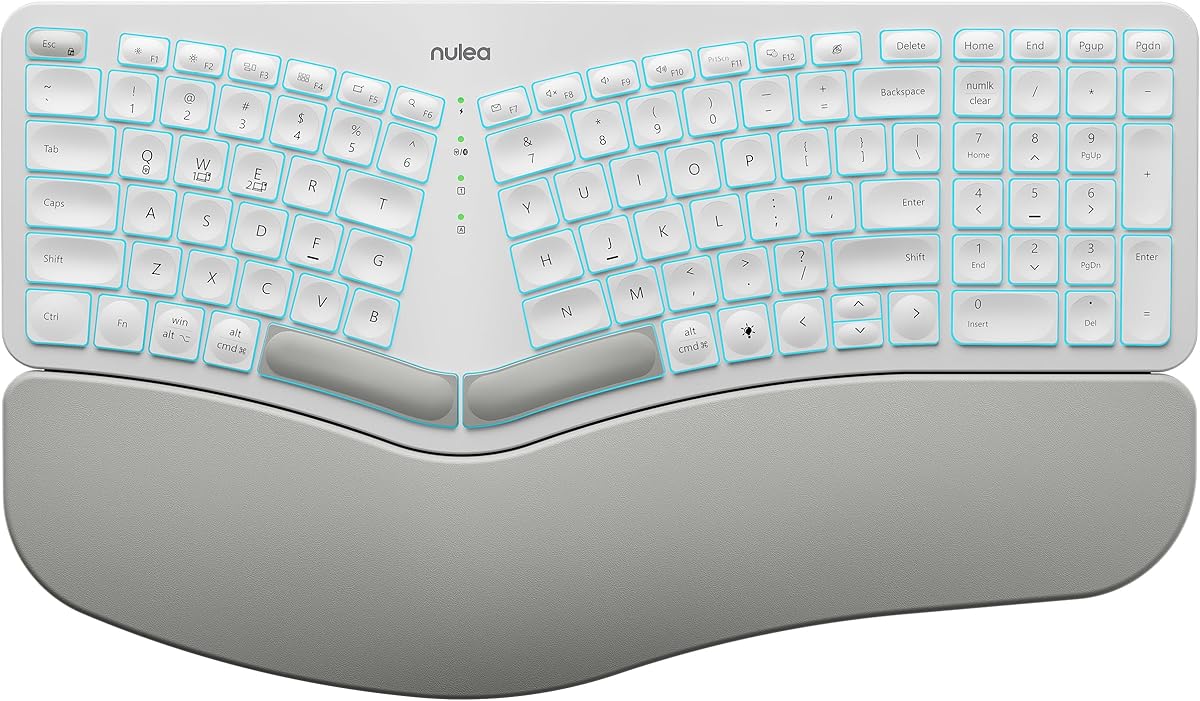
The Nulea RT05 stands out for users who divide their workday across several devices. Its supplied rating of 4.2 reflects positive feedback around comfort, connectivity, and lighting. It combines a split, splayed, curved design with both Bluetooth and 2.4GHz USB, allowing it to serve as the central keyboard for a computer, laptop, and another connected device.
We may earn a commission when you buy through this link, at no additional cost to you.
Switching between those devices is handled with a dedicated button. The keyboard also provides seven backlight colors, three brightness levels, and four adjustable tilt legs that create three different tilt levels. Those controls make it appealing for users who work in changing light or like to match their keyboard lighting to a particular setup.
Its 2,000mAh internal battery is rechargeable by USB-C and is described as offering longer operating time when the backlight is off. When the battery falls below 10 percent, the backlight shuts down to preserve basic functionality. This is sensible power management, although it means users should not expect lighting to remain available indefinitely without a charge.
The RT05 works best for someone who wants a comfortable split layout, flexible wireless connections, and visual customization without entering the more specialized mechanical and macro programming market. It is less attractive for users who require extensive remapping, dedicated macro banks, or dramatically adjustable separation, but its everyday feature set is well rounded.
Bluetooth and 2.4GHz connectivity support up to three devices, and a dedicated switching button reduces the steps needed to move between them. This is useful for workflows that alternate between long-form typing on a computer and shorter messages on a tablet or phone.
Seven colors, three brightness levels, and multiple tilt positions let you adjust the RT05 to your environment and posture. The broad lighting selection is especially useful for a more personalized desk, while the tilt legs provide basic angle refinement.
We may earn a commission when you buy through this link, at no additional cost to you.
The SABLUTE Ergonomic Wireless Keyboard and Mouse has the highest supplied rating in the group at 4.8. That strong customer feedback, combined with its complete keyboard-and-mouse approach, makes it an attractive option for building a comfortable wireless workstation in one purchase.
We may earn a commission when you buy through this link, at no additional cost to you.
The keyboard uses a full-size curved split layout with a number pad, soft memory-foam wrist support, a water-resistant soft-touch surface, and four adjustable tilt legs. It also provides a dedicated Windows and Mac system key along with shortcuts for media, calculator, screenshots, and emoji functions. The included mouse adds contoured palm and thumb support, four DPI settings, and forward and back buttons.
Both devices use rechargeable power and communicate through 2.4GHz wireless. The USB-A receiver is stored under the mouse, while a separate USB-C adapter supports compatible modern ports. Standby periods are stated at up to 250 hours for the keyboard and 350 hours for the mouse, with a five-second auto-sleep feature helping conserve power. A stable connection range of up to 33 feet is also listed.
The main limitation is physical footprint. The keyboard measures 19 by 10.45 by 1.88 inches, so measuring your desk is essential before committing to the full-size arrangement. There is also no Bluetooth mode in the stated specifications. Even so, this is a cohesive package for someone who wants a split keyboard and a more contoured mouse without sourcing both separately.
The matching keyboard and mouse reduce the need to choose a separate pointing device that may sit awkwardly beside a wide split layout. Both offer ergonomic shaping, while the mouse's DPI and navigation buttons make it useful for productivity and browsing.
A dedicated system key lets Windows and Mac users move between layouts, while dedicated shortcut keys handle frequently used functions. The full-size number pad is a major advantage for spreadsheet work, but the dimensions require a generous desk area.
We may earn a commission when you buy through this link, at no additional cost to you.
The RK ROYAL KLUDGE S70 is the most compact and mechanically flexible model in this comparison. Its supplied rating of 4.3 reflects favorable feedback for a keyboard that combines a 75 percent layout with split positioning, wireless connectivity, hot-swappable switches, and programmable controls.
We may earn a commission when you buy through this link, at no additional cost to you.
Eight adjustable feet allow the halves to be separated, angled, or tented, and a coiled cable links the two modules. A fixed wrist rest supports the palms during extended sessions. The left half includes a battery, allowing that section to retain wireless connectivity and macro functionality when used one-handed, an unusual and potentially useful option for gaming or specialized workflows.
The keyboard supports low-latency 2.4GHz, Bluetooth, and USB-C. Its 3,150mAh battery is stated to last up to two weeks without backlighting. Pre-lubed linear creamy switches come installed, while the hot-swappable PCB accepts three-pin and five-pin switches. Five macro keys can be activated by pressing a macro key, and RK software supports remapping, macro creation, and RGB customization on Windows.
This is a strong recommendation for programmers, writers, and gamers who want a smaller footprint and hands-on switch customization. It supports Windows, Mac, and Android devices, though the stated remapping software is Windows-focused. Users who regularly need a number pad or want to avoid configuring software may find the full-size Logitech or SABLUTE alternatives more convenient.
The hot-swappable PCB lets you change compatible mechanical switches without soldering, while the supplied linear creamy switches offer smooth travel. This makes the S70 appealing if key feel is important and you are comfortable learning the basics of switch replacement.
The separable halves, adjustable feet, and tenting options offer more positional freedom than a fixed ergonomic board. Bluetooth, 2.4GHz, and USB-C cover several connection needs, although the 75 percent format omits a dedicated number pad.
We may earn a commission when you buy through this link, at no additional cost to you.
The Wired Ergonomic Split Keyboard delivers many of the features associated with larger gaming boards while keeping the buying decision relatively straightforward. Its supplied rating of 4.2 reflects positive feedback for its split frame, integrated support, backlighting, and full-size layout. It is our Best Budget pick because it emphasizes useful everyday features without charging for wireless hardware or software.
We may earn a commission when you buy through this link, at no additional cost to you.
The split frame includes an integrated wrist rest and two pairs of adjustable kickstands for changing the typing angle. Lighting is a major attraction, offering 10 dynamic rainbow modes, seven solid colors, 17 effects, and five brightness levels. Breathing, wave, gradient, and static patterns provide room to match different preferences or gaming setups.
A 5.6-foot USB-A cable delivers a stable wired connection without pairing, batteries, charging, or drivers. The keyboard includes a USB-C adapter for systems with different ports and has a stated 10-million-keystroke lifespan. Its full-size arrangement includes a number pad and 17 dedicated shortcuts covering media playback, volume, track controls, brightness, calculator, emoji, search, home, and screen capture.
This model is best for a stationary office, gaming desk, or shared setup where reliable plug-and-play behavior matters. It supports Windows, macOS, Chrome OS, and Linux, but it is not compatible with PS5 or Xbox consoles. The included note about functional differences across operating systems is worth considering if you routinely switch systems.
The extensive RGB controls make this keyboard more visually flexible than many conventional wired models. It also keeps the core connection simple, using a direct USB cable with no receiver pairing or battery maintenance.
Seventeen dedicated shortcut keys provide quick access to common productivity and media functions. The number pad suits spreadsheet-heavy workflows, although the overall width of a split full-size design should be checked against your available desk area.
We may earn a commission when you buy through this link, at no additional cost to you.
The Cloud Nine C989M is our Best Premium recommendation because it combines independently adjustable separation with mechanical switches, integrated palm support, full-size functionality, and extensive macro controls. Its supplied rating of 4.3 indicates solid customer approval for a board aimed at people willing to tune their setup.
We may earn a commission when you buy through this link, at no additional cost to you.
The two key modules can be separated by as much as eight inches, giving users room to bring the forearms into a more neutral alignment. Built-in tenting places the keyboard at a seven-degree angle, and the palm supports are designed to keep the hands comfortable during extended work. The split modules support a conventional business workflow while remaining usable for first-person games.
Kailh brown tactile switches provide a relatively low activation force with a tactile sensation. The product description refers to them as brown switches with linear behavior, so buyers should evaluate the feel based on the stated switch type rather than assuming every characteristic of a conventional brown switch. RGB illumination is selectable through the included app, while ten programmable macro keys add substantial shortcut potential.
This keyboard is ideal for power users who want substantial layout control but do not require a compact 75 percent format. The full number pad and USB pass-through are useful in a professional or gaming setup. However, its separation and tenting are not as continuously adjustable as the Kinesis Freestyle2, and users who prefer silent or linear switches may prefer a hot-swappable alternative.
The ability to separate the modules by up to eight inches is the central attraction. It allows the hands and forearms to settle into a shoulder-width arrangement instead of adapting to the narrower span of a standard keyboard.
Tactile brown switches offer a distinct press, while ten programmable macro keys support shortcuts that would otherwise consume multiple combinations. RGB selection through the companion app adds visual control for work and gaming.
We may earn a commission when you buy through this link, at no additional cost to you.
The Logitech Ergo K860 Split for Business is designed around managed deployment as much as personal comfort. Its supplied rating of 4.1 is the lowest among the ten listed models, but that figure should be considered alongside its specialized focus on secure wireless operation, broad certification, and support for administrators.
We may earn a commission when you buy through this link, at no additional cost to you.
Logi Bolt provides fully encrypted wireless connections and a Secure Connections Only mode, making the keyboard more suitable for managed corporate environments. It is certified in more than 100 countries, and remote mass deployment and device-firmware management are supported through Logitech Options. These features matter when an IT team must standardize equipment across many employees.
The ergonomic foundation remains strong. A split, curved frame and sloping design support a more natural typing posture, while a pillowed wrist rest is intended to reduce wrist bending. Three tilt positions accommodate seated or standing work. The full-size board includes a number pad, connects to up to three devices, and has a stated two-year battery life.
Choose this version for an organization that values centralized management and secure wireless deployment. An individual can still benefit from its comfort-oriented design, but the fixed frame lacks the separation and tenting range offered by premium adjustable models. It is more specialized than the standard K860 rather than a different ergonomic shape.
Logi Bolt's encrypted connection and Secure Connections Only mode distinguish this model from ordinary wireless keyboards. Remote deployment and firmware management make it a practical option for IT departments standardizing ergonomic equipment.
The split, curved frame, pillowed wrist rest, and three tilt positions create a comfortable platform for long workdays. Full-size functionality and three-device connectivity preserve productivity features despite the keyboard's business emphasis.
We may earn a commission when you buy through this link, at no additional cost to you.
The Kinesis Freestyle2 is built around the principle that no single fixed split shape fits every body and desk. Its supplied rating of 4.3 reflects favorable feedback for a long-established ergonomic design. The two key modules can rotate and separate by up to nine inches, allowing users to create a hand, wrist, and forearm position tailored to their preferences.
We may earn a commission when you buy through this link, at no additional cost to you.
The supplied V3 tenting accessory adds fixed positions of five, ten, or fifteen degrees. These angles are selected rather than continuously adjusted, but they provide more variety than most fixed ergonomic keyboards. Adhesive cushioned palm pads support the wrists, and a detachable pivot tether helps maintain the chosen distance while still permitting repositioning.
The Freestyle2 uses a standard Windows layout with Cut, Copy, Paste, multimedia hotkeys, and an embedded numeric 10-key. That embedded keypad is a clever solution for users who need number entry without giving up the narrower footprint of a split board. Low-force custom membrane switches provide tactile feedback while reducing finger fatigue, impact, and strain.
This is the recommendation for a user who values adjustment above wireless convenience, compact styling, or extensive lighting. It works without special software or drivers and is well suited to writing, coding, and general office work. People who need gaming macros or contemporary RGB lighting may prefer the RK S70 or Cloud Nine C989M instead.
Independent rotation and separation up to nine inches make the Freestyle2 one of the most adaptable traditional split designs. The pivot tether helps preserve your chosen geometry, while the supplied palm pads provide a cushioned contact point.
The embedded numeric 10-key provides a practical way to enter numbers without the footprint of a full number pad. Familiar Windows shortcuts and the lack of required software keep the transition manageable for productivity-focused users.
We may earn a commission when you buy through this link, at no additional cost to you.
The right split keyboard depends on your body, desk, devices, and tolerance for a new layout. Consider separation, tenting, key feel, connectivity, functionality, and support before making a choice.
Separation determines how far apart your hands sit. A fixed one-piece split offers a straightforward transition, while independently separated modules can bring the keys closer to shoulder width and help the elbows stay in a more natural position. The Cloud Nine C989M separates by up to eight inches, while the Kinesis Freestyle2 reaches nine inches. Users with narrower shoulders may benefit from a modest separation, whereas broader shoulders often need more room.
Tent angles the keyboard upward so the wrists and forearms do not need to bend sharply toward the desk. Some models use adjustable feet, some offer fixed alternatives, and others rely on a continuous sloping design. The RK S70 provides eight adjustable feet and can be tented, the Logitech K860 offers three palm-lift positions, and the Kinesis Freestyle2 includes five-, ten-, and fifteen-degree options. A fixed tilt is acceptable if it comfortably matches your posture, but adjustable options reduce guesswork.
Key feel is highly personal. The Perixx PERIBOARD-512B uses tactile membrane switches with extended travel, while the RK S70 and Cloud Nine C989M use mechanical switches for a more pronounced response. Membrane designs are generally quieter and require less force, while mechanical switches can support more customization and a distinct sound. If possible, compare switch types in person or investigate return policies before committing to an unfamiliar feel.
Full-size split keyboards retain a number pad but require substantial desk width. Compact 75 percent layouts save space and omit it, while the Kinesis embeds a numeric 10-key within the main key area. The curved rows and separated key groups also require adaptation. The Perixx information says most users adjust within one to two weeks, but you should budget time to type without looking down before deciding the keyboard is uncomfortable.
Wired keyboards provide stable, plug-and-play operation with no charging and are ideal for fixed desks. Wireless models offer freedom to move between laptops and tablets, but they add receiver management, battery charging, or Bluetooth pairing. The Arteck uses 2.4GHz wireless, the Nulea supports Bluetooth and 2.4GHz with three-device switching, and the RK S70 adds USB-C. The Logitech business model emphasizes secure managed wireless deployment.
Backlighting improves visibility and personalization, but it consumes battery power and may be disabled when charge becomes low. The Nulea offers seven colors and three brightness levels, the wired full-size model provides numerous RGB effects, and the Cloud Nine includes selectable RGB illumination. The Arteck and Logitech models emphasize long stated battery durations instead. Check the lighting behavior and charging method rather than judging either feature in isolation.
Macros can streamline repeated tasks, but they are most useful if you are willing to configure them. The RK S70 provides five programmable macro keys and Windows software for remapping and RGB control. The Cloud Nine includes ten programmable macro keys and an app for lighting selection. The Logitech K860 supports Fn-key customization and shortcuts through Logitech Options. Simpler models avoid mandatory software, which can be preferable for quick setup.
A split design creates a wider footprint than a conventional keyboard, and a full-size split board is wider still. The SABLUTE keyboard measures 19 by 10.45 by 1.88 inches, making desk measurement particularly important. Also consider mouse placement because a wide keyboard can force the mouse farther outward. The RK S70's 75 percent layout may be a better fit for smaller desks, while the Kinesis can be positioned more closely because it omits a separate number pad.
Begin by placing the keyboard so that each half sits approximately beneath the corresponding shoulder. Position the modules close enough that your elbows remain relaxed, then use the available separation, tilt, or tenting controls to reduce outward reaching. Keep your wrists neutral rather than sharply bent upward, and raise the chair or adjust the desk so your forearms remain comfortable as you type.
Allow time to learn the revised key locations. Use a keyboard guide or temporarily look at the keys while practicing common letter combinations. Begin with a moderate separation and angle, then make small adjustments as you notice tension in the shoulders, forearms, or wrists. Take short breaks to move your hands and change posture rather than trying to compensate for an unsuitable setup through constant pressure.
For maintenance, disconnect a wired keyboard before cleaning and power off wireless models. Use compressed air or a soft brush to remove debris between keys, then wipe the surface with a lightly damp cloth. Avoid soaking the keyboard, spraying cleaner directly onto it, or using abrasive materials. Follow the manufacturer's charging guidance for rechargeable models and replace batteries only with the type the keyboard is designed to use.
A split keyboard can help reduce the need to bend the wrists outward by positioning each hand more naturally. It may also encourage the shoulders and forearms to relax when the halves are separated and tented appropriately. However, no keyboard guarantees prevention of pain or injury. If you experience persistent pain, numbness, tingling, or weakness, stop relying on the keyboard alone and consult a qualified medical or ergonomic professional.
Many users notice reduced comfort during the first few days because they must look at the keys and relearn muscle memory. A typical adjustment period is around one to two weeks, especially with a curved layout like the Perixx. Consistent daily practice and a comfortable separation are more useful than forcing an aggressive angle immediately. Begin with short sessions and gradually increase typing time.
A fixed split is simpler, more consistent, and often easier to use in shared workspaces. An adjustable model is preferable if your shoulders, forearms, or desk require a wider span or specific tent angle. The Kinesis Freestyle2 and Cloud Nine C989M provide substantial separation, while the RK S70 adds adjustable feet for intermediate control. Try a fixed model only if its position appears to match your body.
A split keyboard can work well for gaming because separate halves may reduce forearm rotation and allow more comfortable mouse placement. However, compact split models often omit a number pad, while macro boards may offer advantages for complex bindings. The RK S70 includes gaming-oriented customization, and the Cloud Nine includes programmable macros and RGB lighting. Check that every essential game function is present before switching.
There is an initial learning curve, particularly when moving between the curved rows and separated letter groups. The separation itself is usually manageable, but users often find that they need to stop watching the keyboard within a week or two of regular use. Starting with a familiar full-size model, keeping the initial tent angle moderate, and practicing common words can shorten the adjustment.
It depends on the model. The Nulea RT05 supports Bluetooth and 2.4GHz connections to up to three devices, the Logitech K860 supports connection to up to three devices, and the RK S70 supports Bluetooth, 2.4GHz, and USB-C. Wired models require a separate connection method for each computer. Check operating-system compatibility and whether a receiver is included before planning a multi-device setup.
Longer travel can provide a clearer tactile sensation and make key actuation easier to perceive, but preferences vary. The Perixx PERIBOARD-512B offers extended membrane travel with audible and tactile feedback, while the Kinesis uses low-force custom membrane switches to reduce finger fatigue. Mechanical users may prefer the Cloud Nine's brown tactile switches. The best choice is the feel you can type on comfortably for hours, not a single universally ideal specification.
A wrist rest can improve comfort by supporting the palms or wrists during pauses, but it should not force the hands into an unnatural raised position. Some boards integrate fixed supports, while the RK S70 and Kinesis use separate or fixed palm-rest systems. Adjust the keyboard angle first, then use the support so that the forearms stay relaxed and the wrists remain close to neutral.
The Logitech Ergo K860 is the most balanced overall choice because it combines familiar keys, a well-designed curved frame, a cushioned wrist rest, practical wireless connections, and several palm-lift positions. The Wired Ergonomic Split Keyboard provides the strongest value-focused feature set, while the Cloud Nine C989M offers premium separation, mechanical feel, palm support, and extensive macro control.
Your priorities should determine the category. Choose a fixed design when simplicity is important, an adjustable model when your body or desk needs precise positioning, a membrane keyboard when low effort and clear feedback matter, and a mechanical model when customization and a pronounced key feel are priorities. Measure the available desk width and allow enough time to adapt before deciding that the layout is wrong for you.
Ratings, promotions, availability, and prices can change, so review the current listing and manufacturer details before purchasing. Confirm connection compatibility, included accessories, desk dimensions, and return terms. The best split keyboard is not necessarily the one with the most features; it is the one that lets you work comfortably and consistently with the layout and controls you actually need.