
JSAUX 2-Pack Ultra HD Screen Protector
4.6Editor score
Two tempered glass protectors
LCD and OLED compatible
Guided edge-to-edge installation
99.99% transparency
Anti-fingerprint oleophobic coating
Steam Deck accessories can transform a capable handheld into a more comfortable, protected, and connected gaming setup. The right add-ons can reduce screen wear, improve cooling, support external displays, organize cables, or make long sessions easier on your hands and lap.
We compared the ten products in this guide across their main purposes, stated compatibility, design features, ratings, and practical use cases. The list covers screen protection, cases, docks, cooling fans, carrying options, and pillow stands without claiming any hands-on testing.
Each pick highlights the accessory best suited to a particular need, from straightforward everyday protection to more elaborate modular setups. Ratings and product details can change over time, and prices fluctuate, so check the current listing and your Steam Deck model before ordering.
4.6Editor score

4.8Editor score

4.7Editor score
As an Amazon Associate we earn from qualifying purchases.
This side-by-side comparison shows how the ten accessories differ by primary function, hardware coverage, portability, and compatibility, making it easier to match a product to your gaming setup.






The JSAUX 2-Pack Ultra HD Screen Protector is a straightforward way to guard the seven-inch display on either a Steam Deck LCD or OLED model. Its 4.6 rating reflects a broadly favorable customer response, while the stated 99.99% transparency emphasizes preservation of the original display clarity. The two-pack also provides a spare if the first protector is damaged during fitting.
We may earn a commission when you buy through this link, at no additional cost to you.
Its defining feature is the supplied guiding frame, which is intended to reduce the repeated edge alignment normally involved in installing a full-screen glass protector. The tempered glass is described as extra-reinforced at 500 degrees Celsius for several hours and five times sturdier than conventional protectors reinforced only once. An oleophobic coating adds a practical layer of resistance to fingerprints and helps keep the display tidy.
The main trade-off is that this is a glossy protector rather than an anti-glare model. It may show reflections more readily in bright surroundings, making the matte alternative a better fit for travel or brightly lit rooms. It also adds no cooling, charging, or stand functionality, but it accomplishes its narrower task without adding bulk to the handheld.
This is our Best Budget pick because it addresses the most common physical risk to a handheld gaming display while remaining easy to install and compatible with both major Steam Deck versions. It is a sensible first accessory for owners who want clear protection and a spare sheet, especially if reflections are not a concern.
The high-transparency tempered glass is intended to preserve the look and clarity of the original screen. Its slim full-screen coverage also avoids the visual distraction of a smaller bordered sheet, although actual sensitivity can vary with installation quality and case fit.
Receiving two sheets provides useful insurance against a damaged first installation. One protector can be fitted immediately while the second remains available for a future replacement or a second device.
We may earn a commission when you buy through this link, at no additional cost to you.
The JSAUX PC0104 Basic Set combines a protective body shell, detachable hard front cover, metal kickstand, and modular strap in one coordinated system. Its 4.7 rating places it among the strongest-reviewed products here, and the stated compatibility includes both the original Steam Deck LCD and newer OLED versions.
We may earn a commission when you buy through this link, at no additional cost to you.
The removable front cover protects the thumbsticks and screen from scratches and pressure while the Deck is being carried without a separate bulky case. A zinc alloy kickstand offers more substantial support than a lightweight folding tab for tabletop play, and the silicone strap can hold a power bank, USB-C hub, or compatible cooling fan.
This is not the simplest or smallest option. The combination of a rear shell, detachable face cover, bracket, and strap may add more bulk than a slim protective shell, and some travelers may prefer a case that remains in one piece. The front cover also has to be removed before play, which is an extra step when the goal is quick handheld gaming.
The set suits owners who want one adaptable platform rather than separate stands, straps, and case components. It earns the Best Premium designation because of its broad feature set and material choices, particularly the metal stand and flexible accessory arrangement, provided the added size fits your storage and travel routine.
Combining a body shell with a hard front cover addresses both the exterior housing and the more exposed display, controls, and thumbsticks. The detachable arrangement allows protection while carrying without committing to a permanently enclosed case.
The modular strap gives the setup more flexibility than a fixed case. It can support a power bank, hub, or cooling fan, allowing the Steam Deck to serve as the central piece of a broader accessory arrangement.
We may earn a commission when you buy through this link, at no additional cost to you.
The JSAUX ModCase Cooler Set is the most complete modular package in the list, combining a protective case, front cover, GP0200 cooling fan, metal bracket, and strap. It holds the highest customer rating among these ten products at 4.8, making it the Editor's Choice for a broad, adaptable Steam Deck setup.
We may earn a commission when you buy through this link, at no additional cost to you.
The included fan adds a distinct advantage over the basic ModCase set. A modular slider on the back cover accepts compatible accessories, while the fan is designed to improve airflow around the handheld during gaming. The case itself uses PC-ABS and silicone materials, includes a protective face cover, and provides a metal stand for tabletop positioning.
The trade-off is complexity. A cooler set naturally carries more hardware than a basic case, and the front cover, bracket, strap, and fan make the overall package larger than a simple sleeve. Users who only travel occasionally or always play in short bursts may not need every component, while those concerned about heat and impact protection may find the combination coherent.
Choose this product if you want a single adaptable system for cooling, protection, and tabletop play. It is especially compelling for owners who can use the modular system across gaming, travel, and desktop configurations, although buyers should consider the carrying bulk and confirm that the fit works with their preferred accessories.
The included GP0200 fan distinguishes this package from a standard protective shell. Because the fan attaches through the ModCase system, it can be positioned as part of the overall setup instead of requiring a completely separate cooler arrangement.
The front cover protects the screen and thumbsticks, while the metal bracket provides a stable platform for desktop sessions. The detachable components let users alternate between protected carrying and an active gaming arrangement.
We may earn a commission when you buy through this link, at no additional cost to you.
The JSAUX 6-in-1 Docking Station is aimed at players who want to connect a Steam Deck to a desktop setup. Its 4.3 rating is solid for a multi-device peripheral, and the headline feature is HDMI 2.1 output advertised at 4K resolution and 120Hz, a meaningful upgrade over earlier 60Hz dock designs.
We may earn a commission when you buy through this link, at no additional cost to you.
The dock also includes 100W Power Delivery, three USB-A 3.0 ports, and Gigabit Ethernet. That combination covers the main requirements of a desktop connection: display output, wired networking, peripheral connectivity, and power delivery in a compact unit. Its stated compatibility extends beyond the Steam Deck to the ROG Ally X, Legion Go S, and other supported handhelds.
Real-world display results depend on the monitor, game, resolution, and graphics settings. The product is also not compatible with the ROG Xbox Ally or ROG Xbox Ally X, according to the supplied information. Users should also provide a suitable 100W charger for the best charging experience, particularly when operating a handheld in a high-power mode.
This dock is a strong match for a desk-based Steam Deck user who values 120Hz output and wants a simple wired network. It is less relevant for purely handheld play, where a large collection of ports adds little benefit, but it offers the most focused high-refresh desktop feature set in this guide.
HDMI, Ethernet, USB, and charging are consolidated into one unit, reducing the number of adapters connected directly to the handheld. That makes the dock especially useful for a permanent station with a monitor, controller, network connection, and power supply.
The listed support for ROG Ally and Legion models broadens the dock's appeal, but exclusions still matter. It is not designed for the ROG Xbox Ally or ROG Xbox Ally X, so buyers should verify their exact handheld model before purchasing.
We may earn a commission when you buy through this link, at no additional cost to you.
The Mechanism Gaming Pillow is designed to make Steam Deck sessions more comfortable by suspending the handheld rather than requiring the player to hold its full weight. Its 4.1 rating is the lowest of the ten products, but that does not reflect a lack of distinctive features; the pillow targets comfort-focused users in a way the other accessories do not.
We may earn a commission when you buy through this link, at no additional cost to you.
A Deckmate grip secures the console to the pillow, and a 360-degree ball socket lets the user position the screen and controls at different angles. The filling is described as lightweight beaded material, while high-performance Lycra fabric conforms to the player's shape. An additional mounting point can accommodate accessories such as a battery or phone mount for a more elaborate arrangement.
A soft pillow will not be as compact or rigid as a conventional folding stand, and its shape may take up more space on a bed or sofa. The washable construction also does not make the product immune to accidental spills. Users who strongly prefer a stable hard surface may find a rigid stand more appropriate for their normal gaming position.
This is the pick for players who regularly game while reclining, on a bed, or in bed and want the device to remain within easy reach. The adjustable socket and soft support are more important than minimizing desk footprint, making it a specialized comfort solution rather than a general-purpose stand.
The 360-degree ball socket allows the Steam Deck to be brought closer to the player and angled toward a comfortable line of sight. Tightening or loosening the joint can also accommodate different postures and control preferences.
The beaded filling and Lycra exterior are intended to conform around the player while supporting the handheld. This can reduce the need to hold the device continuously, making the pillow especially useful during relaxed, hands-light gaming.
We may earn a commission when you buy through this link, at no additional cost to you.
The JSAUX 2-Pack Anti Glare Screen Protector is a practical choice when reflections are more of a concern than maximum gloss. Its 4.5 rating reflects solid customer feedback, and the matte texture is specifically designed to reduce harsh reflections under light while maintaining full-screen coverage on LCD and OLED models.
We may earn a commission when you buy through this link, at no additional cost to you.
The protectors use tempered glass and a stated thickness of only 0.33mm. A guiding frame assists with alignment, and the matte coating is also described as anti-fingerprint. As with the other two-pack option, having a spare sheet protects against installation mistakes and makes future replacement more convenient.
Anti-glare materials can slightly mute color intensity or make a display appear less vibrant, especially when compared with an untreated glossy screen. Users who care most about saturated colors and a highly reflective appearance may prefer the Ultra HD version, while people who game near windows or under strong indoor lighting may accept that trade-off.
Choose this protector if reflections regularly distract from a game or if you frequently use the Steam Deck in bright spaces. It offers the same basic installation benefits and broad model compatibility as the clear option, with a finish deliberately optimized for reduced glare.
The matte surface diffuses light rather than presenting a clear mirror-like reflection. That makes the display easier to see in rooms where lamps, windows, or overhead lighting create pronounced glare.
At a stated 0.33mm, the glass is designed to preserve a slim profile. The included frame helps users align the sheet while the anti-fingerprint coating helps maintain visibility between cleaning sessions.
We may earn a commission when you buy through this link, at no additional cost to you.
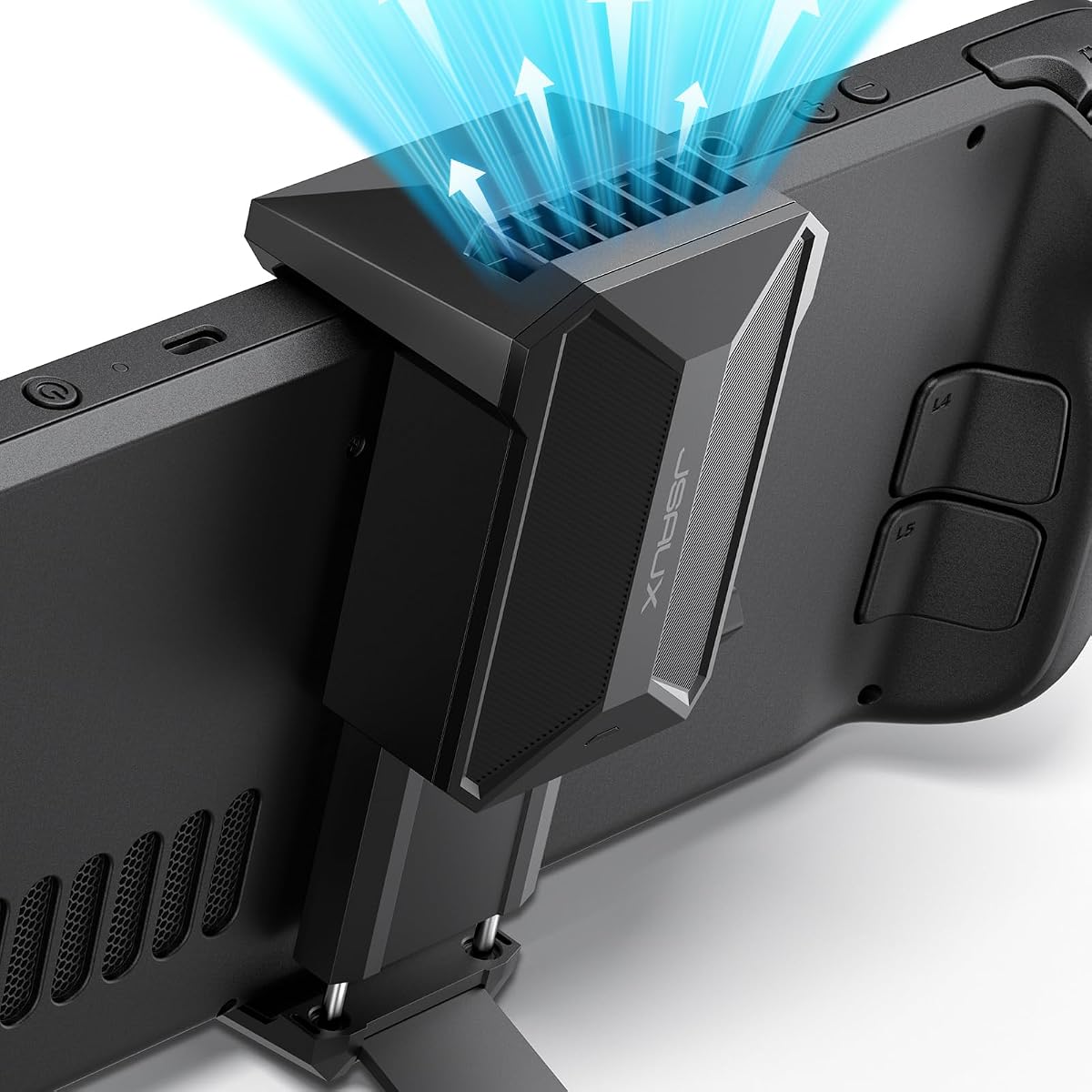
The JSAUX Cooling Fan is a dedicated cooling accessory designed specifically for the Steam Deck and Steam Deck OLED. It carries a 4.7 rating, placing it among the best-reviewed items in the guide, and its fan directs airflow toward the handheld's vents to increase internal circulation.
We may earn a commission when you buy through this link, at no additional cost to you.
Its integrated stand removes the need for a separate basic platform while the fan is in use. A rotary control adjusts speed from 0% to 100%, allowing users to balance cooling against noise. The stated maximum duration is more than three hours at full speed and up to five hours at the minimum setting.
The manufacturer states that four to eight minutes of operation can reduce device temperature by 8–15 degrees Celsius, although individual results depend on the environment, game, fan setting, and thermal conditions. The product description also notes that higher wind speeds produce more sound, which is a normal trade-off for stronger airflow.
This is the best focused option for owners who want additional cooling without committing to a full modular case system. It is particularly useful for longer sessions, tabletop play, or situations where the Steam Deck is already in a protective shell that may restrict heat dissipation. Users should select a speed that provides adequate cooling without creating unwanted noise.
The 0–100% speed control lets users increase cooling when the console is working hard and reduce it for lighter games. This makes the fan adaptable to different play styles rather than forcing one fixed operating level.
Because the fan includes a stand, it performs two jobs at once. Players can keep the handheld elevated and stable while directing air toward the vents, reducing the need for a separate desktop stand.
We may earn a commission when you buy through this link, at no additional cost to you.
The YCE 12-in-1 Steam Deck Dock is built for users who want the largest selection of connections in one desktop accessory. Its 4.2 rating indicates a generally positive reception, and the feature list includes two USB 3.0 ports, three USB 2.0 ports, Gigabit Ethernet, HDMI 2.0, and USB-C power delivery.
We may earn a commission when you buy through this link, at no additional cost to you.
Two 5cm RGB cooling fans distinguish it from simpler docks. The product description states that they move more air than common 2cm fans and can be switched off from the rear along with the lighting. A USB-C port supports 100W charging and up to 40Gbps data, while the aviation aluminum body provides a more substantial structure and passive heat dissipation.
The principal limitation is its HDMI specification. It supports 4K at 60Hz rather than the 4K at 120Hz output offered by the JSAUX six-in-one dock, so high-refresh desktop users should prioritize the JSAUX model. Nintendo Switch video and charging functions work, but data limitations imposed by the platform apply, as they would with other docks.
Choose the YCE model for maximum peripheral flexibility, a larger cooling implementation, and broad compatibility with supported handhelds, laptops, and tablets. It is less compelling for a simple monitor-and-controller setup, but it is valuable when storage, network, charging, data, cooling, and multiple accessories need to converge in one station.
The mix of high-speed and standard USB ports supports a wider range of peripherals than a basic four-port dock. Gigabit Ethernet and Type-C data expand the station's usefulness for gaming, file transfer, and general productivity.
The twin 5cm fans add active cooling around the supported handheld. A rear switch turns off both the fans and RGB lighting, providing a simple way to reduce power use when they are not needed.
We may earn a commission when you buy through this link, at no additional cost to you.
The JSAUX Hard Shell Travel Case is built for Steam Deck owners who regularly commute or travel with a collection of cables and accessories. Its 4.6 rating is among the stronger results in the list, and the dual-layer layout separates the console and microSD storage from chargers, earbuds, power banks, cables, and a dock.
We may earn a commission when you buy through this link, at no additional cost to you.
A removable hook-and-loop divider lets users customize the internal arrangement, while the soft padded lining cushions the handheld and helps prevent scuffs and minor scratches. The hard exterior is intended to resist daily wear and light splashes, offering more structured protection than a simple fabric sleeve.
The case is not included with any accessories, and its size is a consideration for users who carry only the Steam Deck without extras. A power bank is also not included. However, the built-in cable port allows connection to a power bank while the case remains open, and the included right-angle USB-C to USB-C cable is designed to reduce connector bending.
This is a strong recommendation for commuters, travelers, and anyone whose gaming setup extends beyond the handheld. The center panel folds into a stand, the recessed top groove helps reduce joystick pressure, and internal straps keep the console stable. Those details turn the case from simple storage into a flexible travel hub.
The upper compartment holds the Steam Deck and microSD cards, while the lower space accommodates everyday accessories. The removable divider allows the arrangement to change according to the equipment being carried.
A built-in cable port provides access to a power bank while the case is open. The right-angle cable helps reduce strain on the connector, which is useful during longer travel breaks.
We may earn a commission when you buy through this link, at no additional cost to you.
The LULULOOK Gaming Pillow Stand combines a soft lap-support base with an adjustable arm for positioning a Steam Deck. Its 4.4 rating reflects a favorable response, and the product targets players who want a stable hands-free setup while sitting up or reclining rather than a conventional desk-only stand.
We may earn a commission when you buy through this link, at no additional cost to you.
The support arm uses adjustable damping resistance, allowing joints to be tightened so the device does not droop. A high-density memory foam core is designed to resist collapsing, while breathable fabric surrounds it. The full cover can be removed and machine washed, making the pillow easier to maintain after long sessions or accidental spills.
Two specialized clamps are included: one for the Steam Deck and a universal clamp for most phones, tablets, and Kindle devices. That second clamp can hold a guide or video beside the main display, although the product is not compatible with a Steam Deck fitted with a protective case, silicone sleeve, or other third-party accessory.
The integrated storage compartment adds useful space for snacks, drinks, earbuds, chargers, and other small items. The main trade-off is size: the pillow occupies more room than a rigid stand, and its case restrictions may be important for owners who already rely on a protective shell.
The damped arm holds a selected angle without relying on a loose friction joint. This allows the Steam Deck to be placed near the player and remain stable whether the user is upright or reclined.
The universal clamp provides space for a compatible phone or tablet next to the Deck. It can be useful for a guide, companion content, or a second view during a longer gaming session.
We may earn a commission when you buy through this link, at no additional cost to you.
The most useful Steam Deck accessory depends on how and where you play. Start with the problem you want to solve, confirm exact model compatibility, and consider how the accessory will fit into your storage, charging, and transportation routine.
Begin by identifying the biggest limitation in your current setup. A screen protector addresses scratches and glare, a dock supports external displays and peripherals, a cooling fan improves airflow, a case organizes travel gear, and a pillow stand improves positioning during relaxed play. Choosing a single purpose makes it easier to avoid paying for a bundle that contains components you will never use.
A modular case may be attractive if you want both protection and a foundation for future additions, but a focused accessory can be simpler. Match the product to the actual habit: frequent travel, long desktop sessions, bright-room gaming, or playing on a bed or sofa.
Most products in this guide explicitly support both the original Steam Deck LCD and the Steam Deck OLED, but compatibility should always be confirmed against the exact listing. Screen size alone may not tell the whole story because case openings, button positions, power buttons, ports, and dimensional tolerances can differ between models and accessories.
Some docks extend support to other handhelds, yet exclusions still apply. The JSAUX six-in-one dock, for example, supports several named devices but is not compatible with the ROG Xbox Ally or ROG Xbox Ally X. Check the full model name, accessory version, and any warnings before ordering.
A useful protective case should cover vulnerable areas without blocking buttons, triggers, vents, speakers, or ports. Modular cases with detachable front covers offer a compromise between storage protection and quick access, but they add components and may feel bulkier than a fixed shell. Screen protectors similarly require attention to edge coverage, installation method, and touch responsiveness.
The pillow stands have a separate compatibility consideration: the LULULOOK clamps do not support a Steam Deck fitted with a protective case, silicone sleeve, or other third-party accessory. Treat the entire accessory stack as one system rather than assuming every component will work together.
Dock shopping should begin with the display, power supply, network, and peripheral requirements of your desk. The JSAUX six-in-one dock offers HDMI 2.1 at up to 4K and 120Hz, while the YCE twelve-in-one dock uses HDMI 2.0 at up to 4K and 60Hz. A higher refresh specification can be valuable, but only if the monitor, game, and selected resolution support it.
Both docks advertise 100W Power Delivery, but the supplied charger and the handheld's supported input can determine the result. Compatibility notes also distinguish between basic USB operation and full data functionality on platforms such as Nintendo Switch, where hardware restrictions remain in place.
Cooling accessories are most useful when the device can draw air through its vents and the surrounding environment is not already blocking airflow. The standalone JSAUX fan provides adjustable output, while both case-based and dock-based options add active cooling in larger stationary setups. More fan speed generally means more audible noise, so there is no reason to run maximum output continuously if lower settings are sufficient.
Consider the case and cooling fan as a combined system. A snug protective shell can affect heat dissipation, and a cooling accessory may need unobstructed placement around the vents. Read the instructions, avoid blocking openings, and test any newly added system during normal game conditions.
Travel users should look for a hard or padded exterior, internal organization, secure retention, and a comfortable way to carry the case. The JSAUX travel case offers two storage layers, a removable divider, a folding center-panel stand, and charging access while open. It is more capable than a simple sleeve but will also occupy more room than a minimalist carrying solution.
Decide whether you carry only the Steam Deck or also a charger, power bank, cables, microSD cards, earbuds, or a dock. Accessories are not included with the case, so its usefulness depends on your existing equipment. For frequent travelers, organized storage may be more valuable than the smallest possible footprint.
A comfortable accessory should fit the way you actually play. The Mechanism Gaming Pillow uses a 360-degree ball socket and soft filling, while the LULULOOK stand uses a damped adjustable arm and memory foam. Both offer more positioning freedom than a basic rigid stand, but both also take up more space and are better suited to relaxed environments than a tightly packed desk.
Think about viewing angle, arm fatigue, reach, and the duration of each session. A device placed comfortably in your line of sight may be more valuable than one held at a technically ideal angle. The included clamps and mounting points should also be checked for the possibility of using a second display or another supported accessory.
Individual compatibility statements do not guarantee that every product can be used together. A screen protector can sit beneath a compatible front cover, but a case can prevent a clamp from closing, and a dock can be too large for a travel case's lower compartment. Cooling attachments may also need a specific back-slot arrangement or an unobstructed path to the vents.
Before purchasing, list the components you already own and compare their model names, dimensions, and attachment methods. This prevents the common mistake of selecting an individually compatible accessory only to discover that it conflicts with a case, screen cover, stand, or dock already in the setup.
Install screen protectors in a clean, dust-free area and use the supplied alignment frame where one is provided. Remove the device from its case, clean the display with a suitable microfiber cloth, and follow the protector's own application sequence. Avoid pressing trapped particles against the screen because small specks can create persistent pressure points.
For cases, cooling fans, and pillow stands, attach each component according to its instructions and confirm that buttons, triggers, ports, speakers, and vents remain unobstructed. Dock users should connect the power supply, display, and network in the order recommended by the manufacturer, then select a resolution and refresh rate supported by the monitor and game.
Clean fabric products according to their care instructions, especially removable pillow covers. Keep cooling fans free of dust, avoid placing drinks directly over electronics, and use a dry or lightly damp cloth on hard shells. Periodically check connectors, case fit, and cooling alignment, especially after placing the Steam Deck in a travel case or changing cases.
Most of the products in this guide explicitly state compatibility with both the Steam Deck LCD and Steam Deck OLED. However, compatibility can depend on the exact accessory version and other installed hardware, so verify the full model name and product listing before purchasing. The LULULOOK pillow stand also cannot be used with a Deck that has a protective case, silicone sleeve, or third-party attachment fitted.
A clear protector is preferable when image vibrancy and a glossy finish are your main priorities. An anti-glare protector is usually more practical in bright rooms, near windows, or under strong lighting because its matte texture reduces harsh reflections. Both products here include two sheets, a guiding frame, and compatibility with the LCD and OLED displays.
A cooling fan is not essential for every player or every session, but it can be useful during longer or more demanding games. The standalone JSAUX fan targets the vents with adjustable airflow, while the ModCase and YCE dock offer cooling within larger setups. Ensure the fan is not blocked, and remember that higher speed settings are normally louder.
The JSAUX six-in-one dock focuses on a compact desktop connection with HDMI 2.1 output up to 4K and 120Hz, 100W charging, three USB-A 3.0 ports, and Gigabit Ethernet. The YCE twelve-in-one dock offers more total connections, additional USB 2.0 ports, two 5cm cooling fans, and an aluminum body, but its HDMI 2.0 output is listed at up to 4K and 60Hz.
The JSAUX hard shell travel case includes a built-in cable port for connecting to a power bank while the case remains open, along with a right-angle USB-C to USB-C cable. A power bank is not included, and the case should not be treated as fully sealed while charging. Follow the instructions supplied with the case and your power bank.
The Mechanism Gaming Pillow is the most directly oriented toward relaxed, zero-gravity positioning because it uses a soft base, Steam Deck-specific grip, and 360-degree ball socket. The LULULOOK Gaming Pillow Stand is another strong option, offering a memory foam base, damped adjustable arm, second-device clamp, and integrated storage. Both trade compactness for flexible positioning.
It depends on the dock. The YCE twelve-in-one model includes two 5cm cooling fans, while the JSAUX six-in-one dock does not list an integrated fan. The ModCase Cooler Set includes a GP0200 fan in its modular case system. If thermal support is important, compare the cooling features of the complete package rather than assuming every dock includes them.
Compare every installed item with the Steam Deck model and with one another, focusing on case thickness, clamp clearance, attachment locations, port access, and vent coverage. Individual compatibility does not guarantee that a screen protector, case, stand, fan, and dock can all be used simultaneously. Review the dimensions and instructions for the complete setup before ordering.
The JSAUX ModCase Cooler Set is the strongest all-around choice for buyers who want protection, active cooling, a stand, and a modular foundation in one package. The JSAUX PC0104 Basic Set delivers a similar modular platform without the included fan, while the JSAUX Ultra HD protector is the straightforward option for guarding the display on a budget.
Prioritize the problem your current setup actually has. Use a matte screen protector for bright environments, a high-refresh dock for an external gaming monitor, a dedicated fan for airflow, a travel case for organized commuting, and a pillow stand for relaxed play. Verify exact model compatibility and check whether an accessory conflicts with a case or clamp you already use.
Ratings, specifications, availability, and prices can change over time, so review the current Amazon listing before making a final decision. The product links in this guide are affiliate links, and the publisher may earn from qualifying purchases without changing the recommendations based on the commission.