
Womier SK80 75% Keyboard
4.7Editor score
Multimedia information display
Hot-swappable switch sockets
Customizable RGB effects
Our expert guide compares the best colorful keyboards for typing, gaming, wireless setups, compatibility, comfort, lighting, and distinctive desk style in 2026.
Colorful keyboards transform an ordinary workstation into a personal expression of style. The best models combine vivid finishes or retro round keycaps with comfortable typing, dependable connectivity, useful layouts, and features that suit work, study, gaming, or creative projects.
We compared ten colorful keyboards across important buying considerations, including connection type, layout, keycap shape, backlighting, programmable features, compatibility, cleaning, and everyday comfort. The list includes wired and wireless models, compact mechanical boards, full-size retro designs, and keyboard-and-mouse bundles.
Each pick shows how a particular design fits a different kind of user, from a straightforward wired option for Windows desks to a feature-rich mechanical keyboard for customization. Product details and ratings reflect the supplied information, while current prices and availability can change at any time.
4.7Editor score
4.6Editor score

4.6Editor score
This side-by-side comparison highlights the connection style, layout, standout color treatment, and defining feature of each model, helping you identify the colorful keyboard that best matches your desk and daily routine.


The KNOWSQT MilkTea Combo combines a 104-key wireless keyboard with a matching mouse, earning a 4.4 rating from the supplied marketplace information. Its defining attraction is the milk-tea color treatment paired with round, typewriter-inspired keycaps, giving a practical workstation a warm retro personality without the visual complexity of a mechanical gaming board.
We may earn a commission when you buy through this link, at no additional cost to you.
The keyboard connects through 2.4GHz wireless technology and shares a single nano receiver with the mouse. The stated working range reaches 35 feet, while plug-and-play operation means there is no need to install drivers or configuration software. The full-size layout includes a number pad, and the floating button design is intended to create a softer, quieter typing sensation than a conventional raised-key office keyboard.
A major practical benefit is the detachable keycap system. The manufacturer states that the buttons can be disassembled, placed in water for cleaning, and maintained with the included brush. Automatic sleep begins after one minute of keyboard inactivity, and any key press wakes it within about two seconds. A low-battery indicator helps signal when a replacement is needed, though the included battery configuration is not clearly stated.
This is a strong fit for someone who wants coordinated wireless peripherals and retro styling without buying the keyboard and mouse separately. The main compromise is that compatibility may require an adapter on devices using only a USB Type-C port. Buyers who value easy cleaning and a distinct desk look will find this model especially practical.
Using one receiver for both devices keeps the setup simple and reduces cable clutter on the desk. The keyboard and mouse can also be used independently, which is convenient if one device is stored while the other remains active.
The detachable keycaps go beyond visual nostalgia by allowing more thorough maintenance. A brush helps dislodge debris, while removable pieces make it easier to address dust around frequently used keys.
We may earn a commission when you buy through this link, at no additional cost to you.
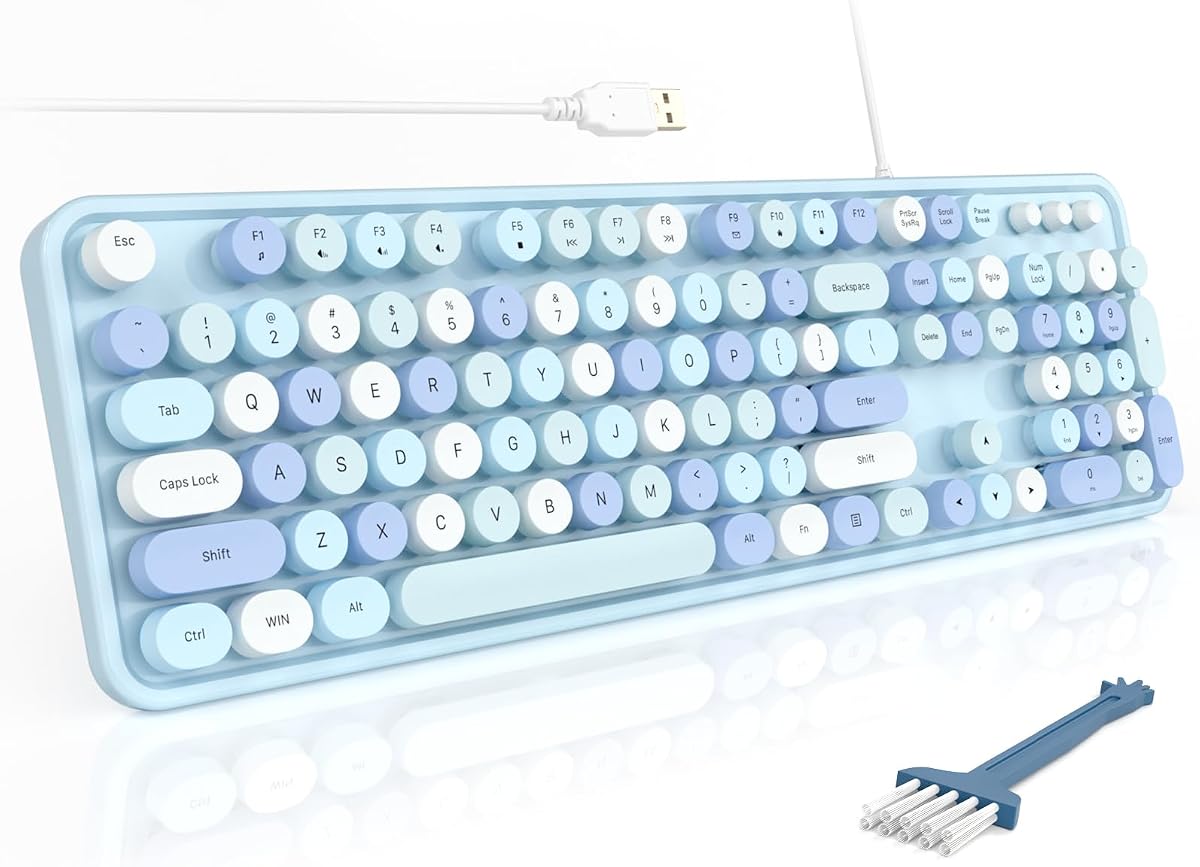
The MOFII Blue Colorful Keyboard is a full-size wired model with a 4.6 rating, combining round typewriter-style keycaps with a vivid blue aesthetic. It feels like a natural editorial choice because it offers a balanced mix of personality, familiar layout, useful controls, and uncomplicated setup without trying to imitate a mechanical gaming keyboard.
We may earn a commission when you buy through this link, at no additional cost to you.
Its primary advantages are a spacious number pad, three indicator lights, and twelve multimedia shortcuts. Playback, volume, web browsing, and email controls can make daily work more fluid, while foldable stands and anti-slip pads let the user select a more comfortable typing angle. The keyboard also comes with a dust brush for easier maintenance.
Connection is through USB using a wired plug-and-play arrangement. Because it needs no battery, charging, pairing, or wireless receiver, it avoids several common sources of setup friction and interference. It is listed for Windows 7, 8, 10, 11, XP, Vista, Server, Chrome OS, and Linux, as well as desktops, Chromebooks, PCs, and laptops.
The sensible audience is a Windows-focused office, school, or home user who values a bright desk accessory and appreciates retro keycaps but wants the familiarity of a full-size layout. A number pad can feel wasteful if you never enter figures, and the wired cable may not suit a minimalist desk, but the MOFII remains an unusually well-rounded colorful keyboard.
The number pad, status indicators, and multimedia shortcuts make this more than a decorative keyboard. It preserves familiar full-size productivity while giving the desk a distinctive typewriter-inspired appearance.
The folding stands and anti-slip pads add ergonomic adjustment in a simple wired package. With no batteries to replace and no receiver to store, it is an approachable option for everyday office typing.
We may earn a commission when you buy through this link, at no additional cost to you.
This black-colorful wireless keyboard and mouse bundle pairs a retro round-keycap keyboard with a matching pointing device. It carries a 4.4 rating and offers a straightforward 2.4GHz connection, making it a practical option for buyers who want a coordinated, cable-free setup at an approachable cost.
We may earn a commission when you buy through this link, at no additional cost to you.
Both peripherals connect through a single USB receiver without drivers or dedicated software. The stated connection distance reaches 30 meters, or 98 feet. The keyboard includes a numeric keypad and multimedia hotkeys for common actions such as music, volume, and email, while concave round keycaps are shaped to follow the fingertips and improve the feel of longer typing sessions.
Automatic sleep activates after five minutes of keyboard inactivity, and the stated battery life can reach up to 36 months depending on use. The keyboard requires one AAA battery and the mouse requires one AA battery, with batteries not included. It is compatible with PCs, Macs, desktops, laptops, notebooks, and other computers that accept the receiver connection.
This bundle makes sense for a student or home-office user who prefers a clean desk and appreciates vintage styling. The included receiver is initially stored in the cardboard packaging beside the mouse, so it is worth locating it before setup. Additional batteries are also required, but the overall package covers the core keyboard and mouse needs.
The shared receiver keeps the wireless setup streamlined and allows both devices to work together. Because the keyboard and mouse can operate without a wired connection, the desk remains freer of cables.
The rounded, concave keycaps recreate a typewriter-inspired feel while retaining a compact number pad. Multimedia shortcuts provide useful controls without requiring a separate accessory.
We may earn a commission when you buy through this link, at no additional cost to you.
The UBOTIE Purple Rainbow Combo is built for people who want color to be the defining feature of their desk. It combines a purple rainbow keyboard with a matching wireless mouse and carries a 4.2 rating, making it a vivid alternative to conventional black office peripherals.
We may earn a commission when you buy through this link, at no additional cost to you.
Round keycaps provide a retro typewriter style with a stated clicky tactile feel. The listed 2.4GHz connection has a range of up to 33 feet, and both the keyboard and mouse have independent power switches, allowing each to be turned off when not needed. Automatic sleep is included to conserve energy, with quick reactivation when the devices are used again.
Compatibility covers Windows and macOS laptops, desktops, tablets, and smartphones when a USB adapter is required. That broad device support is useful for a desk that moves between a work computer and a tablet. The product information also emphasizes upgraded, fade-resistant keycap materials for maintaining the vivid appearance during regular use.
The main limitation is that this is primarily a productivity and lifestyle keyboard rather than a dedicated gaming board. There are no stated mechanical switch specifications, macro controls, or extensive lighting software. Its strongest appeal lies in the coordinated rainbow design, broad compatibility, and the simple freedom of a wireless setup.
Unlike a restrained accent color, the purple rainbow treatment fills the setup with visible personality. It is especially effective in a home office, dorm, or creative studio where the keyboard should function as part of the decor.
Support for Windows, macOS, tablets, and smartphones broadens the practical use of the bundle. A USB adapter may be needed for some mobile devices, so compatibility should be checked before purchase.
We may earn a commission when you buy through this link, at no additional cost to you.
The MOFII Green Wireless Combo delivers a complete green-themed keyboard and mouse set with a 4.2 rating. It combines a full-size retro keyboard, number pad, and 2.4GHz wireless connection, making it a useful option for buyers who want coordinated peripherals and a generous typing layout.
We may earn a commission when you buy through this link, at no additional cost to you.
The keyboard is compatible with Windows 2000, XP, Vista, Windows 7, Windows 8, and Windows 10, as well as Raspberry Pi 3 and 4 systems, PCs, desktops, and laptops. Its receiver is stored inside the mouse, which helps prevent the small adapter from getting lost. The stated reliable range is 10 meters, or 33 feet.
Ergonomic touches include a folding holder, anti-slide pads, and a contoured mouse shape intended to remain comfortable over long work periods. Keycaps can be removed for cleaning, which helps with the dust that routinely settles between keys. Both devices use AA batteries, and the listed battery life is up to 18 months for each, depending on use.
The keyboard enters automatic sleep after approximately eight to ten minutes of inactivity. That is a sensible energy-saving design, though some users may prefer a shorter delay. This set is best for a green-themed office or home setup that needs a number pad, wireless freedom, and matching peripherals.
The keyboard and mouse share a cheerful green theme that creates a more intentional look than mixing unrelated wireless accessories. The full-size keyboard also has the familiar visual density associated with traditional office equipment.
A folding holder and anti-slide pads let the user adjust the keyboard angle and keep it in place. The contoured mouse and removable keycaps support extended work and routine maintenance.
We may earn a commission when you buy through this link, at no additional cost to you.
The FOPETT Blue Colorful set pairs a 105-key wireless keyboard with a compact mouse and holds a 4.3 rating. Its strongest selling points are practical details: a large anti-slip base, quiet mouse operation, splash resistance, a keyboard power switch, 12 function shortcuts, and generous stated wireless range.
We may earn a commission when you buy through this link, at no additional cost to you.
The keyboard and mouse communicate through one nano receiver stored at the bottom of the mouse. The listed 2.4GHz range reaches 10 meters, and plug-and-play operation avoids additional software installation. Keyboard dimensions are given as 17.5 by 5.5 by 1.3 inches, while the mouse measures 4.1 by 2.5 by 1 inch.
The mouse uses micro-motion technology for nearly silent clicks and offers 1600 DPI for cursor control. On the keyboard, laser-engraved high-definition characters and injection molding are intended to resist fading. A waterproof conductive film allows liquid to flow away from the internal membrane, adding a degree of spill protection.
Compatibility is broad across Windows systems, USB-equipped laptops, MacBooks, desktops, Chromebooks, and smart TVs, although the multimedia hotkeys may not function completely on Mac systems. The mouse needs one AA battery and the keyboard two AAA batteries, neither included. A three-year warranty and stated replacement option add reassurance, but Mac users should verify shortcut behavior first.
The nearly silent mouse clicks help limit disturbance in offices, dorms, and homes where another person may be working or resting. The full-size layout retains familiar placement for productivity tasks.
The splash-resistant membrane is helpful in an everyday desk where drinks are present. Twelve function shortcuts for music, volume, and mail add utility, while the keyboard power switch provides straightforward battery control.
We may earn a commission when you buy through this link, at no additional cost to you.
The Atelus Purple Colorful Keyboard is a full-size wired typewriter-style keyboard with a 4.6 rating. Its bright purple finish and detachable round keycaps create an expressive appearance, while the large number pad, indicator lights, and foldable stands preserve the practical qualities expected from a conventional office keyboard.
We may earn a commission when you buy through this link, at no additional cost to you.
Using a single USB connection, the keyboard supports plug-and-play operation without extra software. This removes the need for battery charging, receiver pairing, or wireless troubleshooting. The listed compatibility covers Windows 7, 8, 10, XP, Vista, and later computers, including laptops, desktops, PCs, and notebooks.
The keycaps are described as ABS plastic with an ergonomic design, and their detachable construction makes the keyboard easier to clean. Foldable stands allow the user to change the typing angle. Caps indicators provide visible status for common keyboard functions, while the full-size arrangement is particularly helpful for accounting, data entry, and spreadsheet work.
This is an excellent choice for someone who wants a colorful retro keyboard without paying for a wireless bundle or a mechanical gaming model. Its trade-offs are a standard rather than specialized key layout and a compatibility list centered on Windows. It also lacks a stated multimedia shortcut row, making it better suited to straightforward typing than media-heavy control.
The purple color gives an ordinary full-size keyboard a strong personality without changing the overall shape. Users can keep the productivity benefits of a number pad and status indicators while making the desk look more distinctive.
A single USB plug is all that is required. There are no batteries to monitor or receiver to store, which makes this model particularly straightforward for offices, schools, and shared computers.
We may earn a commission when you buy through this link, at no additional cost to you.
The Womier SK80 75% is the most advanced customizable model in the group, with a 4.7 rating and a color multimedia display. Its frog-green mechanical design, gasket mount, RGB lighting, and hot-swappable sockets place it well beyond a standard decorative office keyboard.
We may earn a commission when you buy through this link, at no additional cost to you.
The upper-right display can visualize a custom GIF, Caps Lock state, connection mode, Windows or Mac mode, system information, backlight brightness and speed, RGB mode and color, volume, and language. Its 11-degree viewing angle is designed to align more naturally with the user's sightline. This display gives the board a visual identity that changes the way a colorful keyboard feels on the desk.
Pre-installed full POM switches come with a hot-swap PCB that supports three-pin and five-pin replacement switches without soldering. The gasket mount is intended to improve stability and reduce typing noise. RGB customization includes 19 lighting effects, nine lighting colors, adjustable brightness, and adjustable flow rate. The detachable USB-C connection adds flexibility for switching between devices.
The keyboard itself works with Windows and Mac, but the driver for advanced GIF, macro, and display settings is Windows-only. Its compact 75% layout saves desk space but omits a separate number pad. It is best for a gamer, programmer, streamer, or customization enthusiast who wants color, tactile mechanical construction, and deeper control in one premium package.
The multimedia screen can show useful system details and custom GIF artwork, making it both a status display and a visual centerpiece. Users can adjust brightness, RGB settings, macros, and displayed images through the Windows driver.
Hot-swappable sockets let users replace compatible three-pin or five-pin switches without soldering. This makes it possible to change switch characteristics while retaining the colorful 75% chassis and multimedia display.
We may earn a commission when you buy through this link, at no additional cost to you.
The UBOTIE Black-Colorful Wireless Combo combines a multicolored retro keyboard with a matching mouse and holds a 4.3 rating. Its most distinctive feature is the mirror-finish panel around the keys, which creates subtle reflections and gives the set a polished decorative appearance.
We may earn a commission when you buy through this link, at no additional cost to you.
Round keycaps deliver a typewriter-inspired clicking feel, while an updated color coating is designed to resist fading during daily use. The combination of black structural elements and bright key colors gives the desk more contrast than a uniformly colored board, making it suitable for a modern home office or gaming setup.
Both devices use one nano receiver stored near the mouse battery compartment. Plug-and-play operation requires no drivers, and automatic sleep helps conserve battery life. Windows 7, 8, 10, 11, and macOS are listed as supported, although the product information notes that some shortcut keys may not work on updated macOS versions.
This set is a good pick for a user who wants a coordinated wireless bundle without abandoning the classic round-keycap look. The glossy panel may show fingerprints and reflections more readily than a matte surface, and Mac shortcut limitations are worth considering. Otherwise, it provides attractive color, simple connectivity, and practical everyday typing in one package.
The mirror-finish panel adds a visual layer that ordinary colorful plastic cannot provide. It catches ambient light around the keys and gives the keyboard a premium decorative presence.
The keyboard and mouse operate through a shared receiver, reducing cable clutter and keeping the setup visually clean. Independent use is also possible, so the mouse can remain stored while the keyboard is in use.
We may earn a commission when you buy through this link, at no additional cost to you.
The HUO JI Purple Blue wired gaming keyboard delivers bright rainbow illumination in a conventional 104-key layout. Its 4.4 rating reflects a solid balance of gaming appearance, everyday controls, and practical protection, while the purple-blue color theme adds personality beyond a standard black backlit board.
We may earn a commission when you buy through this link, at no additional cost to you.
Rainbow lighting includes a breathing effect, adjustable brightness, and the ability to turn the backlight off. Double-shot injection keycaps are designed to resist fading, and the ABS construction provides a firm base. Twelve multimedia key combinations support common work and gaming actions, while the strengthened space bar offers a larger contact area.
Two rear angle feet adjust the keyboard height, and the arc-style keycaps follow the hands' natural positioning. The core has a triple-protection, water-resistant design intended to reduce damage from accidental spills. Removable keycaps also make routine cleaning easier than on a permanently sealed surface.
Compatibility covers Windows 10, 8, 7, XP, Vista, and Mac OS. It is a straightforward wired option without stated hot-swappable switches, dedicated macro software, or customizable RGB profiles. It works best for a gamer who wants colorful illumination and a familiar full-size layout without paying for a fully programmable mechanical board.
The rainbow backlight is the defining visual element, offering a breathing effect and adjustable brightness for low-light sessions. Turning the light off provides a simpler appearance when color is not wanted.
Double-shot keycaps, a firm base, adjustable feet, and a water-resistant core are useful for sustained computer use. Removable keycaps improve the ease of cleaning around food and other common desk debris.
We may earn a commission when you buy through this link, at no additional cost to you.
A colorful keyboard should still suit your devices, typing habits, and setup. Consider connection, layout, keycap feel, lighting, maintenance, and compatibility before choosing a model based on appearance alone.
Wired keyboards provide a direct, dependable path to the computer and usually avoid batteries, charging, pairing, and receiver storage. That makes models such as the MOFII Blue, Atelus Purple, and HUO JI Rainbow straightforward for fixed desks. Wireless designs offer greater freedom, although they require batteries or rechargeable power and a clear area for the 2.4GHz receiver to maintain a stable link.
A full-size layout includes the main typing area, function row, navigation cluster, and number pad, making it suitable for spreadsheets and data entry. A compact 75% layout removes the number pad to conserve desk space and creates a more minimal arrangement. Consider whether you regularly enter numbers, whether arrow and navigation keys are important, and whether the smaller footprint of a compact board is worth losing dedicated keys.
Round, concave keycaps provide a typewriter-inspired appearance and may encourage a different touch than flat rectangular keys. Mechanical boards can offer more customization, while membrane-style office keyboards generally emphasize straightforward operation. The Womier SK80 stands apart with hot-swappable mechanical sockets, whereas the retro models focus on the look and feel of raised round keys.
Color can come from the keycaps, case, surface finish, backlight, or a combination of all three. The HUO JI uses a fixed rainbow breathing effect with adjustable brightness, while the Womier SK80 adds a multimedia screen and customizable RGB modes. A display-driven model offers more visual information and customization but is more complex than a single-color or backlit office keyboard.
Confirm that the keyboard supports your primary operating system before buying. Most full-size wired models emphasize Windows compatibility, while several wireless bundles include Mac support and some list Linux or Chrome OS. USB-A plug-and-play systems are straightforward, but a device with only USB-C may require an appropriate adapter, and Mac multimedia shortcuts may behave differently from Windows shortcuts.
Stated wireless ranges vary from about 10 meters to as much as 35 feet across the list. These figures are useful for comparing reach, but a desk setup usually needs much less range. Receiver storage is also important: the MOFII Green keeps its receiver inside the mouse, the FOPETT and UBOTIE sets place the receiver near the mouse battery compartment, and other bundles may require the small adapter to be kept elsewhere.
Retro keycaps that detach can be cleaned more thoroughly, a feature highlighted by KNOWSQT, MOFII, and Atelus. Some sets include a dust brush. The FOPETT keyboard uses a waterproof conductive film intended to let liquid escape from the membrane, and the HUO JI has a water-resistant core. No keyboard should be treated as fully waterproof, so spills still require prompt attention.
Wireless keyboards need a power plan. Automatic sleep, manual power switches, and long stated battery lives can reduce interruptions, although actual results vary by activity. Several bundles require AA or AAA batteries that are not included. Warranty and support terms also differ across the list, with specific periods and customer-service arrangements stated for certain products.
Start by confirming the connection method and compatibility. For a wired keyboard, connect the USB plug directly to the computer or an appropriate adapter. For a 2.4GHz model, locate the small receiver, insert it into a compatible USB port, and switch on the keyboard or mouse as needed. Most listed models are designed for plug-and-play use without additional drivers, although the Womier SK80 needs its driver for advanced Windows customization.
Place the keyboard where your forearms remain level and your wrists do not need to bend upward. Use the rear feet or folding stands on models that include them to adjust the angle, and keep the mouse close enough to avoid reaching across the desk. Allow adequate space around a wireless receiver, and avoid leaving the receiver inside a bag or behind a large metal object when the keyboard is expected to connect reliably.
For maintenance, disconnect power or switch the devices off before cleaning. Use a soft brush or microfiber cloth to lift dust from between keys, and follow the removable-keycap guidance for models that support it. Do not pour liquid directly onto any keyboard. If a spill occurs, disconnect the wired cable or switch the wireless device off, remove accessible power sources where appropriate, and let the keyboard dry before attempting to use it again.
Yes, provided the layout and connection suit your work. Full-size models with number pads are useful for spreadsheets and data entry, while compact boards can free desk space. Round keycaps may feel different from a standard office keyboard, so adapting to the new shape can take a few days of regular use.
Wired models are usually simpler because they need no batteries or receiver pairing. Wireless models are better for flexible desks, clean cable management, and use across several computers. Check battery requirements, receiver placement, and the stated wireless range before deciding.
Retro colorful keyboards emphasize round keycaps, typewriter-inspired styling, and conventional office layouts. Mechanical colorful keyboards use switch-based construction and may support programmable lighting or hot-swappable switches. The Womier SK80 is the most mechanically advanced option in this list, while most others are designed as straightforward retro-style peripherals.
Many of the listed keyboards support both operating systems, but compatibility varies by model. Some shortcut keys may not work as expected on macOS, particularly on newer versions. Confirm the product's operating system list and check whether your device needs a USB-C adapter.
A bundle can be convenient when you want matching keyboard and mouse accessories without selecting each separately. The included mouse may meet basic needs, but buyers who already own a preferred mouse can compare the keyboard alone with a standalone alternative. Consider desk space, receiver storage, and whether the mouse shape suits your grip.
First unplug the keyboard or switch it off. Use a soft brush or vacuum designed for electronics to remove loose dust, then wipe keycaps with a lightly damp cloth if the manufacturer permits it. Several listed models have detachable keycaps, but follow their specific cleaning instructions and never pour liquid over the keyboard.
Confirm whether you need a number pad, arrow keys, or a dedicated navigation cluster. Also check compatibility with Windows or Mac, connection type, software requirements, and switch format. The Womier SK80 uses a 75% layout and supports Windows and Mac, but its advanced display and RGB settings are managed through Windows software.
They need the same basic care as other keyboards: keep food and drinks away, remove dust regularly, and disconnect the device before cleaning. Removable keycaps, included brushes, and splash-resistant membranes can make maintenance easier, but no model should be soaked or exposed to running water.
The Womier SK80 75% stands apart as the premium option for mechanical customization, RGB effects, and its multimedia display. The MOFII Blue Colorful Keyboard is the most balanced everyday choice, combining a retro full-size layout, multimedia shortcuts, adjustable stands, and a simple wired connection. For an expressive desk on a more modest budget, the Atelus Purple keyboard provides a strong rating, detachable round keycaps, and dependable plug-and-play operation.
Prioritize the feature that changes your daily experience: choose a full-size layout for number entry, a compact board for desk space, wireless for flexibility, or a wired model for effortless setup. Pay attention to operating system support, batteries, receiver storage, cleaning, and backlighting controls as well as color. The most satisfying colorful keyboard is one that remains comfortable and useful after the initial visual novelty fades.
Ratings, product details, prices, and availability can change, so confirm the current listing and specifications before buying. Comparing the latest information is especially important for wired and wireless bundles whose included components, battery requirements, or supported devices may vary over time.