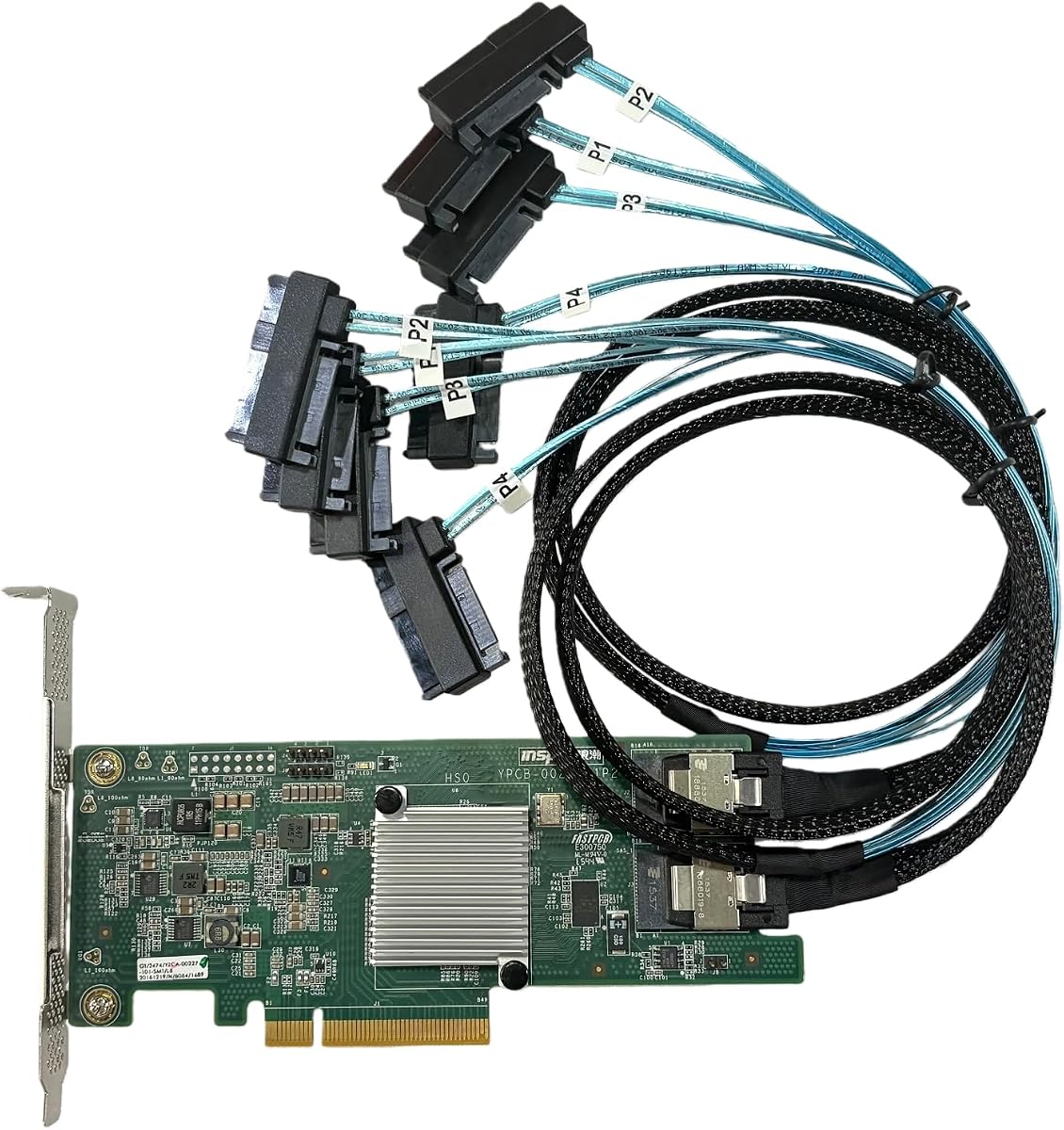
9207-8I SAS2308 PCI Express 3.0
4.7Editor score
6Gb/s SAS transfer
PCIe 3.0 x8 interface
Includes two SAS cables
Our SAS Card for PC guide compares ten options for IT-mode expansion, controller compatibility, internal connectors, transfer speeds, bundled cables, and home
A SAS card for a PC can add the connectivity needed for high-capacity storage, external enclosures, and NAS-style disk arrays. The right card depends on controller type, firmware mode, PCIe compatibility, connector layout, and whether the included cables actually match your SATA or SAS drives.
We compared all ten products by examining their stated controllers, transfer rates, PCIe interfaces, internal connectors, drive capacity, expansion support, IT-mode behavior, and supplied accessories. The list covers SAS/HBA options, a SATA breakout controller, and one product that is not a SAS card despite its broader PC expansion relevance.
The selections show that the best overall option depends on whether you prioritize cable convenience, controller breadth, or maximum direct-attached drive count. Ratings and availability can change over time, as can retailer pricing and bundled configurations, so verify the current listing details before buying.
Choosing the right SAS card for a PC starts with matching the host slot and operating system to the controller architecture you need.
4.7Editor score

5.0Editor score

The comparison below places all ten products side by side, emphasizing controller compatibility, connection methods, transfer capabilities, and the practical differences between SAS HBA, SATA breakout, and unrelated expansion options.


This LSI 9300-8i-compatible SAS HBA card is built around the Broadcom/LSI SAS3008 controller and carries a 4.5 rating. Its standout feature is the practical bundle of two SFF-8643-to-four-SATA breakout cables, making it a straightforward option for a PC that needs to connect several SATA hard drives or solid-state drives without assembling a separate cable set.
We may earn a commission when you buy through this link, at no additional cost to you.
The card operates in HBA IT Mode rather than presenting a hardware RAID configuration, which makes it relevant to ZFS, FreeNAS, TrueNAS, unRAID, Proxmox, and ESXi home-lab systems that manage disks in software. With two internal Mini-SAS HD SFF-8643 connectors, it can directly attach up to eight drives and can expand beyond that through a compatible external SAS expander.
The principal limitation is the cable type in the box. The supplied SFF-8643-to-SATA leads are intended for SATA drives and are explicitly not compatible with SAS drives. Buyers who intend to install SAS disks will need suitable SFF-8643-to-SFF-8482 leads, while users working only with SATA equipment benefit from the ready-made breakout set.
This is a good match for a home NAS builder who knows the card will be paired with SATA disks and wants both the controller and breakout wiring in one package. It is less appropriate for a mixed SAS-and-SATA installation unless you are prepared to acquire the appropriate additional cables. Check your chassis connectors and operating system support before ordering.
The two included SFF-8643-to-four-SATA cables provide a practical path to connect up to eight SATA drives directly. This reduces the number of separate accessories a builder needs when the planned array consists entirely of SATA hardware.
HBA IT Mode leaves disk management to the operating system or NAS platform. That arrangement fits software-defined storage tools such as ZFS, TrueNAS, unRAID, Proxmox, and ESXi.
We may earn a commission when you buy through this link, at no additional cost to you.
This card combines stated compatibility with the LSI 9211-8i and LSI 9300-8i, using the Broadcom/LSI SAS3008 controller family. It has a 4.2 rating and is especially appealing to builders who want one card to suit either of those commonly referenced eight-port controller configurations.
We may earn a commission when you buy through this link, at no additional cost to you.
Like the first selection, it provides a PCIe 3.0 x8 host interface, two Mini-SAS HD SFF-8643 connectors, HBA IT Mode firmware, and transfer rates of up to 12Gb/s for SAS with SATA support at 6Gbps. It can directly attach as many as eight drives, while a compatible SAS expander can extend the storage topology for larger configurations.
The included accessories are two SFF-8643-to-four-SATA breakout cables. These are useful for SATA drives but do not connect SAS drives. A mixed-drive system therefore requires separate SFF-8643-to-SFF-8482 SAS cables, and even a SATA-only user should confirm that the enclosure or case accepts the appropriate internal connectors.
Choose this card when compatibility with both the 9211-8i and 9300-8i references is important and your storage plan uses SATA devices. Its lower rating than several alternatives should prompt buyers to review recent customer feedback, particularly around system recognition, firmware, and hardware condition, before making a final decision.
Stated support for both the LSI 9211-8i and 9300-8i is the defining feature. It offers flexibility for builders comparing older and newer eight-port SAS3008-based designs.
Two internal SFF-8643 connectors and the included SATA breakouts create a straightforward eight-drive starting point. Additional capacity can be pursued with a compatible SAS expander.
We may earn a commission when you buy through this link, at no additional cost to you.
The 9207-8I SAS2308 is a value-focused HBA option with a 4.7 rating. It uses the older SAS2308 controller, operates in IT mode, and is described as suitable for ZFS, FreeNAS, unRAID, and similar software-managed storage environments.
We may earn a commission when you buy through this link, at no additional cost to you.
Its stated data transfer rate is 6Gb/s, and the card uses a PCIe 3.0 x8 interface. The package includes both a high and low bracket as well as two SFF-8087-to-SFF-8482 SAS cables, making it especially convenient for builders working with SAS drives rather than SATA-only storage.
Its main tradeoff is generational. A 12Gb/s SAS3008 card can negotiate faster SAS links with compatible equipment, while this card is limited to the older 6Gb/s generation. That difference may matter for heavily populated or frequently accessed arrays, although actual performance also depends on the host platform, storage software, and individual drives.
This is the most compelling budget pick when SAS cables are already what you need and your plan does not require 12Gb/s SAS. It is best suited to a PC with a compatible PCIe slot, adequate power and cooling, and a case that provides the necessary internal connectors. Confirm the 9207-8I label and connector layout against your system before purchase.
Two SFF-8087-to-SFF-8482 SAS cables are included. That makes the package more immediately useful for SAS disk installations than a listing that supplies only the card.
The included high and low-profile brackets help accommodate different case layouts. The appropriate bracket still depends on the physical clearance available in your PC.
We may earn a commission when you buy through this link, at no additional cost to you.
This SAS3008-based HBA card is listed for compatibility with the LSI 9300-8i, LSI 9211-8i, and 9207-8i references. It provides 12Gb/s SAS and SATA support at 6Gbps, making it a modern-generation option for PC-based storage projects.
We may earn a commission when you buy through this link, at no additional cost to you.
The card uses a PCIe 3.0 x8 host interface and two internal SFF-8643 connectors. It can attach up to eight drives directly and can be extended through a compatible SAS expander. The included SFF-8643-to-SFF-8482 cables support compatible SAS and SATA drives, reducing the need to source a separate cable set immediately.
The most obvious uncertainty is the absence of a customer rating in the supplied listing information. That does not establish product quality, but it means buyers have less visible feedback to use when assessing long-term stability. Review recent customer comments, seller information, and the returned condition carefully.
This option is a strong fit for builders using SAS drives who want 12Gb/s controller capability and cables in the box. It also makes sense for a mixed storage environment when the proper SAS breakout cable is used, although the listing's statement that the included cables support compatible SAS and SATA drives should be checked against the exact drive connectors being planned.
The SAS3008 controller supports up to 12Gb/s SAS, giving the card a higher stated link rate than the 6Gb/s SAS2308 alternative. Compatible backplanes and devices determine the rate actually achieved.
Direct attachment reaches up to eight drives, and the stated expander support allows a larger topology. Expansion still requires compatible hardware, appropriate cables, and sufficient power for the full system.
We may earn a commission when you buy through this link, at no additional cost to you.
This D3307- and LSI 9300-8i-compatible HBA card combines a 5.0 rating with 12Gb/s SAS capability. Its SAS3008 controller, IT Mode firmware, and PCIe 3.0 x8 interface place it among the most balanced specifications in this guide.
We may earn a commission when you buy through this link, at no additional cost to you.
Two Mini-SAS HD SFF-8643 connectors support direct attachment of up to eight drives, and the card can work with a compatible SAS expander for larger arrays. The product is positioned for ZFS, FreeNAS, TrueNAS, unRAID, Proxmox and ESXi passthrough, and JBOD NAS configurations, covering common home-lab and enthusiast storage use cases.
The package contains only the HBA card, so appropriate cabling must be obtained separately. This is less convenient than listings with SATA or SAS breakouts included, but it also leaves the buyer free to choose the correct cable type for the exact drive mix. The card does not provide a simple one-size-fits-all solution for every enclosure.
This is our top overall recommendation for a builder who values the balance of a strong customer rating, modern SAS speed, broad NAS relevance, and direct eight-drive capacity. It is especially appropriate when the system already uses SFF-8643 wiring or when the required drive connectors are known in advance.
A 5.0 rating is the highest numerical customer rating among the products with available feedback. It makes this card an attractive choice when buyers want a well-regarded option with a broadly applicable specification set.
IT Mode and compatibility with major NAS and virtualization platforms make the card suitable for storage pools, JBOD arrangements, and virtualized storage environments. The operating system and storage application must support the specific controller as expected.
We may earn a commission when you buy through this link, at no additional cost to you.
This card combines a 5.0 rating with stated compatibility for the LSI 9300-8i, 9211-8i, and 9207-8i. It uses the Broadcom/LSI SAS3008 controller in HBA IT Mode, giving buyers several recognized eight-port controller references to consider.
We may earn a commission when you buy through this link, at no additional cost to you.
The stated interface is PCIe 3.0 x8, and the two SFF-8643 connectors can directly attach as many as eight drives. Transfer capability reaches up to 12Gb/s for SAS, while SATA is supported at 6Gbps. A compatible SAS expander can extend the topology for larger storage installations.
Two SFF-8643-to-SFF-8482 SAS cables are included and are described as supporting compatible SAS and SATA drives. The wording leaves a practical need to verify every drive and connector type. Users should also confirm the card's physical dimensions, bracket availability, and case clearance because those details are not supplied.
This is an attractive pick for a PC builder who wants broad controller labeling, a high customer rating, and 12Gb/s SAS capability without sourcing the initial breakout cables. It is most suitable for systems using standard SAS3008-style HBA configurations and storage platforms that recognize IT-mode controllers.
The listing names the 9300-8i, 9211-8i, and 9207-8i, offering useful flexibility for builders familiar with those controller families. Buyers should still verify physical and firmware compatibility with their intended system.
Two SFF-8643-to-SFF-8482 leads are included, which is helpful for systems using that cabling pattern. Matching the cable to the precise drive connectors remains essential.
We may earn a commission when you buy through this link, at no additional cost to you.
The ASUS ThunderboltEX 4 is not a SAS HBA card and does not meet the core drive-controller requirements for this category. It uses an Intel Thunderbolt 4 JHL 8540 controller to add two USB Type-C ports with Thunderbolt 4 and USB 4 support, so it belongs in the guide only as a clearly distinct PC expansion-card comparison.
We may earn a commission when you buy through this link, at no additional cost to you.
Its headline capability is up to 40Gb/s of bidirectional bandwidth per port, with support for daisy-chaining as many as five Thunderbolt-enabled devices. It also provides DisplayPort 1.4 support for high-resolution displays and a quick-charge solution of up to 100W. These are peripheral and display features rather than storage-array features.
The 3.9 rating is lower than those of the leading SAS-related products, and that figure should not be interpreted as a SAS-controller rating because the product does not offer SAS connectivity. It also lacks the SFF connectors, IT-mode firmware, and drive-expansion architecture required to build a NAS disk array with it.
Do not select this card as a SAS card for a PC. It is relevant only if your real requirement is a desktop Thunderbolt expansion card for displays, docks, fast external peripherals, or Thunderbolt storage enclosures that use a compatible external interface. For direct SAS disk attachment, choose one of the dedicated HBA cards instead.
Two Type-C ports and daisy-chain support make the card useful for connecting compatible Thunderbolt devices. This is separate from the direct-attached SAS capability required by conventional HBA-based arrays.
DisplayPort 1.4 support and charging up to 100W are meaningful desktop-card benefits. They do not substitute for SAS, SATA, or NVMe storage-controller features.
We may earn a commission when you buy through this link, at no additional cost to you.
This LSI-compatible HBA card has a 5.0 rating and offers a practical combination of SAS3008 performance, broad controller references, and included SATA breakouts. It is listed as compatible with the LSI 9300-8i, 9211-8i, and 9207-8i.
We may earn a commission when you buy through this link, at no additional cost to you.
Operating in HBA IT Mode, the card supports up to 12Gb/s SAS and SATA at 6Gbps through a PCIe 3.0 x8 interface. Its two SFF-8643 connectors can directly attach up to eight drives, and a compatible SAS expander can extend the array. The included application targets include ZFS, FreeNAS, TrueNAS, unRAID, Proxmox, ESXi home labs, and NAS storage.
The included SFF-8643-to-SATA cables are expressly limited to SATA drives. SAS drives require SFF-8643-to-SFF-8482 cabling, which is not included. This limitation is easy to understand but important because the card itself supports SAS even though the supplied accessory set does not.
This is a good choice for a SATA-based eight-drive NAS or storage lab where the buyer wants 12Gb/s SAS-capable hardware and high customer feedback. It also provides an upgrade path for later expansion, provided the appropriate expander, SAS cables, power supply, cooling, and case capacity are available.
Two SFF-8643-to-SATA breakout cables allow direct connection of SATA hardware without a separate initial cable purchase. They support the common SATA side of a mixed storage plan but not SAS drive connectors.
The 5.0 rating and three named controller references make this a strong candidate for buyers seeking a well-rated SAS3008-style card. Platform and firmware support should still be verified before installation.
We may earn a commission when you buy through this link, at no additional cost to you.
The LSI 9305-16i-compatible card is the premium selection in this guide because it uses the Broadcom/LSI SAS3224 controller and provides four internal SFF-8643 connectors. That configuration supports direct attachment of up to 16 drives, twice the direct capacity of the eight-port alternatives.
We may earn a commission when you buy through this link, at no additional cost to you.
The card operates in HBA IT Mode, supports transfer rates of up to 12Gb/s for SAS and 6Gbps for SATA, and uses a PCIe 3.0 x8 host interface. It can also connect through a SAS expander for larger arrays. Its stated use cases include ZFS, FreeNAS, TrueNAS, unRAID, Proxmox, ESXi home labs, and NAS storage builds.
This greater capacity also raises practical demands. A 16-drive system may require a case with sufficient drive bays, a robust power supply, careful airflow, and a motherboard that can support the intended data path. The package contains only the HBA card, so suitable cabling is not included. No customer rating is available in the supplied information.
Choose this card for a serious high-drive-count build that can justify a 16-port controller and four internal cable runs. For a smaller NAS, an eight-port option will usually be easier to cool, cable, and power. This premium pick prioritizes drive density over a ready-made accessory bundle.
Four SFF-8643 connectors allow up to 16 drives to be attached directly. This is the clearest capacity advantage over the eight-port SAS3008 products in the guide.
More drives mean greater power, heat, and cable-management demands. The controller can simplify density, but the surrounding PC must be designed to support a large storage array reliably.
We may earn a commission when you buy through this link, at no additional cost to you.
The RIITOP Dual SFF-8643 is a SATA expansion card rather than a true SAS HBA. It provides two internal SFF-8643 ports and is intended to expand a NAS or Linux PC with up to eight SATA hard drives or solid-state drives through suitable breakout cables.
We may earn a commission when you buy through this link, at no additional cost to you.
Its card form factor is PCIe x4, while the stated active interface is PCIe Gen3 x2, providing up to 16Gbps of upstream bandwidth. Each SFF-8643 port can serve up to four SATA devices at SATA 6Gbps, for a stated maximum of eight drives and total capacity of up to 240TB. The product also includes a low-profile bracket.
Unlike the SAS3008-based HBA cards, this product does not offer SAS drive connectivity, 12Gb/s SAS links, IT-mode HBA firmware, or expander support. SFF-8643-to-SATA breakout cables are also not included. These limitations make the product a specialized option for SATA-only storage expansion rather than a universal answer for the keyword.
Consider this card for a desktop, server, NAS, NVR/DVR system, or industrial computer that needs compact SATA drive expansion and supports the specified operating systems. The listing names Windows 10, Windows 8, Linux, and Mac OS, but current driver and platform requirements should be confirmed before installation.
Two SFF-8643 ports and four-device breakouts create an eight-drive SATA path. The card is a good fit when every planned storage device uses SATA rather than SAS.
Independent LEDs for each SATA port provide visible connection and activity information. This can simplify monitoring and troubleshooting in a densely equipped storage build.
We may earn a commission when you buy through this link, at no additional cost to you.
The most important selection criteria are controller type, PCIe and connector compatibility, firmware mode, drive count, and the exact cabling system used by your disks. A card that looks similar on the outside may not work with the planned enclosure, operating system, or storage application.
Choose a documented HBA IT Mode card for direct drive access, and verify operating-system support before purchase.
Verify physical dimensions, available lanes, and neighboring components before choosing an HBA.
Choose the port count that matches your planned array, including room for future expansion.
Match every breakout lead to the exact connector on the planned HDD or SSD.
Treat advertised link speed as one factor, not a complete performance forecast.
Check the exact operating system, kernel, driver, and storage-software combination.
Budget for drive power, cooling, and redundancy alongside the controller.
Confirm included cables, physical accessories, seller details, and return terms.
Begin by confirming that the card, bracket, slot layout, and enclosure match. Power the PC down completely, disconnect its power supply, and follow the manufacturer's instructions for opening the case. Install the correct low- or full-height bracket, seat the card firmly in the intended PCIe slot, and secure it with the appropriate screw or retention mechanism.
Connect the appropriate internal leads before installing the operating system or storage software. For SATA drives, use SFF-8643-to-SATA breakout cables; for SAS drives, use suitable SFF-8643-to-SFF-8482 SAS cables. Route cables away from fans and hot components, secure the card's bracket, and avoid leaving excess cable loops where they can obstruct airflow or snag during maintenance.
After powering on, enter the PC's firmware or UEFI interface and confirm that the PCIe slot and storage controller are detected. Install the operating system and its required HBA or storage drivers, then verify that every intended disk is visible with the expected serial number and capacity. Create the array only after confirming the drive list, then monitor controller and operating-system logs for configuration, media, or connectivity errors. Keep the card seated, connections secure, and the storage area properly cooled during long-running workloads.
Yes, when the card and cables are compatible. The listed SAS3008-based HBA cards support SATA at up to 6Gbps, and several include SFF-8643-to-SATA breakout cables. An SFF-8643-to-SATA lead is for SATA drives, while SAS drives require the appropriate SFF-8482-side SAS cable.
An HBA in IT Mode generally passes disks through to the host operating system, where software handles pooling, redundancy, and other storage functions. A RAID controller may provide its own hardware-managed array features. This guide primarily covers IT-mode HBAs because they are commonly used with ZFS, TrueNAS, FreeNAS, unRAID, and related platforms.
Most of the eight-port SAS3008-based options directly support up to eight drives through two SFF-8643 connectors. The LSI 9305-16i-compatible card has four connectors and supports up to 16 direct drives. Several products can also use a compatible SAS expander, adding another tier of capacity.
No. The listings that include SFF-8643-to-SATA cables explicitly limit those leads to SATA drives. SAS disks need compatible SFF-8643-to-SFF-8482 cables. Check the exact connector on the back or front of every drive before choosing a cable.
No. A 12Gb/s SAS link is faster than a 6Gb/s link, but sustained performance also depends on the drives, controller overhead, queue depth, software configuration, and workload. Mechanical hard drives often deliver less than their interface maximum, while suitable SSDs can expose a different performance profile.
Potentially, provided the motherboard has a compatible physical and electrical PCIe slot and the operating system recognizes the controller. Many listed cards are specifically positioned for ZFS, FreeNAS, TrueNAS, unRAID, Proxmox, and ESXi, but you should verify the exact card, firmware, driver, and platform combination.
No. It is a Thunderbolt 4 expansion card with two USB Type-C ports, DisplayPort 1.4 support, and up to 40Gb/s bidirectional bandwidth. It may be useful for compatible peripherals and Thunderbolt enclosures, but it does not provide the SAS or SATA HBA connectivity needed for a direct disk array.
Confirm the card is fully seated, the correct bracket is installed, every cable matches the drive connector, and the case has adequate power and airflow. After startup, verify that the firmware detects the controller and that every disk appears with the intended capacity and serial number before creating an array.
The D3307- and 9300-8i-compatible SAS3008 card is the strongest overall choice for its 5.0 rating, 12Gb/s SAS capability, eight-drive direct attachment, and relevance across major NAS and virtualization platforms. The SAS2308 model is a compelling budget-oriented alternative when included SAS cables and older 6Gb/s capability meet your needs, while the 9305-16i-compatible card takes the premium slot for builds designed around as many as 16 direct drives.
Prioritize the controller family and IT-mode behavior first, then verify PCIe fit, connector type, drive count, operating-system support, and the exact cables included or required. SATA-only builders can consider the RIITOP dual-SFF-8643 card, but mixed SAS users should not mistake SATA breakouts for SAS cables or assume that a Thunderbolt expansion card can replace an HBA.
Retailer prices, stock, customer ratings, and package configurations can change, so confirm the current listing before ordering. Most importantly, check the cable requirements, enclosure layout, power budget, cooling, and storage software together; the correct card is the one that fits the complete system rather than merely matching a controller label.