
Fire Stick Voice Remote Replacement
4.4Editor score
Broad Fire Stick compatibility
Four app shortcut buttons
Straightforward ten-second pairing
This Fire Stick Replacement Remote guide compares 10 voice remotes for Fire TV devices, reviewing model fit, features, controls, pairing, and ease of use.
A Fire Stick replacement remote should do more than replace missing buttons. It should match the device, support voice search, provide useful shortcut keys, and pair without unnecessary troubleshooting. The right choice depends on your exact Fire TV generation, smart television model, preferred controls, and whether you want an official or third-party alternative.
This guide compares ten replacement remotes using the supplied compatibility lists, control layouts, voice functions, pairing procedures, ratings, and included accessories. It includes official Amazon remotes and third-party options for current and older Fire TV devices, while clearly noting excluded generations and models that require different remotes.
Each review explains the strongest reasons to consider a particular remote, along with practical trade-offs involving compatibility, setup, buttons, and battery requirements. Ratings and availability can change over time, as can retail prices, so compare the current device and product details before placing an order.
4.4Editor score

4.5Editor score
4.5Editor score
The table below compares all ten remotes by their most consequential attributes, including device coverage, voice support, shortcut controls, pairing method, and battery requirements. The differences are substantial enough that compatibility should be confirmed before considering convenience features.
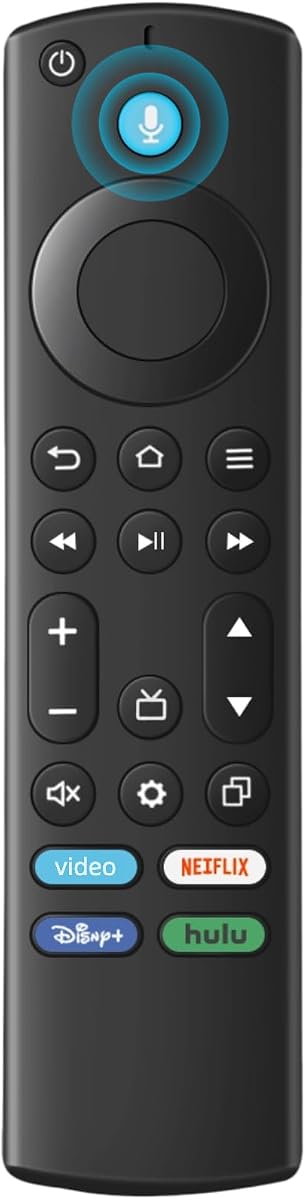


This replacement voice remote holds a 4.2 rating and offers a practical way to restore control over compatible Fire streaming devices and smart TVs. Its strongest feature is the combination of broad modern-device coverage and voice commands, allowing users to search for content or open apps without navigating an entire on-screen menu.
We may earn a commission when you buy through this link, at no additional cost to you.
The stated compatibility list covers the third-generation Fire TV Stick, several generations of the Fire TV Stick 4K and 4K Max, second- and third-generation Fire TV Cube models, and first- and second-generation Fire TV Stick Lite devices. It also supports compatible Omni, Ember, Insignia, Toshiba, and Pioneer smart TVs that accept voice commands.
The principal limitation is that this is not a universal replacement for every historical Amazon device. It excludes first- and second-generation Fire TV Sticks, first-generation Fire TV Cube units, and first-, second-, and third-generation Fire TV Boxes. It also requires two AAA batteries that are not included, so a new set should be on hand when setup begins.
This is a sensible choice for a household using a relatively recent Fire Stick or compatible Fire television and needing a straightforward voice remote without the specialized features of a premium model. Check the exact device generation first, then choose this option if its listed coverage matches your equipment.
The remote's voice function can be used to locate content more quickly than manual browsing. Its usefulness depends on using a device and television combination listed in the compatibility notes, as well as completing the separate pairing procedure for each supported product category.
The strongest selling point is broad support for current Fire Stick, 4K, Max, Lite, Cube, and compatible smart TV models. Buyers should still compare the precise generation on the product listing before ordering, especially when multiple generations are present in the same home.
We may earn a commission when you buy through this link, at no additional cost to you.
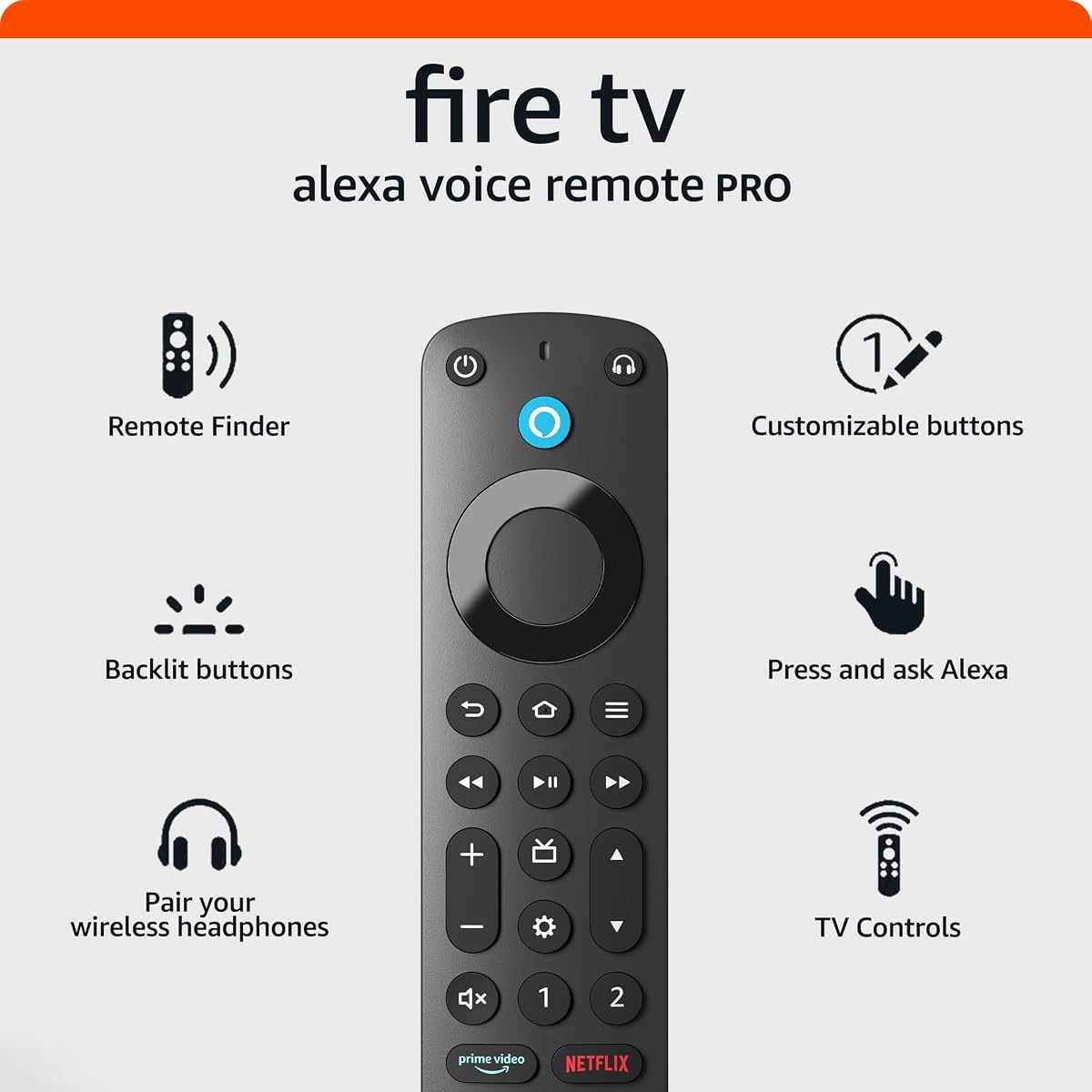
The Alexa Voice Remote Pro carries a 4.5 rating and stands out as the most feature-rich option in this guide. It combines backlit buttons, an Alexa-assisted remote finder, programmable shortcuts, dedicated TV controls, and voice operation, making it especially useful for users who regularly lose remotes or navigate in dim rooms.
We may earn a commission when you buy through this link, at no additional cost to you.
The remote finder can locate the Pro remote through a compatible Alexa device, the Alexa app, or the Fire TV app. Motion-activated illumination makes the controls easier to see during movie night, while two customizable buttons can be assigned to favorite channels, apps, or Alexa commands.
Integrated controls for power, volume, and live TV channels reduce the need to handle a separate television remote. A dedicated headphone button opens the on-screen Bluetooth menu, although it is a shortcut rather than a conventional headphone output, and the voice system can control content and compatible smart-home devices.
Compatibility is extensive but not universal. It works with most Fire TV media players, Fire TV smart televisions, and Fire TV-equipped smart TVs, while several older and specific television models are excluded. Choose it when losing a remote, navigating in darkness, or centralizing television controls are recurring concerns.
The remote finder is the defining convenience of this model. Once configured with a compatible Alexa device, the Alexa app, or the Fire TV app, asking Alexa to find the remote causes it to emit a ring, reducing the need to search furniture cushions or other common hiding places.
A motion-activated backlight illuminates the buttons after movement is detected. This is particularly useful for late-night viewing because users can locate controls without turning on a bright room light or relying on memory alone.
We may earn a commission when you buy through this link, at no additional cost to you.
This Fire TV replacement voice remote earns a 4.5 rating and distinguishes itself with an unusually long compatibility list. It supports numerous Fire streaming devices, Fire-series televisions, and a wide range of named Fire TV model series, making it worth examining closely in homes with several different Amazon hardware products.
We may earn a commission when you buy through this link, at no additional cost to you.
Its controls include four shortcut buttons and two additional customization buttons that can be programmed by pressing and holding the designated keys. The voice remote also includes a manual explaining how to pair and activate voice functionality, while a dedicated microphone can be used to find content once setup is complete.
Compatibility requires care. Although the listing covers many Insignia Fire TV model numbers, it explicitly says the remote is not for Insignia televisions generally, and it also excludes Toshiba, Hisense, TCL, and every listed Roku streaming device. The wording therefore requires buyers to match the exact television model rather than rely on the brand alone.
This is a strong option when a user has one of the many specifically listed Fire TV models and values a higher rating and generous shortcut selection. It may be less convenient for users who want a simple remote with automatic setup, since voice activation depends on following the supplied instructions.
The remote includes specific television series and model numbers in addition to streaming-device generations. That level of detail can prevent an otherwise disappointing purchase, provided buyers locate the exact model number printed on their television rather than assuming every television from a listed brand is supported.
Four direct shortcut buttons and two programmable controls create several paths to favorite services. The customization keys offer a degree of personalization that is often absent from entry-level remotes, although the product is still far less advanced than the official Pro model.
We may earn a commission when you buy through this link, at no additional cost to you.
This Fire Stick remote replacement has a 4.3 rating and focuses on straightforward operation. It supports a wide selection of current Fire streaming hardware, including Fire TV Stick 4K Max, Fire TV Stick 4K, Plus, Select, third-generation Fire TV Stick, and second- and third-generation Fire TV Cube models.
We may earn a commission when you buy through this link, at no additional cost to you.
Its built-in microphone enables voice commands after pairing and activation. Four shortcut buttons provide quick access to favorite apps, while the listed pairing process involves disconnecting the streaming device's power, waiting briefly, restoring power, and installing fresh batteries so the remote can pair automatically.
There are important exclusions. It does not support first-, second-, or third-generation Fire TV boxes, first- or second-generation Fire TV Sticks, first-generation Fire TV Cube devices, or Fire TV Edition televisions. The stated 40-foot range and more than 20,000 supported clicks also come from approved internal tests rather than an independent evaluation.
This is a good fit for a recent Fire Stick user who values simple setup, familiar app shortcuts, and a voice microphone. It is less suitable for owners of first-generation hardware, and a close reading of the compatible model list remains essential before ordering.
The automatic pairing method is a meaningful convenience. After the streaming device has been power-cycled and fresh batteries are inserted, the remote can establish the connection on its own, reducing the number of separate setup steps compared with a fully manual pairing process.
Four app shortcuts are useful for viewers who repeatedly open the same services. They reduce menu navigation while preserving the familiar navigation, playback, and voice controls required for everyday use.
We may earn a commission when you buy through this link, at no additional cost to you.
This replacement TV remote has a 4.2 rating and emphasizes effortless synchronization. It is designed to connect automatically with a compatible streaming device or Fire smart television, removing some of the manual work associated with restoring a lost or damaged remote.
We may earn a commission when you buy through this link, at no additional cost to you.
Compatibility covers first- and second-generation Fire TV Stick 4K Max devices, first- and second-generation Fire TV Stick 4K models, Plus and Select variants, the third-generation Fire TV Stick, third-generation Fire TV Cube, and first- and second-generation Fire TV Stick Lite units. It also supports compatible Insignia, Toshiba, Omni, 2-Series, and 4-Series smart TVs.
The remote adds voice control for finding content, launching apps, and adjusting volume. Four pre-programmed buttons provide direct access to popular streaming applications, while the listing describes automatic syncing as the standard setup experience. Two AAA batteries are required, and the user manual is included.
First- and second-generation Fire TV Sticks are not supported, and the remote cannot operate a soundbar or another receiver. Consider it for a modern Fire Stick household seeking simple setup and quick application access, especially if the television falls within the specifically listed smart TV families.
Automatic syncing is the central convenience. Once compatible batteries are inserted, the remote can connect with the supported streaming hardware or Fire television without the more involved sequence expected from a replacement that requires manual device matching.
The remote balances two navigation methods: spoken requests and four pre-programmed application buttons. This combination suits users who want quick access to major services while retaining the ability to search for less frequently used content.
We may earn a commission when you buy through this link, at no additional cost to you.
The All Fire Series Remote carries a 4.3 rating and offers one of the broadest generational coverage lists in the guide. It supports Fire TV Stick Lite, second- and third-generation Fire TV Sticks, first- and second-generation Fire TV Stick 4K models, first- and second-generation 4K Max devices, all three listed Fire TV Cube generations, and third-generation Fire TV hardware.
We may earn a commission when you buy through this link, at no additional cost to you.
Its voice function can find or launch content, play music, check the weather, view compatible camera feeds, and control supported smart-home devices. Standard navigation and playback controls remain available for moving through menus, changing scenes, and managing playback without using speech.
The pairing method is clearly described: disconnect the streaming device, reconnect its power, reinsert it into the television, and hold the Home button for approximately 10 to 15 seconds until the amber indicator flashes rapidly. The remote then pairs automatically, subject to the device accepting the connection.
It is not compatible with first- or second-generation smart televisions, first-generation Fire TV Sticks, or Fire TV Edition televisions. Its inclusive language in the product title should therefore be interpreted alongside the detailed exclusions. It is a versatile choice for homes with multiple supported streaming generations that need a voice-capable replacement.
The extensive model list is especially useful for households that own different generations of Fire streaming hardware. Instead of limiting the remote to one recent product family, it covers Lite, HD-era, 4K, Max, Cube, and third-generation Fire TV equipment within the stated limits.
Beyond finding programs, the voice function can handle music, weather information, compatible camera feeds, and smart-home controls. That makes the remote a small hub for the broader Fire ecosystem rather than merely a pointer for on-screen menus.
We may earn a commission when you buy through this link, at no additional cost to you.
The newest Amazon Fire TV Alexa Voice Remote has a 4.5 rating and offers the most balanced combination of official-style features in the guide. It includes voice control, dedicated television buttons, preset application shortcuts, and a guide function without adding the more specialized hardware found in the Pro model.
We may earn a commission when you buy through this link, at no additional cost to you.
Users can ask Alexa to find, launch, and control content. Dedicated power, volume, and mute buttons can operate a compatible television, soundbar, or receiver, while preset app buttons provide quick routes to favorite services. A separate guide button displays channel and program listings and brings live television apps into one location.
The remote supports Fire TV Stick Lite, Fire TV Stick HD, third-generation and later Fire TV Sticks, first-generation and later Fire TV Stick 4K models, 4K Plus, first-generation and later 4K Max devices, second-generation and later Fire TV Cube models, and Echo Show 15.
Older Fire TV and Fire TV Stick generations, first-generation Fire TV Cube devices, and Fire TV Edition smart televisions are excluded. It also lacks the Alexa remote finder and backlit buttons found in the Pro version. It is the strongest general-purpose recommendation for compatible modern Fire hardware.
Dedicated power, volume, and mute controls make this remote more versatile than a basic streaming stick controller. When the television, soundbar, and receiver are compatible, users can reduce the number of physical remotes needed for a typical evening of viewing.
The dedicated guide button gathers live television applications into one place. This is helpful for users who move between streaming and scheduled programming without wanting to search through the full application list every time.
We may earn a commission when you buy through this link, at no additional cost to you.
This Fire Smart TV Voice Remote has a 4.4 rating and covers a useful middle range of Amazon streaming products. It supports Fire TV Stick Lite, the 2020 Fire TV Stick, Fire TV Stick 4K, second-generation Fire TV Stick, first- and second-generation Fire TV Cube, and third-generation Fire TV hardware.
We may earn a commission when you buy through this link, at no additional cost to you.
Its voice function supports commands such as turning on the television, raising the volume, or switching to a sports channel. The remote pairs by holding the Home key for approximately 10 seconds, waiting for a rapidly flashing indicator, and allowing roughly 30 to 60 seconds for the connection to complete.
The manual matching requirement is the main inconvenience. If the remote requests a software update during setup, the instructions say to press the voice or return button. If it does not connect, the user is directed to remove and reinsert the batteries or add the replacement manually through the television's remote-control settings.
First- and second-generation smart televisions, first-generation Fire TV Sticks, and Fire TV Edition televisions are excluded. The product is appropriate for a user with one of the explicitly supported models who needs voice control and a clearly explained pairing process without paying for a premium official remote.
The indicator light provides useful feedback during setup. Rapid flashing indicates that pairing mode has been reached, while the light going out signals a completed connection, giving users two clear checkpoints instead of leaving them to guess whether the process is working.
The listed voice examples cover practical actions such as powering on a television, changing volume, and changing channels. These everyday uses can make the remote feel more useful than a basic point-and-click controller.
We may earn a commission when you buy through this link, at no additional cost to you.
This Fire TV Cube remote replacement has a 4.3 rating and combines broad Fire hardware support with four application shortcuts. It covers first-, second-, and third-generation Fire TV Cube devices, first-generation Fire TV Stick 4K Max, first- and second-generation Fire TV Stick 4K, second- and third-generation Fire TV Sticks, Fire TV Stick Lite, and third-generation Fire TVs.
We may earn a commission when you buy through this link, at no additional cost to you.
Compatible smart television brands named in the listing include Insignia, Toshiba, and Pioneer. The voice function can find content, while standard navigation and playback controls support direct movement through scenes and other media actions. Four preset app buttons provide one-touch access to selected services.
Setup involves holding the Home button for approximately 10 to 15 seconds until the LED rapidly flashes, then waiting around 30 to 60 seconds for automatic pairing. The instructions also advise removing the old remote's batteries so both remotes do not attempt to connect at the same time.
The remote does not support Roku devices, Samsung televisions, first- and second-generation smart televisions, first-generation Fire TV Sticks, or Fire TV Edition smart televisions. Its coverage is broad within the Fire ecosystem, making it a practical choice for a compatible mixed-generation setup.
Support for first-, second-, and third-generation Fire TV Cube models is among the strongest Cube coverage in this list. That matters for households that still use a first-generation Cube or are replacing a remote across several generations.
Removing the old remote's batteries before pairing prevents the previous controller from interfering with the connection. This small step can reduce confusion when a new remote and the original remote are both nearby.
We may earn a commission when you buy through this link, at no additional cost to you.
This Fire Voice Controller Replacement earns a 4.4 rating and provides a well-rounded specification set. Its compatibility list includes Fire TV HD, first- and second-generation Fire TV Stick 4K Max, first- and second-generation Fire TV Stick 4K, second- and third-generation Fire TV Sticks, first- and second-generation Lite devices, and all three listed Fire TV Cube generations.
We may earn a commission when you buy through this link, at no additional cost to you.
It also supports third-generation Fire TV hardware across Omni, Insignia, Toshiba, and Pioneer. Voice commands can search for action movies, skip ahead, raise the volume, or pause a show, while four dedicated shortcut buttons launch selected applications without moving through the full menu.
The pairing instructions call for two AAA batteries, which are not included. After installing them, the user holds the Home button for around 10 seconds until the LED blinks rapidly, then waits 30 to 60 seconds for the automatic connection. Support is available for setup questions and troubleshooting.
First- and second-generation Fire TVs, first-generation Fire TV Sticks, and Fire TV Edition smart televisions are not supported. Despite that limitation, the generous Fire streaming coverage, helpful shortcuts, and strong rating make this a compelling value-oriented option for a compatible household.
The remote covers a large portion of the modern Fire streaming lineup while adding a solid 4.4 rating. For buyers who only need dependable voice navigation and application shortcuts, its feature set is more relevant than premium extras such as a remote finder or illuminated buttons.
Four shortcut buttons serve frequently used applications, while the microphone handles broader spoken commands. Having both options available means viewers can choose the quickest method for any task instead of relying exclusively on on-screen navigation.
We may earn a commission when you buy through this link, at no additional cost to you.
The decisive factor is compatibility, followed by the control layout, voice functions, pairing process, and included accessories. Checking the exact device model and generation prevents most disappointments before setup begins.
Start with the model number of the Fire streaming device or smart television. Support can vary between generations within the same product family, and some remotes work with a Fire TV edition model but not every television sold by the same brand. Compare the exact generation and model against the complete compatibility list rather than relying on a shared brand name.
Consider whether the remote should control only the streaming device or also the television, soundbar, and receiver. Dedicated power, volume, mute, and channel buttons are useful in a living room setup, while people with separate audio equipment may only need navigation, playback, and voice controls. Extra shortcut buttons are most valuable when the same services are opened every day.
A built-in microphone allows faster searches and app launches, but voice functionality must be activated or paired according to the instructions. Official Amazon models may integrate more directly with Alexa, while third-party remotes often require a manual pairing sequence. Check whether the remote is paired to a device or television through the same process.
Some replacements synchronize automatically after fresh batteries are installed, while others require holding the Home button until an indicator flashes. A power cycle of the Fire Stick can be part of either process. Although every method is manageable, automatic pairing is generally more convenient for users who are less comfortable with device menus or technical troubleshooting.
Preset application buttons provide one-touch access to popular services, while customizable buttons can be assigned to channels, applications, or Alexa commands. The usefulness of these controls depends on viewing habits. A household that always opens the same four services can gain more from shortcuts than one that uses many different applications.
Most of the listed remotes use two AAA batteries, but the package contents differ. The Amazon Fire TV Alexa Voice Remote includes two batteries, while most third-party replacements do not. Check the package contents before ordering so the remote is ready for its first pairing attempt rather than requiring an additional shopping trip.
The Alexa Voice Remote Pro adds a remote finder, motion-activated backlighting, two customizable buttons, and integrated television controls. These conveniences are most useful for people who frequently lose remotes or navigate in dim rooms. A standard replacement with voice search and app shortcuts can be more appropriate for straightforward streaming use.
Read the entire compatibility section, including exceptions. Fire TV Edition models, first-generation hardware, soundbars, receivers, and non-Fire platforms are frequently excluded. Sellers of third-party replacements also often provide customer support or pairing assistance, which can be useful if the exact model number is difficult to interpret.
Begin by identifying the streaming device or smart television model, then install two fresh AAA batteries if required. Some remotes pair automatically, while others instruct the user to disconnect the Fire Stick's power, wait briefly, reconnect it, and then hold the Home button until the indicator flashes rapidly. Follow the instructions included with the exact remote because pairing sequences can differ.
After a successful connection, test navigation, playback, voice search, and every shortcut button. Assign any customizable keys through the television's remote-control settings if the model supports them. If the remote requests an update during pairing, use the voice or return button as directed in the product instructions, and remove the old remote's batteries to prevent a competing connection.
Keep the remote away from moisture, excessive heat, and heavy impact. Remove batteries if it will remain unused for an extended period, and clean the exterior with a dry or lightly dampened cloth rather than pouring liquid into the buttons. Replace batteries promptly when operation becomes slow or the voice response becomes unreliable.
Many Fire streaming devices and Fire TV televisions use similar voice remotes, but compatibility is determined by the exact hardware generation and model. A remote that works with one Fire TV Stick generation may not work with an older Stick, Fire TV Cube, Fire TV Edition set, or a television from a different manufacturer. Check the complete compatibility list and the model number on your device before ordering.
First install fresh AAA batteries and remove the batteries from the old remote if it remains nearby. Many models require you to disconnect the Fire Stick from power briefly, reconnect it, and hold the Home button for about 10 to 15 seconds until the indicator flashes. Some remotes pair automatically afterward, while others require manual selection in the television's settings.
No. The Amazon Fire TV Alexa Voice Remote listed in this guide includes two AAA batteries, while most third-party replacement remotes require users to supply their own. Treat batteries as a separate accessory when purchasing a third-party option, and use fresh cells during the initial pairing attempt for more reliable communication.
That depends on the remote's dedicated controls and the compatibility of those components. The official Alexa Voice Remote and Voice Remote Pro include power, volume, and mute features, with the Pro model also adding channel controls. Third-party replacements are primarily designed for Fire streaming navigation, and some explicitly cannot operate soundbars or receivers.
Fire devices communicate through different protocols and generations, so a remote may support only a defined group of models. Also check the television brand and model, not merely whether it runs Fire TV. Restart the streaming device, replace the batteries, repeat the pairing process, and confirm that the remote's exclusions do not include your hardware.
Shortcut buttons open selected applications with a single press rather than requiring menu navigation. They are especially helpful for services used every day, such as a primary streaming platform, live television, or another frequently visited app. Models with customizable buttons add further flexibility by allowing the user to assign preferred channels, apps, or Alexa commands.
The Pro model is most useful if you often lose remotes, navigate in a dark room, or want a single controller for streaming and television functions. Its remote finder, motion-activated backlight, customizable keys, and live television controls offer genuine convenience. A standard remote with reliable voice search and app shortcuts may be more appropriate for simpler use.
These products are designed for Fire TV streaming devices and compatible Fire televisions, not for every television platform. One listing explicitly excludes Roku sticks and Samsung televisions, while others focus on named Fire TV brands. Check the hardware brand and operating platform before purchasing, because a compatible Fire app on a non-Fire television does not guarantee remote compatibility.
The Amazon Fire TV Alexa Voice Remote is the strongest general-purpose pick for modern Fire hardware because it combines a 4.5 rating, Alexa voice control, television buttons, app shortcuts, a live TV guide, and included batteries. The Alexa Voice Remote Pro is the premium selection for anyone who values remote finding, backlighting, and deeper television integration.
For buyers seeking a more economical replacement, the Fire Voice Controller Replacement provides a 4.4 rating, four application shortcuts, a straightforward pairing process, and broad support for current Fire streaming models. Whichever option you choose, the exact device generation and television model should take priority over shortcuts, lighting, or other secondary features.
Retail prices and product availability can change, so review the current listing before making a final decision. Confirm the compatible model list, pairing method, required batteries, and included accessories at the time of purchase to ensure that the selected remote is ready for your Fire TV setup.