
8Bitdo Ultimate Mobile Gaming Controller
4.3Editor score
Official Xbox license
Apple official support
Hall Effect stick rings
Two programmable back buttons
Expandable phone grip
Discover best mobile gaming controller for Android, comparing Hall Effect sticks, wireless connections, turbo, compatibility, comfort, and features for gamers.
A mobile gaming controller for Android can turn touch controls into a more precise, comfortable, and console-like experience. Important considerations include device compatibility, Hall Effect joysticks, trigger response, wireless stability, adjustable turbo, vibration, grip design, and whether pass-through charging keeps long sessions uninterrupted.
This guide compares ten controllers across phones and tablets, focusing on their connection methods, control layouts, supported features, and practical differences. The list includes wired and wireless models, entry-level options, expandable designs, and premium controllers for gamers who want more tactile controls and broader platform support.
Each selection highlights the qualities that distinguish it from the alternatives, while also noting limitations involving device width, ports, case fit, software, or platform restrictions. Ratings and product details are based on the supplied information, and prices and availability can change, so readers should verify current listings before purchasing.
4.3Editor score

4.4Editor score

4.2Editor score
The table below compares all ten controllers by their primary strengths, including control technology, connection style, device accommodation, and gaming features. It is designed to make it easier to identify the right model for your Android phone, preferred games, and typical gaming setup.
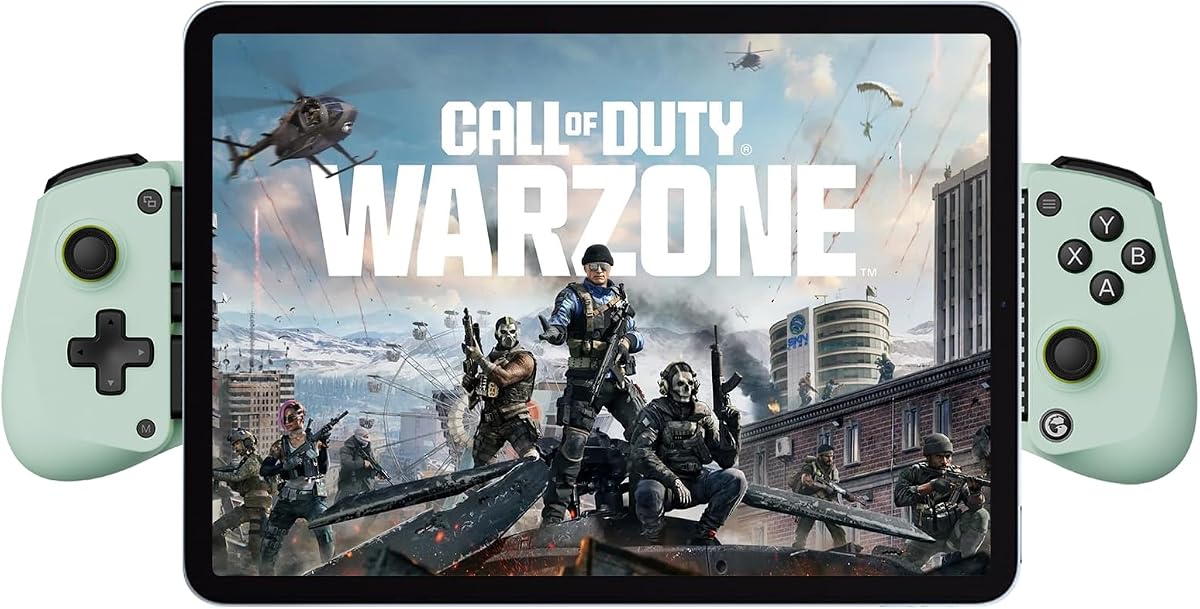


The Mocagen MC1 stands out as the most complete option in this guide, combining a 4.4 rating with a broad collection of mobile-focused features. It uses Bluetooth, Hall Effect joysticks, an ergonomic grip, dual vibration, a rechargeable battery, and programmable turbo. Its compatibility extends across Android devices and all iPhone models, making it a flexible choice for users who do not want to be locked into one mobile platform.
We may earn a commission when you buy through this link, at no additional cost to you.
Control precision is a central selling point. The Hall Effect joystick is specified to deliver drift-free operation and a five-million-cycle lifespan, while the three-level turbo can be configured for 5, 12, or 20 shots per second. Vibration intensity can be adjusted in the KeyLinker app, and the lighting system adds a seven-color light ring. These are meaningful additions for action games where rapid input, feedback, and personal setup can materially improve the experience.
The MC1 also considers the practical frustrations of phone gaming. Its recessed camera area is 0.2 inches deep, and the stated case allowance reaches 0.47 inches, so many users can keep a protective case attached. That is a meaningful advantage over controllers with shallow openings. On the other hand, PlayStation Remote Play is unsupported, and the ABXY lights can be disabled but not independently color-adjusted, so buyers wanting Sony remote streaming or fully customizable illumination should consider that limitation.
This is the strongest general recommendation for an Android gamer who values broad compatibility, precise controls, useful customization, and case convenience. It is particularly appealing for people using cloud gaming, emulators, Xbox Remote Play, or native controller-compatible Android titles. Anyone whose priority is specifically PlayStation Remote Play should look elsewhere, but for everyone else, the MC1 offers the most balanced package in the list.
The Hall Effect sticks, selectable turbo rates, app-based vibration adjustment, and programmable controls make the MC1 adaptable to different games. These options are more useful than a fixed layout when switching between shooters, action games, and titles with repetitive inputs.
The case-friendly width, camera recess, textured grips, and portable wireless design reduce the everyday friction associated with mobile controllers. The built-in battery and stated six-hour brightness-mode runtime also suit travel and extended casual sessions.
We may earn a commission when you buy through this link, at no additional cost to you.
The 8Bitdo Ultimate is a polished choice for Android users who value established platform support and a familiar console layout. Its 4.3 rating reflects a well-rounded controller that carries official Xbox and Apple backing, works over Bluetooth, and supports Xbox Cloud Gaming. Hall Effect joysticks, tactile bumpers and D-pad, an Xbox button, and wear-resistant metal joystick rings give it a more refined feel than many straightforward mobile pads.
We may earn a commission when you buy through this link, at no additional cost to you.
The most useful distinction is the inclusion of two professional back paddle buttons. They provide additional commands for games that support remappable controls, potentially reducing reliance on face buttons during intense moments. The controller also supports 8Bitdo Ultimate Software V2 on mobile, allowing supported customization within its established software environment. Its expandable design accommodates devices measuring 100–170mm in length, covering a broad range of Android phones.
There are trade-offs, however. No pass-through charging is listed, so continuous charging during a wired session is not one of its confirmed benefits. Its maximum stated device length is shorter than the 213mm range offered by the X5 Lite, which could matter for unusually large phones or some tablet arrangements. It also appears more focused on a refined core control experience than on lighting, extensive vibration, or a large battery specification.
Android gamers who want rear paddles, official Xbox and Apple recognition, and a durable traditional gamepad layout should give this model serious consideration. It is especially attractive for cloud gaming and competitive mobile titles where extra rear inputs can be valuable. Those needing larger device accommodation or integrated charging may find another model better aligned with their setup.
Official Xbox and Apple support can simplify expectations for game recognition and mobile integration. The familiar layout, tactile shoulder controls, D-pad, and Xbox button make the controller approachable for console players moving into Android gaming.
The two rear paddles add practical flexibility for games with remappable secondary actions. They make the controller especially interesting for shooters and other competitive genres when players want more actions available without constantly moving their thumbs.
We may earn a commission when you buy through this link, at no additional cost to you.
The renewed GameSir X5 Lite delivers a useful combination of modern controls, broad device support, and practical features at an approachable level. Its 4.2 rating and Hall Effect joystick make it a compelling Android option, especially for users who want a direct USB-C connection rather than a wireless accessory. At only 135.4g, it is among the lightest controllers here and may be easier to hold during long sessions.
We may earn a commission when you buy through this link, at no additional cost to you.
Its defining feature is the expandable frame, which stretches to 213mm and can accommodate the iPad Mini 6 or 7 as well as Android tablets. The controller also supports iPhone 15 and 16 models and Android devices. Pass-through charging allows the phone to continue charging while connected, while the GameSir app enables button customization and turbo assignment. Cushioned membrane triggers and buttons offer quieter, softer feedback than simple hard plastic controls.
The renewed status deserves careful consideration. It does not change the stated technical capabilities, but buyers should check the listing's condition details, included accessories, warranty information, and return terms. The product information also does not suggest the same broad official platform licensing as the 8Bitdo Ultimate, and its strongest device support is concentrated around USB-C hardware. Older Android phones requiring another port may need an adapter or a different model.
This is the best budget-oriented recommendation for an Android gamer who values pass-through charging, a lightweight body, Hall Effect controls, and room for larger devices. It works particularly well for anyone switching between a phone and supported tablet. Renewed-condition shoppers should verify the seller's standards, while buyers wanting current-condition assurance may prefer the similarly equipped Wasabi version.
Pass-through charging is particularly useful during long matches, streaming sessions, or emulated games. The direct wired connection can also provide a consistent link without the need to manage wireless pairing or controller battery levels.
The 135.4g weight and laser-engraved textured grips are intended to reduce fatigue and improve security. Cushioned membrane controls add softer tactile feedback and quieter operation than many conventional mobile controllers.
We may earn a commission when you buy through this link, at no additional cost to you.
The Wasabi edition of the GameSir X5 Lite pairs a 4.3 rating with a feature set that is hard to overlook for Android users. It connects directly through USB-C, expands from 105mm to 213mm, and supports modern iPhone models, iPad Mini, and a wide range of Android hardware. That makes it a practical option for anyone who wants one controller to move between a compact phone and a larger supported device.
We may earn a commission when you buy through this link, at no additional cost to you.
Hall Effect sticks are the core attraction, providing the 360-degree control and improved durability associated with magnetic sensing. The controller also includes cushioned, durable membrane triggers and buttons, which create a quieter and more comfortable action than rigid surfaces. Turbo can be assigned to A, B, X, Y, LB, RB, LT, or RT, and pass-through charging keeps the phone powered during extended play.
App-based customization is a notable benefit for Android users because the GameSir app provides deeper control over the selected settings. However, the product information explicitly notes that the app is available on Android only, which limits customization for iPhone or iPad owners even when those devices are physically compatible. The wired format also means there is no built-in wireless option, so users must remain connected during play.
This X5 Lite configuration is a strong all-round pick for Android gamers who value lightweight construction, tactile controls, pass-through charging, and extensive button assignment. It is especially well suited to shooters, emulators, and supported streaming applications. Buyers interested in a current-condition product with the same core design may prefer the standard listing, while renewed-condition shoppers can compare the value offered by the other X5 Lite.
The adjustable grip handles devices from 105mm to 213mm in length, yet the controller weighs just 135.4g. That balance makes it convenient for travel and extended play when a larger, heavier grip would be less comfortable.
Cushioned membrane buttons reduce noise and provide a softer response. Customizable turbo assignments can be adapted to different action games, while Hall Effect sticks support consistent, precise directional input.
We may earn a commission when you buy through this link, at no additional cost to you.
This mobile controller is designed for gamers who want the freedom to choose between a direct cable and wireless play. It supports a foldable USB-C connection and Bluetooth 5.3, allowing Android phones to operate in either mode. The product information lists compatibility with Android 6.0 and later, iOS 13.0 and later, and Windows 7.0 and later, giving it one of the broadest software ranges in the comparison.
We may earn a commission when you buy through this link, at no additional cost to you.
The 32.8-foot stated wireless range provides ample room for couch gaming or streaming from a distance. Hall Effect joysticks, quick-response triggers, configurable turbo, and adjustable vibration give the controller a capable control package. Its mode switch and long-press pairing procedure add a little setup complexity, but they also make it possible to move between devices using different connection requirements.
There are important caveats. The physical mount is not suitable for an iPad, tablet, or Switch 2 even though those devices are listed as compatible through another connection method. The wired option depends on USB-C, and the instructions advise removing the phone case if the controller does not illuminate after connection. The 4.1 rating is also the second-lowest among the ten products, reflecting a less established user impression than several alternatives.
Android users who alternate between cable and wireless sessions will appreciate the two-mode design, especially when playing cloud games or streaming from a PC or console. The included streaming-service support and adjustable vibration make it a versatile travel companion. It is best suited to phones rather than larger devices, and buyers should confirm their port and case fit before committing.
Wired mode offers a straightforward connection for USB-C phones, while Bluetooth 5.3 removes the cable during casual gaming or streaming. Supporting both modes makes the controller adaptable to different locations, charging habits, and game services.
The controller is listed for major cloud and remote-play platforms, including GeForce NOW, Steam Link, and relevant console remote-play applications. Compatibility still depends on the game, service, device, and network conditions.
We may earn a commission when you buy through this link, at no additional cost to you.
The Wireless Hall Joystick Controller is a strong choice for Android gamers who want long wireless sessions and broad game recognition. Its 4.3 rating, 600mAh rechargeable battery, and stated battery life of more than eight hours distinguish it from smaller wireless alternatives. It also uses a Hall Effect joystick, adjustable turbo at 5, 12, or 20 shots per second, and dual vibration motors.
We may earn a commission when you buy through this link, at no additional cost to you.
The controller follows the Xbox Controller Input Protocol, allowing compatible iOS and Android devices to recognize it as an Xbox Wireless Controller. That can make setup feel familiar and provide access to numerous mobile games and applications that support Xbox pads. Its expandable design accepts devices from 10 to 17.5cm, while the nonslip grip is designed to work with the phone case left in place.
Sony remote-play services are not supported because the controller uses an Xbox-style protocol. The setup guide also requires the fourth LED to flash rapidly during pairing, and it explains how to reset the controller with a pin if connection, charging, or joystick-offset problems occur. Those steps are useful, but buyers should expect a slightly more hands-on initial setup than a controller that offers simple plug-and-play operation.
Android gamers who prioritize battery life, native-style Xbox recognition, adjustable vibration, and case-friendly operation should find this controller especially practical. It supports cloud gaming, Steam Link, GeForce NOW, and numerous mobile games, making it useful beyond a single genre. PlayStation Remote Play users should look at a Sony-protocol alternative, while others can benefit from the long wireless runtime.
The 600mAh battery is specified to deliver more than eight hours of play and recharge in two to three hours. That combination reduces downtime and makes the controller easier to use for travel or all-day gaming.
Using the Xbox Controller Input Protocol helps compatible devices recognize the pad as an Xbox Wireless Controller. This broadens access to mobile titles and apps built around standard gamepad input.
We may earn a commission when you buy through this link, at no additional cost to you.
The GameSir G8 Galileo is built for Android gamers who want a more console-like control experience. It includes Hall Effect joysticks and Hall Effect analog triggers, a movable USB-C connection, pass-through charging, and a 3.5mm audio jack. Those features make it particularly compelling for players who use headphones, value trigger response, and prefer the consistency of a wired controller.
We may earn a commission when you buy through this link, at no additional cost to you.
The movable Type-C port is designed to maintain a dependable connection across different phone sizes. Compatible devices range from 110 to 185mm in length, with depth requirements of 13mm or less and a camera depth of 5mm or less. The recommendation to use the controller without a case, or with a case within 1mm, is stricter than the allowances listed for several expandable rivals.
Customization is another major strength. On-the-fly mappings cover A, B, X, Y, LB, RB, LT, RT, both sticks, View, Menu, Capture, and the D-pad. Magnetic detachable faceplates allow visual personalization, while the GameSir app and specified firmware version provide additional configuration for Android users. The app itself is not intended for iOS, and the movable port is a feature some users may need time to adjust.
The G8 Galileo is a strong premium pick for Android players who prioritize trigger quality, wired stability, integrated headphone support, and deep remapping. It is particularly useful for shooters, emulators, and streamed PC or console games. The stricter case allowance and Android-focused app are the main compromises, so users should check their phone dimensions before buying.
Hall Effect analog triggers offer smooth, responsive control, while the extensive mappable layout gives players access to important functions without returning to the phone interface. These features make the controller adaptable to competitive and emulator-focused play.
Pass-through charging keeps the phone powered while the controller remains connected. The 3.5mm jack allows wired headphones to be used during play, creating a more complete setup for users who do not want to rely on Bluetooth audio.
We may earn a commission when you buy through this link, at no additional cost to you.
The Bluetooth Mobile Game Controller is the broadest option in the list for users who move between phones, tablets, Switch systems, PCs, and streaming services. Its 4.0 rating is the lowest among these picks, but the product information supports a wide device range and a feature set that goes beyond basic mobile play. Android users can connect to phones and tablets from major brands, with support extending to many iPhone and iPad models.
We may earn a commission when you buy through this link, at no additional cost to you.
The expandable grip supports controllers up to 11 inches, including listed iPad, iPad Air, iPad mini, Samsung, Lenovo, Amazon, and Huawei tablet models. Hall Effect joysticks, a linear Hall Effect trigger, 360-degree rotating sticks, and rear programming buttons offer a more refined control package. Turbo can be adjusted to suit the game, while macro programming provides additional customization for supported titles.
Compatibility claims still need to be read carefully. The controller does not support the 12.9-inch iPad Pro or 13-inch iPad Air, and Apple TV, iPod, Fire TV, and TV Box devices are excluded. Different connection modes may be required for particular games and devices, so consulting the manual or product page before setup is sensible. The lowest rating in the group also suggests checking recent user feedback for any recurring concerns.
This controller is a compelling choice for Android tablet gamers, especially those who also use a Switch or want programmable rear controls. Its support for many platforms adds value for a shared household. Buyers should verify the exact dimensions of their device and confirm that the desired game supports the selected input mode before purchasing.
The adjustable grip accommodates a much wider range of screen sizes than a typical phone-only controller. This is particularly useful for Android tablets, where a stable grip and familiar physical controls can make action games more comfortable.
Rear programming buttons and adjustable turbo extend the control options beyond the standard face and shoulder controls. These functions can make repetitive actions easier in compatible FPS and action titles.
We may earn a commission when you buy through this link, at no additional cost to you.
The GameSir G8 Plus combines the feel of a console gamepad with the flexibility to work across phones, tablets, Nintendo Switch systems, and a PC. It has a 4.2 rating, Bluetooth for mobile devices, and a wired connection for PC. Its extendable body, Hall Effect joysticks, and Hall Effect triggers are designed to provide precision and durability across different screen sizes.
We may earn a commission when you buy through this link, at no additional cost to you.
Motion control is a distinctive addition. A six-axis gyroscope can benefit compatible Switch games, while dual vibration motors provide more noticeable feedback. The interchangeable magnetic components allow the controller's appearance or functional configuration to be personalized. Its larger stick and button arrangement is also intended to deliver console-sized comfort during longer Android gaming sessions.
The connection arrangement is less uniform than the product's broad compatibility list might initially suggest. Bluetooth is specified for mobile devices, while wired use is designated for PC. Pass-through phone charging is not stated, so Android users who need continuous power may need to consider a separate charging method or another controller. Buyers should also check the fit of a large phone or tablet and whether their chosen game supports motion input.
The G8 Plus is ideal for gamers who want one controller to serve mobile, tablet, Switch, and PC use. Its gyroscope, Hall Effect controls, vibration, and interchangeable design create a premium feature set that goes beyond ordinary Android pads. Android phone users primarily interested in pass-through charging should instead examine the G8 Galileo.
Bluetooth mobile use and wired PC support make the G8 Plus useful beyond Android phones. Its compatibility with Switch and tablets also makes it attractive to users who alternate between handheld and home-console sessions.
Dual motors create stronger and subtler vibration levels, while the six-axis gyroscope adds motion input where the game supports it. These features deepen immersion in compatible action, racing, and Switch-oriented titles.
We may earn a commission when you buy through this link, at no additional cost to you.
The Backbone One USB-C is a polished mobile controller aimed at users who want a console-style experience with a minimalist phone-centered design. It supports modern iPhone models, including the listed 18, 17, 16, and 15 series, as well as most Android phones with USB-C. Ultra-wide analog triggers, high-precision thumbsticks, and a responsive D-pad form the core control package.
We may earn a commission when you buy through this link, at no additional cost to you.
The controller supports mobile games, Xbox Game Pass, GeForce NOW, and Remote Play from PlayStation, Xbox, or PC. Included adapters help accommodate cases, addressing a common problem with phone grips. Its optional Backbone+ membership adds features such as game recording, a friends list, and a universal launcher, but the controller also works for supported games without the subscription.
Its in-app emulator is the main qualification. iOS users need version 18.4 or higher, must import their own ROMs, and require a Backbone+ subscription. The Android emulator is described as still in development, so Android buyers should not assume the same feature is currently available. The 4.1 rating also trails several higher-rated options despite the refined design and control specifications.
Backbone One is a strong choice for Android gamers who value a discreet, premium-looking setup, dependable USB-C operation, and broad streaming support. It is especially useful for users who switch between native games, cloud services, and remote play. Buyers interested primarily in the in-app emulator should consider subscription requirements, while those wanting simple controls may find a lower-cost Hall Effect model more focused.
Ultra-wide triggers, high-precision sticks, and a responsive D-pad provide the kinds of physical controls that touchscreens cannot reproduce. The result is a more familiar experience for console players using Android.
Support for major cloud and Remote Play services allows the controller to work with content beyond locally installed Android games. Included case adapters improve compatibility for users who prefer keeping protective cases attached.
We may earn a commission when you buy through this link, at no additional cost to you.
The right Android mobile gaming controller depends on your phone, games, preferred connection style, and tolerance for setup. Focus on fit, supported input protocols, stick technology, charging options, and customization before choosing a model.
Controller fit is determined by more than the length of a phone. The product specifications list several different ranges, from 100–170mm for the 8Bitdo Ultimate to 105–213mm for the GameSir X5 Lite. Depth and camera clearance also matter: the Mocagen MC1 supports cases up to 0.47 inches and includes a camera recess, whereas the G8 Galileo is limited to a 1mm case allowance and a specific camera-depth range. Measure the device with its everyday case attached, then compare those measurements with the controller's requirements rather than relying on a generic phone size.
Buy the controller that physically holds your device securely without forcing the phone into a tight position. A secure fit improves comfort and prevents accidental movement during intense play.
Wired USB-C controllers provide a dependable connection and can support pass-through charging, as seen with the GameSir X5 Lite and G8 Galileo. Wireless controllers remove the cable and are often more convenient for cloud gaming, couch play, and streaming from a distance. The connection-flexible controller in this guide supports both USB-C and Bluetooth 5.3, while the Backbone One uses a direct USB-C connection. Consider where you normally play, how long your sessions last, and whether a cable interferes with your preferred grip.
Choose wired for consistency and charging, or wireless for portability and freedom of movement. Verify the required port and pairing method before buying.
Hall Effect joysticks use magnetic sensing rather than the contact-based systems found in some older gamepads. The listed controllers emphasize reduced drift, smoother movement, and a longer service life. The Mocagen MC1 specifies a five-million-cycle lifespan for its sticks, while the G8 Galileo and G8 Plus extend the concept to Hall Effect analog triggers. These technologies are particularly useful for games that demand fine directional corrections or frequent stick movement.
Prioritize Hall Effect sticks when precision and resistance to drift matter. The benefit becomes more noticeable as the controller is used over time.
Turbo can automate a repeated input, while vibration communicates in-game events such as impacts and notifications. Several controllers let turbo be assigned to face, shoulder, and trigger buttons, and some provide on-the-fly combinations or deeper app-based configuration. The Mocagen MC1 and Wireless Hall Joystick Controller offer three selectable rates, while the 8Bitdo Ultimate adds two rear paddles for additional remappable actions. Consider whether your games benefit more from rapid repetitive inputs, physical feedback, or extra rear commands.
Look for programmable controls rather than a fixed layout. Customization is especially useful when one controller serves shooters, emulators, and cloud games.
A controller cannot add support to a game that does not accept external input. Most products work with controller-compatible Android games, and several list Xbox Game Pass, GeForce NOW, Steam Link, and similar services. Input protocols also matter. The Mocagen MC1 and Wireless Hall Joystick Controller use an Xbox-style protocol but do not support PlayStation Remote Play, while the Backbone One advertises Remote Play from PlayStation, Xbox, and PC. Always check the exact game, service, and operating-system requirements before purchasing.
Prioritize controllers whose listed protocols match your most-used games. Broad compatibility claims are useful only when they include the services and input standards you actually need.
Wireless controllers need enough battery capacity for long sessions. The Wireless Hall Joystick Controller specifies a 600mAh battery, more than eight hours of gameplay, and a two-to-three-hour recharge time. The Mocagen MC1 also has a 600mAh battery, with up to six hours stated in brightness mode. Wired models avoid the need to recharge the controller itself, and some support phone pass-through charging. Decide whether uninterrupted phone power or completely cable-free play is the greater priority.
Compare stated runtime, recharge time, and whether your phone can charge through the controller. Battery claims are most useful when they align with your normal session length.
Android support may extend beyond basic Bluetooth pairing. Some controllers are officially supported by Apple or Xbox, while others provide mobile apps for changing turbo assignments, button mappings, vibration, and lighting. The GameSir X5 Lite Wasabi's app is Android-only, and the G8 Galileo also limits its app to Android with a specified firmware version. A broad device list can still contain connection-mode restrictions, so read the setup notes and ensure the controller's software is available for your device.
Check official platform status, app availability, and firmware requirements. These details often determine how much customization you can realistically use.
Long sessions are more comfortable with a controller that feels balanced and secure. The X5 Lite weighs 135.4g and uses laser-engraved textured grips. The G8 Plus emphasizes console-sized sticks and buttons, while the Mocagen MC1 uses a laser-engraved anti-slip texture and an ergonomic shape. Pay attention to grip texture, weight distribution, trigger travel, and button spacing. A premium appearance should not replace checking whether the controls suit your hands.
Choose a shape, weight, and grip that remain comfortable over long play. Texture and stable phone retention are especially important during fast action.
Begin by fully charging the controller and confirming that your Android game or streaming application supports external gamepads. For a wired model, connect the USB-C plug directly and remove the case only if the connection is obstructed. For Bluetooth models, open the phone's Bluetooth settings, start the controller's pairing mode, and select the matching device name. The exact sequence varies by model, so the included manual remains the final reference.
Once connected, test every stick, trigger, D-pad, face button, and turbo assignment before entering a match. Use the controller's app or on-device shortcuts to configure mappings, vibration, turbo, lighting, or other supported options. If a controller does not appear, power it off, disconnect the cable, and repeat pairing rather than repeatedly changing unrelated settings. A reset is appropriate only when the manual specifically recommends it and the controller has stopped responding correctly.
To preserve performance, keep the grip free of dust and avoid pulling the phone by its case or cables. Store the controller in a dry environment and recharge it before long periods of inactivity. Do not use excessive force when inserting a phone, and check case clearance regularly if you change cases. When a game, service, or Android update changes input support, revisit the controller's compatibility notes and update its app or firmware when required.
No. A physical controller can only replace touch input when the game, service, or application officially supports external gamepads. Check the game's settings and compatibility notes before buying. Controllers in this guide also vary in protocol, so a device may appear as an Xbox Wireless Controller while still being unable to run a service that requires PlayStation-style input.
Wired controllers are usually preferable when consistent input, lower-latency behavior, or pass-through phone charging matters most. Wireless controllers are more convenient for cloud gaming, couch play, and moving around with a phone. Some models support both modes, while others are limited to one connection type, so check the specific model before deciding.
It depends on the controller's stated length, depth, width, and camera-clearance limits. Several options support common cases, while the G8 Galileo recommends little or no case. Measure the phone with the case attached and compare it with the product specifications. Avoid forcing the device into the grip if the edges do not align naturally.
Hall Effect joysticks use magnetic sensing and are generally less prone to drift as they wear than traditional contact-based analog sticks. They also tend to provide smooth, precise directional control. The advantage is particularly valuable in games that require frequent fine adjustments, although proper pairing and calibration remain necessary for a good experience.
Many of the listed controllers support services such as Xbox Game Pass, GeForce NOW, Steam Link, and other streaming platforms. Actual performance also depends on network quality, the service, the game, and the controller's input protocol. The supplied guidance particularly notes that cloud gaming benefits from a fast, stable, low-latency network.
Turbo automatically repeats a selected action at a controlled rate, which can simplify firing or other repetitive inputs in supported games. Programmable buttons let you assign a specific command to a physical input. The two features are complementary: turbo reduces repetition, while remapping places frequently used actions on accessible buttons such as the rear paddles.
It is valuable if you play for long periods and want to keep your phone powered while it remains connected to the controller. The GameSir X5 Lite and G8 Galileo are listed with this feature, while the Backbone One does not list it. If you play in shorter sessions or can charge between rounds, the feature may be less important.
Start by confirming Bluetooth is enabled, the controller is powered on, and no other app is already connected to it. Remove the phone case if a wired plug is not making firm contact, then follow the model's pairing sequence. Several products describe a reset hole that can be pressed gently with a pin, but a reset should be used only after checking the manual and ruling out basic connection issues.
The Mocagen MC1 is the strongest overall choice because it combines broad Android and iPhone support, Hall Effect sticks, case-friendly construction, a rechargeable battery, vibration, lighting, and adjustable turbo. The 8Bitdo Ultimate stands out for official Xbox and Apple support plus rear paddle buttons, while the GameSir X5 Lite delivers a focused, lightweight package with wired stability and pass-through charging.
Prioritize the features that affect your actual setup: device dimensions, case clearance, USB-C or Bluetooth connection, input protocol, pass-through charging, and game compatibility matter more than any single feature. Hall Effect sticks are worth seeking for precision, while wireless and long battery life are valuable for cloud gaming. Read each game's requirements and the controller's setup notes before ordering.
Product details, ratings, availability, and prices can change, so verify the current listing and included accessories at the time of purchase. That final check is particularly important for renewed products, platform-specific app features, and controllers with strict case or port limitations. With the right fit and compatibility confirmed, any of these options can make Android gaming feel substantially more precise and comfortable.