
TEACH TECH Hydrobot Arm
4.5Editor score
Six-axis hydraulic movement
No batteries required
Gripper and suction components
Discover the best robotic arm for education, comparing programming options, control methods, STEM value, assembly complexity, sensors, and advanced features.
A robotic arm for education combines mechanical construction, electronics, programming, and problem-solving in one engaging platform. The best models offer approachable controls, useful learning resources, dependable motion, and enough expansion potential for classroom projects, coding practice, and advanced experimentation.
This guide compares ten educational robot arms across degrees of freedom, control methods, programming languages, sensor support, assembly requirements, payload, feedback systems, and advanced AI capabilities. It includes both accessible hands-on kits and sophisticated open-source platforms, helping educators and learners match a project to their experience.
Each review identifies the product's strongest educational features, practical limitations, and ideal audience. The first three picks receive our Best Budget, Editor's Choice, and Best Premium distinctions, while the remaining options cover more specialized needs. Prices and availability can change, so confirm current details before purchasing.
4.5Editor score

4.4Editor score
4.3Editor score
The comparison below highlights the major differences among all ten models, including motion range, control flexibility, programming depth, connectivity, sensor expansion, and the amount of assembly or advanced technical knowledge each kit requires.


The Hiwonder xArm1S combines a six-axis, full-metal desktop arm with six smart serial-bus servos, making it a well-rounded platform for teaching robotics, bionic motion, coding, and object manipulation. Its 4.0 rating reflects a capable general-purpose kit, while the ability to grasp objects up to 500 grams gives it meaningful classroom and maker appeal.
We may earn a commission when you buy through this link, at no additional cost to you.
One of the most useful educational features is the feedback built into each servo. Position, voltage, and temperature readings can help students understand actuator behavior rather than treating the arm as an opaque toy. Its aluminum-alloy brackets, reinforced base, high-torque servos, and industrial-grade bearings also provide a more durable platform for repeated demonstrations and iterative projects.
Control and programming flexibility is another major strength. The arm can be operated through a PC application, phone app, mouse, wireless PS2 controller, or fingertip-style control, and action editing is available through desktop, mobile, and offline methods. These options let beginners immediately explore grasping and transportation while more experienced learners translate those actions into custom programming sequences.
This is the strongest all-around choice for students, educators, university makers, and serious hobbyists who want one kit to cover assembly, programming, sensor-based learning, and repeated demonstrations. It is less suitable for someone seeking a completely plug-and-play toy or a simple mechanical project without electronics, but its versatility justifies the additional setup.
Servo position, voltage, and temperature feedback gives learners measurable data about robot behavior. That visibility supports troubleshooting exercises, comparisons between programmed and manual actions, and deeper discussions of electromechanical control.
Manual controllers make the arm approachable for demonstrations, while graphical and action-based tools support programming instruction. The same hardware can therefore serve guided STEM activities, independent projects, and advanced motion sequencing.
We may earn a commission when you buy through this link, at no additional cost to you.
The LewanSoul MaxArm earns a 4.4 rating and stands out as a connected, programmable option for learners who want to study coordinate-based movement and wireless development. Its link mechanism and inverse kinematics allow the end effector to move along the x, y, and z axes, offering a clearer introduction to how mathematical position relates to physical robot motion.
We may earn a commission when you buy through this link, at no additional cost to you.
The ESP32 controller supports both Python and Arduino, while app, PC, wireless-controller, and mouse control broaden the ways students can interact with the arm. Numerous reserved sensor ports, servo interfaces, a buzzer, LED, and USB connections create a substantial base for secondary development. WiFi and Bluetooth support also make it practical to explore remote communication and sensor-driven behavior.
Three precision serial-bus servos support trajectory planning and accurate movement along programmed paths. The supplied suction nozzle is well suited to lightweight objects and straightforward demonstrations, although it does not offer the same varied grasping potential as a mechanical claw. The three-axis mechanism also provides less spatial freedom than six-axis desktop arms.
Choose the MaxArm when Python, ESP32, inverse kinematics, and sensor expansion are central to the curriculum. It is particularly appropriate for advanced secondary education, university prototyping, and makers ready to work with electronics and code. Buyers seeking a six-axis arm or heavier grasping tasks may prefer a more mechanically elaborate model.
Inverse kinematics turns spatial goals into coordinated joint movement. Learners can compare Cartesian coordinates with servo positions, building a practical connection between geometry, algorithms, and physical movement.
WiFi and Bluetooth, combined with numerous external ports, let students add sensors and execution modules. Projects can progress from simple programmed reaches to connected experiments involving environmental data or automated responses.
We may earn a commission when you buy through this link, at no additional cost to you.
The TEACH TECH Hydrobot Arm has a 4.5 rating, the highest in this guide, and offers a distinctive route into STEM through hydraulic construction rather than electronic programming. Designed for ages 12 and up, it teaches mechanical engineering by asking students to assemble a working, water-powered arm with six axes and up to 270 degrees of rotation.
We may earn a commission when you buy through this link, at no additional cost to you.
Its educational value lies in cause and effect. Levers operate the gripper, and students can use the included suction components to lift objects, allowing them to study mechanical advantage, fluid pressure, joint design, and problem-solving. No batteries are required, which also makes the kit convenient for demonstrations where dependable power access could be awkward.
This is not a coding-based robotic arm, so schools looking for Python, Arduino, sensor expansion, or autonomous behavior should choose elsewhere. The in-depth build normally takes multiple hours and rewards patience with a more meaningful understanding of how the mechanism works. Careful assembly is particularly important because small components and alignment affect operation.
The Hydrobot Arm is ideal for learners who enjoy mechanical construction, classroom teambuilding, or introductory robotics projects. It works especially well alongside electronic robot arms in a broader STEM program, where students can compare hydraulic control with servo-driven motion and study why real industrial machines use different power and actuation systems.
The water-driven mechanism makes abstract concepts such as pressure, leverage, and control inputs visible. It offers a tactile introduction to engineering that differs meaningfully from a conventional motor-driven kit.
Several hours of assembly make this a sustained STEM project rather than a short-lived novelty. Detailed instructions and problem-solving prompts help students follow a model while learning why each component matters.
We may earn a commission when you buy through this link, at no additional cost to you.
The LewanSoul LeArm is a 4.2-rated six-axis desktop arm designed for students, engineers, university courses, and robot enthusiasts. Six digital servos support grasping, object transportation, custom actions, and graphical programming, while a mechanical claw makes it more versatile for handling small classroom objects than a suction-only system.
We may earn a commission when you buy through this link, at no additional cost to you.
The metal bracket design, fortified base, high-torque servos, and industrial-grade bearings create a stable foundation for repetitive movement. Three anti-blocking servos with gear clutches add anti-stall protection, a practical feature when the arm meets resistance or the load approaches the mechanism's limits.
PC software, app, mouse, and wireless handle control make the product accessible across different teaching situations. The supplied tutorials and programming software are designed for learners building their first robot structures, although the arm still requires assembly and some patience to configure.
Choose the LeArm when a mechanical claw, six-axis range, and approachable software matter more than wireless connectivity or extensive sensor expansion. It is a solid classroom entry point for movement lessons, sequencing exercises, and introductory bionic robotics.
A six-axis arm can change the orientation and reach of its end effector in ways that simpler kits cannot. This makes it useful for sorting, stacking, drawing, and object-transport demonstrations after learners master basic commands.
Anti-stall servos and clutch-equipped gears help protect actuators when motion is obstructed. That durability-oriented design is valuable in busy classrooms where repeated student experiments are expected.
We may earn a commission when you buy through this link, at no additional cost to you.
The ACEBOTT 5DOF Smart Robot Arm Car combines a five-axis gripper with an ESP32-powered omnidirectional vehicle, offering more integrated movement than a stationary desktop arm. Its 4.0 rating reflects a broad feature set for teens and adults interested in Arduino, Python, Blockly, autonomous navigation, and sensor-based robotics.
We may earn a commission when you buy through this link, at no additional cost to you.
The mobile base uses Mecanum wheels to move forward, sideways, diagonally, rotate, drift, and navigate narrow spaces. Ultrasonic and infrared sensors support obstacle avoidance, and follow mode is designed to track a person. Combining autonomous driving with a robotic arm creates compelling projects involving delivery, environmental sensing, and coordinated navigation.
The arm itself uses five metal gear servos, with a gripper that opens up to 260 degrees, wrist rotation of 180 degrees, elbow rotation of 180 degrees, and base rotation of 180 degrees. A paper manual explains assembly, and the controller arrives with a pre-burned program so users can begin with the assembled system rather than immediately uploading code.
This kit is ideal for learners who want one project to teach chassis control, arm kinematics, sensors, and multiple programming levels. Batteries are not included, and the combined chassis-and-arm assembly is more involved than building a desktop arm, so younger or less patient users may need adult guidance.
Adding omnidirectional movement changes robotic-arm problems from fixed pick-and-place tasks into navigation and delivery challenges. Students must consider route planning, obstacle response, and how the arm's behavior changes as the base rotates.
Blockly support gives beginners a visual entry point, while Arduino and Python expose the same platform to more advanced code. Teachers can use one kit across multiple levels without abandoning the physical robot when students progress.
We may earn a commission when you buy through this link, at no additional cost to you.
The Thames & Kosmos Bionic Robotic Arm is a 4.3-rated mechanical model built from nearly 300 pieces. Instead of relying on motors or electricity, it uses joysticks that pull and release a network of nylon cables, creating an engaging way to study biomimicry, mechanical engineering, and the principles behind working robotic arms.
We may earn a commission when you buy through this link, at no additional cost to you.
Buttons on the joystick controllers open, close, and rotate the arm and claw. This straightforward interaction makes the model approachable for demonstrations, while the large assembly challenge provides a substantial hands-on STEM activity. A full-color manual guides the build and explains real-world robotic arms, biological inspiration, and mechanical design.
The recommended audience is children ages 10 with assistance or ages 14 and up for independent play. As a cable-driven model rather than a programmable robot, it cannot perform autonomous sensor-based tasks or execute custom software. It is nevertheless valuable when the educational objective centers on assembly, mechanical reasoning, and understanding control linkages.
Choose this set for a classroom activity that emphasizes construction and the physical design of robotic mechanisms. It is also a useful companion to an electronic arm, allowing students to compare direct manual control with motor-driven and computer-controlled systems.
The visible cable network shows how a user's input travels through a mechanical control system. Learners can investigate linkage behavior, force transmission, and the importance of coordinated movement without needing electronic components.
Nearly 300 components turn assembly into the central educational activity. Following the illustrated sequence encourages attention to detail while the scientific sections add context beyond simply completing the model.
We may earn a commission when you buy through this link, at no additional cost to you.
The LeArm Open Source is a six-axis ESP32 robotic arm with a 3.8 rating, making it the least highly rated option in this comparison but also one of the most ambitious educational packages. It supports Arduino programming, inverse kinematics, path planning, and multiple control options for students who want more than basic motion commands.
We may earn a commission when you buy through this link, at no additional cost to you.
Its most distinctive benefit is the learning library. More than 200 tutorials, sample experiments, open-source code, circuit schematics, and extensive programs give teachers and learners a structured route from assembly to more sophisticated applications. Bluetooth and multiple expansion ports are integrated for upgrades and secondary development.
The platform supports AI vision, voice, ultrasonic, and acceleration modules, opening projects involving color recognition, target tracking, face detection, voice control, and distance measurement. Six smart PWM servos and inverse kinematics are intended to support smooth movement and coordinated trajectories across the arm's six degrees of freedom.
This is a strong choice for experienced students, makers, and instructors who value open resources and want to develop custom sensing projects. Its 3.8 rating may reflect a steeper setup curve, and the technical breadth can be intimidating for a complete beginner. Beginners should confirm that tutorials and instructor support match their preferred learning style.
The extensive tutorials and sample programs can structure a semester-long progression. Learners can begin with foundational control exercises and then move toward trajectory planning, sensors, recognition, and custom interfaces.
Open-source code, schematics, and expansion ports make it possible to adapt the arm instead of limiting projects to a fixed demonstration. That flexibility is valuable for student research, competitions, and custom classroom challenges.
We may earn a commission when you buy through this link, at no additional cost to you.
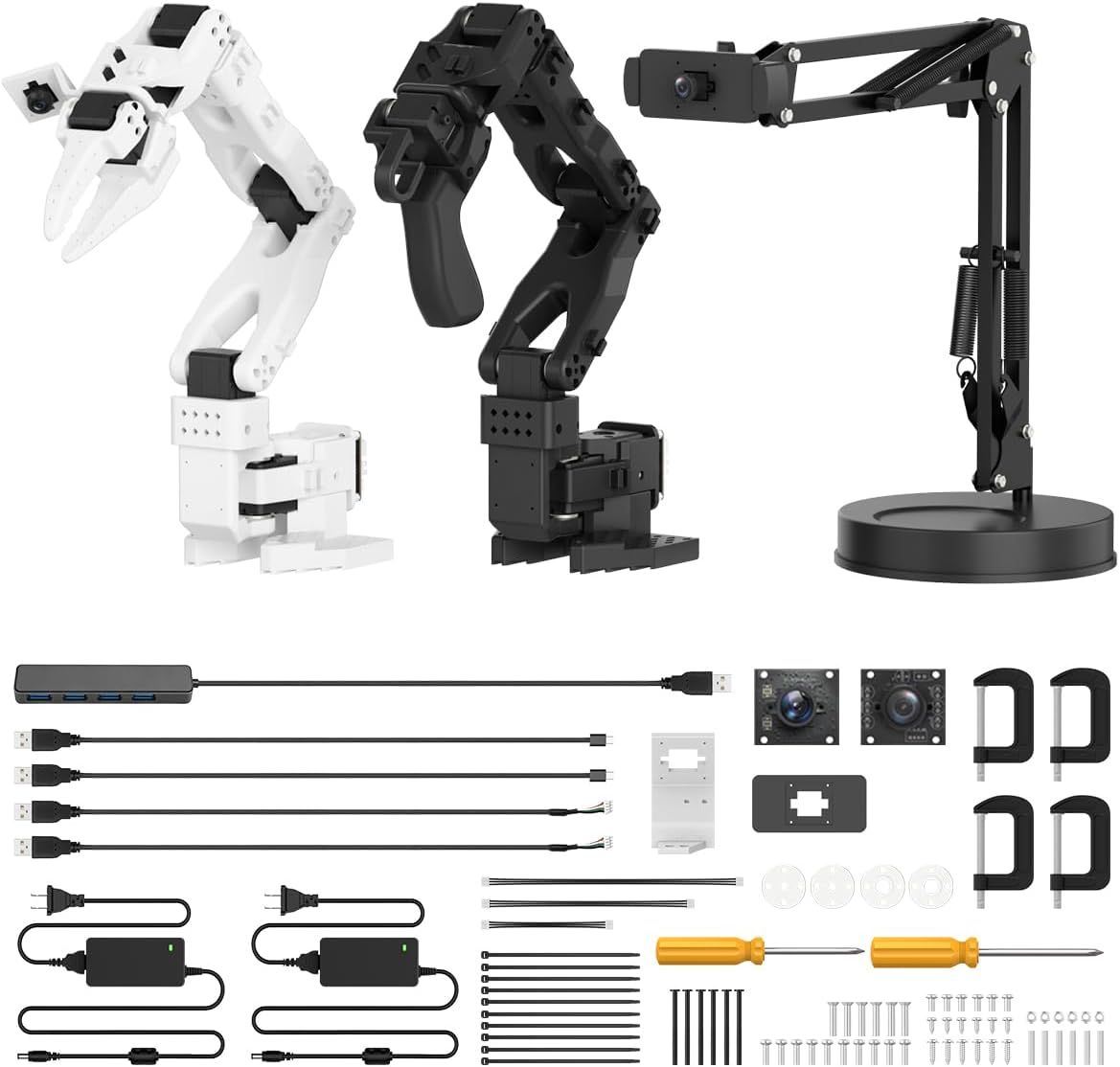
The Hiwonder SO-ARM101 is a 4.3-rated, six-axis arm created for embodied AI, imitation learning, and advanced robotics research. Compatibility with the LeRobot open-source framework gives learners access to shared code, templates, and pre-trained models, while the advanced package includes a 3D-printed part and an assembled unit.
We may earn a commission when you buy through this link, at no additional cost to you.
Its dual-camera vision system places one camera on the gripper and another outside the arm. This configuration supports both close-up manipulation and broader environmental awareness, making it well suited to imitation-learning experiments in which a robot observes and reproduces demonstrated actions. Twelve high-torque bus servos with magnetic feedback provide smooth, stable movement and useful position data.
The integrated Hiwonder BusLinker V3.0 debugging board supports servo scanning, real-time status monitoring, trajectory control, calibration, and troubleshooting. Professional PC software simplifies setup, although the system still assumes a learner comfortable with robotics development tools rather than a casual first build.
Choose the SO-ARM101 for university study, serious AI experimentation, advanced maker teams, or research-oriented courses. It is not the easiest choice for young beginners or a simple classroom build. In exchange, it offers a mature hardware foundation and an open-source pathway into contemporary embodied intelligence.
Gripper-mounted and external cameras provide complementary views of the same task. That combination helps a learning system observe both the object being manipulated and the wider scene, which is central to imitation-learning workflows.
Magnetic feedback across twelve servos and dedicated debugging hardware give developers better visibility into system behavior. The resulting tools support calibration, monitoring, and trajectory work beyond what many classroom kits provide.
We may earn a commission when you buy through this link, at no additional cost to you.
The assembled Hiwonder xArm1S provides the same core six-axis platform as the related xArm1S listing, but it arrives ready for use. Its 4.0 rating and pre-assembled configuration make it especially appealing to educators who want to spend lesson time on programming and demonstration rather than mechanical assembly.
We may earn a commission when you buy through this link, at no additional cost to you.
The full-metal arm uses an aluminum-alloy bracket structure, a reinforced base, high-torque servos, and industrial-grade bearings. Six high-precision serial-bus servos report position, voltage, and temperature feedback and provide enough strength to grasp objects weighing up to 500 grams. Those features support both classroom tasks and independent experimentation.
PC, phone app, mouse, and PS2 wireless control give users several ways to operate the arm. Action editing through desktop, app, and offline manual methods allows custom behaviors, while graphical programming helps introduce sequencing and automation. The same physical system can therefore support beginner demonstrations and more advanced project work.
This version is ideal for a classroom that already owns suitable components, wants a ready-to-teach setup, or has students who would rather focus on code. Buyers seeking a build-from-scratch STEM experience should consider the related unassembled xArm1S instead, while comparing current availability carefully.
A pre-assembled arm removes alignment and construction work from the classroom timetable. Teachers can devote more sessions to controls, feedback, motion sequences, and object-handling challenges.
The assembled version does not sacrifice core performance for convenience. It retains the six-axis structure, smart servo feedback, reinforced base, and 500-gram grasping capability.
We may earn a commission when you buy through this link, at no additional cost to you.
The SIYEENOVE 4DOF Smart Robot Arm is a 4.1-rated entry point for students who want to assemble a programmable arm without beginning with a complex coding setup. Four MG90S servos provide four degrees of freedom, and the pre-programmed ESP32-C3 board allows the kit to operate as soon as it is assembled and powered.
We may earn a commission when you buy through this link, at no additional cost to you.
Two included joysticks offer direct manual control, while a web interface provides remote access without requiring an app installation. A button on the right joystick switches between the two control modes. This design lets beginners explore movement immediately and then transition to Arduino or MicroPython programming as their skills develop.
Motion recording and loop playback are particularly useful educational features. Students can capture individual actions, build a sequence one press at a time, and replay the finished routine. Code modifications can also change the recording capacity, turning a simple motion feature into a lesson in automation, control flow, and program structure.
This kit suits teens, students, and DIY makers beginning a home robotics lab or working toward classroom projects. Four axes and small MG90S servos limit heavy lifting and complex wrist positioning, and batteries are not included. Even so, it offers a friendly introduction to electronics, coding, autonomous routines, and web control.
The pre-programmed controller and browser-based control make the first successful movement relatively straightforward. Students can verify the build, test each axis, and begin experimenting before writing original code.
Recording separate actions and replaying them as a loop provides an intuitive bridge to automation. Learners can analyze what makes a useful sequence, modify timing, and eventually recreate the behavior in Arduino or MicroPython.
We may earn a commission when you buy through this link, at no additional cost to you.
The right educational arm depends on the learners' age, available class time, curriculum goals, and technical experience. Motion range, programming depth, mechanical challenge, expansion options, and ease of setup should be weighed together.
Degrees of freedom determine how independently the arm can position and orient its gripper. Six-axis models offer the greatest directional freedom, making them suitable for stacking, sorting, drawing, and complex pick-and-place demonstrations. Four-axis kits are easier to coordinate and can still support meaningful projects, while three-axis mechanisms emphasize forward, vertical, and horizontal reach.
Choose based on the motions your lessons require, not simply the largest axis count. More joints create additional programming and calibration work, so a simpler arm may produce better learning outcomes for beginners.
Graphical programming, Arduino, Python, and MicroPython each serve different audiences. Visual tools support fast onboarding and younger learners, while text-based languages encourage deeper computational thinking and offer greater control over sensors, motion, and communication. Open-source code can also make it easier for teachers to adapt examples.
Confirm that the software, operating system requirements, and sample projects are suitable for the intended computers. A kit that offers several languages is valuable only if the instructor can provide the appropriate level of support.
App, desktop, browser, mouse, joystick, and wireless-controller control serve different classroom situations. Manual controls are useful for demonstrations and troubleshooting, while programmable interfaces are necessary for repeatable sequences. Browser-based tools can simplify access because students may not need to install a dedicated application.
Look for a product that supports both immediate manual play and increasingly independent automation. This transition helps beginners build confidence before they must solve every movement problem through code.
A kit that takes several hours to build can be an excellent engineering exercise, but construction time must be included in lesson planning. Pre-assembled products reach programming activities faster, while kits with hundreds of components create a longer, more detailed mechanical experience. Neither approach is inherently superior.
Match the build to available time and the intended learning outcome. Use construction to teach systems thinking, or select an assembled model when educators need a dependable platform for repeated code lessons.
Expansion ports and supported sensors determine how far a project can develop. Ultrasonic and infrared sensors can support distance measurement and obstacle avoidance, while vision and voice modules open AI demonstrations involving recognition, tracking, or speech commands. WiFi and Bluetooth additionally allow data transmission and remote control.
Verify which modules are included and which are optional. Also consider whether the controller exposes usable interfaces and whether documentation covers the sensors you want to teach.
Mechanical claws offer adjustable contact and can handle varied objects, while suction nozzles work best with smooth, lightweight items. Payload claims provide a useful comparison, but real performance also depends on reach, balance, attachment quality, and the object's center of mass. Larger arms may need stronger bases to remain stable.
Select the end effector around the actual classroom materials. Test the intended objects if possible and avoid choosing a model based only on its maximum advertised capacity.
Position, voltage, and temperature feedback make actuator behavior easier to study and troubleshoot. Smooth movement and anti-stall protection are especially valuable when many students handle the same robot. Metal brackets, reinforced bases, bearings, and clutch-equipped servos can improve longevity in repeated demonstrations.
Prioritize repeatable motion and accessible feedback over features that are difficult to demonstrate. A stable arm that reliably performs simple tasks often supports better learning than an elaborate machine that is frustrating to calibrate.
For advanced courses, dual cameras, high-torque feedback servos, dedicated debugging boards, and compatibility with an open-source robotics framework can be decisive. These systems support imitation learning, trajectory control, calibration, and sensor-rich research. The tradeoff is a steeper learning curve and a more demanding technical setup.
Choose an advanced platform when students are ready to work with development tools and custom code. For introductory instruction, manual controls, graphical programming, and clearly documented sensor examples provide a more accessible foundation.
Begin by reading the included assembly and safety guidance, sorting all components, and checking that moving parts are aligned before applying power. Build the arm on a stable surface, tighten fasteners evenly, and confirm that cables have enough slack for the full range of motion. For code-based kits, complete a basic manual-control test before loading more complex programs.
Introduce one learning goal at a time. First let students operate each axis, then combine joints into simple reaches, and afterward record or program repeatable sequences. Use light objects at first and keep the workspace clear. A simple cycle of predict, program, observe, diagnose, and revise teaches the core engineering process more effectively than asking learners to copy a long final script immediately.
Store the arm with the joints supported and the gripper open or in the position recommended by its manual. Keep dust and liquids away from the controller, servo connectors, and sensors. Inspect wires, joints, and fasteners after repeated use, and avoid forcing a blocked axis because stalled motion can place unnecessary stress on the servos and gear train.
The best age depends on the complexity of the product and the amount of adult support available. The Bionic Robotic Arm is designed for ages 10 with help or 14+ for independent play, while the Hydrobot Arm targets ages 12 and older. More advanced ESP32 and AI kits are generally better for motivated teens, university students, or guided classroom projects.
The SIYEENOVE 4DOF Arm offers one of the gentlest programming introductions because its ESP32-C3 controller is pre-programmed, it works with joysticks and a web interface, and it supports recording and playback. The Bionic Robotic Arm is also approachable for beginners who want a mechanical rather than software-focused activity. Whichever style is preferred, budget time for assembly and initial troubleshooting.
No. The TEACH TECH Hydrobot Arm is water-powered and requires no batteries, while the Thames & Kosmos Bionic Robotic Arm uses cables and needs no motors or electricity. Electronic servo-based kits generally require a power source, and batteries are explicitly not included with the ACEBOTT arm car and SIYEENOVE 4DOF arm listings.
A suction nozzle works best on smooth, flat, lightweight objects and offers a simple way to demonstrate repeated pick-and-place actions. A mechanical claw can adapt to more varied shapes and can pinch edges or irregular objects. The MaxArm includes a suction nozzle, while several LeArm and Hiwonder options use mechanical claws.
Yes, especially when instructors want students to inspect code, adapt examples, and connect sensors. The LeArm Open Source includes extensive tutorials, sample experiments, source code, and circuit schematics, while the SO-ARM101 supports the LeRobot framework. Open resources make projects more flexible, although instructors should still assess the technical support their students need.
Four degrees of freedom can support basic picking, lifting, turning, and placing activities. Six axes provide more freedom for stacking and complex orientation. A three-axis arm is useful for coordinate-based lessons, but its reach is more limited, so the number of joints should be matched to the complexity of the intended assignment.
Several models can be. The SO-ARM101 is specifically designed around dual-camera vision and imitation learning. The LeArm Open Source supports AI vision, voice, ultrasonic, and acceleration modules for tasks such as face detection, target tracking, and distance measurement. These advanced functions require additional hardware, software familiarity, and more advanced programming.
Charge or install the required power source, assemble and test one unit, check the control software, and create a short baseline activity. Prepare lightweight objects, keep the workspace uncluttered, and demonstrate how to stop or release the robot safely. If students will write code, provide a working example before asking them to build more complex motions.
The TEACH TECH Hydrobot Arm is the best budget choice for mechanical STEM learning, the LewanSoul MaxArm is the strongest connected coding option, and the Hiwonder SO-ARM101 is the leading premium platform for advanced AI and imitation-learning work. Each fills a distinct educational niche rather than competing for exactly the same learner.
When choosing, prioritize the curriculum goal. Use a hydraulic or cable-controlled model to emphasize mechanisms, a four- or six-axis servo arm for programming and manipulation, and an ESP32 platform for wireless control or sensor expansion. The SIYEENOVE model is especially approachable, while the LeArm Open Source and SO-ARM101 suit more technically advanced students.
Check the current listing, included accessories, software compatibility, required power, and available learning resources before ordering. Product availability and prices can change, and those details may differ from the information shown in this October 2026 guide. A careful match between learner level and project complexity will produce the most rewarding educational experience.