
Crenova A4 Laminator
4.6Editor score
Compact portable design
Hot and cold operation
Ten pouches included
A cold laminator machine protects documents, photographs, artwork, and classroom materials without requiring the heat used by conventional thermal laminators. The best models combine consistent pressure, smooth rollers, practical capacity, and straightforward handling. A good machine should make routine laminating faster while remaining suitable for heat-sensitive originals and frequently used materials.
This guide compares ten laminators selected from manual cold-roll, desktop cold-and-hot, and wider thermal-and-cold formats. We evaluated the available information around operating modes, feed width, speed, warm-up time, roller design, jam handling, included accessories, portability, and intended applications. The list covers options for home crafters, teachers, offices, and high-volume document work.
Each review explains the product's strongest benefits, practical limitations, and best-suited user. The top selections highlight the strongest overall balance, the most accessible compact option, and a feature-rich premium-style choice. Product listings and ratings can change over time, and current prices should be checked before purchasing to confirm the latest configuration, included accessories, warranty terms, and availability.
4.6Editor score

4.7Editor score

4.5Editor score
As an Amazon Associate we earn from qualifying purchases.
The comparison below places all ten options side by side, emphasizing the differences that matter most: operating method, document width, speed, portability, and included tools. Models that support both thermal and cold modes provide more flexibility, while manual and compact machines offer distinct advantages for specialized workflows.


The VEVOR 29.5 Inch Cold Laminator Machine is a manual, large-format system built for users who need substantial document capacity without a powered roller mechanism. Its 4.5 rating reflects a recognizable market presence, while the all-metal frame, hand-crank operation, and 29.5-inch working width distinguish it from compact desktop laminators. It is particularly suited to photography, signage, mounting, and craft workflows involving posters or oversized prints.
We may earn a commission when you buy through this link, at no additional cost to you.
Its central advantage is the combination of wide capacity and electrical independence. Soft rubber rollers are designed to pull vinyl film through smoothly, while adjustable roller positioning allows the operator to accommodate different material thicknesses. Four non-slip feet help stabilize the machine during cranking, and the folding table makes storage more manageable. The available information also identifies applications including wedding photography, book covers, calligraphy, painting, documents, and advertising photographs.
The trade-off is that manual operation requires more physical involvement than an electric laminator. Users must feed the document and film correctly, maintain even cranking pressure, and allow time for larger materials. The machine is designed specifically for cold roll laminating, so it does not provide the dual-mode convenience found in several compact thermal-and-cold alternatives. Its large structure also makes it less convenient for quick, on-the-go A4 projects.
Despite those limitations, this is a strong choice for people who regularly laminate large prints or work in settings where reliable electrical access is uncertain. The durable construction and broad width justify the effort for high-volume poster, photograph, and mounting jobs. It is less appropriate for someone who primarily wants a lightweight appliance for quick school projects, but it offers impressive specialization for manual cold-laminating tasks.
The 29.5-inch working area accommodates oversized materials that cannot pass through ordinary desktop laminators. Manual operation also means the machine can be used wherever a suitable work surface is available, without depending on a nearby outlet or an electronic temperature-control system.
An all-metal structure, stable rubber feet, soft rollers, and adjustable pressure support a more specialized professional workflow. The folding table improves portability between tasks while preserving the machine's wide working configuration.
We may earn a commission when you buy through this link, at no additional cost to you.
The Crenova Laminator Machine combines a 4.6 rating with one of the most portable formats in this guide. At 335 by 88 by 65 millimeters and 742 grams, it is designed for home offices, classrooms, and workspaces where a full-size laminator would consume too much room. Its 230-millimeter inlet accommodates A4-width material, making it a practical choice for photos, identity cards, certificates, postcards, menus, and letters.
We may earn a commission when you buy through this link, at no additional cost to you.
Unlike products that only offer cold operation, the Crenova supports both hot and cold modes through a simple switch. Its listed warm-up time of one to two minutes is useful for quick sessions, and ten thermal laminating pouches are included for getting started. A user manual is also supplied, while the jam-clearing procedure centers on turning off the machine, holding the ABS lever, and carefully removing the stuck pouch and paper.
Its limitations follow naturally from the compact format. A4 is the main document size, so oversized posters, wide signage, and A3 documents are outside the intended range. The supplied information mentions cold mode but does not state that self-adhesive cold-laminating pouches are included, so buyers should confirm those supplies separately if their project requires cold film. It also lacks the integrated cutter, punch, corner rounder, and storage compartment found in larger all-in-one kits.
For a teacher, parent, crafter, or home-office user who needs a small machine with both operating modes, this is a particularly approachable choice. Its quick warm-up and simple control make it easier to use for short bursts of work. It is not the right tool for a print shop handling wide-format material, but it delivers an effective combination of portability, versatility, and included supplies.
Many similarly small laminators focus entirely on thermal processing. The switch between hot and cold modes adds flexibility for delicate photographs, documents, and heat-sensitive materials while preserving the machine's small footprint.
The included pouches remove the need to make an initial consumables purchase, and the short warm-up supports spontaneous crafting or school preparation. The included manual also gives beginners a starting point for setup and operation.
We may earn a commission when you buy through this link, at no additional cost to you.
The Portable Thermal A4 Laminator is a compact white machine aimed at parents, teachers, students, and home crafters. Its 4.6 rating reflects a well-received combination of quiet operation, dual modes, a three-minute warm-up, and a practical jam-release system. The nine-inch inlet is narrower than a full 13-inch machine but broad enough for common A4-oriented classroom and photo projects.
We may earn a commission when you buy through this link, at no additional cost to you.
Hot mode works with the thermal pouches included in the kit, while cold mode is intended for self-adhesive laminating sheets that are not included. This distinction is important for buyers protecting old photographs, stickers, or other delicate items. The ABS jam-release control is designed to help users free a stuck sheet without pulling forcefully, and the manufacturer recommends 3- to 4.5-mil pouches for the best results.
The main drawback is that the supplied consumables do not cover every part of the advertised six-in-one use case. Cold-mode users must purchase compatible self-adhesive sheets separately, and the recommended pouch thickness should be followed to reduce jams. The three-minute warm-up is also longer than the rapid warm-up times claimed by several 13-inch competitors, although it remains reasonable for a compact model.
This laminator is a strong fit for quiet rooms, shared family spaces, and classrooms where a large machine would be disruptive. Its compact shape can be stored more easily than wide models, while the dual-mode design broadens the range of supported originals. For high-volume A3 production, a wider machine would be more appropriate, but this model offers strong utility for routine small-format protection.
Quiet operation makes the machine more appropriate for late-night crafting, study sessions, and classrooms where mechanical noise could be disruptive. Its compact white enclosure also keeps the footprint manageable on a desk or shelf.
Cold mode offers a path for protecting old photographs, labels, and other heat-sensitive pieces without relying on heated rollers. Compatible self-adhesive laminating sheets must be obtained separately for that mode.
We may earn a commission when you buy through this link, at no additional cost to you.
The Qfun Laminator Machine with Sheets combines a 4.7 rating, rapid warm-up, broad document support, and an unusually complete accessory set. It offers both thermal and cold modes, a 13-inch feed width, and a stated laminating speed of 450 millimeters per minute. That makes it one of the most versatile selections for teachers, office professionals, store operators, and serious craft projects.
We may earn a commission when you buy through this link, at no additional cost to you.
Its 60-second warm-up is one of the quickest listed in the guide, while the 13-inch opening can accommodate 11-by-17-inch posters as well as A4, A5, and A6 media. NTC temperature control and a dual-roller system support smooth adhesion and help limit bubbles, wrinkles, and haze. The machine accepts both 3-mil and 5-mil pouches, giving users a choice between lighter everyday protection and thicker finishes.
The major attraction is the all-in-one design. A paper cutter, corner rounder, hole punch, binder rings, and 30 A3, A4, A5, and A6 pouches are included, with the tools stored inside the machine. One-touch jam release and a 45-minute automatic shut-off add convenience and safety. However, cold mode still requires self-adhesive laminating material that is not included, and the wide body may be excessive for a small desk.
This is an excellent all-around pick when one device must handle teaching materials, business documents, menus, photographs, posters, and craft projects. The rapid start and high stated throughput suit users who cannot afford long idle periods. Buyers seeking a tiny A4-only machine or a fully manual cold system should look elsewhere, but for a wide, feature-rich desktop package, the Qfun is difficult to overlook.
Cutting, corner rounding, punching, binding rings, and pouches are integrated with the laminator itself. Storing the accessories in the built-in compartment reduces clutter and helps keep a classroom or office workflow organized.
A one-minute warm-up, 450-millimeter-per-minute speed, and support for 3-mil and 5-mil pouches make the machine adaptable to both quick and more protective projects. The 13-inch opening reduces the need to trim large posters or signage before laminating.
We may earn a commission when you buy through this link, at no additional cost to you.
The 13 Inch Laminator Machine with 50 Sheets is a wide-format dual-mode system focused on useful document formats and a substantial consumables package. Its 4.3 rating is lower than several alternatives, but the machine offers 13-inch capacity, cold and thermal modes, a 95-second warm-up, and a stated speed of 355 millimeters per minute. It is well suited to A3, A4, A5, and A6 work.
We may earn a commission when you buy through this link, at no additional cost to you.
The bundle contains 50 thermal laminating sheets divided among five A3, five A4, 20 A5, and 20 A6 sheets. A paper cutter and corner rounder are also included, allowing users to trim pouch edges and soften sharp corners after finishing. The dual-roller system is designed to apply heat and pressure evenly, while the ABS jam-release button provides a safer response when a sheet becomes stuck.
Cold mode requires self-adhesive pouches, which are not part of the stated bundle, so users must not assume that every cold-laminating supply is available. The lower 4.3 rating may also encourage buyers to examine the current listing closely and consider warranty support. Compared with the fastest 13-inch options, its 95-second warm-up is quick but not the quickest available in this category.
This model is most compelling for a new user who wants many pouch sizes immediately, along with basic cutting and finishing tools. The wide format works for posters, classroom charts, menus, and photographs, while the larger number of included pouches reduces early consumable costs. It is a sensible dual-mode choice for home offices and schools that want flexible formats without buying several separate accessories.
The included mix of A3, A4, A5, and A6 sheets is useful for projects of different scales. It provides a ready supply for everything from small cards and labels to classroom displays and larger documents.
A 95-second warm-up and 355-millimeter-per-minute speed provide an effective balance between readiness and throughput. The ABS release control and two-roller layout support a smoother general-purpose workflow.
We may earn a commission when you buy through this link, at no additional cost to you.
The 13 Inch 11-in-1 Laminator is a comprehensive package for teachers, home users, and office teams that want more than a basic laminator. It holds a 4.6 rating and combines hot and cold modes, a 13-inch feed opening, a 60-second warm-up, and a stated speed of 450 millimeters per minute. Its A3 capability makes it suitable for posters, menus, photographs, cards, and standard office documents.
We may earn a commission when you buy through this link, at no additional cost to you.
The accessory system is particularly useful for organized workflows. A cutter, corner rounder, hole punch, binder rings, and 30 pouches are stored in a built-in compartment, reducing desk clutter and the chance of losing small tools. NTC smart temperature control works with the dual-roller design to regulate heat and pressure, while a 45-minute automatic shutoff adds a safety measure when the machine is left unattended.
As with the Qfun, cold mode requires self-adhesive pouches that are sold separately. The product listing also mentions a two-year warranty and responsive customer support, but buyers should verify the current terms directly from the seller. A wide machine with multiple accessories is naturally less space-efficient than a compact A4 model, and operators should allow enough room to feed large materials and use the cutting tools.
This is a strong match for schools, training centers, small offices, and craft studios that regularly produce varied materials. Its quick warm-up, high stated speed, and self-contained accessory organization reduce interruptions during busy preparation periods. It is particularly attractive for users who value organization and versatility more than the smallest possible footprint.
The integrated compartment keeps the cutter, punch, corner rounder, rings, and pouches together. That design is especially useful in busy classrooms where small accessories are otherwise easily misplaced between activities.
The one-minute warm-up and 450-millimeter-per-minute operating speed support quick preparation of large A3 posters and routine smaller documents. Smart temperature control and automatic shutoff support repeatable, unattended workflow management.
We may earn a commission when you buy through this link, at no additional cost to you.
The Scotch TL901X Thermal Laminator is a focused thermal model with a 4.7 rating and a long-standing format for home, office, and school use. It accepts documents and pouches up to nine inches wide, making it a practical middle ground between narrow personal machines and 13-inch production laminators. Its two heated rollers and two temperature settings are designed to produce a smooth, professional finish.
We may earn a commission when you buy through this link, at no additional cost to you.
A stated throughput of one letter-size page per minute is sufficient for regular classroom, office, and home tasks. The release lever helps the operator retrieve a completed pouch quickly, while the machine supports both 3-mil and 5-mil pouches. Listed uses include assignments, instruction sheets, photos, event flyers, annual schedules, graduation diplomas, to-do lists, and other materials that benefit from protection from moisture, tears, and spills.
The most important limitation is that the TL901X is a thermal laminator rather than a cold-and-thermal system. It is therefore not the right choice for heat-sensitive originals or workflows that need self-adhesive cold film. The nine-inch width also falls short of A3 and 11-by-17-inch material, making the model more appropriate for letter-size and smaller A-series projects than wide posters.
For users who only need dependable thermal laminating and do not require cold mode, the TL901X delivers a focused feature set. Its established product identity, two heated rollers, selectable settings, and compatibility with common pouch thicknesses make it a solid choice for schools and offices. Cold-laminating specialists should favor one of the dual-mode alternatives in this guide.
Two heated rollers and two temperature settings give the user some control over the lamination process. This configuration is intended to reduce bubbles and wrinkles while handling frequently used school, office, and home documents.
A release lever, one-page-per-minute speed, and compatibility with common pouch thicknesses keep operation straightforward. The machine focuses on thermal finishing rather than adding cold mode or integrated craft tools.
We may earn a commission when you buy through this link, at no additional cost to you.
The YE381 13-Inch Laminator combines thermal and cold operation with an unusually useful rotary paper trimmer. Its 4.3 rating places it lower than several competitors, but the machine offers a broad working width, a 250-millimeter-per-minute lamination speed, 50 pouches, and three built-in cutting patterns. It is aimed at teachers and home-office users who want both laminating and paper finishing in one device.
We may earn a commission when you buy through this link, at no additional cost to you.
The trimmer offers straight, perforated, and wave patterns, supported by grid lines and a removable metal bar. A corner rounder is also included for softening document edges. These additions go beyond basic laminating and may reduce the need for separate desktop tools. The double-roller heating system supports both thermal and cold work, while intelligent temperature control is intended to protect the machine and maintain safer operating conditions.
Cold operation requires appropriate laminating material, and the supplied information should be checked for the exact compatible pouch type and thickness. Its stated speed is slower than the 355, 450, and 12-inch-per-minute figures associated with several other 13-inch models. That difference may matter for sustained high-volume production, though it may be less noticeable for intermittent classroom and office projects.
This laminator is a good fit for users who value the integrated three-pattern trimmer and corner rounder alongside cold and thermal flexibility. The included 50-pouch bundle offers a useful mix of A4 and A6 sizes, while the ABS button supports easier jam recovery. Buyers with heavy production demands may prefer a faster model, but creative and educational users get a more versatile finishing station here.
Straight, perforated, and wave settings add finishing options that many basic laminators do not provide. These patterns are useful for classroom materials, labels, cards, and craft layouts.
The two-roller system supports thermal and cold work, while the listed low-noise operation suits shared rooms. A broad pouch range and included corner rounder make it especially practical for teachers and home crafters.
We may earn a commission when you buy through this link, at no additional cost to you.
The Scotch LS960 Cold Laminating System is a manual, heat-free approach to document protection. Its 4.4 rating and recognized brand name make it a distinctive choice for users who specifically want cold laminating without an electrical supply. Rather than using heated rollers, it relies on a cartridge-based process to apply pressure and finish documents at the workstation.
We may earn a commission when you buy through this link, at no additional cost to you.
The system includes an easy-loading 18-foot cartridge and five bonus cartridges, reducing the need for frequent additional cartridge purchases. Heat-free operation is the central benefit for photographs, records, artwork, and other materials that should not be exposed to elevated temperatures. The design also avoids warm-up delays and allows the machine to be used in locations where an outlet is inconvenient.
As a manual system, it does not offer the immediate throughput of an electric desktop laminator. Users must follow the loading sequence carefully to keep the material aligned, and the cartridges may require more handling than a standard roll of film or self-adhesive pouch. It is also limited to cold finishing, with no thermal fallback for projects where heat-based adhesion is preferred.
This model is best for users who prioritize heat-free document care, portability, and professional manual finishing over automated speed. Schools preserving old photographs, offices handling sensitive records, and craftspeople working with heat-sensitive media may find that focus especially valuable. For large-scale daily output, however, an electric dual-mode model offers greater convenience.
The system is built around cold lamination, making it a natural fit for older photographs, archival-style projects, and materials that may react poorly to heat. It provides an alternative to thermal appliances rather than trying to combine both methods.
An easy-loading 18-foot cartridge and five additional cartridges support repeatable manual use. Users who become comfortable with the loading process can gain a controlled, electricity-free way to finish documents.
We may earn a commission when you buy through this link, at no additional cost to you.
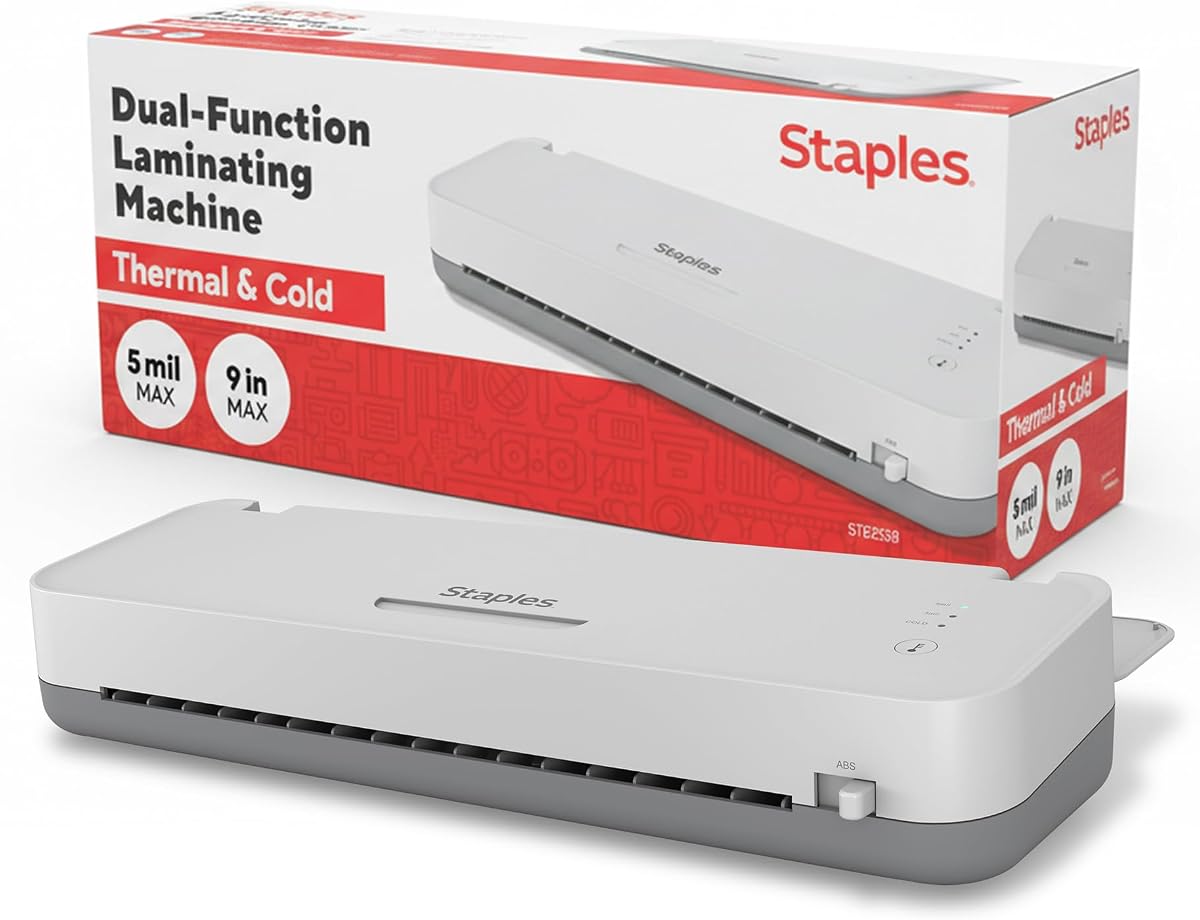
The Staples 12.9-Inch Thermal and Cold Laminating Machine combines a 4.7 rating with wide capacity and a high stated operating speed. Its generous throat accommodates large documents, while dual rollers create a strong, reliable seal. It is designed for teachers, businesses, office presentations, and other workflows where larger sheets must be protected without trimming first.
We may earn a commission when you buy through this link, at no additional cost to you.
The machine can process material at up to 12 inches per minute according to the product information, and its three-to-five-minute warm-up is relatively short for a wide model. Thermal mode supports conventional heat-based lamination, while cold mode gives users a non-heat option for material that requires gentler handling. Reverse jam prevention is intended to reduce damage and interruption when a sheet or pouch fails to feed normally.
The accessory situation is less generous than that of the Qfun, 13-inch 11-in-1 model, or YE381. The supplied data does not list cutting, punching, corner-rounding tools, or pouches, so buyers may need to purchase consumables and finishing accessories separately. The warm-up is also longer than the 60- and 95-second figures claimed by several competing 13-inch machines, although the 12.9-inch capacity remains highly useful.
This Staples model is a good choice for organizations that regularly handle large documents and value processing speed over a bundled workstation. It can cover posters, presentation boards, signage, and oversized photographs in a single pass. For a small craft desk, it is unnecessarily large; for a busy office or classroom, its wide throat, dual modes, and jam-prevention design make it a practical professional tool.
The 12.9-inch opening supports large posters, presentations, and signage without requiring them to be cut down. This saves preparation time and makes the machine more suitable for organized production work.
A stated speed of 12 inches per minute supports efficient batch processing. Thermal and cold options give operators more material flexibility, while two rollers and reverse jam prevention support dependable feeding.
We may earn a commission when you buy through this link, at no additional cost to you.
Choosing a cold laminator involves balancing document size, operating mode, throughput, consumable requirements, and available workspace. The most important distinction is whether you need a truly manual cold system, a compact hot-and-thermal desktop machine, or a wide electric model for frequent production.
A cold-only machine avoids heat and is best for photographs, records, artwork, and other materials that may be sensitive to elevated temperatures. Manual cold systems can be especially useful where electricity is unavailable. A dual-mode machine adds thermal lamination for conventional pouches, giving users more flexibility across routine and delicate projects. Buyers should confirm whether cold mode uses self-adhesive pouches or another cold-laminating material, since those consumables are often not included.
Feed width determines which materials can be laminated without trimming. Compact A4-oriented machines suit letters, cards, identity materials, recipes, and standard photographs. Nine-inch models offer additional room, while 12.9- and 13-inch machines accommodate A3, 11-by-17-inch posters, menus, signage, and large presentation pieces. Also compare maximum pouch thickness, because accepting both 3-mil and 5-mil material provides more flexibility for everyday and more durable protection.
Warm-up time matters most for short, intermittent sessions. A one-minute start is convenient for spontaneous classroom preparation, while a three-to-five-minute warm-up may be acceptable for an office with steady volume. Processing speed becomes more important during batch work. A stated one-page-per-minute rate suits regular use, while speeds around 355 to 450 millimeters per minute or more help teachers and business users complete larger collections efficiently.
Even pressure and stable temperature are central to a smooth finish. Dual-roller systems are common in this category, and models with NTC intelligent temperature control are designed to maintain more consistent heat. Cold systems use pressure without heat, but their material path and feeding method can differ from thermal machines. For frequent use, look for a two-roller arrangement, clear temperature controls, and a release mechanism that does not require forceful pulling.
Even a well-designed laminator can encounter a misaligned, overly thick, or damaged pouch. ABS jam-release buttons and levers are common because they allow the user to release the roller mechanism before removing the material. Reverse jam prevention, described for the Staples model, is another useful feature intended to protect the document. Always switch off the machine and follow its removal instructions rather than pulling a jammed sheet forcefully.
Some machines include pouches, while others require an immediate consumables purchase. A broad starter set with A3, A4, A5, and A6 sheets can be convenient for new users. Integrated paper cutters, corner rounders, hole punches, and binder rings create a more complete document-finishing station. Compare the accessory list carefully because a larger total of items does not necessarily mean every included tool is necessary for your workflow.
Compact models such as the Crenova are easy to store and move between a home, classroom, or shared office. Their limitations are the restricted document width and lower throughput. Wide machines need enough clearance to feed large sheets and may also require space for built-in tools. Manual systems eliminate power-cable requirements but add physical effort. Choose the format that fits the intended workspace rather than selecting solely by feature count.
A home crafter may need only occasional A4 protection, while a school or office may process menus, certificates, instructional materials, and signs daily. For heavy use, faster rollers, a wide opening, an automatic shutoff, and easy-access accessories are more valuable than a very small footprint. Check the current listing for warranty terms, customer-support details, and included components because packages and policies can change over time.
Begin by reading the machine's manual, checking the rollers for debris, and confirming that the correct pouch or cold-laminating material is compatible with the selected mode. For a thermal model, allow the stated warm-up period before processing. Clean the document and make sure it is dry, undamaged, and free of protruding fasteners or grit that could score the rollers or create bubbles.
For a pouch-based laminator, place the document inside the pouch with a small, even margin and ensure the sealed edge enters first. Feed it in slowly while keeping the item centered. For a self-adhesive cold pouch, remove the release liner only as directed and keep the adhesive surface from folding onto itself. With a manual cold-roll machine, align the film and document before turning the crank steadily while applying even pressure.
If a jam occurs, stop the machine and use its ABS release control or other designated disengagement method. Do not pull a caught sheet forcefully, because that can tear the document or damage the rollers. After removal, inspect the pouch and feed path before restarting. Keep the machine away from moisture, unplug electric models before cleaning, and wipe the rollers only with a method approved by the manufacturer.
Cold laminating uses pressure without heated rollers, making it a better choice for heat-sensitive photographs, records, and artwork. Thermal laminating melts adhesive within a pouch to create a durable seal around the document. A dual-mode laminator can handle both types of media, although cold mode usually requires self-adhesive pouches or another compatible cold-laminating material.
Yes, cold operation is especially suitable for old or delicate photographs because it avoids the heat used in thermal lamination. The Scotch LS960, Crenova, Portable Thermal A4 Laminator, Qfun, 13-inch models, YE381, and Staples machine all offer cold-related functionality. Confirm the required consumables and handle fragile originals carefully during alignment.
No. Several products that advertise cold mode state that self-adhesive pouches are sold separately. The Crenova includes ten thermal sheets, the 13-inch set includes 50 thermal sheets, and the Qfun and other all-in-one kits include thermal pouches in their listed accessories. Confirm the exact pouch type included before ordering additional supplies.
Standard posters and 11-by-17-inch materials generally require a laminator with a 13-inch feed opening or a comparable wide throat. The VEVOR manual model offers an even larger 29.5-inch capacity, while the Qfun, 13-inch, YE381, and Staples options are designed around 13-inch documents. Compact A4 and nine-inch models are better for letters, cards, and smaller sheets.
Use the recommended pouch thickness, keep the sealed edge at the entry side, and center the document inside the pouch. Do not laminate materials with staples, clips, dirt, or uneven edges. If a jam occurs, turn off the machine, use the ABS release control, and remove the pouch slowly rather than pulling it forcefully.
A manual model can be preferable when electricity is unavailable, heat must be avoided entirely, or large-format control is important. It requires more physical effort and is generally less convenient for rapid batches. Electric dual-mode machines are easier for frequent small projects, provide automatic heating, and usually offer faster processing through powered rollers.
The answer depends on the largest materials you regularly laminate. A compact A4 model handles letters, worksheets, cards, and small photographs, while a nine-inch model adds flexibility. Teachers frequently preparing A3 posters, charts, menus, or large displays may benefit from a 12.9- or 13-inch model with an integrated cutter and punch.
Store the machine in a dry area with the rollers and feed path clean and free of loose paper. Electric models should be unplugged after use, and the power cord should not be wrapped tightly around the housing. Keep included cutting tools secured, protect the machine from dust, and follow the manufacturer's storage and cleaning instructions.
The Qfun 13-Inch Thermal Cold Laminator is the strongest all-around recommendation because it combines a fast warm-up, 450-millimeter-per-minute speed, 13-inch capacity, intelligent temperature control, and an extensive built-in accessory kit. The Crenova A4 Laminator is the leading compact option for accessible home, office, and school use, while the VEVOR 29.5-Inch Manual Cold Laminator stands out for large-format, electricity-free cold laminating.
Prioritize the operating method that matches your originals, the size of your typical documents, and the volume of work you expect. Heat-sensitive or archival-style projects favor cold operation, while frequent school and office work may justify a dual-mode machine with a fast warm-up and jam release. Wide models save time on posters, whereas compact models are easier to store and carry.
Before making a final purchase, verify the current listing details, included accessories, compatible pouch type, warranty, and availability. Ratings and configurations can change, and current prices should be compared with the machine's overall feature set. The right cold laminator is the one that fits your materials, workflow, and available space without paying for capabilities you will never use.