
Acer 24-inch Conferencing Monitor
5.0Editor score
Integrated conferencing hardware
Fully adjustable ergonomic stand
Three video input options
A monitor with a built-in webcam can simplify a home or office setup by combining a display, camera, microphone, and speakers in one package. The strongest models offer clear video, useful privacy controls, dependable call audio, flexible ports, and an adjustable stand, making them especially practical for remote work and online learning.
This guide compares ten monitors with integrated webcams across resolution, refresh rate, camera type, microphone and speaker features, connectivity, ergonomics, eye-care functions, and suitability for different workspaces. The list covers compact business displays, larger productivity screens, curved ultrawides, and models designed for both everyday office work and smoother motion.
Each selection also illustrates what a particular type of buyer may prioritize, from a straightforward Full HD office monitor to a feature-rich QHD or ultrawide conferencing display. Ratings and specifications reflect the supplied product information, while availability, bundle contents, compatibility, and prices can change, so readers should verify current details before buying.
5.0Editor score
4.3Editor score

3.8Editor score
As an Amazon Associate we earn from qualifying purchases.
The comparison below covers ten webcam-equipped monitors, highlighting their displays, conferencing hardware, motion rates, connectivity, and workspace features so buyers can match a model to their computer, room, and daily workflow.




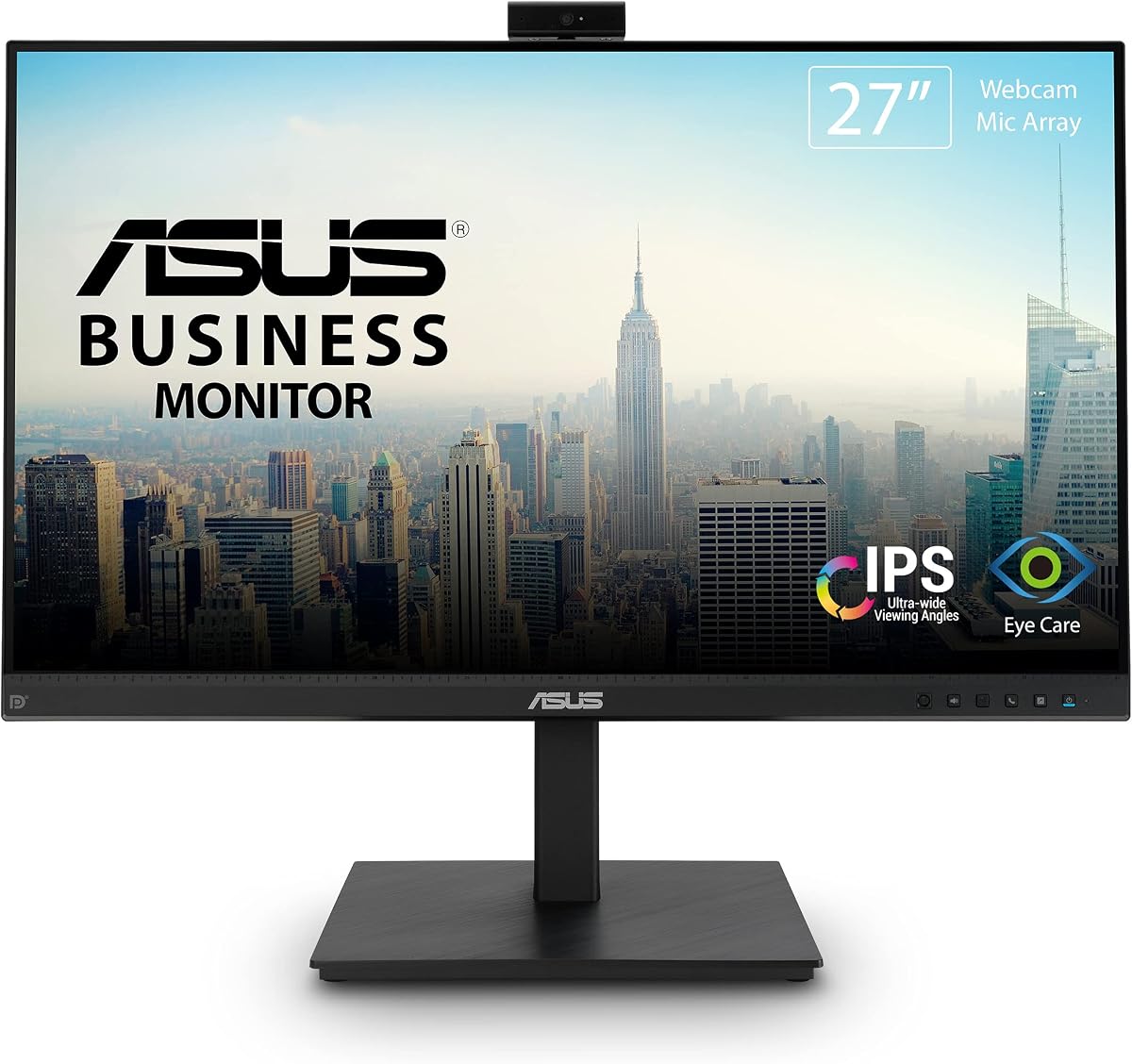
The ASUS BE279QSK is a well-rounded 27-inch conferencing monitor with a 4.3 rating. Its standout combination is an adjustable Full HD webcam, microphone array, stereo speakers, a frameless IPS panel, and unusually broad stand movement. That makes it suitable for users who want a large, polished office display without assembling a separate camera, microphone, and speaker system.
We may earn a commission when you buy through this link, at no additional cost to you.
The display uses a 1920 x 1080 IPS panel with wide viewing angles, which is practical for documents, web applications, spreadsheets, and video calls. At the back, the monitor offers DisplayPort, HDMI, D-sub, upstream USB for the webcam, audio input, and a headphone jack. Having both modern digital inputs and legacy options makes it easier to connect a laptop, desktop, docking arrangement, or older equipment.
Ergonomics are a major strength. The supplied height, swivel, pivot, and tilt adjustments allow the screen and camera to be positioned for a seated user rather than relying on a fixed factory angle. ASUS Eye Care technology, including flicker-free operation and low blue light features, is another useful addition for long workdays. The main limitation is that Full HD across 27 inches is less detailed than QHD, and no USB-C docking capability is listed.
This is an excellent general recommendation for office professionals, hybrid workers, teachers, and anyone moving to a larger desk. The integrated camera is more flexible than a fixed-position module, while the broad connectivity reduces the need for adapters. Choose this ASUS when a dependable, feature-rich 27-inch business monitor matters more than maximum pixel density.
The adjustable Full HD webcam can be aimed toward the user rather than remaining fixed at one angle. Along with the microphone array and stereo speakers, it gives a laptop desktop user a more complete meeting setup without requiring three separate accessories.
DisplayPort, HDMI, D-sub, upstream USB, audio input, and headphone output provide useful flexibility. The dedicated webcam connection is particularly important for a cleaner desk, while legacy inputs broaden compatibility with existing office equipment.
We may earn a commission when you buy through this link, at no additional cost to you.
The ASUS BE24EQK combines a 24-inch Full HD frameless IPS display with an adjustable 2MP webcam, microphone array, and stereo speakers. Its 4.0 rating reflects a conventional office-focused design that emphasizes voice clarity and a compact footprint. It is a logical choice for shared desks, call-heavy offices, and users who value useful integrated hardware over gaming-oriented specifications.
We may earn a commission when you buy through this link, at no additional cost to you.
One of the most attractive features is the audio processing. Beamforming is used to focus on nearby speech, while echo cancellation is intended to filter ambient sounds such as keyboard clicks. That combination can make a difference in busy rooms where a basic built-in microphone might capture distracting background noise. The 16:9 panel also provides a familiar work and media aspect ratio.
The supplied specifications emphasize DisplayPort and HDMI connectivity, which should cover most modern laptops and desktops, although the product title also identifies VGA. The 300-nit typical brightness and 178-degree horizontal and vertical viewing angles support clear visibility from different positions. As with the first ASUS model, the Full HD panel is restrained by today's standards for large or detail-heavy workspaces.
This monitor is best for users who spend substantial time in meetings and want clearer voice pickup without adding a separate conference microphone. It is less compelling for fast gaming or color-sensitive creative work, but for everyday productivity it delivers the essential combination of display, camera, and call-focused audio in one reasonably compact device.
Beamforming and echo cancellation distinguish this model from displays that merely provide a basic microphone. These features are especially relevant in shared offices or home spaces where nearby sounds, speaker feedback, and keyboard noise can interfere with a call.
The 24-inch 16:9 format preserves desk space while retaining a conventional Full HD work area. Its wide viewing angles help maintain consistent readability when the screen is adjusted for a shared workstation or viewed from slightly off-center.
We may earn a commission when you buy through this link, at no additional cost to you.
The Thinlerain 23.8-inch 2K monitor pairs a 2560 x 1440 IPS panel with a 100Hz refresh rate, a retractable 3MP webcam, microphone, and dual speakers. Its 5.0 rating makes it one of the strongest specifications in this roundup. The unusual ability to rotate into portrait mode also distinguishes it from conventional office displays.
We may earn a commission when you buy through this link, at no additional cost to you.
The QHD-class panel provides more working detail than Full HD while retaining a compact footprint. It covers 100% sRGB, offers wide 178-degree viewing angles, and is rated at 350 nits, making it a credible option for documents, creative browsing, programming, and general productivity. Motion appears smoother at 100Hz than on a standard office panel, though it is not positioned as a dedicated high-performance gaming monitor.
Privacy is handled through the pop-up camera design: activating the module raises it into view, and it can retract completely when not needed. The height, tilt, swivel, 90-degree pivot, and vertical orientation options are excellent for creating a more adaptable workstation. A key setup detail is that the included USB-C cable must be connected for the webcam, microphone, and speakers, although other display functions operate independently.
This is an appealing recommendation for programmers, document readers, hybrid workers, and users who want more pixel density without moving to a large monitor. The mandatory USB-C connection for conferencing deserves attention during setup, but once connected, it delivers a rare combination of sharp resolution, smooth motion, physical camera privacy, and highly flexible orientation.
A 2560 x 1440 panel offers a meaningful increase in working space over Full HD without the footprint of a 27-inch model. The 23.8-inch size can therefore suit smaller desks while still supporting dense documents, side-by-side applications, and detailed creative work.
The retractable 3MP webcam leaves no lens visible when retracted, offering a straightforward privacy benefit in shared or public spaces. This physical concealment is stronger than relying only on a software shutter, although the required USB-C connection should be planned before setup.
We may earn a commission when you buy through this link, at no additional cost to you.
The Philips 34E1C5600HE is the premium productivity option here, combining a 34-inch curved ultrawide display with a 5MP Windows Hello webcam, noise-canceling microphone, stereo speakers, and USB-C docking. Its 3.8 rating is the lowest among the listed products, so the strong feature set should be weighed carefully against that single data point.
We may earn a commission when you buy through this link, at no additional cost to you.
The 3440 x 1440 resolution and 21:9 aspect ratio create a broad canvas for timelines, spreadsheets, side-by-side documents, and multitasking. A 1500R curved VA panel wraps around the user and may improve immersion. The stated color-gamut figures and Ultra Wide-Color technology make the display relevant to mixed work and entertainment use as well.
The integrated 5MP webcam includes sensors for Windows Hello facial recognition, allowing compatible Windows devices to authenticate the user without a separate sign-in camera. The noise-canceling microphone is designed for remote-work communication. Most notably, the USB-C dock can carry high-speed data, video, and up to 65W of power delivery over one cable, reducing desk clutter when paired with a compatible laptop.
This monitor is best for power users who routinely need more horizontal workspace and want a single-cable laptop setup. Its curved 34-inch format requires a large desk and careful positioning, while the supplied rating is less encouraging than that of many alternatives. Buyers should therefore prioritize the ultrawide workspace and docking convenience over raw value.
USB-C connectivity can combine display output, data transfer, and up to 65W of charging. This makes the Philips particularly useful for frequent travelers or office workers who connect to a compatible notebook and want a single streamlined workstation connection.
The 5MP camera includes facial-recognition support for compatible Windows devices. It can simplify sign-in while also supplying the image and microphone needed for ordinary meetings, although the surrounding 34-inch curved panel requires more space than a conventional monitor.
We may earn a commission when you buy through this link, at no additional cost to you.
The CUNPU 24-inch 5MP monitor is a feature-rich business display with a 4.1 rating. It combines a Full HD IPS panel, 120Hz HDMI mode, pop-up 5MP webcam, dual-channel stereo microphone, speaker, anti-glare finish, and a highly adjustable stand. Its broad specification sheet makes it interesting for offices that value smooth motion and flexible positioning.
We may earn a commission when you buy through this link, at no additional cost to you.
The webcam uses a pop-up privacy mechanism, allowing the camera to disappear completely when it is not needed. The stated 2K camera capture, dual-channel microphone, and integrated speaker create a convenient conferencing package. For calls, the monitor can serve as the central hub without requiring a separate camera and speaker array.
Display performance is also versatile. HDMI supports up to 120Hz, while VGA supports 75Hz, and the 10ms response time favors fluid movement. The 1920 x 1080 IPS panel covers 96% sRGB, includes 16.7 million colors at 8-bit depth, and is rated at 300cd/m². DC dimming and a matte surface are intended to limit flicker and reflections during extended use.
This monitor makes sense for business users who want a higher refresh rate, physical camera privacy, and extensive stand adjustment in a 24-inch package. It is less ideal for users who need QHD resolution, and the USB-B upstream connection must be considered when planning the workstation. Otherwise, it is a practical all-in-one choice for calls and productivity.
The 120Hz HDMI mode offers visibly more fluid movement than a standard 60Hz office panel. It can benefit cursor movement, scrolling, video playback, and casual games without turning the product into a dedicated gaming monitor.
The pop-up 5MP camera retracts completely when it is not needed, providing a visible privacy solution in busy rooms. USB-B upstream connectivity allows the camera to integrate with a compatible PC or laptop, so users should confirm that the necessary cable and port are available.
We may earn a commission when you buy through this link, at no additional cost to you.
The HP Series 5 Pro 24-inch FHD USB-C Conferencing Monitor earns a 4.5 rating and is designed specifically around hybrid-work collaboration. It brings together a 23.8-inch Full HD display, Poly Studio 5MP pop-up tiltable webcam, AI noise-reduction microphones, four 3W down-firing speakers, USB-C connectivity, and an included portable data hub.
We may earn a commission when you buy through this link, at no additional cost to you.
The camera can pop down after a call for on-demand privacy, while Auto Lock and Awake features are intended to keep the conferencing setup secure. AI noise reduction helps limit distracting background sounds. Those camera and microphone details make the display more compelling for daily meetings than for users who only want a general-purpose screen with an incidental camera.
Comfort is another strength. The stand supports 150mm of height adjustment, 45 degrees of swivel in either direction, 90 degrees of pivot, and a tilt range from minus 5 to plus 23 degrees. The three-sided borderless design keeps the visual footprint tidy, while built-in Eye Care reduces blue light output without compromising color accuracy according to the supplied information.
This is a strong recommendation for hybrid workers, team members who move between offices, and anyone who values meeting features and polished industrial design. The Full HD panel does not offer QHD detail, and the supplied data does not specify a refresh rate, so it is better suited to productivity than fast-motion gaming. Its included Dockztorm data hub adds useful peripheral connectivity.
The tiltable Poly Studio 5MP camera is paired with AI noise-reduction microphones for a more specialized conferencing design. The ability to lower the camera after a meeting gives the screen a cleaner appearance and provides a physical privacy state.
Four-way stand adjustment makes it easier to adapt the display to different desks, seating positions, and shared setups. USB-C connectivity and the included data hub also support a more mobile and organized hybrid-work workflow.
We may earn a commission when you buy through this link, at no additional cost to you.
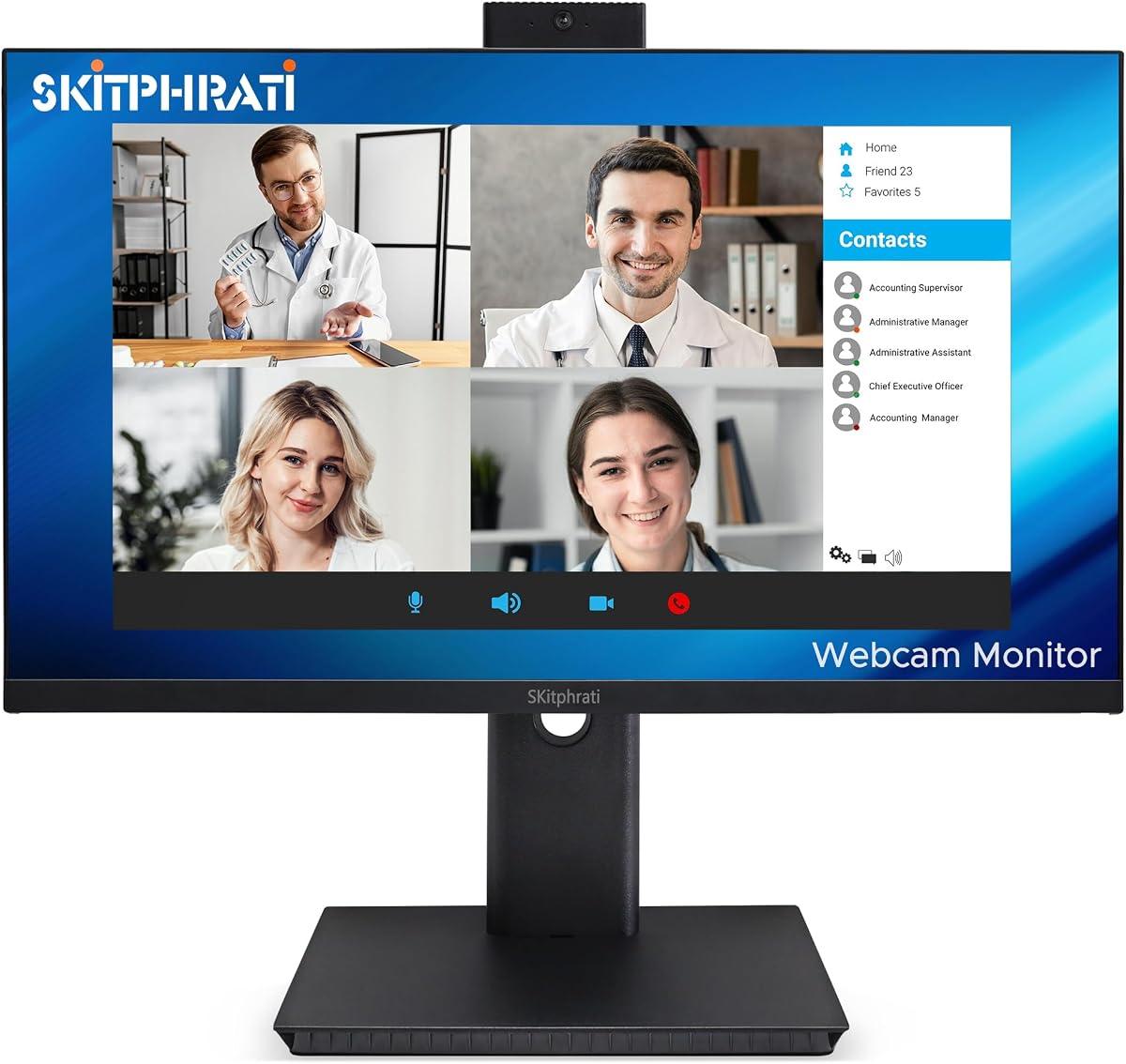
The SKitphrati 27-inch Business Webcam Monitor is a large, 4.0-rated option that combines a 1080p IPS display with a 120Hz refresh rate and integrated conferencing hardware. Its adjustable 3MP camera, microphone array, and stereo speakers target users who want one display for regular office work, presentations, and online meetings.
We may earn a commission when you buy through this link, at no additional cost to you.
The 27-inch size creates a generous work area, while the frameless presentation keeps the screen visually uncluttered. Eye-care technology is included for extended viewing, and the 120Hz refresh rate makes cursor movement, page scrolling, and video playback feel smoother than they would on a conventional 60Hz business monitor.
Connectivity is one of its strongest practical features. HDMI, DisplayPort, VGA, and USB 2.0 provide options for modern and legacy devices, while integrated speakers reduce the immediate need for external meeting audio. The broad selection can be especially valuable in offices with mixed computer fleets or when a user wants straightforward access to several display sources.
This monitor is a sensible choice for large-desk business users who value size, smooth motion, and broad connection options over maximum resolution. Its Full HD panel means a 27-inch workspace will not provide the same fine detail as a QHD alternative. It works best for general office tasks and calls where the convenience of integrated hardware outweighs pixel-density priorities.
Combining a 27-inch panel with a 120Hz refresh rate gives users both room to multitask and smoother everyday motion. The result is particularly useful for spreadsheets, browser-based applications, presentations, and video playback.
HDMI and DisplayPort support current equipment, while VGA adds compatibility with older systems. USB 2.0 provides an additional data route for the integrated webcam, making this a flexible choice for varied office environments.
We may earn a commission when you buy through this link, at no additional cost to you.
The CUNPU 27-inch QHD monitor combines a 2560 x 1440 display with a pop-up 5MP webcam, dual-channel microphone, speaker, and 120Hz refresh rate. Its 4.1 rating reflects a balanced specification set, but QHD resolution at 27 inches is the feature that most clearly differentiates it from conventional Full HD business monitors.
We may earn a commission when you buy through this link, at no additional cost to you.
The display covers 99% sRGB and 16.7 million colors at 8-bit depth, giving it useful color breadth for general creative work and media consumption. Both HDMI 2.0 and DisplayPort 1.4 support 120Hz, while a 10ms response time and compatibility with AMD FreeSync and G-Sync provide smoother motion and less tearing. It is not marketed as a dedicated gaming display, but it handles casual gaming well.
The integrated conferencing system is equally practical. The pop-up camera retracts for physical privacy, and the dual-channel microphone and speaker make the monitor ready for online learning and business calls. USB-B upstream connectivity provides the camera-to-computer link. A matte anti-glare surface, DC dimming, 300cd/m² brightness, and a 1500:1 contrast ratio support comfortable daily use.
This is a strong all-around choice for buyers who want a large, detailed, smooth display with integrated conferencing hardware. The 27-inch footprint demands adequate desk space, and the camera requires the correct upstream USB connection. For users who prioritize screen quality and smooth motion while retaining the convenience of an all-in-one meeting display, it is a particularly compelling option.
A 2560 x 1440 panel offers more usable resolution than Full HD, making the 27-inch size more appropriate for detailed documents, image editing, and multitasking. It offers more refinement than a standard office screen without moving into the footprint of an ultrawide model.
A 120Hz refresh rate, 10ms response time, and adaptive-sync support make scrolling and casual gaming feel more fluid. These features complement rather than define the monitor, whose main appeal remains its integrated camera and business-ready audio.
We may earn a commission when you buy through this link, at no additional cost to you.
The ViewSonic VG2441V is a 24-inch conferencing monitor with a 4.1 rating, combining Full HD resolution and a 120Hz refresh rate with a built-in 5MP infrared webcam, microphone, and speakers. The infrared camera and Windows Hello support distinguish it from models intended only for basic video calls.
We may earn a commission when you buy through this link, at no additional cost to you.
Windows Hello allows compatible systems to use facial recognition for streamlined authentication, which can reduce the need for a separate login camera. The same integrated hardware supports meetings, presentations, training, and collaboration. USB-C, HDMI, and DisplayPort provide modern connectivity for compatible laptops and desktops, while the built-in audio removes several common desk accessories.
Eye Care features are intended to support longer meetings and document-heavy work. The supplied information also states compatibility with laptop, PC, and Mac systems, although specific operating-system features such as Windows Hello naturally require compatible hardware and software. A 120Hz panel can make cursor movement and scrolling feel more responsive than a conventional 60Hz office monitor.
The VG2441V is a strong fit for business, shared-office, and home users who prioritize authentication, camera quality, and tidy connectivity. Its Full HD resolution is adequate for regular productivity but trails QHD alternatives for dense work, and users should confirm exact platform support and included accessories before relying on a particular feature.
The integrated 5MP infrared camera supports Windows Hello on compatible Windows devices. This can make daily sign-in more convenient while preserving the monitor's value as an all-in-one conferencing display.
USB-C, HDMI, DisplayPort, a microphone, and speakers create a centralized workstation for compatible systems. Eye Care features and a 120Hz refresh rate further support a monitor intended for long working sessions and frequent video meetings.
We may earn a commission when you buy through this link, at no additional cost to you.
The Acer 24-inch 1080P IPS Conferencing Monitor has a 5.0 rating and offers a practical combination of a 23.8-inch Full HD display, integrated webcam, microphone arrays, speakers, and an included Dockztorm data hub. It is a budget-focused recommendation for users who want essential conferencing hardware without paying for a larger or higher-resolution panel.
We may earn a commission when you buy through this link, at no additional cost to you.
The IPS screen provides 1920 x 1080 visuals, 178-degree viewing angles, 250 nits of brightness, and a 75Hz refresh rate. AMD FreeSync supports smoother synchronization with compatible graphics output and can reduce screen tearing during video playback or casual gaming. An anti-glare surface is also well suited to bright office environments.
Comfort and connectivity remain strong for an entry-oriented display. The stand offers tilt, swivel, and height adjustment, while HDMI, VGA, and DisplayPort support a range of devices. Integrated speakers, microphones, and a webcam create a self-contained setup for daily calls. The included portable data hub provides data-transfer connectivity, although buyers should verify its exact fit with the monitor and their other equipment.
This monitor is best for students, home workers, and budget-conscious offices that need an all-in-one conferencing display. It does not offer QHD detail, a higher refresh rate, or a documented Windows Hello camera, but it covers the fundamentals with strong ergonomics and a 5.0 supplied rating. It is a sensible first webcam monitor for a new workspace.
The webcam, microphone arrays, and speakers are integrated into the display, reducing the number of accessories needed for routine calls. That makes the monitor especially approachable for students and employees setting up a first dedicated home workspace.
HDMI, VGA, and DisplayPort provide broad display compatibility, while height, swivel, and tilt adjustment helps optimize the screen position. The 75Hz panel and FreeSync support are sensible additions for a value-focused office and media display.
We may earn a commission when you buy through this link, at no additional cost to you.
The right webcam monitor balances image quality, call audio, privacy, display resolution, connectivity, and ergonomics. Buyers should consider how they will connect the camera, where the monitor will be used, and whether gaming, color accuracy, or maximum workspace matters more than the lowest practical cost.
A higher camera resolution can provide a sharper image, but placement remains equally important. The group includes adjustable cameras, tiltable modules, fixed cameras, and pop-up designs. Adjustable and tiltable models are useful when users change seating position or share a screen, while a pop-up camera physically conceals its lens when not in use. Five-megapixel cameras appear on several models, while others use three megapixels or Full HD.
Choose based on how your room and seating are arranged. A higher-resolution sensor is helpful for detailed video, but it cannot compensate for backlighting, a poorly positioned lens, or an unstable connection. Confirm the camera's native resolution and whether it retracts, tilts, or adjusts manually.
Integrated audio is one of the main advantages of a webcam monitor, but the specifications vary significantly. Beamforming, echo cancellation, AI noise reduction, microphone arrays, and noise-canceling microphones are designed to improve speech pickup in different ways. Stereo or multi-speaker systems may provide fuller output, though separate high-quality meeting devices can still be preferable in demanding environments.
Prioritize microphone features when speaking regularly in shared spaces. For quieter offices or occasional calls, the built-in microphone and speakers may already meet your needs. Always check whether the webcam, microphone, and speakers require a specific upstream cable or USB connection.
Most options use a 16:9 Full HD IPS panel, while three provide more resolution: the Thinlerain uses 2560 x 1440, the CUNPU 27-inch uses QHD, and the Philips uses a 3440 x 1440 ultrawide format. IPS panels generally offer broad viewing angles, while the curved Philips display uses VA. Color-gamut claims range from standard sRGB-oriented coverage to 100% sRGB on the Thinlerain, with the CUNPU QHD model listed at 99%.
Full HD is adequate for email, documents, and routine calls. QHD gives a 27-inch display more room for dense applications, while an ultrawide is ideal for side-by-side workflows but needs more desk space. Consider brightness, anti-glare treatment, and eye-care features if your screen remains on for long periods.
Refresh rate matters most for scrolling, cursor movement, video, and games. Several models operate at a standard office-oriented rate, while the CUNPU models, ViewSonic, and SKitphrati reach 120Hz, the Thinlerain reaches 100Hz, and the Philips reaches 100Hz. The Acer is listed at 75Hz. These differences can be noticeable during fast scrolling and casual gaming.
Do not treat a webcam monitor as a dedicated gaming monitor solely because of a higher refresh rate. Check response time, adaptive-sync support, input lag information, and resolution if gaming is a primary activity. For office use, the more important points are panel quality, camera placement, and comfort.
Camera privacy ranges from a manual privacy shutter or adjustable lens to a fully retractable module. The Thinlerain and both CUNPU monitors use pop-up cameras, while the HP model can pop down after a meeting. These physical states can be reassuring in shared rooms because the lens is not merely disabled in software.
The ViewSonic and Philips add Windows Hello support, enabling facial authentication on compatible Windows devices. Verify operating-system compatibility before relying on biometric sign-in. Also consider whether your organization has policies about always-on cameras, stored profiles, or using workplace authentication hardware.
The most important connection question is how the webcam receives data from the computer. The ASUS BE279QSK includes upstream USB for its camera. The Thinlerain requires the included USB-C cable for the webcam, microphone, and speakers. Both CUNPU models use USB-B 2.0 upstream connectivity, and the ViewSonic uses USB-C along with HDMI and DisplayPort.
For display connections, HDMI and DisplayPort are the most common modern choices, but VGA remains present on several models for older office systems. The Philips adds USB-C docking and up to 65W of power delivery, making it especially convenient with compatible laptops. Check whether the supplied cables match your computer's available ports and whether adapters are acceptable in your setup.
Height adjustment, swivel, pivot, and tilt can materially improve comfort, especially when a monitor serves several users. The ASUS BE279QSK, HP Series 5 Pro, and CUNPU models offer extensive four-way adjustment, while the Thinlerain can rotate into vertical portrait mode. Smaller 23.8- and 24-inch models generally demand less desk space than the 27-inch and 34-inch alternatives.
Consider your chair height, desk depth, viewing distance, and whether the webcam should point straight toward you. Portrait mode is useful for coding and documents but needs a wide-enough desk and a suitable viewing angle. VESA compatibility on some models also opens wall-mounting and monitor-arm options, though webcam positioning and cable access should be checked first.
A warranty can provide useful protection, but buyers should understand the included support terms and regional coverage. ASUS models list a three-year warranty with advanced replacement and repair, the Philips has a four-year advance replacement claim, and the CUNPU products list a one-year warranty. The HP and Acer models include a Dockztorm data hub, while the Thinlerain includes USB-C cables required for its conferencing hardware.
Review what arrives in the box before connecting the monitor. Some models include HDMI or DisplayPort cables, but the listing may not promise every cable for every input. Also check whether webcam privacy controls, microphone mute behavior, and authentication features depend on a particular operating system or utility.
Begin by placing the display at a comfortable distance and connecting the required video and upstream USB cables. The webcam, microphone, or speakers will not function on models whose conferencing features require a dedicated data connection even if the display itself receives an image. Install the appropriate graphics, webcam, or USB driver if the computer requests one, then select the monitor as the camera, microphone, and speaker in the meeting application.
For best results, adjust the camera so the lens is approximately level with your face and avoid pointing it toward a bright window. Use the monitor's height, tilt, swivel, and pivot controls to align the screen and camera with your seating position. In the conferencing software, select the integrated microphone and speakers, test the levels, and use a mute control or camera-retraction mechanism whenever privacy is important.
Care for the display with a soft, lint-free cloth and avoid aggressive cleaners on the screen surface. Keep the camera lens free from dust and fingerprints, and do not push or force a retractable module. Check cables for strain, secure the stand on a stable surface, and update the computer and conferencing software periodically. If the image or sound changes, test the upstream connection, permissions, input selection, and room acoustics before assuming a hardware fault.
Yes, provided the webcam is connected to the computer and selected as the active camera in the operating system and conferencing app. Some models require USB-C or USB-B upstream connectivity even though HDMI or DisplayPort carries the display image. Check that the computer supports the monitor's camera connection and that meeting software has permission to access it.
A pop-up webcam physically conceals the lens when retracted, which can make its inactive state obvious and reduce the chance of accidental capture. A manual privacy shutter offers similar physical protection on some fixed-camera designs. Either approach is stronger than software alone, but users should still check application settings and follow workplace privacy policies.
Not every model requires USB-C, but several rely on it for the camera, microphone, speakers, or full docking. The Thinlerain requires the included USB-C connection for those functions, while the ASUS and CUNPU models use other upstream USB arrangements. USB-C docking on the Philips also carries video, data, and power, which is useful with compatible laptops.
A 5MP camera can capture more detail than a 2MP camera, but image quality in a real call also depends on lighting, focus, bandwidth, and application processing. The practical benefit is most noticeable when the camera is well positioned and the display or platform uses the available resolution. A lower-resolution camera can still be perfectly adequate for routine calls.
A 120Hz panel provides smoother motion than a standard office monitor and can work well for casual gaming. Its suitability for competitive titles also depends on response time, adaptive-sync support, input performance, and graphics hardware. None of these specifications alone guarantees that a webcam-focused display will equal a dedicated gaming monitor.
Full HD is sufficient for email, documents, standard applications, and video meetings in a compact workspace. QHD offers more useful detail on a 27-inch screen, while an ultrawide is valuable for timelines, large spreadsheets, and side-by-side applications. Larger and higher-resolution formats also require more desk space and may increase the total system cost.
Often, yes. Models such as the CUNPU displays include a 3.5mm audio output, while the ASUS BE279QSK has a headphone jack. Other models may allow system-level routing to external speakers or headphones through USB or the computer. Check the supplied specifications and operating-system audio settings before assuming every external audio route is available.
Use the physical camera-retraction or privacy-shutter feature when available, and keep the camera inactive when not in a meeting. Mute the microphone separately, disable camera access in system permissions, and verify the selected device before joining a call. For added assurance, ask your organization which camera and recording policies apply in shared workspaces.
The ASUS BE279QSK stands out as the strongest all-around recommendation because it combines a large frameless IPS display, an adjustable Full HD webcam, microphone array, stereo speakers, extensive connectivity, and excellent stand movement. The Acer 24-inch model is a cost-conscious starting point, while the Philips 34E1C5600HE is the premium choice for buyers who prioritize an ultrawide workspace, Windows Hello, and one-cable USB-C productivity.
Prioritize the conferencing system first: confirm the camera connection, camera positioning, microphone behavior, and compatibility with your meeting software. Next, choose a display resolution and size that suit the desk, then consider refresh rate, eye comfort, ergonomic adjustment, and port availability. A slightly simpler monitor that fits the room and workflow is often a better purchase than a more advanced model whose features remain inconvenient to use.
Ratings, bundles, compatibility, and prices can change, so review the current listing and manufacturer information before ordering. Verify that every required cable is included or available, particularly for monitors that use USB-C or USB-B for conferencing hardware. With those checks complete, the right webcam monitor can provide a cleaner desk and a more dependable daily meeting setup.
