
CMS 8GB DDR4 S145
4.6Editor score
Purpose-built IdeaPad S145 match
DDR4-2400 260-pin SODIMM
Single 8GB memory module
Explore the best RAM for Lenovo Ideapad with this expert guide comparing capacity, DDR generation, speed, voltage, form factor, and fit.
Finding the best RAM for a Lenovo Ideapad starts with identifying the laptop’s supported memory generation, maximum capacity, and installed slot layout. A visually similar module can still be incompatible if it uses the wrong DDR standard, pin count, voltage, or capacity configuration.
This guide compares ten laptop memory options across capacity, speed, voltage, rank, latency, form factor, and stated compatibility. It includes purpose-built Lenovo matches, universal DDR4 and DDR3L SODIMMs, single modules, and dual-module kits, with the goal of making the technical details easier to navigate.
Each pick highlights a different practical use, from a straightforward IdeaPad S145 upgrade to higher-capacity universal options. Product ratings, availability, and retail conditions can change, so readers should verify their exact IdeaPad model and current listing details before ordering.
4.6Editor score

4.8Editor score

4.7Editor score
The table below places all ten modules side by side, emphasizing the differences that determine compatibility: DDR generation, capacity, speed, form factor, and whether the product is a single module or a matched two-module kit.


The CMS 8GB DDR4 S145 module is a focused upgrade for owners of the Lenovo IdeaPad S145 family. Its 4.6 rating and explicit compatibility references make it a practical choice for users who want a module clearly associated with 14-inch and 15-inch S145 configurations instead of relying only on a generic DDR4 description. The kit contains one 8GB DDR4 SODIMM.
We may earn a commission when you buy through this link, at no additional cost to you.
Its core specifications are appropriate for the laptops named in the product information: 260-pin, non-ECC, unbuffered laptop memory rated at DDR4-19200, or 2400MHz. Because it is a one-module kit, it can also make a straightforward addition to a compatible laptop that already has a separate memory slot. The 1.2V class of modern DDR4 SODIMM design is typical of the systems for which this module is intended.
The main limitation is capacity. Eight gigabytes is a modest amount of memory for heavy browser use, large productivity applications, or several demanding programs running at once. It is most useful as a matched or supplementary module in a system designed for two modules, rather than as the only way to achieve a very high total memory capacity. Buyers should also check the exact S145 submodel because compatibility statements are specific.
This is an appealing choice for an IdeaPad S145 owner who has confirmed the laptop uses DDR4 SODIMM memory and needs a straightforward 8GB replacement or expansion. It combines model-specific fit information with widely used DDR4-2400 specifications. For most compatible S145 configurations, it offers a more targeted upgrade than an unbranded universal module without requiring a two-piece kit.
The listing names specific S145 variants, including 14-inch and 15-inch models and several IWL or IKB identifiers. That detail helps narrow the search, although the full hardware code on the underside of the laptop should still be checked before purchase.
A one-module kit can be especially convenient for laptops with two accessible SODIMM slots. It allows the buyer to add memory while retaining an existing compatible module, provided the system supports the resulting configuration and the operating system recognizes it.
We may earn a commission when you buy through this link, at no additional cost to you.
The Crucial 16GB DDR4 module combines a high 4.8 rating with a broadly useful 16GB capacity and 260-pin SODIMM format. Its stated support for 3200MHz, 2933MHz, and 2666MHz profiles makes it a strong candidate for an IdeaPad that uses DDR4 laptop memory, although the processor and firmware ultimately determine the operating speed.
We may earn a commission when you buy through this link, at no additional cost to you.
Capacity is the module’s most important strength. Sixteen gigabytes gives modern IdeaPad users more room for browser tabs, office documents, communication tools, and background applications than a smaller 8GB configuration. Crucial also emphasizes easy installation and provides a System Scanner or Upgrade Selector to help identify a compatible module for a particular laptop.
The specifications list non-ECC memory, 1.2V operation, and either 1Rx8 or 2Rx8 configuration depending on the module. Its rated PC4-25600 speed is useful for newer systems, but it would be misleading to assume every IdeaPad will run it at 3200MHz. Older processors may operate it at a lower supported frequency. The listing also contains a Mac-oriented phrase in its feature text, so buyers should focus on the actual IdeaPad compatibility information rather than that wording.
This is the most balanced option in the guide for a compatible IdeaPad that needs 16GB in one slot. It offers more capacity than the 8GB picks, a high customer rating, and compatibility tools that reduce uncertainty. It is a strong all-around recommendation for users who want a modern 16GB module without committing to a matched two-module kit.
A 16GB module can make a noticeable difference when numerous browser tabs, large spreadsheets, remote meetings, and background applications compete for memory. It also leaves more room for virtualization, creative tools, and software that keeps substantial data cached in memory.
The listed 3200MHz, 2933MHz, and 2666MHz support means the module can serve several DDR4 laptop platforms. A compatible IdeaPad will select an appropriate supported speed, so buyers should not treat the maximum rating as an automatic guarantee for every processor.
We may earn a commission when you buy through this link, at no additional cost to you.
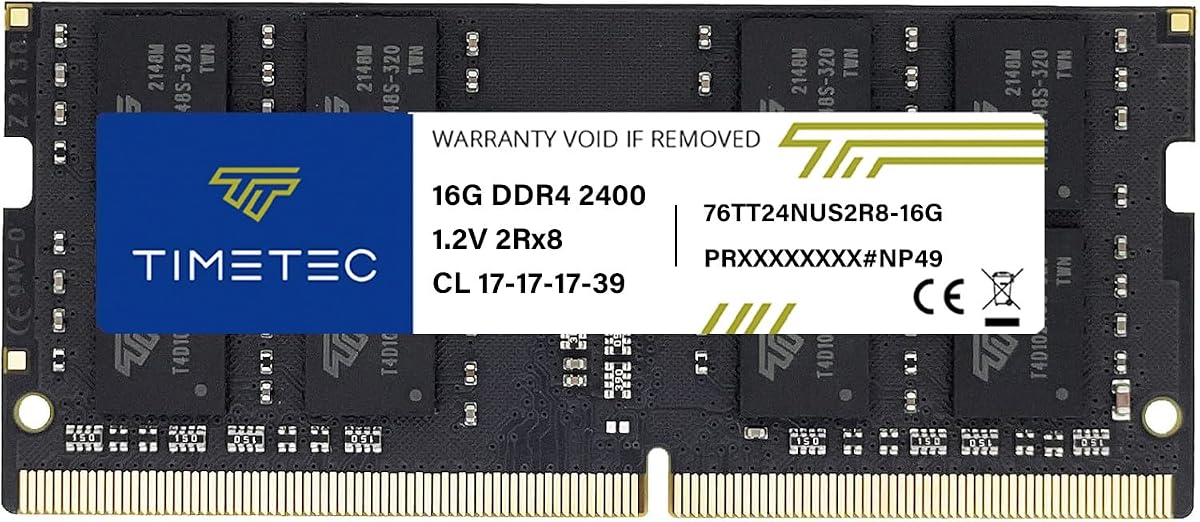
Timetec’s 16GB DDR4-2400 module is a straightforward way to add substantial memory to a compatible IdeaPad. Its 4.8 rating reflects strong customer reception, while the 260-pin, non-ECC, unbuffered SODIMM format aligns with many mainstream IdeaPad laptops that use DDR4 memory.
We may earn a commission when you buy through this link, at no additional cost to you.
The module operates at 2400MHz, a widely used speed for DDR4 laptops, and carries CL17 timing. Its single 16GB layout is useful when the system has one occupied slot and another available slot, or when the user wants a larger module in a single slot. It is also compatible with selected notebooks, mini PCs, and all-in-one systems that accept this type of memory.
One minor uncertainty is that the PCB may be green or black depending on the production batch, and the rank may be either 1Rx8 or 2Rx8. The manufacturer states that performance and quality remain consistent, so visual differences do not alter the core specification. The module is not suitable for desktop DIMM slots, which are physically and electrically different from laptop SODIMMs.
This Timetec option is a compelling choice for IdeaPad owners who want 16GB and a conventional 2400MHz module without requiring the very highest possible speed. It is particularly attractive when compatibility is straightforward and the laptop’s processor is unlikely to benefit meaningfully from a faster memory profile. Confirm the DDR4 requirement first, then the module can serve as a long-term capacity upgrade.
DDR4-2400 is a broadly compatible baseline across many laptop platforms. Choosing this speed can make sense when the IdeaPad’s own memory controller limits performance or when a stable, standard profile is the priority.
The 16GB single-module format simplifies capacity planning. A buyer with one free slot can install one module, while a dual-slot laptop may eventually use two matched 16GB modules if the manufacturer permits that configuration.
We may earn a commission when you buy through this link, at no additional cost to you.
The Timetec 8GB DDR3L module serves an important but often overlooked group: older IdeaPad laptops that still use 204-pin DDR3 memory. Its 4.7 rating, 1600MHz speed, and dual-voltage design make it a relevant option for systems whose memory slot cannot accept a modern DDR4 SODIMM.
We may earn a commission when you buy through this link, at no additional cost to you.
This module supports DDR3L and DDR3 at 1600MHz and can operate at either 1.35V or 1.5V according to the supplied specifications. The CL11 timing, 2Rx8 organization, and non-ECC unbuffered design are typical characteristics for this class of laptop memory. Its compatibility covers DDR3 laptops, notebooks, mini PCs, and all-in-one systems that use the appropriate SODIMM format.
The critical limitation is that DDR3L memory is physically and electrically different from DDR4. It must not be forced into a DDR4 slot, and a DDR4 module cannot replace a DDR3L module. Capacity is also more restrained: 8GB is useful for light productivity and web use, but it may feel limited for heavy multitasking. Some older systems may also have maximum per-slot or total-memory restrictions.
This pick is recommended only after confirming that the IdeaPad uses DDR3L 204-pin SODIMM memory. For a compatible older laptop, it provides a broadly compatible 1600MHz module with flexible voltage support. For a modern DDR4 IdeaPad, the buyer should instead choose one of the 260-pin DDR4 options in this guide.
The ability to operate at 1.35V or 1.5V makes the module adaptable to compatible DDR3 laptop platforms. The system and installed memory determine the operating mode, so the laptop manufacturer’s requirements remain the deciding factor.
Look for a 204-pin SODIMM specification in the laptop service manual or a hardware-information utility. If the system identifies its memory as DDR3L-1600 or PC3L-12800, this module is a relevant candidate.
We may earn a commission when you buy through this link, at no additional cost to you.
The CMS 16GB DDR3 P500 kit is the most specifically targeted option for the Lenovo IdeaPad P500 series. It carries a 5.0 rating and is sold as a matched two-piece kit containing two 8GB DDR3-1600 SODIMMs, making it a convenient way to install 16GB at once.
We may earn a commission when you buy through this link, at no additional cost to you.
The modules use the 204-pin non-ECC SODIMM format associated with many older IdeaPad systems. Running a matched pair can provide a more balanced memory configuration than mixing unrelated modules with different timings or organizations. The 1600MHz speed is also a common standard for this era of laptop, and the product information specifically names the P500 series.
This is not a universal upgrade. A P500 buyer should verify the exact model and current memory configuration, while owners of newer DDR4 IdeaPads cannot use these modules. Depending on how the laptop is configured, the buyer may need to replace both existing sticks because the kit contains two modules rather than one. As always with matched kits, the system must support the intended total capacity and dual-module arrangement.
For an IdeaPad P500 owner seeking 16GB, this is a particularly clear recommendation. It combines model-specific compatibility, a complete matched kit, and the highest customer rating among the products listed. The main requirement is diligence: confirm that the P500 configuration uses DDR3-1600 SODIMMs and accepts two modules of this size.
The two included 8GB modules are designed to work together in a compatible dual-slot laptop. A matched pair is generally preferable when replacing both sticks because it avoids mixing different capacities or timing profiles.
Older laptop platforms can use different memory generations even within the same IdeaPad family. Naming the P500 series narrows the field and makes it easier to select the correct DDR3 form factor.
We may earn a commission when you buy through this link, at no additional cost to you.
A-Tech’s 16GB DDR4-3200 module is a strong fit for compatible IdeaPad laptops that support 260-pin DDR4 SODIMM memory. Its 4.7 rating reflects solid customer reception, and the combination of 16GB capacity with a 3200MHz JEDEC profile makes it appealing for newer systems with faster memory controllers.
We may earn a commission when you buy through this link, at no additional cost to you.
The module operates at 1.2V and carries a PC4-25600 or PC4-3200AA designation. It is non-ECC and unbuffered, matching the format used by many consumer laptops. The product information explicitly excludes desktop DIMMs, non-DDR4 memory, and ECC types such as RDIMM, LRDIMM, and ECC UDIMM, which helps clarify which systems are suitable.
A module’s rated speed does not force the laptop to run at that exact frequency. Depending on the processor, IdeaPad generation, BIOS, and memory configuration, the operating speed may be lower. Capacity and maximum supported module size also need confirmation. Buyers should check all three requirements rather than relying only on the 3200MHz label.
This module is recommended for IdeaPad users who want more memory and a modern speed class in a single SODIMM. It works particularly well as an upgrade for a laptop with one occupied slot and one free slot. It is less suitable for systems limited to 8GB modules or those designed for DDR3 memory, so the service manual remains the best final reference.
A 3200MHz JEDEC profile can benefit compatible recent processors that support that data rate. Older DDR4 IdeaPads may clock the module down to 2666MHz, 2400MHz, or another supported level.
Using one 16GB module can free the other slot and make later expansion easier. The result remains subject to the laptop’s maximum per-slot and combined memory limits, which should be verified in advance.
We may earn a commission when you buy through this link, at no additional cost to you.
The CMS 8GB DDR4 module is designed specifically for the Lenovo IdeaPad 110-15ISK. It shares the same 260-pin, non-ECC DDR4-2400 characteristics as many laptop SODIMMs, but its explicit model association is the key reason to consider it for that particular IdeaPad configuration.
We may earn a commission when you buy through this link, at no additional cost to you.
The kit contains one 8GB module rated at DDR4-19200, also identified as 2400MHz. This is a conventional speed for compatible IdeaPad hardware, and a single-module format is convenient for adding memory to a laptop with two slots. The module also comes with a limited lifetime warranty when purchased directly from the listed manufacturer.
The supplied product record does not provide a numerical customer rating, so this review does not assign a meaningful score. That absence makes the detailed model specifications more important for the evaluation. Buyers should also avoid assuming that the IdeaPad 110-15ISK designation covers every IdeaPad 110 variant, as memory configurations can differ across model numbers and hardware revisions.
For a user who has confirmed the exact IdeaPad 110-15ISK configuration, this is a focused 8GB replacement or expansion option. It is less attractive when the goal is to reach 16GB in one slot, in which case a compatible 16GB DDR4 module may be easier. Its value lies in targeted compatibility rather than maximum capacity.
The explicit IdeaPad 110-15ISK designation narrows the intended platform considerably. Check the complete model code and existing memory information because similarly named IdeaPad 110 configurations may use different memory hardware.
No numerical customer rating is supplied for this product. The module should therefore be evaluated primarily through its stated compatibility, DDR4-2400 specification, form factor, warranty, and fit within the buyer’s exact laptop.
We may earn a commission when you buy through this link, at no additional cost to you.
The Samsung 16GB DDR4 module offers a high-capacity, 3200MHz option in a standard laptop SODIMM format. Its 4.7 rating and clearly stated 1Rx8 organization make it a useful option for an IdeaPad owner who wants a single module rather than a matched pair.
We may earn a commission when you buy through this link, at no additional cost to you.
The product is identified as a 16GB PC4-3200AA DDR4 module with a 1Rx8 rank configuration. A single-rank module can be a practical fit in systems designed to accept standard consumer DDR4 memory, and it provides substantial capacity for multitasking. The listing says it is compatible with systems supporting DDR4 SODIMM and includes Lenovo among the named laptop brands.
As with any 3200MHz module, its effective speed depends on the laptop’s processor and firmware. A DDR4 IdeaPad that supports only 2400MHz may operate it at that lower rate. The broader compatibility claim also means the buyer must verify the required 260-pin form factor, supported module capacity, and total memory limit rather than relying on the brand name alone.
This Samsung module is a strong recommendation for a compatible IdeaPad that supports 16GB DDR4-3200 SODIMMs. It is particularly attractive when a user wants one larger module, a defined 1Rx8 configuration, or the 3200MHz class. For older platforms, its capacity and speed may exceed the manufacturer’s limits, so model verification remains essential.
The single-rank configuration is stated clearly, which can help buyers who need a module matching an existing one. Using modules with the same capacity and organization is generally simpler than mixing unrelated sticks.
The combination of 16GB and a 3200MHz rating suits compatible recent DDR4 laptops. If the IdeaPad supports only a lower memory speed, the laptop’s memory controller will determine the stable operating frequency.
We may earn a commission when you buy through this link, at no additional cost to you.
Corsair’s Vengeance SODIMM is the premium-oriented pick in this lineup, combining 16GB capacity with an up-to-3200MHz profile and a low-profile 1.2V laptop design. Its 4.7 rating indicates favorable customer feedback, while the detailed timing specification gives buyers a clearer view of the module’s operating profile.
We may earn a commission when you buy through this link, at no additional cost to you.
The listed timings are CL22-22-22-53, and the module is rated at up to 3200MHz. Corsair states that automatic overclocking can occur with compatible laptops and notes that maximum speed depends on the motherboard, processor, and other system components. This makes the module attractive for a newer IdeaPad that can make use of a 3200MHz memory profile.
The important caveat is that “up to” does not mean every compatible laptop will run it at the stated maximum. Some systems may require a lower speed, while others may need a BIOS setting before the higher profile is available. CL22 is also a relatively looser latency specification, so buyers should prioritize compatibility and capacity over a small theoretical timing advantage when comparing it with slower modules.
This Corsair is best for an IdeaPad owner who wants a recognizable premium laptop memory line, 16GB of capacity, and the possibility of 3200MHz operation. It is a sound choice for newer compatible DDR4 systems. Buyers should check the supported memory specification and keep the system-dependent speed disclaimer in mind.
The module can take advantage of a 3200MHz profile on compatible hardware and may otherwise operate at a lower system-supported frequency. Automatic overclocking support makes it convenient for users who prefer the laptop to select the available profile without manual configuration.
Corsair describes a slim and attractive design intended for physical compatibility with supported laptops. Buyers should still confirm that their IdeaPad accepts a standard 260-pin DDR4 SODIMM and supports a 16GB module.
We may earn a commission when you buy through this link, at no additional cost to you.
The Crucial 8GB DDR4-2400 module is a trusted option for a compatible IdeaPad that needs a modest, reliable memory increase. Its 4.8 rating, energy-efficient 1.2V specification, and standard 260-pin SODIMM format make it relevant to many mainstream DDR4 laptop configurations.
We may earn a commission when you buy through this link, at no additional cost to you.
The module provides one 8GB of DDR4-19200 memory with a 1Rx8 configuration. Crucial highlights simple installation and provides a System Scanner and Upgrade Selector to help users identify a compatible replacement. These resources are particularly useful for buyers who know the laptop brand but are unsure about the exact memory standard or module capacity.
Eight gigabytes can improve a system that previously had only 4GB, especially when paired with another compatible 8GB module. It is less suitable as a single-module solution for intensive editing, many simultaneous applications, or other memory-heavy workloads. The module also cannot be used in systems designed exclusively for DDR3 because its 260-pin DDR4 interface and electrical characteristics are different.
This Crucial 8GB module is recommended for owners of a DDR4 IdeaPad who need an economical single-module addition or replacement, especially when the laptop supports a matched 16GB two-module arrangement. Its strong rating and clear specifications make it a solid basic option, while users seeking more demanding multitasking capacity should consider a 16GB module.
Crucial’s scanner and selector tools can reduce the risk of ordering the wrong generation, capacity, or form factor. Buyers should still use the complete IdeaPad model code and compare the recommendation with the laptop manufacturer’s memory limits.
The 1.2V specification aligns with standard DDR4 laptop memory and supports energy-efficient operation. A lower voltage does not eliminate the need to verify electrical and physical compatibility with the particular IdeaPad.
We may earn a commission when you buy through this link, at no additional cost to you.
The most important step is matching the module to the exact IdeaPad rather than choosing by capacity alone. Memory generation, electrical specifications, physical format, supported capacity, and the number of available slots must all be considered before selecting an upgrade.
IdeaPad laptops have used several memory generations over the years. DDR4 SODIMMs have 260 pins and generally operate at 1.2V, while DDR3L modules commonly have 204 pins and may use 1.35V or 1.5V. The two standards are not interchangeable because their notch positions, pin layouts, and electrical signaling differ. A module that looks broadly like a laptop SODIMM can still be impossible to install in the wrong generation.
Start with the laptop’s service manual, hardware-information utility, or a reputable upgrade-selector tool. Confirm whether the current memory is DDR4, DDR3L, or another standard. Then verify the replacement module against that exact requirement rather than relying on the broad idea that it is an IdeaPad.
Laptop memory uses the SODIMM form factor, which is shorter than a desktop DIMM. The examples in this guide use either 260-pin DDR4 SODIMMs or 204-pin DDR3 SODIMMs. Desktop DIMM slots are physically and electrically incompatible, so a desktop memory module cannot be used as a substitute. A laptop may also have unusual restrictions on module height, even though standard SODIMMs are designed to fit laptop compartments.
Look for the form-factor language in the product specifications, then compare the module dimensions and notch location with the existing memory. Purpose-built listings for a specific IdeaPad model can be helpful, but they should still be reconciled with the complete hardware model number.
A module’s capacity is only one part of the system’s usable memory. The IdeaPad may support a modest total, a higher maximum across two slots, or a limit on the size of each individual module. A 16GB module can therefore be unsuitable for a laptop that accepts only 8GB per slot even when its physical connector appears compatible. Conversely, two compatible 8GB modules may provide a simple route to 16GB on a system that does not support a single 16GB module.
Check the maximum supported memory and any per-slot limit in the laptop documentation. Users should also consider that the operating system reserves a portion of installed memory, so the visible usable total may be slightly lower than the advertised module capacity.
The speed printed on a memory module is its rated capability, not a guarantee of the speed at which every laptop will run it. A DDR4-3200 module may operate at 2400MHz in an older IdeaPad, while a DDR4-2400 module may be the most straightforward choice for a platform whose memory controller supports that standard. Latency values such as CL17, CL20, or CL22 provide additional timing detail, but they should be considered alongside compatibility rather than in isolation.
Choose the fastest profile that the exact processor, BIOS, and IdeaPad platform formally support. If several modules are installed, matched capacity, speed, and timing can make system behavior more predictable. The Corsair and other 3200MHz options in this guide should not be assumed to reach their maximum rated frequency in every laptop.
Modern DDR4 laptop memory typically operates at 1.2V, matching the Crucial, A-Tech, Samsung, Corsair, and CMS DDR4 products in this guide. The listed DDR3L option supports both 1.35V and 1.5V operation. Voltage differences are part of the compatibility equation, and using a module outside the platform’s expected specification can prevent it from working reliably.
All modules listed for the relevant laptop categories are non-ECC and unbuffered, which suits most consumer IdeaPads. Enterprise-oriented ECC, RDIMM, and LRDIMM products are different classes of memory and should not be substituted for ordinary laptop modules. The product’s full specification should be checked for any exception.
A single 8GB or 16GB module can be convenient because it may allow the other memory slot to remain available, can simplify installation, and can make a future matching upgrade easier. A two-module kit is useful when both memory slots need to be populated, when the laptop supports dual-channel operation, and when matching modules provide a more consistent configuration. The CMS 16GB P500 option is a matched 2x8GB kit, while most other picks are single modules.
Do not assume that two modules always increase performance. Actual dual-channel behavior depends on the IdeaPad’s chipset, processor, and support for the memory arrangement. The safer priority is a compatible capacity upgrade that the laptop officially supports.
Some listings name an IdeaPad family, while others identify a narrower series or submodel. Products such as the CMS 8GB S145 module and CMS 8GB IdeaPad 110-15ISK module provide more targeted guidance than a generic universal description. That guidance narrows the selection but does not replace checking the full model code, because similarly named devices can use different processors, motherboards, and memory configurations.
A reliable verification routine includes checking the label beneath the laptop, opening the current memory-information page in the operating system, and comparing the installed module’s part number and specifications. If a manufacturer’s scanner or selector tool is available, use it alongside the service documentation rather than relying on one source alone.
Before opening the laptop, shut it down completely rather than merely closing applications. Disconnect the charger and remove the battery if the IdeaPad design and service manual make that possible. Hold the power button for several seconds to drain residual power, then work on a dry, nonconductive surface with the correct screwdriver and a small container for retaining screws.
Remove the bottom cover according to the service manual, locate the SODIMM slot, and release the retention clips that secure the existing module. Insert the new memory at the correct angle, using consistent pressure until the retaining clips close on both ends. Do not force the module, and never attempt to place DDR4 into a DDR3L slot or a desktop DIMM into a laptop.
Reassemble the cover, reconnect the power source, and start the laptop. Confirm that the new capacity appears in the operating system and check the memory-information utility for the reported module speed, capacity, and configuration. If the system does not detect the upgrade, power it down and reseat the module, then verify again that the DDR generation, voltage, capacity limit, and physical form factor all match the IdeaPad.
The maximum depends on the exact IdeaPad model, processor, motherboard, and operating system. Some systems support 8GB per slot, while others allow 16GB or higher modules across two slots. Check the service manual or a manufacturer-supported memory tool for both the per-module and total limits before buying.
No. Many recent IdeaPads use 260-pin DDR4 SODIMMs, but older models generally use 204-pin DDR3 or DDR3L memory. A connector may look similar, but the notch and electrical specifications differ. Identify the current memory generation before selecting a replacement.
Only if the laptop’s processor, memory controller, and firmware support that speed. A faster module can normally operate at a lower compatible speed, but some systems may require a BIOS setting or may have limited memory support. The product’s rated maximum is not a guarantee of the speed achieved in every laptop.
Not necessarily. If the IdeaPad has two SODIMM slots and one is empty, a single compatible module may be enough. If both slots are occupied, a matched 16GB kit can be a convenient replacement. Existing and new modules can sometimes work together, but matching capacity, speed, and organization is the safer approach.
No. Desktop DDR4 uses a longer DIMM form factor, while IdeaPad laptops use shorter SODIMMs. Their physical dimensions, connector layout, and electrical characteristics differ. Use a laptop SODIMM that matches the DDR generation and specifications required by the system.
It can improve responsiveness and prevent slowdowns when the original memory is exhausted. If the laptop already has ample unused memory, adding more may produce little visible benefit. Speed also depends on the processor, storage, thermal design, and software, so RAM is only one part of overall performance.
Open the operating system’s system-information or memory-information page and search for the memory module details. You can also check the service manual, inspect the label on the current SODIMM, or use a manufacturer-provided compatibility scanner. Record the generation, capacity, speed, voltage, and number of occupied slots.
Shut the laptop down, disconnect power, and confirm that the module is fully seated with both retention clips closed. Then verify the DDR generation, pin count, voltage, capacity limit, and slot configuration. If everything matches but detection still fails, consult the IdeaPad service manual or the manufacturer’s technical support before attempting further changes.
The CMS 8GB DDR4 S145 module is the most targeted budget-oriented choice for a compatible S145 owner, while the Crucial 16GB DDR4 module serves as the strongest all-around recommendation for a modern IdeaPad. The Timetec 16GB DDR4-2400 module offers a similar capacity level with a conventional speed profile and a high customer rating.
Older IdeaPads need different attention. The Timetec 8GB DDR3L module is suited to compatible 204-pin systems, and the CMS 16GB DDR3 P500 kit is the most logical option for the P500 series. For users with a compatible newer laptop, prioritize the exact model, supported memory generation, maximum capacity, and slot arrangement before considering a faster speed profile.
Availability, customer ratings, and retail conditions can change over time, so review the current listing before ordering. Compare the module specifications with the IdeaPad service manual, confirm the maximum supported capacity, and use the seller’s compatibility tools when available. The right upgrade is the one that fits electrically and physically while meeting the laptop’s capacity requirements.

