
Switch 2 TV Dock Station
4.2Editor score
Dedicated desktop dock design
4K at 60Hz output
Charge while playing
Three-level safety protection
Our expert Third Party Switch 2 Dock guide compares video output, charging, ports, portability, cooling, and case compatibility across ten options for TVs.
A third-party Switch 2 dock can turn the hybrid console into a flexible living-room gaming system while adding useful display, charging, and USB connections. The right model depends on your television, protective case, travel habits, controller arrangement, and tolerance for a larger desktop accessory.
We compared the supplied options by examining advertised video modes, power delivery, port selection, physical design, cooling, case compatibility, and device support. The list includes compact travel docks, feature-rich desktop stations, a case-friendly extender, cooling-focused models, and one controller-only charging accessory included for comparison.
Each review identifies the product's strongest use case and important limitations, from bundled versus separate cables to capped output modes and protective-case restrictions. Ratings and availability can change, and current prices fluctuate, so confirm the latest listing details before ordering.
4.2Editor score

4.9Editor score

4.3Editor score
The comparison below highlights each dock's principal advantages, including high-refresh HDMI support, USB expansion, integrated cables, active or passive cooling, travel portability, and compatibility with thick protective cases. The fifth product differs from the TV docks because it is a controller charging station rather than a console docking station.



The JSAUX Dock Extender is designed around a problem many generic replacement docks overlook: protected Switch 2 systems may not fit cleanly into a standard docking cradle. With a 4.2 rating, it stands apart by extending the connection to the original dock while supporting cases up to five centimeters thick, making it the most case-conscious option in this guide.
We may earn a commission when you buy through this link, at no additional cost to you.
Its 35-centimeter USB-C cable gives the console enough freedom to rest in an open stand without leaving the screen area. The product listing states that the original dock can retain charging, data transfer, and video output, while the extension provides up to 4K at 60Hz and USB data transfer up to 10Gbps. The open frame also promotes passive airflow around the console.
This is not a self-contained TV dock: it works with the original dock rather than replacing it, and it is not intended for one-step drop-in docking. The 35-centimeter length also makes it less flexible than a conventional full-size dock. Those restrictions are reasonable for a buyer whose main priority is keeping a substantial protective case installed.
Choose this extender if you already own the original Switch 2 dock, use a thick case, and want a tidier connection with improved passive ventilation. It is less suitable for travelers who need one self-contained accessory or for users who prefer a long, freely routed dock cable.
The extender's principal advantage is its support for protective cases up to five centimeters thick. That makes it useful for players who add grip, travel, or impact protection and do not want to remove the case every time they move to the television.
The open, ventilated stand avoids a fan while allowing natural heat dissipation. It is best viewed as a modest thermal-management aid rather than a replacement for careful ventilation during extended high-load sessions.
We may earn a commission when you buy through this link, at no additional cost to you.
This Portable TV Dock Station combines a 4.7 rating with a balanced set of travel-friendly features. It supports the Switch 2, original Switch, and Switch OLED, but not Switch Lite, and provides a straightforward desktop-style alternative for users who want more ports and visual polish than a minimal travel adapter.
We may earn a commission when you buy through this link, at no additional cost to you.
Its one-button TV and desktop mode control makes operation easy, while the advertised HDMI output reaches 4K at 120Hz on compatible devices and displays. Connectivity includes HDMI, USB 3.0, USB 2.0, a USB-C power input, and a USB-C output. The station can charge during play, and its listed safety protections address overcharging, overheating, short circuits, and overcurrent.
The dock weighs 5.29 ounces and measures 6.89 by 2.60 by 1.65 inches, making it reasonably portable for a backpack or game case. RGB lighting adds atmosphere and can be disabled. However, neither a cable nor a charger is included, so buyers must plan to bring their own compatible HDMI and power accessories.
This is a strong all-around recommendation for travelers and home users who want 120Hz output, several USB connections, mode switching, and lighting without carrying a large official-style dock. It is less ideal for buyers who want everything in the box or need a product explicitly designed for thick protective cases.
Switching between TV and desktop modes is handled by a single button, reducing setup friction. USB 3.0, USB 2.0, and USB-C connections make the station more versatile than a basic video-output adapter.
At 5.29 ounces, the station is easy to include in a travel setup. Its RGB lighting provides a gaming-oriented appearance while the anti-slip base helps maintain stability during use.
We may earn a commission when you buy through this link, at no additional cost to you.
The Aluminum Travel TV Dock is a strong choice for gamers who regularly move between the Switch 2 and other USB-C handhelds. Its 4.4 rating reflects a solid combination of portability, metal construction, 120Hz-capable HDMI output, and compatibility with an unusually broad device list.
We may earn a commission when you buy through this link, at no additional cost to you.
The listing advertises 4K at 60Hz or 120Hz HDR output, 1080p support, and a USB-C power input rated up to 100W. The aluminum alloy housing is intended to improve durability and heat dissipation, while short-circuit, overcurrent, and overheating protection support stable operation. USB connectivity also permits compatible keyboards, mice, and file-transfer devices.
The main compromise is the limited port selection. It offers one HDMI output, one USB input, and one USB-C charging input rather than a broad collection of USB-A and USB-C sockets. Users must also connect through the Switch 2's bottom USB-C port because the top port does not support video output.
This dock suits people who want one travel accessory for several compatible handhelds and value a compact aluminum body. It is less ideal for users whose priority is maximum wired expansion, bundled cables, or seamless docking with a thick protective case.
Support extends beyond Nintendo systems to Steam Deck variants, MSI Claw, ROG Ally models, and Legion Go variants. That makes the station more useful for a mixed-device gaming setup than a Switch-exclusive adapter.
The aluminum body supports heat dissipation while the dock offers 120Hz HDR and 100W charging capabilities. Actual display modes remain limited by the source device, attached display, cables, and game.
We may earn a commission when you buy through this link, at no additional cost to you.
The AHGEIIY Compact TV Dock is the pick for buyers who prioritize low weight and straightforward travel. It has a 4.3 rating and weighs about 39 grams, according to the product information, making it a notably compact alternative to the original-style dock footprint.
We may earn a commission when you buy through this link, at no additional cost to you.
It provides HDMI output up to 4K at 60Hz, a USB 3.0 data port, and a USB-C Power Delivery input advertised up to 100W. The dock supports charging during play, and its broad compatibility list includes Switch 2, Switch OLED, original Switch systems, Steam Deck, and compatible USB-C devices such as iPads and MacBooks.
The most important limitation is that the original Switch and Switch OLED are limited to 1080p output by the console itself. A wall charger, HDMI cable, and USB-C charging cable are not included, and the product does not support Switch Lite. Some devices also require an external power source when used in desktop or TV mode.
This is the most budget-conscious recommendation here for occasional travel, dorm use, or a simple second-screen setup. Buy it if low weight and useful USB expansion matter more than 120Hz output, an integrated cable, or extensive port selection.
At roughly 39 grams, the dock is easy to fit into a pocket or computer bag. Its small size makes it a sensible companion for hotels, offices, and temporary gaming arrangements.
The USB-C input enables charging while playing, while USB 3.0 provides a high-speed connection for compatible accessories and data transfer. A suitable power source and display cable still need to be supplied separately.
We may earn a commission when you buy through this link, at no additional cost to you.
The NEWDERY 6-in-1 Charger Dock is the one product in this comparison that does not provide television output. It is a controller charging and storage stand for original Switch Joy-Con and Pro Controllers, so it belongs in the roundup as a complementary accessory rather than a genuine Switch 2 TV dock.
We may earn a commission when you buy through this link, at no additional cost to you.
It can charge four Joy-Cons or two Pro Controllers at once, and the charging dock can also hold those accessories when they are not being charged. Individual red and green indicators show charging and full or standby status. A built-in smart chip is listed with overheat, short-circuit, and over-power protection.
Compatibility needs careful attention. The product information explicitly says it fits the Switch 2 Pro Controller but not Switch 2 Joy-Cons. It is designed for original Switch controllers, and third-party controllers may not function properly. The package includes a charging data cable, but an AC adapter is not included.
Choose this product if your main need is keeping controllers charged and organized, especially when a family or gaming group shares a room. Do not choose it as a substitute for a TV dock because it cannot connect a Switch 2 to a television for video output.
The multi-slot design reduces desk clutter while keeping frequently used controllers accessible. It can charge four Joy-Cons or two Pro Controllers simultaneously, depending on which supported controller types are used.
Separate red and green indicators make it easier to identify controllers that are charging and those that are ready. The included data cable removes the need to purchase that basic connection separately.
We may earn a commission when you buy through this link, at no additional cost to you.
The Switch 2 TV Dock Station is designed as a fixed desktop replacement rather than a minimalist travel adapter. It has a 4.2 rating and emphasizes the familiar official-dock experience: place the console on the base, connect the display, and maintain power during extended sessions.
We may earn a commission when you buy through this link, at no additional cost to you.
Its advertised output includes stable 4K at 60Hz and 1080p at 60Hz. The station provides a Type-C power input, HDMI 2.0, and USB 3.0, allowing charging during play and connection of compatible external controllers. The listing also describes stable 1080p screen mirroring for playing on a larger television.
Unlike many portable alternatives in this list, compatibility is narrowly focused on the Nintendo Switch 2. It does not advertise 120Hz output, and its three-port arrangement is simpler than docks offering several USB-A connections. The product's primary appeal therefore rests on its dedicated base-station format rather than broad expansion.
Choose this dock for a home setup where the console will be connected regularly and a stationary base is more convenient than a tiny travel accessory. It is less suitable for users who need cross-platform support, high-refresh output, or a dock that works with several handheld consoles.
The desktop-style format prioritizes repeated use and straightforward placement. It provides a familiar alternative to the original dock while retaining charging, video, and external-controller functions.
The dock targets 4K at 60Hz and 1080p at 60Hz, with Type-C power and HDMI 2.0 connections. Over-voltage, over-current, and short-circuit protections are included according to the listing.
We may earn a commission when you buy through this link, at no additional cost to you.
The Piranha Dock Gen 2 stands out with a built-in cooling fan and a decorative plant-inspired design. It has a 4.3 rating and is intended for gamers who want active heat management alongside a conventional TV docking function and controller charging features.
We may earn a commission when you buy through this link, at no additional cost to you.
The listing advertises 4K at 60fps output, screen mirroring for Switch and Switch 2 systems, and charging from the console's top connection. Both sides are designed for Switch 2 Joypads, with capacity for four Joypads to charge fully in three hours. Red, green, and soft-white indicators communicate charging and mirroring states.
The product requires a 60W USB-C charger and HDMI cable, neither of which is included. It also requires thick protective cases to be removed before docking, a meaningful limitation for users who prefer to keep a case installed. The active fan adds a feature absent from passive extender designs, but it also makes the accessory more specialized.
Choose the Piranha Dock Gen 2 for long sessions, players who value visible cooling and controller charging, and anyone who likes a distinctive gaming-desk centerpiece. It is less attractive for travel-focused use or for owners who need thick-case docking.
The integrated fan is intended to reduce heat buildup during lengthy gaming sessions. Its advanced control chip also includes over-temperature, short-circuit, automatic shutoff, and heat-dissipation features.
Dedicated Switch 2 Joypad charging on both sides can accommodate four controllers. A three-hour full-charge estimate is listed, although results can depend on the controllers, power adapter, and usage conditions.
We may earn a commission when you buy through this link, at no additional cost to you.
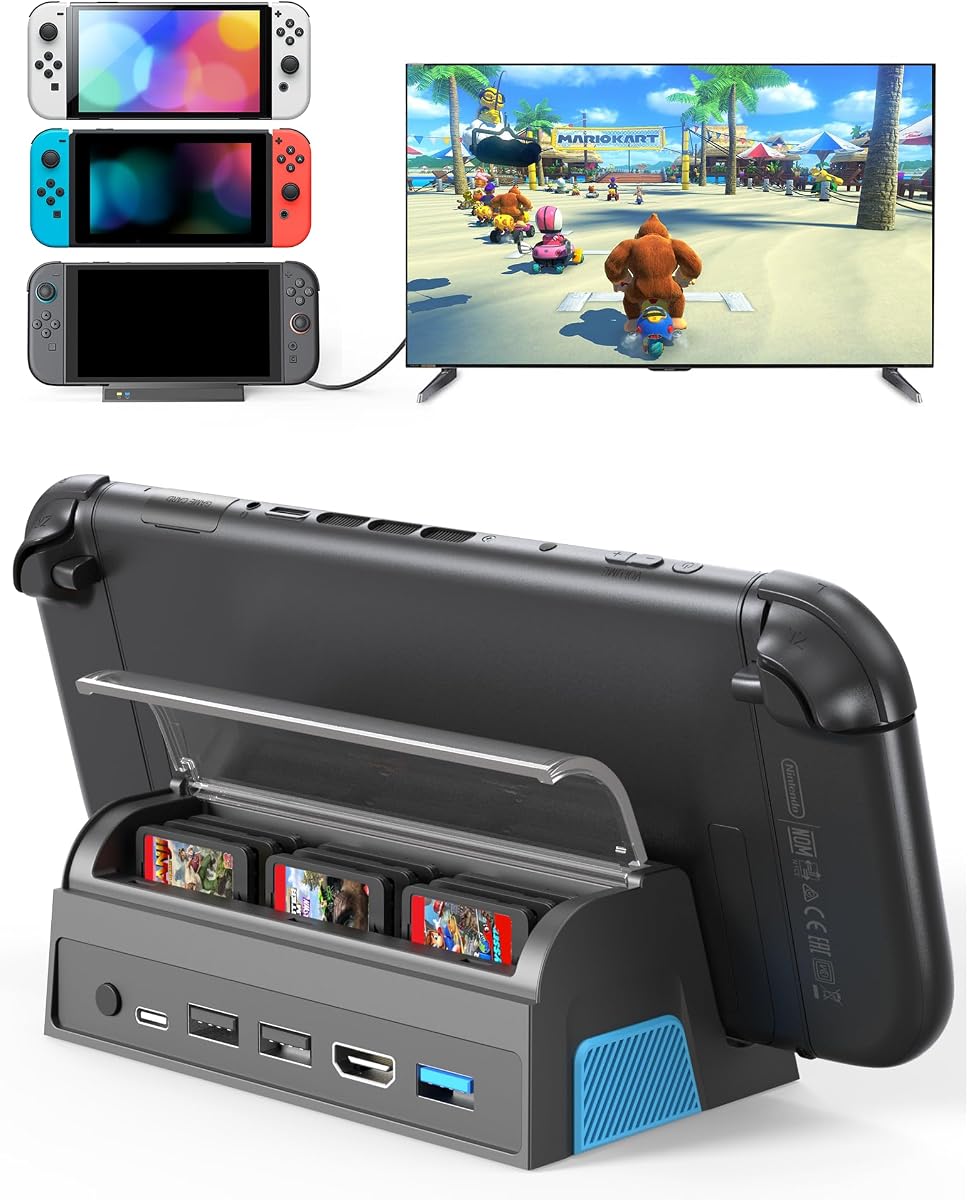
The QJYKIONE Nine-Slot Dock combines a 4.7 rating with a feature few conventional docks offer: protected storage for nine physical game cards. This makes it particularly attractive to owners who still play cartridge-based Nintendo games and want a single station for storage, charging, and TV output.
We may earn a commission when you buy through this link, at no additional cost to you.
Video output is advertised at 4K at 120Hz or 1080p, with the listing clarifying that Switch 2 itself supports up to 4K at 60Hz while Switch 1 and OLED systems remain limited to 1080p. Connectivity includes one USB 3.0 port, two USB 2.0 ports, a Type-C charging connection, HDMI, and a TV or tabletop mode button.
The dock weighs 149 grams and measures 4.9 by 2.8 by 1.8 inches, making it smaller and lighter than many original-style docks. A dust cover helps protect the nine game-card slots. However, it does not support protective console cases, and no cable or charger is included in the package.
This is a particularly good match for physical collectors and owners of multiple Switch systems who value storage as much as video output. It is less suitable for case-heavy players or anyone who expects a complete, ready-to-connect package.
The nine dedicated slots keep cartridges organized and reduce the chance of leaving them behind during travel. A dust cover adds protection for a station likely to sit near a display or entertainment unit.
Three USB-A ports provide more expansion than several travel docks, while USB 3.0 supports faster data transfers. Charging while playing and one-touch TV or tabletop switching round out the station's practical design.
We may earn a commission when you buy through this link, at no additional cost to you.
The Switch 2 Dock with Built-in 6FT HDMI Cable is the most convenient option for travel because it eliminates one of the accessories most often lost or left behind. It carries a 4.9 rating and combines that integrated cable with 120Hz-capable output, 100W Power Delivery, and broad compatibility.
We may earn a commission when you buy through this link, at no additional cost to you.
The fixed six-foot braided HDMI 2.1 cable connects directly to a television or monitor, while the aluminum housing is intended to improve heat dissipation without the bulk of a full-size plastic dock. Power Delivery pass-through supports up to 100W, allowing the connected device to remain charged during a long session when a suitable charger is connected.
The design is not as flexible as a dock with a detachable cable, because the six-foot length cannot be shortened. It also provides only one USB accessory port, so buyers with several wired accessories will need another solution. Supported devices include the Switch 2, Steam Deck, ROG Ally, Legion Go, laptops, and other compatible USB-C products.
Choose this model for hotel rooms, competitive events, dorms, and friends' homes where a TV is already present and minimizing separate cables matters most. It is also a strong general-purpose choice for a user who values a clean setup and wide compatibility over multiple USB sockets.
The permanent HDMI 2.1 cable is six feet long and uses a braided construction. Integrating it into the dock means the station can connect directly to a compatible display without a separate HDMI lead.
A lightweight aluminum body and 100W PD pass-through make the station practical for mobile use. Actual charging performance depends on the attached power source, device, cable connection, and workload.
We may earn a commission when you buy through this link, at no additional cost to you.
The Aluminum USB-C Travel Dock is one of the lightest full-featured options in the guide. With a 4.9 rating and a listed weight of 1.7 ounces, it targets travelers who want high-refresh HDMI output and charging without carrying the much larger original-style dock.
We may earn a commission when you buy through this link, at no additional cost to you.
Its HDMI 2.1 output supports up to 4K at 120Hz with HDR on compatible combinations, while the USB-C input accepts up to 100W. The aluminum housing is designed to dissipate heat and reduce buildup. Overcurrent, overvoltage, and overheating protection are included, and the dock can support a compatible controller, keyboard, or mouse through its USB accessory port.
Compatibility spans the Switch 2, original Switch, Switch OLED, Steam Deck variants, MSI Claw, ROG Ally family, and Legion Go variants. For Switch 2 television output, the console must use its bottom USB-C port because the top port cannot carry video. The single USB port is also modest for elaborate desktop accessories.
Choose this dock when every gram and every item in your bag matters but you still want 120Hz HDR, 100W pass-through, and broad handheld support. It is less suitable for a permanent multi-device desk where numerous USB-A connections and maximum station storage are priorities.
The 1.7-ounce aluminum enclosure is built for travel, yet the specification list includes HDMI 2.1 output up to 4K at 120Hz and HDR. Display capabilities still depend on the source device, game, and connected television or monitor.
The supported device list extends well beyond Nintendo hardware, covering major Windows handhelds and portable gaming systems. Using the console's correct USB-C port is essential for obtaining display output.
We may earn a commission when you buy through this link, at no additional cost to you.
The best third-party Switch 2 dock depends on how you play, where you use it, and which accessories you need. Display capability, charging standards, physical size, case fit, port count, and included accessories should be considered together rather than separately.
A dock may advertise 4K at 120Hz, but the Switch 2 itself is listed as supporting up to 4K at 60Hz. Original Switch and Switch OLED systems remain limited to 1080p, and individual games may offer different output modes. Your television, monitor, projector, and HDMI cable must also support the selected resolution and refresh rate. Choose the dock's supported modes according to the hardware you actually own rather than treating the largest advertised number as universal.
Charging while playing generally requires a compatible USB-C power source and a dock that supports power input or pass-through. Some products advertise up to 100W, but the console, charger, and negotiated power profile determine the actual result. Several listings explicitly exclude a wall charger, and one compact dock recommends a source above 39W for certain Nintendo systems. Check whether the package includes a power adapter, a cable, or neither before planning your setup.
A single HDMI and USB-C arrangement may be enough for a minimal travel setup, while permanent stations benefit from several USB-A ports for controllers, adapters, storage, keyboards, and other accessories. Pay attention to USB version and data-transfer speed rather than port count alone. The JSAUX extender, for example, is designed to work with the original dock and cannot serve as a fully independent hub.
Dock compatibility is closely tied to the console's physical dimensions and the geometry of the connection. The JSAUX extender is specifically designed for cases up to five centimeters thick, while the QJYKIONE and Piranha Dock Gen 2 explicitly warn against using thick protective cases. If you routinely use a grip, shell, or travel case, treat case clearance as a decisive factor rather than an afterthought.
Compact aluminum docks are easy to carry and can dissipate heat effectively, but a smaller housing offers fewer ports and may still warm during sustained use. The Piranha Dock Gen 2 adds a fan for active cooling, while the JSAUX extender uses an open stand for passive airflow. Consider the size of your travel space, the length of typical sessions, and whether fan noise or moving parts would bother you.
Some docks include a permanent HDMI cable, while others include nothing beyond the station or only a basic charging cable. A built-in HDMI lead is convenient for travel, but a detachable cable offers more placement flexibility at home. Integrated storage for game cards, controller-charging rails, RGB lighting, and physical mode buttons can also reduce the need for separate accessories. Decide which conveniences will genuinely be used before paying for additional features.
Some docks are Switch 2 specialists, while others support original Switch systems, Switch OLED, Steam Deck, ROG Ally, Legion Go, MSI Claw, and other USB-C devices. Wider compatibility is useful for a shared household but does not guarantee identical features on every platform. Verify the required video-output port, external-power rules, desktop-mode behavior, and whether the device supports DisplayPort Alt Mode.
Begin by identifying the correct console video-output port. On the Switch 2, use the bottom USB-C port for TV output because the top port does not support video. Connect the dock to the display, attach a compatible power source to its charging input, and ensure every cable is seated firmly before docking the console.
After connecting the console, use the dock's mode control or the console's TV output option when needed. For displays that support high refresh rates, enable the appropriate video mode on both the console and television. If the picture is missing, reconnect the power source first and check that the game supports the selected display mode and resolution.
For long sessions, keep the dock and console vents unobstructed and use the included or recommended ventilation design. Remove incompatible thick cases, avoid placing fabric or paper over the housing, and inspect connectors for dust. Unplug the power when changing cables or cleaning the station, and use a soft dry cloth rather than liquid cleaners.
No. A dock may support a maximum of 4K at 120Hz, but the connected console, game, display, and cable can impose lower limits. The supplied product information states that Switch 2 supports up to 4K at 60Hz, while original Switch and Switch OLED models support up to 1080p. Individual games may not support 4K output either.
Most of the TV docks in this guide advertise charging while playing. You still need a suitable USB-C charger and a power connection to the dock, and some products do not include an adapter. The actual charging rate depends on the dock, power source, console, and negotiated power profile, so check each listing's requirements.
The JSAUX Dock Extender is the clearest case-focused option because it is designed to support protective cases up to five centimeters thick. It works as an extender for the original dock rather than as a complete standalone dock. Other selected products explicitly require thick cases to be removed before docking.
A built-in cable can make packing simpler because one fewer loose HDMI lead is needed. The Switch 2 Dock with Built-in 6FT HDMI Cable offers this approach and can connect directly to a display. The tradeoff is reduced placement flexibility because the six-foot cable cannot be shortened or replaced with a different length.
Some models support the original Switch, Switch OLED, Steam Deck, ROG Ally, Legion Go, MSI Claw, and other compatible USB-C devices. Compatibility does not mean every port or display mode works identically across those systems. Confirm DisplayPort Alt Mode, the correct video-output port, power requirements, and desktop-mode behavior before relying on cross-device use.
It depends on the model. Most products are standalone alternatives, but the JSAUX Dock Extender is designed to extend a connection to the original dock. If you want a single self-contained accessory for travel, choose a standalone dock; if case compatibility is your priority and you already own the original dock, an extender may be more appropriate.
They can be useful for long sessions because the Piranha Dock Gen 2 includes a fan intended to reduce heat buildup. They are not required for every player, and the JSAUX extender instead offers passive airflow through an open design. Whichever design you choose, blocked vents and poor room airflow can still cause heat buildup.
Most buyers need a compatible HDMI cable and a USB-C power adapter unless those items are integrated or included. Some listings include a charging cable but no wall adapter, while others include neither. The built-in-cable model reduces HDMI packing needs, and the QJYKIONE station stores nine physical game cards but still requires separate display and power accessories.
The Built-In Cable Travel Dock is the most convenient all-around recommendation because it combines 4.9 rating, 120Hz-capable HDMI, 100W pass-through, broad device support, and a permanent six-foot HDMI cable. The dedicated Switch 2 TV Dock Station suits a permanent desktop, while the AHGEIIY Compact TV Dock is a lightweight value option for occasional travel.
Prioritize the features your setup actually needs. Thick-case users should focus on the JSAUX extender, physical collectors may favor the QJYKIONE nine-slot station, and long-session owners may appreciate the Piranha Dock Gen 2's active fan. Dedicated desktop users may prefer more stable placement, while travelers generally benefit from a small aluminum body and few loose accessories.
Before purchasing, confirm output limits, case fit, power requirements, port availability, and whether necessary cables are included. Ratings, product availability, and prices can change, so review the current listing and accessory details before making a final choice.