SABRENT 6-Port USB-C Dock
4.0Editor score
4K at 60Hz
95W pass-through charging
Three USB-A ports
Portable hub design
Explore the best ASUS ROG Ally Dock options, comparing video output, charging, Ethernet, USB ports, cooling, compatibility, and features.
An ASUS ROG Ally Dock can transform a handheld gaming PC into a more practical desktop or living-room system. The best models add external display support, wired networking, faster USB connections, convenient charging, and a stable place to rest the device while peripherals are attached.
This guide compares ten docks using the specifications and compatibility details supplied for each product. It covers HDMI resolution and refresh rate, power delivery, Ethernet performance, USB configuration, cooling, physical design, device support, and practical features that separate a basic hub from a full desktop station.
Each review identifies the configuration that best suits a particular setup, from compact travel-friendly options to elaborate hubs with cooling fans and extensive ports. Customer ratings are included for reference, but features and limitations determine the recommendations. Availability and pricing can change, so confirm current details before buying.
4.0Editor score
4.3Editor score

4.4Editor score
The comparison below highlights each dock's display capabilities, charging power, network connection, port selection, and physical design, making it easier to identify the right option for an ROG Ally setup.

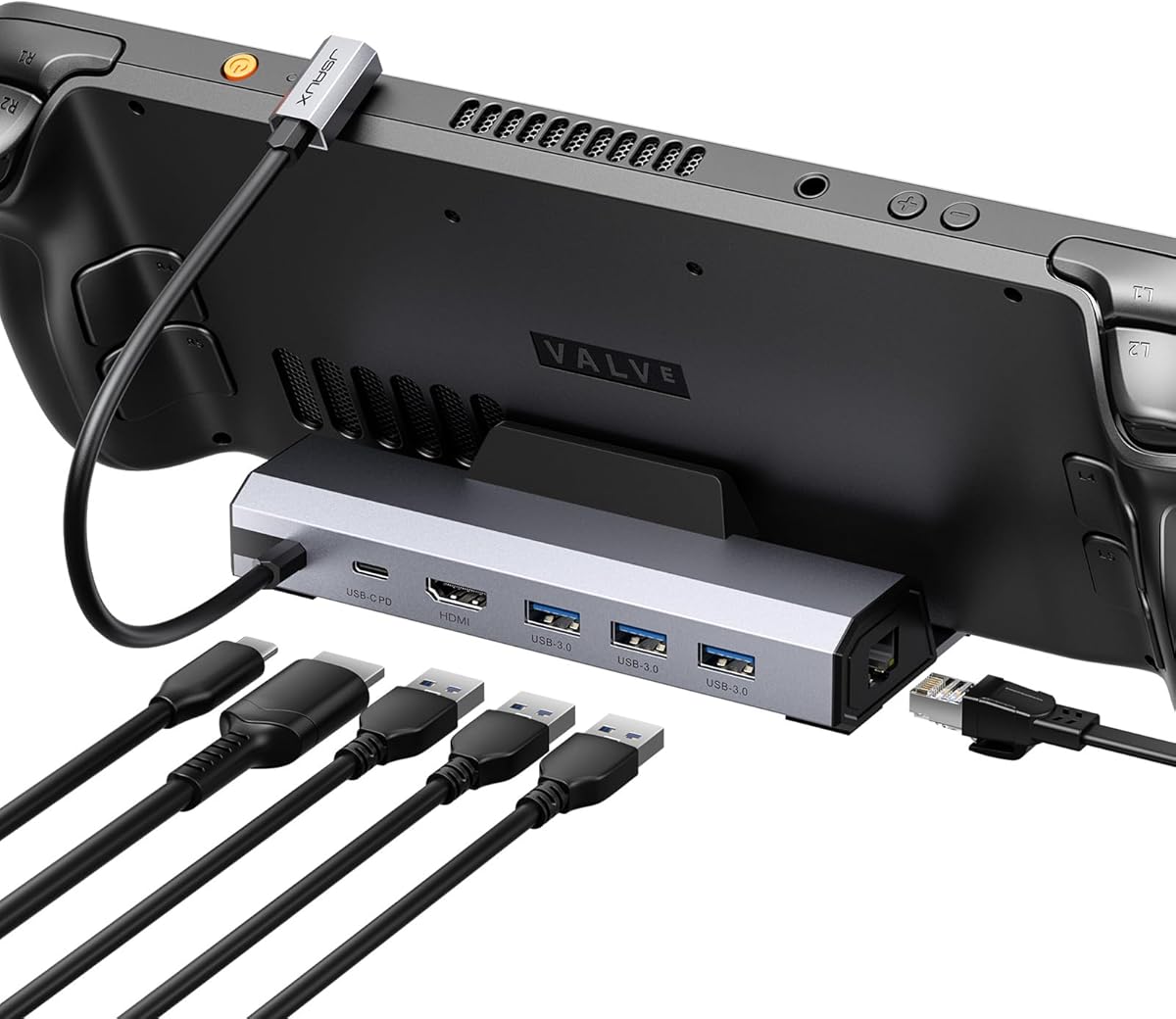
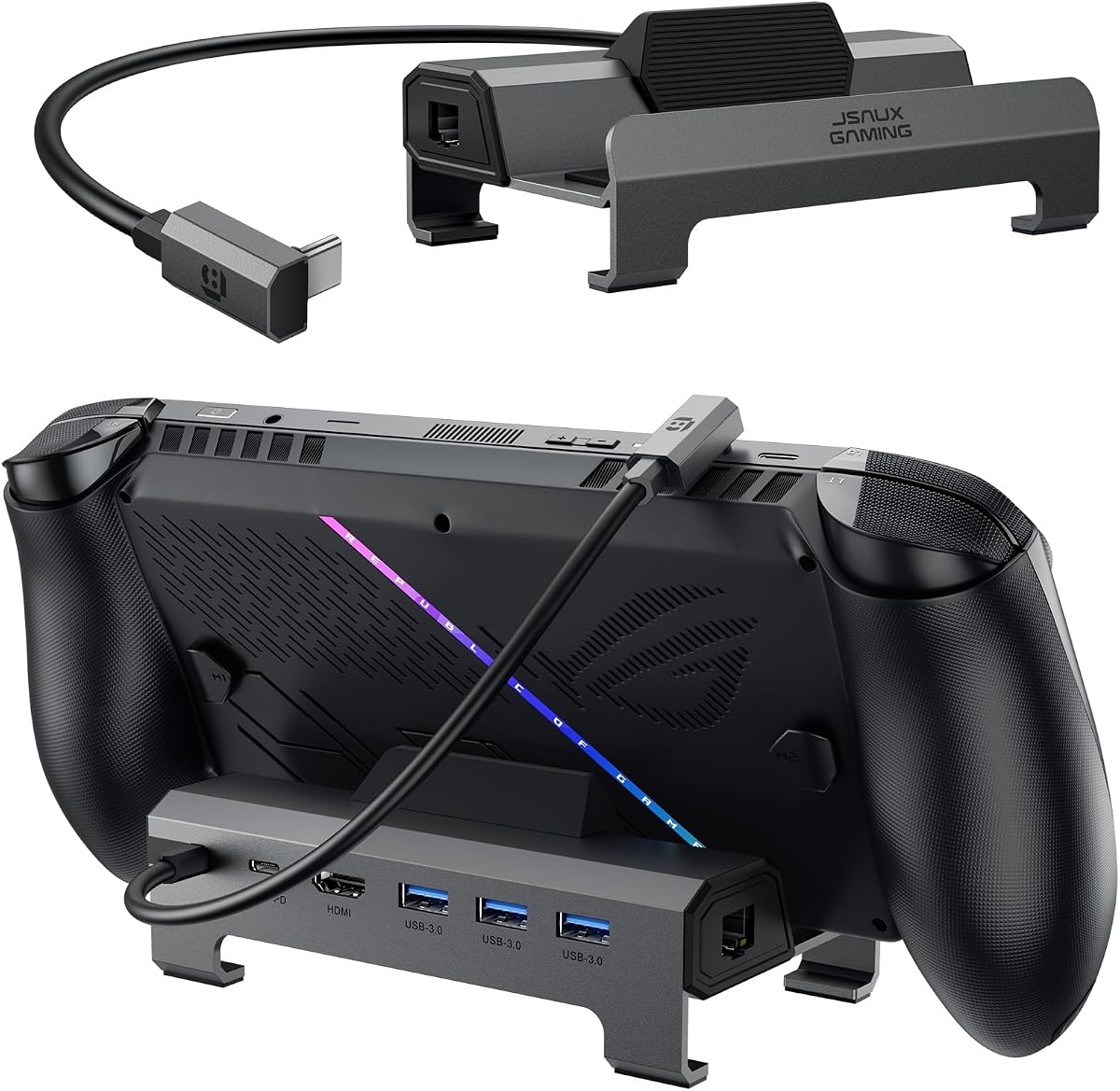

The JSAUX HB0609 is a six-port docking station built for handheld gaming PCs, with particular emphasis on current and previous-generation ROG Ally models. It carries a 4.3 customer rating and stands out for combining 4K at 120Hz output, Gigabit Ethernet, 100W charging, and broad support across popular Windows and SteamOS handhelds. Its modular physical design also makes it more than a basic collection of ports.
We may earn a commission when you buy through this link, at no additional cost to you.
Video output is handled through an HDMI connection that supports up to 4K at 120Hz, while the listed specifications also allow 1080p at 240Hz. That makes it appealing for owners of high-refresh monitors, although the external display must support the selected resolution and refresh rate. The dock includes Gigabit Ethernet for a stable wired connection and three 5Gbps USB-A ports alongside a 5Gbps USB-C data port, providing room for a keyboard, mouse, controller, or storage device.
The main technical limitation is explicit: the HB0609 does not support VRR or ALLM. Users who require those television or monitor features are directed toward the differently named JSAUX HB0705 model. Power is another consideration because the dock itself draws some current from the connected device. A 100W USB-C PD charger is recommended for the best charging experience, particularly when the ROG Xbox Ally or ROG Xbox Ally X is attached.
This dock is a strong recommendation for someone who wants broad compatibility, a high-refresh external display, and a physical base without paying for a complex cooling system. Its detachable base can function as a stand, while the silicone pad improves stability. The lack of VRR and ALLM prevents it from being ideal for every enthusiast display setup, but it remains a versatile choice for a broad range of ROG Ally owners.
Compatibility is a major strength because the HB0609 supports the ROG Xbox Ally and ROG Xbox Ally X released in 2025 as well as the ROG Ally and ROG Ally X. It also supports Steam Deck LCD and OLED models, Legion Go and Legion Go S, and several other USB-C handhelds, making it easier to keep one dock across multiple devices.
The removable front cover accepts a custom card measuring 3.00 by 1.13 inches and 0.01 inches thick. Custom cards are not included, but the feature adds a personal detail to a dock that can otherwise look like standard desktop hardware.
We may earn a commission when you buy through this link, at no additional cost to you.
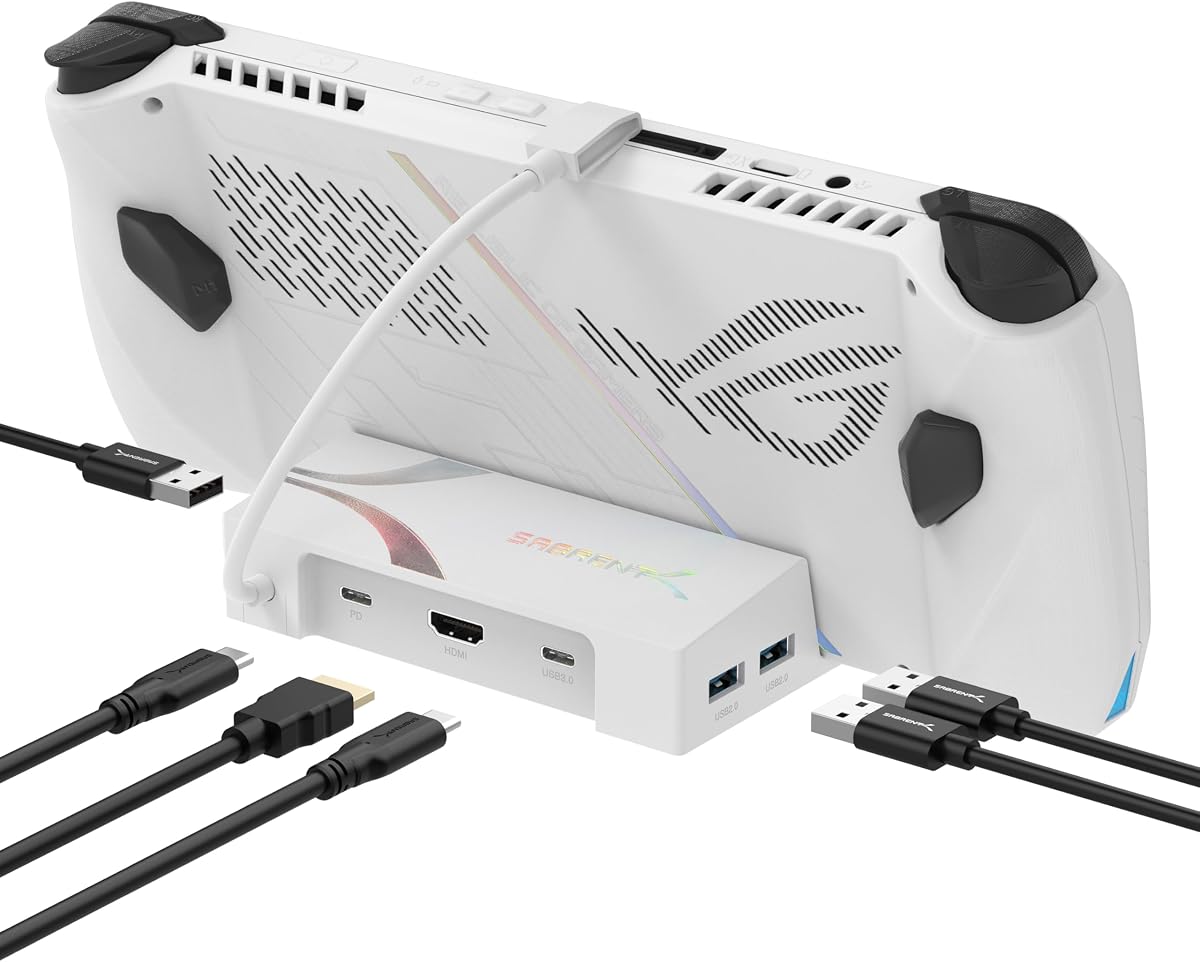
The SABRENT DS-RA6P is a compact six-port USB-C hub designed to make a handheld more practical without adding a large desktop dock. Its 4.0 rating reflects a straightforward approach: one HDMI output, Gigabit Ethernet, three 5Gbps USB-A ports, one 5Gbps downstream USB-C port, and USB-C power input. It supports the ROG Ally, ROG Ally X, ROG Xbox Ally, Steam Deck, and Legion Go.
We may earn a commission when you buy through this link, at no additional cost to you.
The HDMI 2.0 output supports 4K at 60Hz with HDCP 1.4 and 2.2 support. That resolution is suitable for many television and monitor setups, although it is less ambitious than the 120Hz and 144Hz options found elsewhere in this guide. The wired Ethernet connection and four 5Gbps data ports allow simultaneous use of common desktop accessories such as a keyboard, mouse, external drive, and controller.
Power delivery is handled through a 95W PD 3.0 pass-through function. A charger is not included, so users are expected to supply the adapter associated with their handheld or another suitable USB-C charger. A lower-wattage adapter may charge the device more slowly and may struggle to maintain the charge rate during demanding use.
The biggest trade-off is physical. This product is a hub, not a charging stand, so it does not cradle or hold the console upright. It can still be used with a separate stand or simply placed on a desk. For buyers seeking an inexpensive way to add display, network, and USB connectivity, the DS-RA6P is one of the most practical choices in the group.
The DS-RA6P avoids a bulky docking base and connects by USB-C, making it convenient for travel or temporary workstations. Its small footprint is valuable when the goal is simply to add peripherals and an external display rather than create a permanent gaming station.
Video output requires a USB-C connection with DisplayPort Alternate Mode. The supplied information specifically notes that video will not work when that feature is absent, so compatibility should be confirmed before purchase.
We may earn a commission when you buy through this link, at no additional cost to you.
The JSAUX HB0603 is a six-in-one dock rated at 4.3 stars. It combines an HDMI 2.1 connection capable of 4K at 120Hz, 100W USB-C power delivery, three 5Gbps USB-A ports, and Gigabit Ethernet. The specification mix is especially attractive for owners of the original ROG Ally and Ally X who want a direct desktop upgrade.
We may earn a commission when you buy through this link, at no additional cost to you.
Compared with a basic 4K at 60Hz hub, the HB0603 provides twice the listed maximum refresh rate and is designed to reduce tearing when the connected game and external display support the feature. Its three USB-A ports are sufficient for many essential desktop accessories, while the Ethernet port offers a more consistent connection than relying exclusively on a handheld's wireless network.
Its charging specification supports the ROG Ally's 30W Turbo Mode and recommends a 100W charger for the most consistent results. One important compatibility restriction is that this model is not designed for the ROG Xbox Ally or ROG Xbox Ally X. It does support Steam Deck LCD and OLED, the ROG Ally and Ally X, Legion Go and Go S, and MSI Claw handhelds.
The HB0603 is best for a user who values high-refresh video and full-speed charging but does not need active cooling, extensive card readers, or an abundance of slower USB ports. Its focused six-port design avoids the complexity of larger docks and is a sensible way to turn a compatible handheld into a streamlined gaming station.
The 4K at 120Hz capability gives this dock a clear advantage over the common 4K at 60Hz standard. It is particularly relevant for competitive shooters, racing games, and other titles where smooth motion and low perceived input lag are priorities.
The port selection is intentionally concise: display output, wired networking, three USB-A connections, and USB-C power. Owners who only need a keyboard, mouse, controller, Ethernet, and an external display can connect the essential equipment without navigating a much larger hub.
We may earn a commission when you buy through this link, at no additional cost to you.
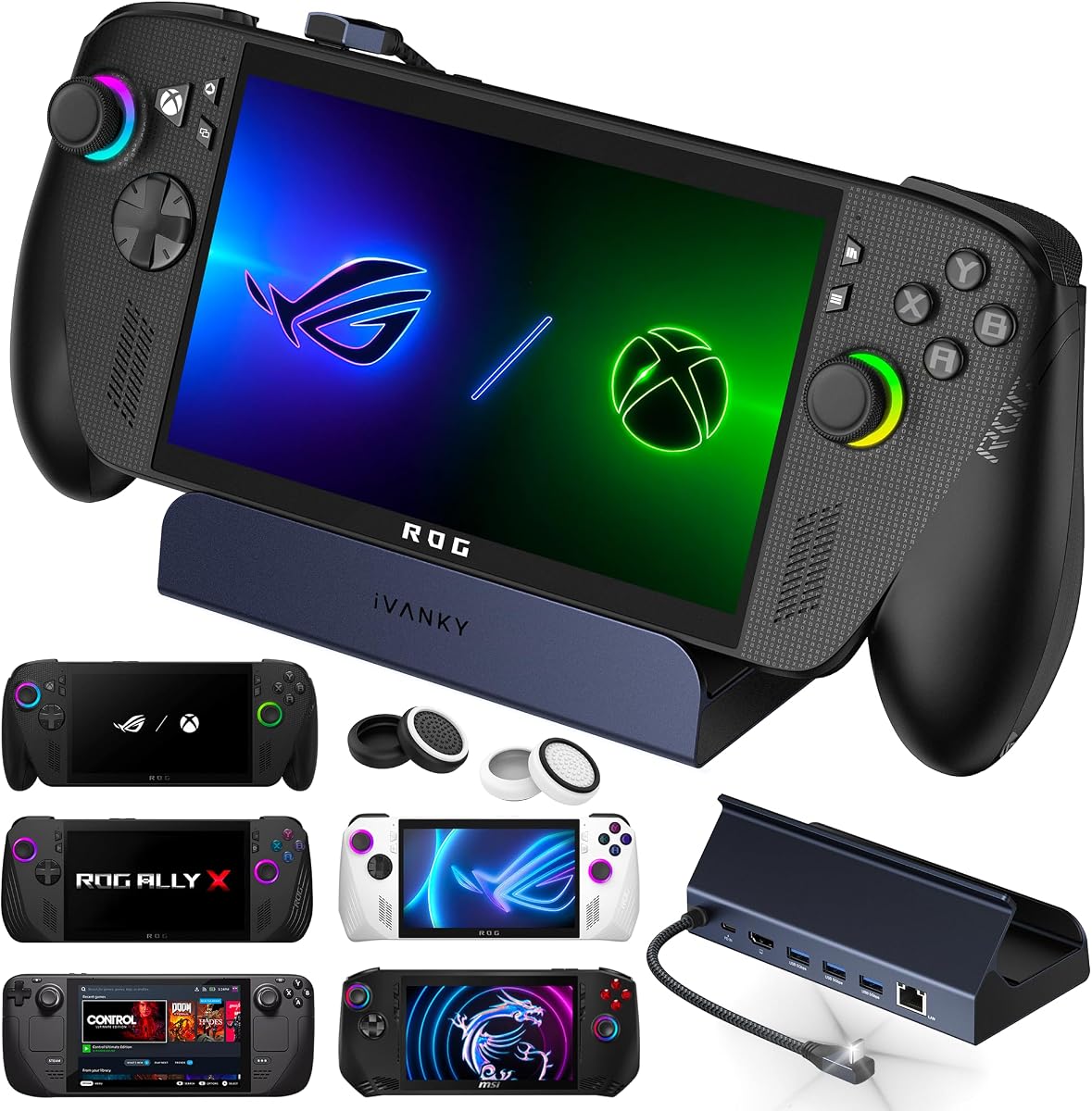
The iVANKY 8-in-1 is the strongest high-refresh option in this guide, with a customer rating of 4.4 and a listed HDMI 2.1 output of 4K at 144Hz. It is designed around the ROG Xbox Ally X, ROG Xbox Ally, ROG Ally, and ROG Ally X, with particular attention to the 30W Turbo Mode found in compatible ROG systems.
We may earn a commission when you buy through this link, at no additional cost to you.
The dock includes Gigabit Ethernet, three 5Gbps USB-A ports, a fast-charge USB-C port, and the central USB-C connection to the handheld. Those specifications make it well suited to a desktop arrangement involving wired networking, a keyboard, a mouse, and an additional controller or storage device. The included joystick caps are a small but thoughtful accessory for protecting control sticks from wear.
Maximum ROG performance depends on the device's firmware. The supplied information states that Turbo Mode is unlocked when the console BIOS is updated to version 323 or later, so users should check the current system version and update it if necessary. Power delivery reaches 100W, with listed figures of 65W for ROG Ally and 45W for Steam Deck.
This is the recommendation for an enthusiast who owns a compatible high-refresh display and wants the highest listed refresh rate available in the group. The 144Hz specification is more future-facing than 60Hz or 120Hz, while the included Ethernet and USB connections cover a conventional gaming setup. The warranty is listed at 24 months with free replacement service.
The 4K at 144Hz output is the defining feature. It is particularly valuable when the external monitor supports that mode and the game is optimized for high frame rates, allowing the dock to avoid being the limiting factor in the display chain.
The product information links Turbo Mode support to BIOS version 323 or later. Updating the handheld's firmware before the first dock connection is a simple way to ensure the intended performance configuration is available.
We may earn a commission when you buy through this link, at no additional cost to you.
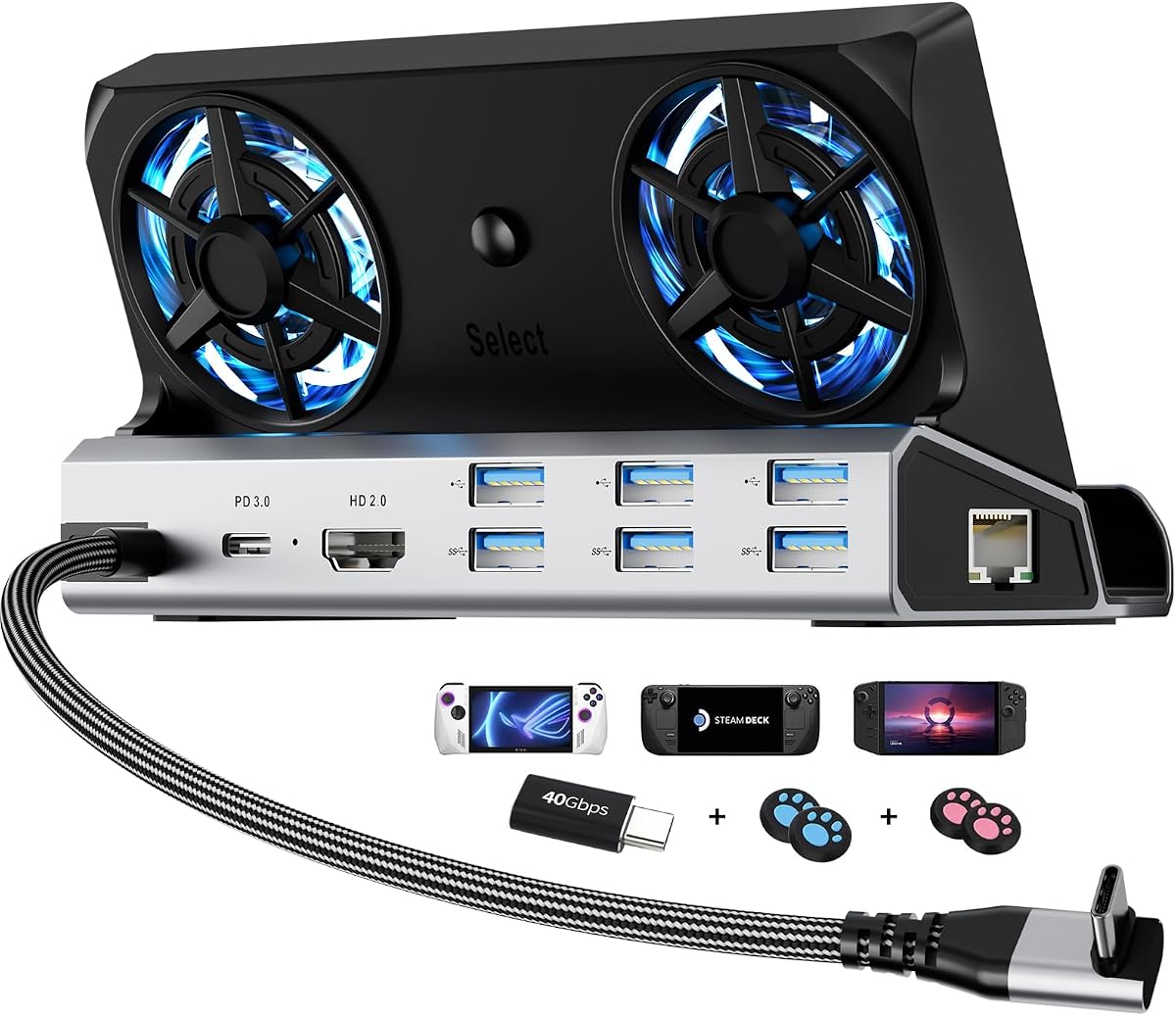
The YCE 12-in-1 is a full desktop-style dock with a 4.2 rating and a feature set aimed at owners who want more than basic handheld connectivity. It combines 4K at 60Hz HDMI output, Gigabit Ethernet, three 5Gbps USB-A ports, three USB 2.0 ports, 100W charging, and a data-focused USB-C connection.
We may earn a commission when you buy through this link, at no additional cost to you.
Its most distinctive feature is the pair of 5cm RGB cooling fans, which are considerably larger than the 2cm alternatives often found in compact handheld docks. A rear power switch turns off both the fans and lighting when they are not needed. The open fan area is designed to improve airflow around the handheld and reduce the potential for thermal throttling during extended sessions.
The dock accepts handhelds up to 27mm thick in its dedicated slot, covering Steam Deck LCD and OLED, Switch models, ROG Ally and Ally X, Legion Go variants, and MSI Claw. Laptops, tablets, and Android devices can use the included USB-C cable without using the slot. Nintendo's own restrictions on USB data use when the console is docked are also noted.
The YCE is a good choice for a permanent station where cooling, charging, networking, and multiple peripherals matter more than high-refresh external gaming. Its 4K at 60Hz output is the main compromise, particularly beside the 120Hz and 144Hz alternatives. The included silicone joystick caps and sacrificial USB-C extender add everyday protection for a setup designed for frequent docking.
The twin larger fans provide a meaningful reason to choose this model over a plain hub. They can maintain airflow while the handheld is operating in a docked desktop arrangement, and the rear switch allows owners to turn the system off when cooling is unnecessary.
Four silicone joystick caps improve grip and help shield the controls from dust and wear. The included Type-C extender provides a sacrificial connection point, reducing repeated plugging and unplugging at the handheld's native port.
We may earn a commission when you buy through this link, at no additional cost to you.
The iVANKY 14-in-1 RGB Dock combines a 4.4 rating with a broad port assortment and polished desktop presentation. It supports 4K at 120Hz through HDMI 2.1, includes Gigabit Ethernet, offers two 10Gbps USB-A ports, adds two 5Gbps USB-A ports, and includes a rapid-charging USB-C connection.
We may earn a commission when you buy through this link, at no additional cost to you.
The dock also expands the setup with a 3.5mm audio jack, TF card slot, and SD card slot. Its listed device support includes Steam Deck OLED, ROG Ally X, ROG Xbox Ally X released in 2025, and Lenovo Legion Go. Two joystick caps are included for protection. Seven RGB lighting modes allow the dock to fit into a coordinated gaming setup rather than remain a purely utilitarian accessory.
The dual-foldable stand is designed to keep the rear panel from blocking the console's cooling vents, improving heat dissipation compared with a one-piece upright cradle. Power delivery reaches 100W, although the maximum charging rate of the connected handheld remains the limiting factor. The listed figures are 45W for Steam Deck, 65W for ROG Ally, and 85W for Legion Go.
This premium model makes the most sense for users who need a wide selection of connections, high-refresh output, fast USB devices, memory-card access, and a polished RGB aesthetic. The dock firmware should be updated according to the supplied guide because that helps avoid HDMI mirroring issues and supports the intended extended-display experience.
Two 10Gbps USB-A ports offer a useful step up for external storage and other high-bandwidth devices, while two additional 5Gbps USB-A connections cover conventional peripherals. That mix reduces the need to keep a slow port occupied by storage when faster devices are available.
The foldable rear section can be adjusted to leave ventilation paths open. This is especially relevant for ROG Ally-family devices because a dock that holds the console rigidly over its intake or exhaust vents can undermine the benefit of a more active setup.
We may earn a commission when you buy through this link, at no additional cost to you.
The JSAUX HB0612 has the highest customer rating among the products compared, at 4.7 stars. Its defining feature is a widened and raised base designed to accommodate handhelds with protruding grips. That makes it a particularly thoughtful option for the ROG Xbox Ally and ROG Xbox Ally X as well as several other large Windows and SteamOS devices.
We may earn a commission when you buy through this link, at no additional cost to you.
Video output reaches 4K at 120Hz through HDMI 2.1. The dock also provides Gigabit Ethernet, three 5Gbps USB-A ports, and USB-C power delivery up to 100W. It supports ROG Ally, ROG Ally X, ROG Xbox Ally, ROG Xbox Ally X, Steam Deck LCD and OLED, Legion Go, Legion Go 2, Legion Go S, Acer Predator Atlas 8, MSI Claw, and OneXPlayer.
The raised base is a practical distinction rather than a decorative detail. Some handhelds have controls, grips, or uneven shells that make them less stable in a conventional cradle. This dock's broader platform should create a more secure connection and allow the attached peripherals to be used without constantly repositioning the console.
For current ROG Ally owners, the HB0612 is a balanced recommendation because it combines high-refresh output, modern-device compatibility, wired networking, and dependable charging without the complexity of numerous slower ports or built-in fans. For the best results, the supplied information recommends pairing it with a 100W charger.
The widened and raised base reflects the growing variety of handheld shapes, including units with larger grips and offset controls. That attention to physical fit sets the HB0612 apart from docks designed only around compact, nearly rectangular Steam Deck layouts.
A 120Hz display, 100W charging, Gigabit Ethernet, and three fast USB-A ports cover the principal needs of a desktop gaming setup. The dock stays focused, making it easier to understand and use than a hub with a much larger collection of specialized connectors.
We may earn a commission when you buy through this link, at no additional cost to you.
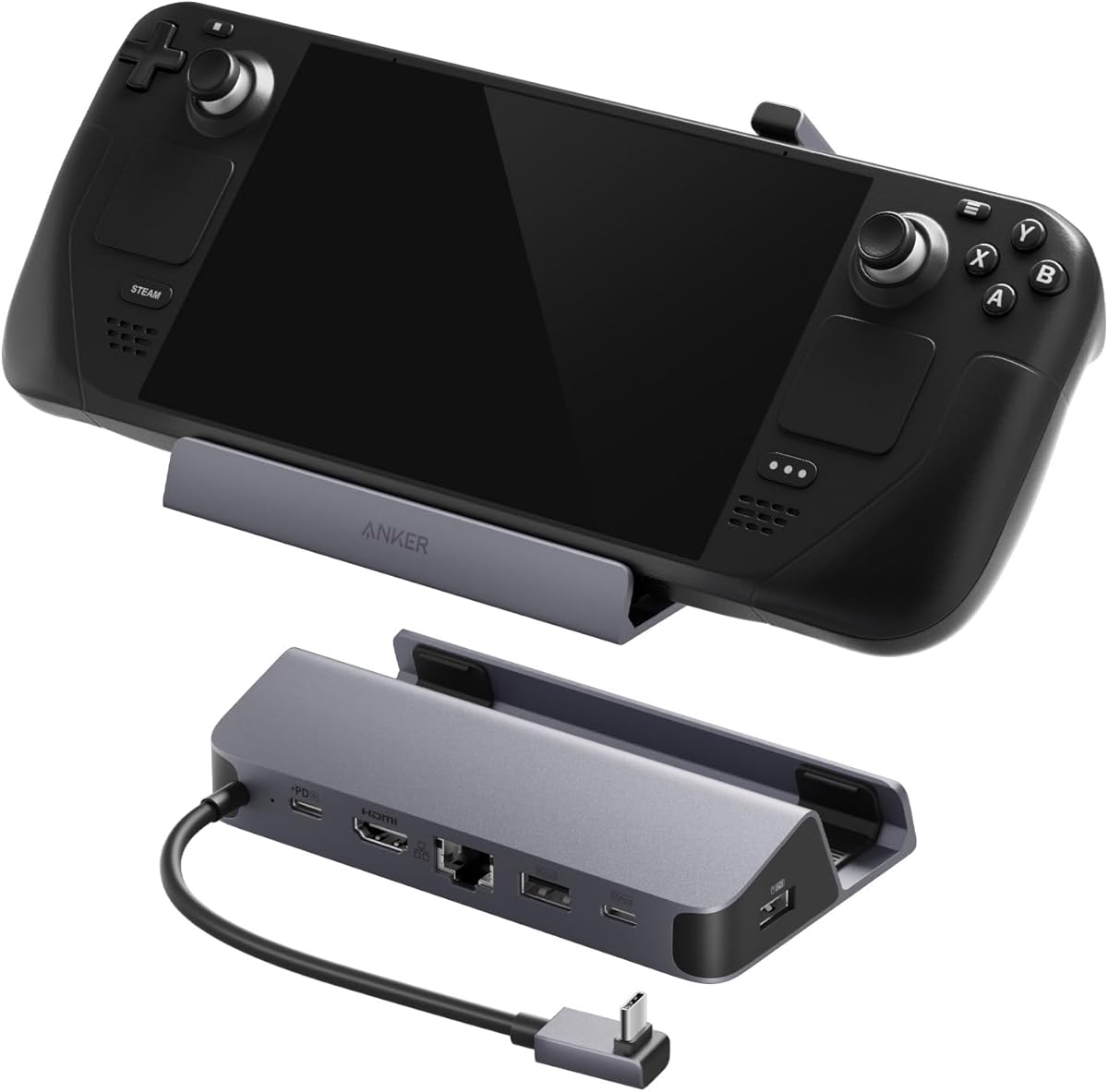
The Anker 6-in-1 is a straightforward dock built around a 100W USB-C power input, one 4K HDMI output, 1Gbps Ethernet, two 5Gbps USB-A ports, and one 5Gbps USB-C data port. It has a 4.4 customer rating and includes an 8.66-inch, or 220mm, built-in USB-C cable.
We may earn a commission when you buy through this link, at no additional cost to you.
Its clean layout makes it suitable for a straightforward gaming desk. The HDMI port supports 4K at 60Hz, while the Ethernet connection provides stable wired networking. Two USB-A ports can accommodate a keyboard and mouse, and the additional USB-C data connection supports another controller, storage device, or compatible accessory.
The built-in cable is convenient because it reduces the number of loose connections and extends the distance between the dock and handheld. It also avoids requiring a separate short USB-C lead for basic operation. The 100W input offers ample power for contemporary handhelds, subject to the charging limits of the connected device.
Two limitations deserve attention. The display output tops out at 4K at 60Hz rather than the 120Hz available from several competing docks, and the USB-C data port cannot be used for screen mirroring. The Anker is therefore most appropriate for users who value simple construction, a reliable port layout, and fast wired networking more than high-refresh gaming or a broad connector assortment.
The integrated 220mm cable provides enough slack for a comfortable desktop arrangement while eliminating one loose accessory. It is a small design decision, but it can make a compact dock noticeably easier to organize.
The USB-C port is useful for 5Gbps peripherals and data transfers, but it does not support display mirroring. Users should rely on the dedicated HDMI connection for the external screen.
We may earn a commission when you buy through this link, at no additional cost to you.
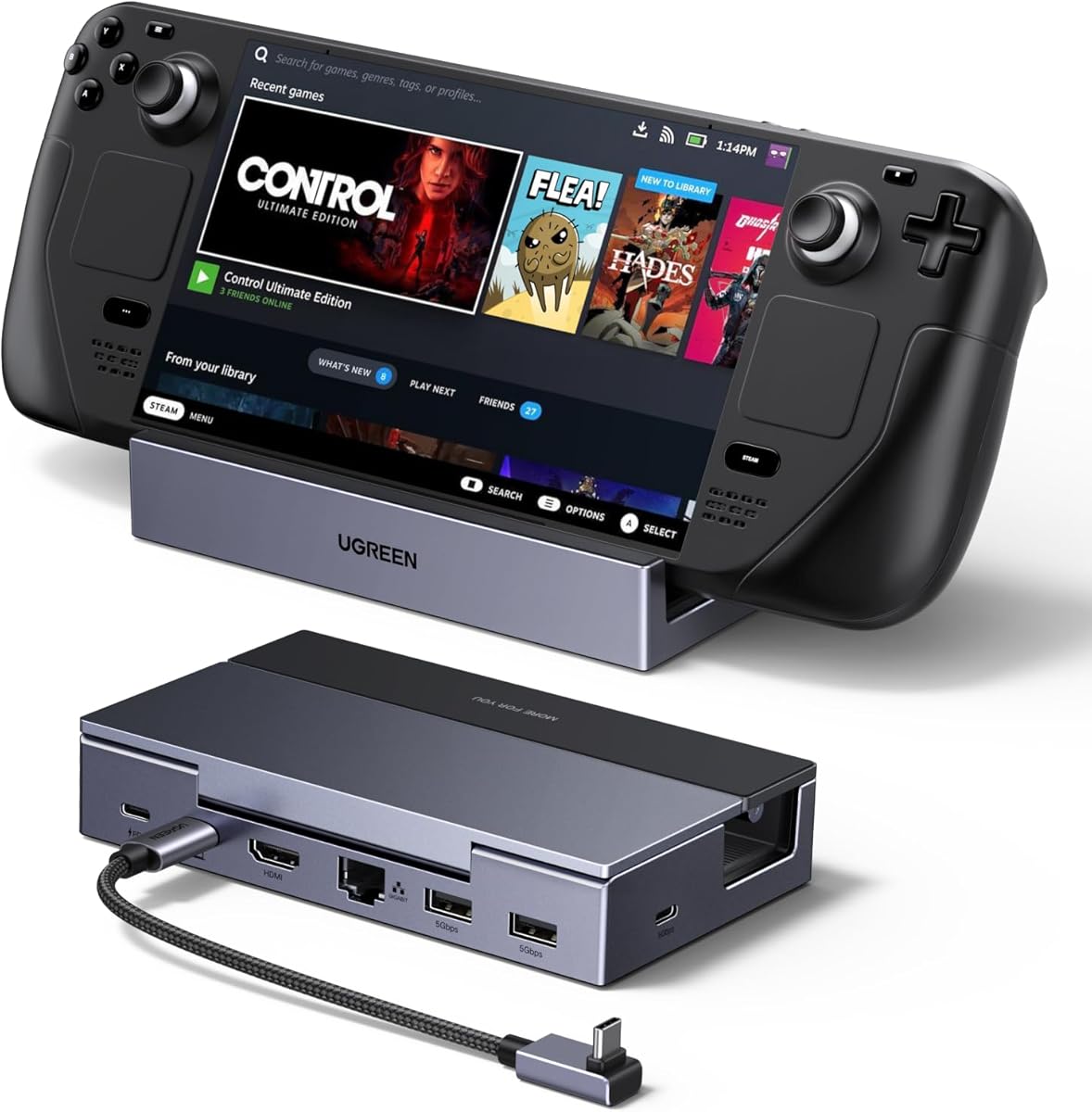
The UGREEN 6-in-1 is a compact, modern dock rated at 4.3 stars. It combines HDMI 2.1 output up to 4K at 120Hz, 100W USB-C power delivery, Gigabit Ethernet, two 5Gbps USB-A ports, and one 5Gbps USB-C data port. A foldable stand made from aluminum alloy and PC/ABS gives the ROG Ally a stable desktop position.
We may earn a commission when you buy through this link, at no additional cost to you.
One of its strongest distinctions is support for VRR, FreeSync, and G-Sync on compatible displays. Adaptive synchronization can reduce screen tearing and maintain a more consistent frame presentation when the game, handheld, dock, and monitor all support the chosen feature. This makes the UGREEN especially attractive to owners of high-refresh gaming monitors.
The dock is broadly compatible with Steam Deck, ROG Ally, ROG Xbox Ally, ROG Xbox Ally X, Legion Go, laptops, PCs, Macs, and phones. It works across Windows, macOS, Linux, and SteamOS without requiring drivers. The listed host-device charging maximum is 85W, while the 100W source also powers the dock, and built-in protection covers voltage spikes, electrostatic discharge, and overcurrent.
Its compromise is the number of conventional USB-A connections. Two ports may be enough for a keyboard and mouse but leave fewer openings for a controller, external storage, or a USB receiver. The Nintendo Switch 2 is explicitly unsupported. For a ROG Ally owner seeking a refined, compact dock with high-refresh and VRR support, however, this is an especially balanced recommendation.
Support for VRR, FreeSync, and G-Sync is the defining benefit for owners of compatible gaming monitors. It helps align the display refresh with the rendered frame rate, reducing tearing and producing a more stable picture during fast motion.
The folding stand collapses to reduce desk and travel space. Its mixed aluminum-alloy and PC/ABS construction aims to provide a rigid support without turning the dock into a large permanent fixture.
We may earn a commission when you buy through this link, at no additional cost to you.
The YCE 14-in-1 is the most elaborate dock in the guide, with a 4.0 rating and a broad collection of ports and accessories. Although the marketing name describes 14 functions, the supplied information explains that it transforms the handheld's USB-C connection into nine physical ports with multiple included accessories.
We may earn a commission when you buy through this link, at no additional cost to you.
Its standout feature is an M.2 NVMe expansion slot, which can add removable solid-state storage to compatible devices. Other connections include 4K at 60Hz HDMI 2.0, Gigabit Ethernet, one 5Gbps USB 3.0 port, three USB 2.0 ports, USB-C PD 3.0 charging, and an SD/TF card reader. A control button changes the screen or display configuration.
Cooling is handled through removable fans with three speed settings. Their colored lighting extends into the bottom of the dock, while removing the fans allows the owner to disable active cooling when it is unnecessary. The package also includes a 40Gbps USB-C adapter, four caps, an HDMI cable, and related connection accessories.
This dock is best for a user who wants a permanent workstation with extensive storage and connectivity rather than a simple gaming upgrade. Its 4K at 60Hz video output and larger physical design place it behind more specialized docks for high-refresh play. The compensation comes from NVMe expansion, numerous accessories, and broad compatibility with Steam Deck, ROG Ally, Legion Go, Switch, and other USB-C devices.
The M.2 NVMe slot is unusual among handheld docks because it adds a practical storage function rather than another basic peripheral port. Compatible users can expand available game and file storage, subject to the device's own support and the chosen drive's requirements.
The removable fan module includes three speed settings and integrated lighting. Users can select an appropriate airflow level during demanding play or remove the module when the dock is used for lighter tasks in a cooler environment.
We may earn a commission when you buy through this link, at no additional cost to you.
The right ROG Ally dock depends on the display, accessories, and physical setup. External video quality, power delivery, wired networking, port availability, cooling, and compatibility should be evaluated together rather than by one headline specification.
HDMI version alone does not determine the experience. The ROG Ally and compatible handhelds also need a monitor or television that accepts the dock's resolution, refresh rate, and synchronization features. The options here range from 4K at 60Hz to 4K at 120Hz and 4K at 144Hz. Higher refresh rates can make motion appear smoother, but they also place greater demands on the display, game, and graphics output chain.
Choose 4K at 60Hz for a conventional television or budget desktop display. Consider 120Hz for a modern gaming monitor, and prioritize the 144Hz iVANKY model when the monitor supports that rate and the user wants the highest listed ceiling. VRR support is also worth checking, particularly for competitive games and fast camera movement.
A dock should support enough power to charge the connected handheld while it is running, particularly when Turbo Mode raises system demand. Most products in this guide offer USB-C PD charging around 95W to 100W, although the handheld's own maximum input remains the practical limit. The ROG Ally is listed at 65W, Steam Deck at 45W, and Legion Go at 85W in relevant product details.
Look for a 100W-capable power supply when using a high-performance mode. A lower-wattage adapter may charge more slowly, trigger a low-power message, or fail to keep pace with power draw. Charger inclusion also varies, so verify whether a suitable USB-C PD adapter is already available.
Gigabit Ethernet is standard across the listed docks and is one of the most meaningful additions for an ROG Ally. It can provide lower and more consistent latency than Wi-Fi during online games, downloads, remote play, and large file transfers. The port also removes wireless-network settings from the equation when consistency matters.
For a gaming desk, wired networking should be a priority even if most use involves streaming. At home, a dock with Gigabit Ethernet is especially useful for reducing input lag and avoiding congestion on a busy wireless network. Confirm that the Ethernet connection and its driver behavior work with the chosen operating system.
A desktop setup often needs at least two USB-A ports for a keyboard and mouse, with additional room for a controller, external storage, receiver, or capture device. Faster 5Gbps and 10Gbps ports are preferable for storage because file transfers, game installation, and asset loading can involve substantial data movement. USB-C data ports add flexibility but are not automatically display outputs.
Count the peripherals you expect to keep connected before choosing. Three or more USB-A ports cover most gaming setups, while a larger hub may better suit creative work. Pay particular attention to whether the USB-C data port supports video, since some docks reserve display output exclusively for HDMI.
Some docks are simple hubs that sit beside the handheld, while others function as charging stands. A cradle can keep the device upright and make desk use more comfortable, but it must fit the console securely without blocking cooling vents. The JSAUX HB0612 addresses this with a widened and raised base for handhelds with protruding grips, while the UGREEN and iVANKY 14-in-1 use folding stands.
Match the dock to the exact handheld rather than relying on a broad compatibility label. Pay attention to grip shape, device thickness, port location, and ventilation openings. Owners who only need occasional peripherals may prefer a compact hub, while a dedicated dock makes more sense for a permanent setup.
Active cooling is most relevant to a docked handheld that must sustain performance during extended sessions. The YCE models include fans, with the 14-in-1 offering removable, three-speed fans and the 12-in-1 using two 5cm RGB fans. Docks without fans can still work well when the stand leaves vents unobstructed and the surrounding area has adequate airflow.
Treat cooling as a system feature rather than a guaranteed performance increase. Fans help preserve airflow, but games must also support the dock's resolution and refresh rate, and the room must remain reasonably cool. A ventilated stand may be sufficient without the added noise and complexity of an active fan assembly.
Additional connectors can simplify a particular workflow. Memory-card readers are useful for transferring photos or media, 3.5mm audio provides a convenient analog output, and M.2 NVMe expansion can add meaningful storage to a compatible device. The YCE 14-in-1 is unusual in including an NVMe slot, while the iVANKY 14-in-1 offers both SD and TF readers plus an audio jack.
Avoid paying for specialized ports that you will never use, but consider them when they replace a separate adapter or eliminate a recurring cable. Check the physical location of each connector and the space remaining around the dock. A more crowded design can also make frequently used ports harder to reach.
Compatibility is especially important because the ROG Ally family includes the original Ally, Ally X, and the 2025 ROG Xbox Ally and ROG Xbox Ally X. Not every dock supports every model. The JSAUX HB0603, for example, explicitly excludes the ROG Xbox Ally and ROG Xbox Ally X, while the HB0609 and HB0612 include them in their listed support.
Firmware can also influence display behavior, mode selection, and performance features. The iVANKY 8-in-1 requires an updated device BIOS to unlock the stated ROG Turbo Mode, while the iVANKY 14-in-1 recommends a dock firmware update to avoid mirroring issues. Verify both device and dock updates before the first connection.
Begin by confirming that the dock supports the exact ROG Ally model and that the handheld's firmware is current. Place the dock where the console sits securely and where its vents remain unobstructed. Connect the USB-C power and data cable first, then attach the display, Ethernet cable, controller, keyboard, mouse, storage, and other accessories.
Power the setup with a compatible USB-C PD adapter, ideally one capable of the dock's rated input. Select the desired display mode and resolution on the external monitor, then confirm that the game is actually rendering at the selected refresh rate. If mirroring, stuttering, or missing VRR occurs, update the dock firmware, test another cable, and verify that the display and game both support the intended mode.
For long-term care, unplug the USB-C connection before moving the console, avoid sharply bending the attached cable, and keep the dock's vents and fan openings clear of dust. When using a passive stand, leave room around the handheld's intake and exhaust paths. Active fans should be cleaned carefully after being powered off, and memory cards or removable storage should be ejected before the dock is disconnected.
No. Compatibility varies among the docks in this guide. The JSAUX HB0609, HB0612, iVANKY 8-in-1, iVANKY 14-in-1, and UGREEN model list the ROG Xbox Ally or ROG Xbox Ally X as supported. The JSAUX HB0603 explicitly excludes those newer models, so the exact handheld version should be checked before purchasing.
A 100W USB-C PD charger is the safest general recommendation for demanding use, although the connected handheld still controls its own maximum charging rate. The docks support up to 100W input, with the ROG Ally listed at 65W, Steam Deck at 45W, and Legion Go at 85W. A lower-wattage charger may charge slowly or struggle to keep pace while the handheld is running.
It depends on both the dock and the game. The reviewed docks range from HDMI 2.0 with 4K at 60Hz to HDMI 2.1 models supporting 4K at 120Hz or 144Hz. The external display must support the selected mode, and individual games may have lower frame-rate or output restrictions even when the hardware is capable of higher settings.
Not necessarily. A well-positioned passive dock that leaves the ROG Ally's vents open can be sufficient for many gaming sessions. Active fans may help maintain airflow during extended play, but they add bulk, possible noise, and another powered component. The choice depends on session length, room temperature, and how the dock positions the console.
A dock can improve network consistency through its Gigabit Ethernet connection, but it does not automatically make the handheld's processor or graphics faster. Wired networking may reduce latency and prevent Wi-Fi interference, while external display support can make the game feel more immersive. Actual performance also depends on the game, monitor, settings, and cooling conditions.
A USB-C hub primarily adds ports and connects the handheld by cable, often without physically holding it upright. A docking stand also supports the console, usually routes power through a dedicated connector, and is designed for a permanent desktop arrangement. The SABRENT DS-RA6P is explicitly a hub, while several JSAUX, YCE, iVANKY, and UGREEN models include stands.
No. Some include a dedicated HDMI connection for video and reserve the USB-C data port for peripherals and storage. The Anker dock explicitly states that its USB-C data port cannot be used for screen mirroring. DisplayPort Alternate Mode is also required for a USB-C video connection, so port capabilities should be checked before assuming every USB-C connection is interchangeable.
Yes, checking for firmware updates is a sensible first step. The iVANKY 8-in-1 states that BIOS version 323 or later unlocks the intended ROG Turbo Mode, and the iVANKY 14-in-1 recommends a dock firmware update for improved extended-display behavior. Updating both sides can also resolve compatibility or mode-detection issues.
The UGREEN 6-in-1 is the most balanced overall recommendation because it combines 4K at 120Hz, VRR support, 100W charging, Gigabit Ethernet, and a compact folding stand. The SABRENT DS-RA6P is the practical budget pick for basic connectivity, while the iVANKY 14-in-1 RGB Dock stands out as the premium choice with extensive ports, fast USB connections, card readers, lighting, and a flexible stand.
Prioritize the dock that matches the display and peripherals already in use. A 60Hz hub is sufficient for a television, while 120Hz or 144Hz is more appropriate for a high-refresh gaming monitor. Wired Ethernet, adequate charging, and an unobstructed cooling path matter more than decorative features in almost every regular desktop setup.
Before making a final purchase, confirm support for the exact ROG Ally generation, review current firmware requirements, and check whether a suitable USB-C PD charger is included. Product availability and pricing can change, so current listing details and the latest manufacturer guidance should be verified before ordering.