
ASRock PG 1600G
4.4Editor score
Continuous 1600W power output
Dual native 12V-2×6 cables
Fully modular sleeved wiring
Our 1600W power supplies guide compares efficiency, modular cabling, transient handling, noise control, connector support, and build compatibility for
A 1600W power supply is built for computers with exceptional graphics hardware, multiple high-power components, extensive expansion, or demanding workstation workloads. The right unit should provide clean and stable power, handle modern transient loads, reduce heat and noise, and fit the physical layout of your case without creating cable clutter.
We compared the featured 1600W models using the specifications and feature details supplied for each product. The guide examines power density, efficiency certifications, ATX and PCIe support, high-current connectors, modular cable designs, cooling systems, component quality, acoustic features, dimensions, warranty coverage, and suitability for demanding gaming or professional systems.
Each review identifies the strongest reason to consider a particular model and the compromises a buyer should understand. The selections span affordable Gold-rated hardware, premium Titanium designs, specialized workstation features, and quieter Noctua-enhanced engineering. Product availability and pricing change frequently, so confirm current details before purchasing.
4.4Editor score

4.5Editor score

4.7Editor score
This side-by-side comparison highlights output capacity, efficiency, modern connector support, cooling, modularity, and the principal feature that distinguishes each power supply. It helps identify which model best matches a particular high-power system, case, acoustic preference, or professional workload.





The ASRock PG 1600G combines a continuous 1600W output with ATX 3.1 and PCIe 5.1 support, making it a capable foundation for an ambitious gaming rig or workstation. Its 4.4 rating reflects a broadly capable package, and the inclusion of two native 12V-2×6 connections is especially relevant for modern high-power graphics hardware.
We may earn a commission when you buy through this link, at no additional cost to you.
The strongest feature is its combination of usable continuous power and practical cable provisions. A 133.3A output on the +12V rail gives demanding components substantial headroom, while the supplied collection includes two EPS connectors, eight PCIe 6+2-pin connectors, six peripheral connectors, and twelve SATA connectors. Fully modular sleeved cables help maintain airflow and reduce the visual clutter associated with a very powerful system.
Its cooling approach balances quiet operation with sustained thermal management. A 135mm fluid dynamic bearing fan and intelligent iCool control keep the fan stopped during lower loads, while a physical switch allows continuous cooling. TempGuard-equipped native 12V-2×6 cables add terminal monitoring, and the 5V BOOST function can compensate for rail voltage drops during transient spikes.
The main limitation is physical rather than electrical. At 180mm deep, the unit may not fit cases designed around more compact power supplies, so case clearance should be confirmed before buying. Its Gold efficiency and Cybenetics Platinum noise rating also place it below the most refined premium models, but the PG 1600G remains an attractive option for buyers who want modern high-power support without moving to the top of the market.
Two native 12V-2×6 cables support contemporary high-power GPUs without relying on multiple older adapters. The dual-color connector design helps identify proper seating, while TempGuard monitoring adds an extra layer of terminal-level protection.
Every major cable is detachable, allowing builders to reserve the enormous connector inventory for components that need it. The semi-passive 135mm fan reduces acoustic output during lighter workloads, while switchable continuous cooling remains available for sustained maximum loads.
We may earn a commission when you buy through this link, at no additional cost to you.
The Seasonic Prime TX-1600 Noctua Edition is tailored to builders who want substantial power without allowing the supply itself to become the loudest component in the room. Its 4.7 rating is the second-highest among the featured products, and the distinction rests on a carefully optimized NF-A12x25 fan, custom fan grill, semi-passive control, and high-efficiency electrical design.
We may earn a commission when you buy through this link, at no additional cost to you.
Seasonic gives the model a native 12V-2×6 connection and full ATX 3.1 and PCIe 5.1 compliance, including backward compatibility with ATX 3.0 and PCIe 5.0. The power supply is fully modular and uses Noctua-themed cabling, while Titanium-level efficiency reaches 94% at a 50% load under the cited 80 PLUS and Cybenetics ETA certifications. Less energy becomes waste heat, which supports both efficiency and thermals.
Noise is the defining strength. The included fan is reported to be approximately 8–10dB(A) quieter than the standard Prime TX-1600, and the unit carries Cybenetics Lambda A++ certification. The fan remains off until a 50% load at an ambient temperature of up to 25°C, then gradually increases speed as demand rises. This design is particularly convincing for quiet workstations and carefully tuned gaming systems.
Its main disadvantage is straightforward: the specialized acoustic engineering places it among the more expensive choices. Buyers who do not care about near-silent operation or who need several additional native cables may find more flexibility elsewhere. Even so, for a high-output system where acoustics matter, the combination of Seasonic's electrical platform and Noctua's cooling is unusually compelling.
The semi-passive curve eliminates fan noise during lighter operation and keeps acceleration gradual as load increases. This is particularly useful for quiet offices, recording spaces, and professional workstations where background noise can be distracting.
Titanium-level efficiency means less power is lost as heat during normal operation. The stated 94% efficiency at a 50% load supports a cooler internal environment and complements the premium fan and fan-grill design.
We may earn a commission when you buy through this link, at no additional cost to you.
The be quiet! Dark Power Pro 13 1600W is a high-output ATX 3.1 and PCIe 5.1 power supply with a 4.3 rating. Its most interesting feature is an overclocking-controlled 12V arrangement that can switch between six 12V rails and one massive rail, giving builders flexibility for specialized multi-GPU or high-current configurations.
We may earn a commission when you buy through this link, at no additional cost to you.
The electrical platform uses fully digital control and full-bridge LLC technology, both presented as tools for signal stability. Efficiency reaches up to 94.5% under the 80 PLUS Titanium description, which can reduce waste heat in a densely packed workstation. The product also supports PCIe 5.0 GPUs and conventional 6+2-pin hardware, preserving compatibility with a broader range of components.
Thermal and acoustic considerations are addressed through the be quiet! design language and a full mesh front grille with a funnel-shaped air inlet. This construction is intended to guide airflow into the power supply more effectively than a simple flat grille, which is useful when a 1600W unit operates near its upper limits for extended periods.
The rail-switching control is less relevant to ordinary users and could be overlooked by buyers who expect it to work automatically. A conventional high-end gaming PC may never need to depart from its default configuration. Even so, for an engineering-focused build, an AI workstation, or a multi-GPU creator system, the Dark Power Pro 13 offers a rare combination of high efficiency, flexible rail behavior, and modern platform support.
The physical overclocking key lets an informed user select either six separate 12V outputs or one consolidated high-current rail. That flexibility is especially relevant to unusual workstation configurations and hardware combinations with unusually demanding power requirements.
Fully digital control and full-bridge LLC technology are intended to provide stable signaling under changing loads. The funnel-shaped mesh intake improves directed cooling, which is valuable in a high-output unit operating inside a compact or tightly packed case.
We may earn a commission when you buy through this link, at no additional cost to you.
The Seasonic Prime TX-1600 is the most balanced general recommendation in this group, earning a 4.5 rating with modern standards, a strong efficiency position, and extensive high-current support. It is aimed at users who need genuine 1600W capacity without necessarily requiring the specialized acoustic treatment of the Noctua Edition.
We may earn a commission when you buy through this link, at no additional cost to you.
ATX 3.1 and PCIe 5.1 readiness are joined by dual native 12V-2×6 connectors. Those native cables are designed for current high-power graphics cards, while backward compatibility remains important for components using older PCIe connections. The 80 PLUS and Cybenetics Titanium A certifications also place this model firmly in the premium efficiency category, reducing wasted energy and associated heat.
Internally, the Prime TX-1600 uses 100% Japanese capacitors and a 135mm fluid dynamic bearing fan. Hybrid fan control adjusts cooling according to demand, helping maintain a quieter profile when the computer is not under sustained maximum load. It is described as ideal for AI workstations, but its broader appeal extends to advanced gaming systems, multi-GPU creators, and processors with high boost power.
Compared with the Noctua version, this model does not offer the same specialized low-noise fan package, and that alternative may be worth considering for a near-silent build. Nevertheless, the standard Prime TX-1600 provides a more focused combination of output, efficiency, modern connectors, and component quality. It is the most complete all-round choice for a high-end system where a specialized feature is unnecessary.
Dual native 12V-2×6 connectors provide a direct route to suitable high-end graphics cards. Native connections can simplify installation while supporting the latest high-current interface requirements.
The 1600W capacity and high-efficiency architecture suit AI workstations, professional rendering systems, and other machines combining a powerful CPU with demanding accelerators. A 135mm FDB fan manages cooling while hybrid control reduces noise at lighter loads.
We may earn a commission when you buy through this link, at no additional cost to you.
The CORSAIR HX1500i 2025 is a 1500W ATX 3.1 and PCIe 5.1-ready power supply with a 4.5 rating. It belongs in this 1600W-focused guide because its output sits close to the class and can suit exceptionally powerful systems, but buyers who require a true 1600W rating should note that it is rated 100W lower than most selections here.
We may earn a commission when you buy through this link, at no additional cost to you.
Its distinguishing feature is iCUE software control. Builders can create custom fan curves, monitor power settings, and toggle between single-rail and multi-rail overcurrent protection configurations. This makes the unit adaptable to different hardware arrangements and gives enthusiasts more direct control than a conventional fixed hardware interface.
Cooling is handled by a 140mm fluid dynamic bearing fan. Its Zero RPM mode stops the fan completely at low and medium loads, supporting near-silent operation during ordinary computing, browsing, and lighter gaming. Intel ATX 3.1 certification adds transient-power-spike handling for the PCIe Gen 5 platform, while the fully modular design keeps unused cables out of the finished build.
The reduced rated capacity is the clearest reason to choose another model. It may still be appropriate for a high-end single-GPU system, although the name and guide category can create confusion. For users who value monitoring and configurable protection, the HX1500i is distinctive. For guaranteed headroom at the 1600W level, one of the native 1600W alternatives is the more straightforward choice.
iCUE exposes power monitoring and overcurrent-protection modes that can be changed as the build evolves. This is useful when moving between legacy multi-GPU arrangements and modern high-current accelerator configurations.
The Zero RPM mode disables the 140mm fluid dynamic bearing fan at low and medium loads. It allows a high-power system to remain acoustically restrained when the processor and graphics card are not working continuously near their limits.
We may earn a commission when you buy through this link, at no additional cost to you.
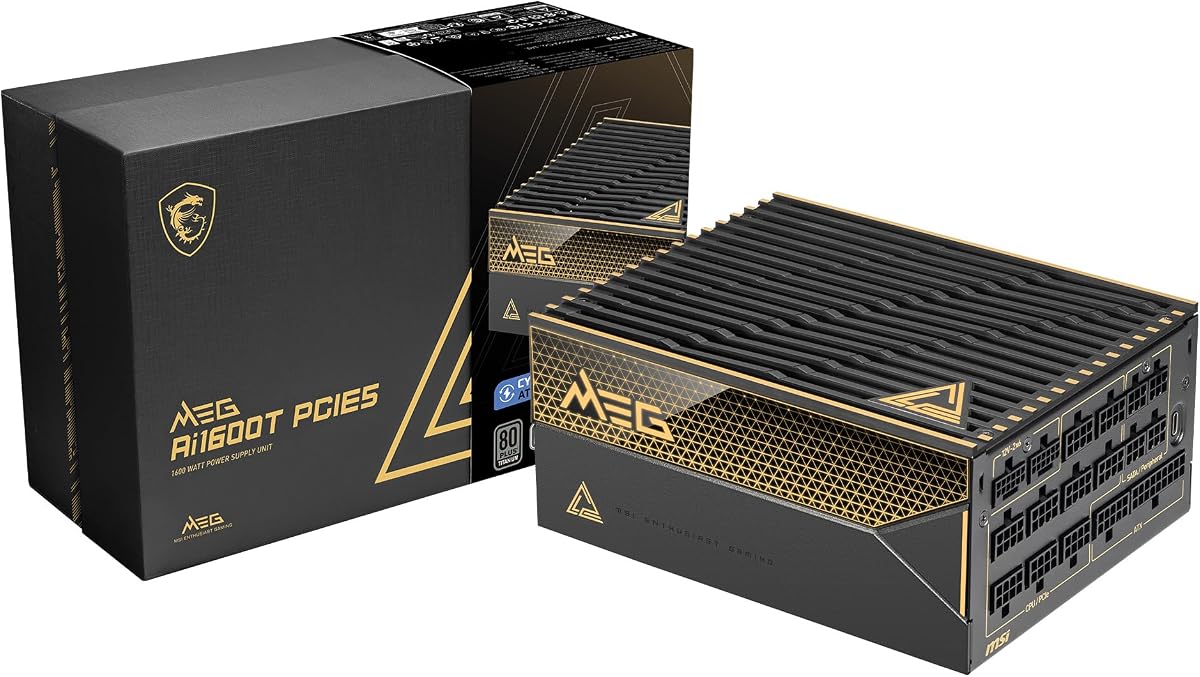
The MSI MEG Ai1600T PCIE5 is built around a 1600W output, ATX 3.1 and PCIe 5.1 compatibility, and two native 12V-2×6 cables. Its 4.5 rating reflects a strong combination of efficiency, high-current connectivity, component quality, and unusually broad protection coverage for a gaming-oriented power supply.
We may earn a commission when you buy through this link, at no additional cost to you.
Efficiency is a particularly strong area. The unit carries triple certification under 80 PLUS, Cybenetics, and PPLP, all associated with the Titanium tier in the supplied product information. This focus on efficiency can reduce waste heat and help the unit operate more comfortably inside a densely equipped high-performance case, especially during sustained maximum-load scenarios.
MSI lists an extensive industrial protection suite: OCP, OTP, OPP, SCP, OVP, UVP, SIP, and NLO. These functions address overcurrent, overtemperature, overload, short-circuit, overvoltage, undervoltage, surge, and no-load conditions. A 100% Japanese 105°C capacitor further supports longevity, while the 12-year warranty provides one of the longest coverage periods in the group.
The fully modular, braided cable system is designed for a clean gaming build, although the thickness and quantity of leads can complicate routing in a compact chassis. The 12-year warranty and broad safeguards are notable strengths for buyers who intend to keep the system for many years. Overall, this is a robust choice for a high-end gaming or creator computer that emphasizes protection and sustained high-output behavior.
The protection list covers numerous abnormal operating conditions, not just the most common short-circuit and overload scenarios. This breadth can provide greater confidence in a costly, densely configured workstation.
A Japanese 105°C capacitor and a twelve-year warranty complement the high-efficiency design. Together, they make the MEG Ai1600T PCIE5 a compelling option for builders planning a long upgrade cycle in a premium system.
We may earn a commission when you buy through this link, at no additional cost to you.
The ASUS ROG Thor 1600W Titanium III is the feature-driven premium option in this roundup, with a 4.3 rating, 1600W capacity, ATX 3.1 compliance, and a magnetic OLED display. It appeals to builders who value visible system information, advanced graphics-card voltage handling, and a high-end ROG presentation.
We may earn a commission when you buy through this link, at no additional cost to you.
Its patented GPU-First smart voltage stabilizer detects the graphics card and is described as improving the voltage delivered to it by as much as 45%. The objective is smoother operation and greater stability when a high-end GPU undergoes rapid load changes. The GaN MOSFET design is also claimed to provide up to 30% greater energy efficiency than standard MOSFETs while permitting a more organized internal layout and cooler operation.
The magnetic OLED display presents real-time power consumption and can be positioned on either side of the unit. That flexibility makes the readout useful whether the power supply is installed with its fan facing upward or downward. Turbo mode supports extended power excursions, while ROG heatsinks, an aluminum housing, and a double-ball-bearing fan help manage thermal output. The cited bearing has twice the stated lifespan of a smooth-bearing fan.
This is a specialized product rather than a necessity. A buyer who never uses the display and does not need GPU-focused voltage detection may not receive full value from the premium feature set. The foldable modular cables, ATX 3.1 support, 80 PLUS Titanium certification, Cybenetics Lambda A+ noise rating, and ten-year warranty still make it an impressive solution for showcase builds and demanding gaming systems.
The magnetic OLED panel displays live power consumption and can move between sides of the chassis. It gives builders immediate information without requiring a software overlay or external monitoring device.
GPU-first detection and the patented intelligent voltage stabilizer focus on the graphics card's power delivery. The stated improvement is designed to support smoother behavior when a modern accelerator changes load rapidly.
We may earn a commission when you buy through this link, at no additional cost to you.
The EVGA SuperNOVA 1600 G2 has a 4.6 rating and brings a long-standing 1600W design to buyers seeking substantial output and a fully modular layout. It remains a credible option for established NVIDIA SLI and Crossfire configurations, although its age is visible in the absence of a native 12V-2×6 specification.
We may earn a commission when you buy through this link, at no additional cost to you.
The 80 PLUS Gold certification is supported by stated efficiency levels of 90% at 115V AC and 92% at 220–240V AC, or higher under typical loads. That is below the best current Titanium units, but it can still produce less waste heat than lower-rated alternatives. Full modularity helps cable management and airflow, particularly important in a dense multi-GPU build.
Cooling uses a 140mm double-ball-bearing fan, a design associated with durability and resistance to wear compared with a conventional sleeve bearing. The supplied protection list includes OVP, UVP, OCP, OPP, and SCP, covering overvoltage, undervoltage, overcurrent, overload, and short-circuit conditions. A ten-year warranty adds long-term reassurance.
The decisive question is connector compatibility. Systems using older PCIe 6+2-pin power plugs may be well served, while a current RTX-class or professional GPU that expects a native 12V-2×6 cable will require an appropriate adapter or cable solution. Buyers should also compare the physical dimensions and included accessories against their case and graphics card. For a proven modular high-output unit, the G2 remains relevant.
The 1600W capacity and 140mm double-ball-bearing cooling fan provide a durable foundation for demanding multi-GPU configurations. Multiple protection circuits help guard the system when loads or cabling are pushed hard.
SLI and Crossfire readiness makes the SuperNOVA G2 especially recognizable for older enthusiast platforms. It remains most attractive when the installed graphics hardware and available cables align with its established connector layout.
We may earn a commission when you buy through this link, at no additional cost to you.
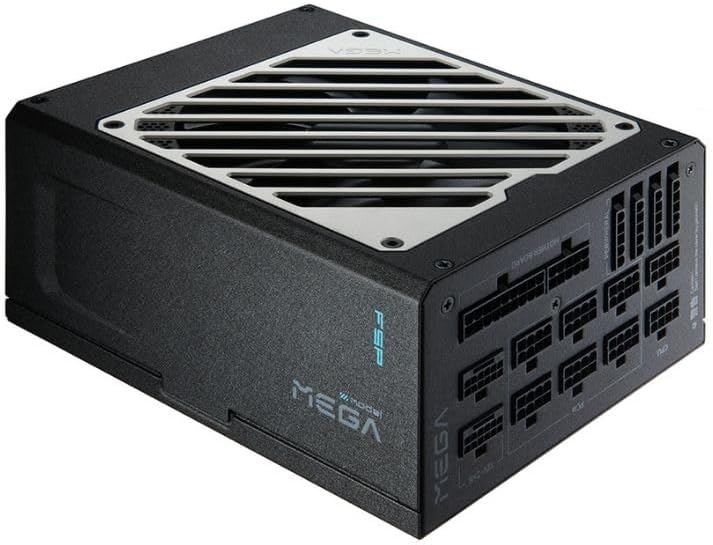
The FSP MEGA TI carries a 5.0 rating and an unusual rated capacity of 1650W, giving it slightly more headroom than products explicitly labeled 1600W. It combines ATX 3.1 readiness, EPS12V 2.92 support, dual native 12V-2×6 connections, and Titanium efficiency in a fully modular 180mm-deep chassis.
We may earn a commission when you buy through this link, at no additional cost to you.
Efficiency is a major strength. The product is certified for at least 94% efficiency at a typical load under 80 PLUS and Cybenetics Titanium standards. This reduces waste heat and complements the 105°C Japanese bulk capacitor. The power supply also supports power excursions of up to 200%, a feature intended to help it cope with demanding modern processors and graphics processors.
The connector assortment is versatile. Two native PCIe 12V-2×6 connectors and cables are joined by six PCIe 6+2-pin connectors, allowing modern high-current cards and older multi-GPU arrangements to coexist. A 135mm fluid dynamic bearing fan supports Zero RPM semi-fanless operation below a 40% load, which keeps normal desktop and lighter gaming use quiet.
The model has a 5.0 rating based on the supplied data, though buyers should consider that it is a newer listing with a less established review history than several competitors. Its actual name also says 1650W while its Amazon title says MEGA TI, which may cause search confusion. Within this category, though, the high rating, high capacity, modern standards, and mature connector mix make it an excellent contender.
Dual native 12V-2×6 cables address the newest graphics hardware, while six 6+2-pin connectors preserve compatibility with older and mixed hardware. That makes the MEGA TI adaptable to evolving enthusiast systems.
Titanium efficiency limits conversion losses, while Zero RPM mode below a 40% load keeps the fan stopped during many ordinary workloads. The result is a power supply designed to combine high capacity with low routine noise.
We may earn a commission when you buy through this link, at no additional cost to you.
The EVGA SuperNOVA 1600 P2 is a 1600W Platinum-rated power supply with a 4.6 rating, fully modular wiring, and a ten-year warranty. It offers an efficient, established alternative for high-end systems using traditional PCIe power connections, although the design predates the native 12V-2×6 interface.
We may earn a commission when you buy through this link, at no additional cost to you.
Its 80 PLUS Platinum certification is accompanied by stated efficiencies of 92% at 115V AC and 94% at 220–240V AC, or higher at typical loads. Japanese capacitors are used throughout, while the 140mm double-ball-bearing fan provides a durable cooling solution. The claimed ECO mode helps reduce fan activity when the system does not require maximum output.
Full modularity is valuable in a high-capacity unit because it lets builders route only the cables they need. Compatibility with NVIDIA SLI and Crossfire makes the P2 recognizable for multi-GPU enthusiast systems. The ten-year warranty also provides meaningful coverage for a component expected to remain in service for a substantial portion of a build's life.
Modern graphics cards may require a 12V-2×6 connection that is not natively provided, making adapter use necessary and potentially less tidy than a native cable. Buyers should also verify the unit's dimensions and current connector inventory. For older multi-GPU platforms or a high-output system built around established 6+2-pin hardware, the SuperNOVA 1600 P2 remains a high-efficiency, well-reviewed choice.
Platinum certification and the stated 92% or 94% typical-load efficiency reduce conversion losses. In a 1600W supply, that can translate into meaningful heat reduction compared with less efficient alternatives.
The P2 combines full modularity, Japanese capacitors, and a ten-year warranty. Its strongest fit is with established SLI or Crossfire hardware that uses conventional power connectors rather than the newest native interface.
We may earn a commission when you buy through this link, at no additional cost to you.
Choosing a 1600W power supply involves more than matching a wattage figure. Efficiency, transient response, connector design, case clearance, acoustics, protection, and the specific demands of your processor and graphics hardware all influence the right decision.
Begin with the combined power demands of the CPU, graphics card, memory, storage, fans, and expansion devices, then allow reasonable headroom for power spikes, efficiency losses, and future upgrades. A 1600W unit is generally more appropriate for a high-end multi-GPU system, a workstation combining a powerful processor with one or more accelerators, or a platform expected to expand considerably.
Choose capacity based on documented component requirements rather than marketing labels alone.
High-wattage power supplies can be physically longer than standard units, and some cable sockets require additional clearance. The ASRock PG 1600G and FSP MEGA TI are each listed at 180mm deep, so builders should compare those measurements with the chassis specification and the space reserved for power supply installation.
Verify both chassis length and connector clearance before ordering.
ATX 3.1 and PCIe 5.1 support indicate compatibility with current high-power platforms, but the most important detail is the supplied 12V-2×6 cable. Several models provide two native connections, while older established units may require an adapter for modern graphics hardware.
Prefer native 12V-2×6 cables when using a compatible current GPU.
Efficiency determines how much incoming power reaches the components and how much becomes heat. Gold, Platinum, and Titanium products can all serve high-output systems, but higher tiers operate more efficiently at typical loads. This matters when the supply is enclosed in a crowded case or operates near its rated capacity for long periods.
Prioritize efficiency when heat, acoustics, or energy use are priorities.
A 1600W supply can reach a higher internal temperature than a modest unit, but efficiency and fan design strongly affect noise. Semi-passive and Zero RPM modes keep the fan stopped during lighter operation, while larger fluid dynamic bearing or double-ball-bearing fans target durability. The Seasonic Noctua Edition goes further with a specialized NF-A12x25 fan and Lambda A++ certification.
Choose semi-passive cooling for quiet everyday operation.
Look for protection against overcurrent, overvoltage, undervoltage, overload, short circuit, overtemperature, and related abnormal conditions. The MSI MEG Ai1600T PCIE5 lists an especially broad protection suite. High-quality Japanese capacitors, including 105°C-rated examples, can also support dependable long-term operation in a premium system.
Treat comprehensive protections as essential for expensive builds.
A fully modular supply lets builders connect only the required leads, improving airflow and reducing clutter. However, premium sleeved or braided cables can be thick and require careful routing behind the motherboard tray. Check the supplied EPS, PCIe, SATA, and peripheral connectors against the exact hardware list before purchase.
Match cable inventory and thickness to your case.
Software control, adjustable overcurrent protection, and real-time displays are optional rather than essential. CORSAIR iCUE adds monitoring and configurable behavior, while the ASUS ROG Thor 1600W Titanium III includes a magnetic OLED power display. These features can be useful for tuning but should not replace compatibility, efficiency, or protection checks.
Treat monitoring extras as useful supplements, not core requirements.
Install the power supply in a clean, well-ventilated area and use only the modular cables supplied or explicitly recommended for that model. Connect the 24-pin motherboard cable, the correct EPS CPU cables, and the appropriate graphics-card cable before arranging the system. Route cables behind the motherboard tray where possible, but avoid sharp bends that could damage conductors.
Never force a connector into a socket and never use a cable from a different power-supply model unless the manufacturer explicitly states that it is compatible. Inspect connector keys, cable types, and modular sockets for a proper match. After installation, check that no unused modular cable is hanging near intake or exhaust fans and that every plugged-in connector is fully seated.
Allow adequate clearance around the unit and keep dust from accumulating on its intake grille. Use the supplied monitoring software when available, but avoid frequent fan-control changes that may undermine a carefully tuned acoustic profile. Periodically check for unusual noise, excessive heat, unstable operation, or visible connector discoloration, and stop using the unit if any of these symptoms appear.
Most conventional gaming PCs do not need that much capacity. A 1600W unit becomes relevant with multiple high-power graphics cards, several accelerators, an extremely power-hungry processor, extensive expansion, or a planned workstation upgrade path. Calculate the expected combined load and choose only when the system has a genuine need for the headroom.
The primary difference is rated continuous output. The CORSAIR HX1500i 2025 provides 1500W, while most of the other featured units are rated at 1600W, and the FSP MEGA TI is rated at 1650W. Actual suitability still depends on connectors, efficiency, transient handling, case dimensions, and the hardware being powered.
They are important for current high-power graphics hardware that uses the 12V-2×6 interface. Native cables provide a direct connection and align with the demands of ATX 3.1 and PCIe 5.1 platforms. Older power supplies can sometimes work through a suitable manufacturer-supplied or properly specified adapter, but native support is cleaner and more convenient.
Gold efficiency can be sufficient because efficiency certification is only one part of power-supply performance. Platinum and Titanium models generally waste less energy as heat, which can be helpful in a crowded or thermally constrained enclosure. The more important considerations are stable voltage delivery, transient support, protection, connector compatibility, acoustics, and a reputable platform.
No. Semi-passive operation generally means the fan remains stopped during lighter loads and begins rotating as temperature or power demand increases. The exact thresholds vary by model, and the Seasonic Noctua Edition is described as keeping its fan off until a 50% load under a stated 25°C ambient condition.
It depends on the model and chassis. The ASRock PG 1600G and FSP MEGA TI are listed with a depth of 180mm, so their full bodies require that much space, plus room for cable bends. Builders should check the manufacturer's case diagram and the power supply's dimensions rather than estimating from a smaller ATX unit.
Possibly, but compatibility must be checked carefully. A new GPU may need a 12V-2×6 connection, while an older supply may provide only 6+2-pin connectors and rely on adapters. The adapter, cable bend radius, transient requirements, and the power supply's supported platform should all be verified before installation.
Prioritize documented continuous output, modern transient handling, native graphics connectors, efficiency, thermal design, electrical protections, and physical fit. Also consider the supplied modular cables, component quality, acoustic behavior, and warranty. A higher wattage figure does not compensate for a cramped chassis, missing connectors, or inadequate protection.
The Seasonic Prime TX-1600 is the strongest all-round choice for most demanding builds because it combines 1600W capacity, ATX 3.1 and PCIe 5.1 support, dual native 12V-2×6 connectors, and Titanium efficiency. The ASRock PG 1600G stands out as the value-oriented option, while the Seasonic Prime TX-1600 Noctua Edition is ideal for buyers who place exceptional quietness above everything else.
Other configurations deserve consideration for specific needs. The MSI MEG Ai1600T PCIE5 emphasizes broad protections and a long warranty, the ASUS ROG Thor 1600W Titanium III adds an OLED display and GPU-focused voltage management, and the FSP MEGA TI combines a 1650W rating with modern high-current cables. For established multi-GPU platforms, the EVGA SuperNOVA models may be more fitting.
Before ordering, verify the power budget, graphics-card connector, case dimensions, and modular cable requirements. Product details, availability, and pricing can change, so check the current listing and manufacturer information before making a final decision.
