
WWZMDiB CH341A EEPROM BIOS Programmer
4.1Editor score
Supports 24 and 25 series
Includes clips and adapters
Switchable 3.3V and 5V
Bios Flash Tool guide comparing programmers, bootable recovery drives, clips, adapters, and kits for BIOS backup, repair, and recovery tasks.
A Bios Flash Tool can be a dedicated chip programmer or a bootable recovery drive, depending on the job you need to complete. Useful options support BIOS backup, firmware reading, chip programming, Windows recovery, password reset, and security testing, so the right choice depends on your experience and equipment.
We compared all ten products by examining their supported chip families, connection methods, included accessories, recovery functions, compatibility claims, and user ratings. The list includes CH341A programmers, EZP2023 hardware, SOIC clips, conversion adapters, bootable Windows utilities, and a Kali Linux cybersecurity drive.
Each review shows what makes a product useful and where its limitations matter. Top picks balance programming capability, accessory coverage, ease of use, and value, while prices and availability can change, so check the current listing before purchasing.
4.1Editor score
4.4Editor score

4.3Editor score
The table below compares the ten products by tool type, supported hardware, connection method, and practical role, making it easier to match a programmer or recovery drive to a specific maintenance task.





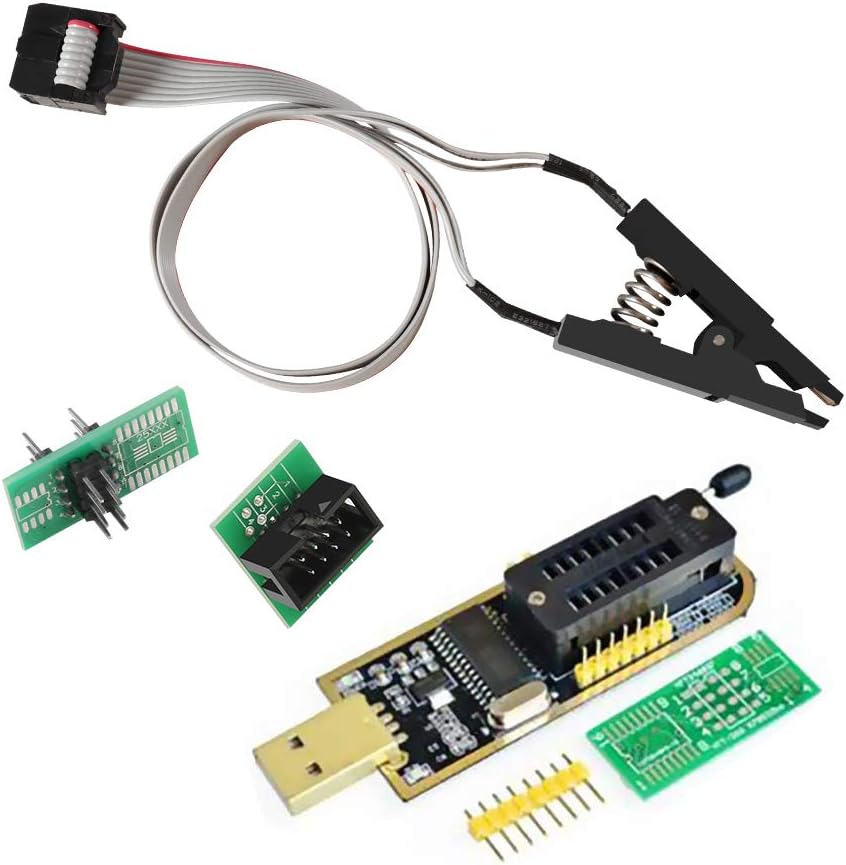
This CH341A-based programmer is a practical entry-level option for reading, erasing, programming, and backing up common 24- and 25-series flash chips. Its 4.1 rating reflects a useful combination of basic programming capability and included accessories, particularly the SOIC8 test clip and SOP8/SOP16 conversion plate.
We may earn a commission when you buy through this link, at no additional cost to you.
The main appeal is that it avoids the need to desolder a chip for routine in-circuit work. The clip can connect directly to a compatible package, while the conversion plate provides another way to work with different package formats. The listed 3.3V and 5V switching is also important because using the wrong voltage can damage a flash chip.
Its limitations are technical rather than fundamental. CH341A hardware has restrictions with certain ESMT SST 25-series chips, and motherboard-level peripheral circuits can make an in-circuit connection unreliable. For that reason, a backup and careful identification step are important before writing a new image.
Choose this programmer if you need a low-cost way to handle common SPI and I2C EEPROM tasks and want the essential clip and adapters in one package. It is a sensible first tool for a home technician, but a more advanced programmer may be preferable for unusual chips or repeated professional work.
The programmer covers the most common 24 and 25 series families and supports the basic operations needed for backup, erase, calibration, and programming. That makes it useful for learning, hobbyist repairs, and straightforward firmware recovery tasks.
The included SOIC8 clip and conversion plate reduce the need for permanent board modifications. They also make the kit easier to use across different motherboard and peripheral-board layouts, provided the chip package and voltage are compatible.
We may earn a commission when you buy through this link, at no additional cost to you.
This ACEIRMC kit combines a CH341A programmer with double SOIC8 test clips, giving it a practical balance of capability and convenience. The 4.4 rating is the highest among the listed products, which suggests generally favorable owner experiences for a hardware programmer in this category.
We may earn a commission when you buy through this link, at no additional cost to you.
The clip design supports in-circuit programming for common 24CXX, 25CXX, and 93CXX devices. That is valuable when the goal is to back up or program firmware without dismantling the board. The package also targets common SOP8 and SOP16 BIOS flash chips used across desktop motherboards and other electronics.
The most important limitation is the documented SST class 25-series restriction, which allows reading but not writing. The product also warns that peripheral circuits can prevent direct clipping from working. These are not reasons to avoid the kit, but they are essential information before attempting a critical write.
This is a strong general-purpose choice for users who want a CH341A platform and more than one connection option. It suits hobbyists, repair technicians, and system builders who regularly work with supported flash chips and can verify the target before programming.
Two SOIC8 clips provide more flexibility than a single-clip setup, especially when comparing different board layouts or working with chips in awkward positions. The approach is quicker than removing a package when the surrounding circuitry does not obstruct the connection.
Support for 24, 25, and 93 series devices gives the kit broader practical reach than a bare programmer with no accessories. Users should still identify the exact chip and confirm that its family and package are supported before erasing or writing.
We may earn a commission when you buy through this link, at no additional cost to you.
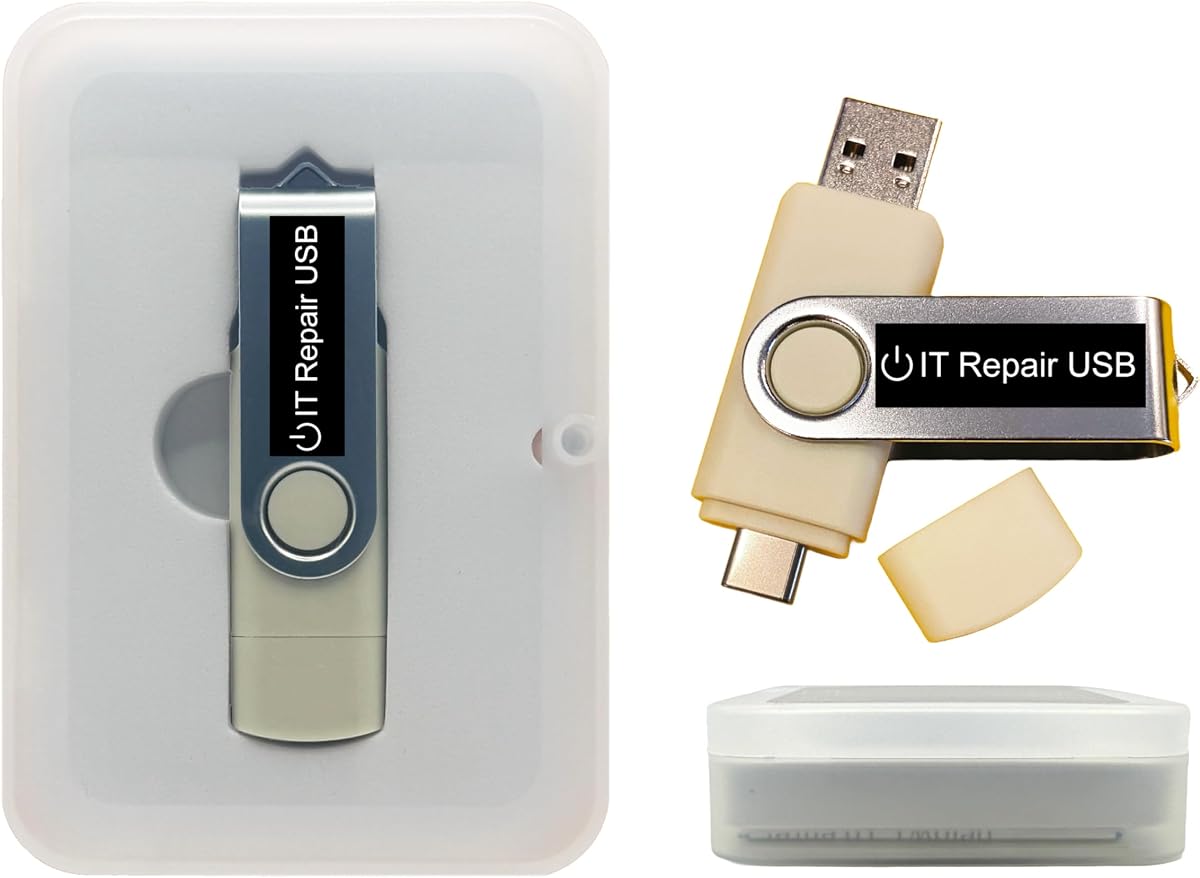
This bootable USB is designed primarily for password recovery and operating-system access rather than direct flash-chip programming. It supports Windows and Linux, and its dual USB-A and USB-C design makes it useful across a wider range of laptops, desktops, mini PCs, tablets, and servers.
We may earn a commission when you buy through this link, at no additional cost to you.
The drive supports both Legacy BIOS and UEFI boot modes, while the included interface provides guided recovery steps. It can also be customized with compatible bootable ISO applications, installers, or utilities, which extends its usefulness for technicians who want a reusable maintenance tool.
Its 3.6 rating is lower than the programmer-focused products, and it cannot perform the chip-level read, erase, and write operations associated with a CH341A or EZP2023. It is also not a substitute for repairing a failed system that cannot start, reach a boot menu, or communicate with a USB device.
Pick this drive when the main goal is recovering access to a Windows or Linux installation, running compatible offline tools, or preparing a system for reinstallation. It is best viewed as a recovery utility rather than a dedicated Bios Flash Tool.
The bootable environment is designed to reset or recover forgotten user-account credentials without immediately reinstalling the operating system or losing files. The on-screen guidance is aimed at making the process approachable for users with limited command-line experience.
Because compatible ISO applications and utilities can be added, replaced, or upgraded, the drive can serve as a general-purpose bootable toolkit. This is valuable for repeated field work where different diagnostic tools may be needed.
We may earn a commission when you buy through this link, at no additional cost to you.
This 8GB drive is focused on installing or repairing Windows 11 and offers an important compatibility advantage by having no TPM requirement. Its 4.0 rating reflects a straightforward product aimed at users who need a bootable installer for a compatible PC.
We may earn a commission when you buy through this link, at no additional cost to you.
The drive supports UEFI and Legacy boot modes, so it can be useful for a wider collection of systems than a UEFI-only installer. Its primary workflow is practical: power on the PC, enter the firmware setup or boot menu, and boot from the USB.
The listing makes unusually clear that this is not a universal repair solution. It cannot fix dead motherboards, bad RAM, failing storage, or a computer that cannot power on or enter BIOS/UEFI setup. It also does not include a product key, and it is not intended for Chromebooks, ARM or Snapdragon PCs, Apple-silicon Macs, BitLocker recovery, or data rescue from a failed drive.
Choose it when you know the computer can reach its boot menu and need a Windows 11 setup and recovery medium. For broader diagnostics or chip-level work, choose a dedicated programmer or a fuller recovery toolkit instead.
The no-TPM requirement broadens the potential use of this installer for systems that cannot satisfy newer Windows 11 platform checks. It is still important to verify other hardware, firmware, and operating-system requirements before starting an installation.
The product description directly explains what the drive cannot do. That makes expectations easier to manage and helps prevent a software-only tool from being purchased for a physically failed computer.
We may earn a commission when you buy through this link, at no additional cost to you.
This ACEIRMC kit expands on a standard CH341A programmer with a 1.8V adapter, a SOIC8-to-DIP8 conversion module, and a SOIC8 flash-chip test clip. Its 4.4 rating places it alongside the strongest kits in the group, while the accessory selection makes it particularly interesting for mixed repair work.
We may earn a commission when you buy through this link, at no additional cost to you.
The product is aimed at 24 and 25 series flash programming and is listed for tasks involving TV memory, desktop motherboards, LCDs, notebooks, routers, cards, DVD equipment, and set-top boxes. The included voltage adapter is particularly relevant to devices that use 1.8V SPI flash memory.
The package contains one programmer and one set of accessories, so buyers who need duplicate clips or adapters may need another source. Its fast programming claim and broad device list should also be understood within the limits of individual chip support and motherboard circuitry.
This kit is a good fit for a technician who wants more than a bare programmer and works across different board types. Confirm the chip marking, package, and required voltage first, then use the appropriate clip or adapter.
The voltage adapter and package converter make this a more complete working set. Those extras can save time when a particular board uses a nonstandard voltage or a physical arrangement that is awkward to connect with a clip alone.
The listed applications span consumer electronics, networking equipment, optical drives, and computers. This makes the kit attractive for general repair work, although each target must be checked for exact chip compatibility.
We may earn a commission when you buy through this link, at no additional cost to you.
The EZP2023 is the most specialized chip programmer in this roundup. It supports 24, 25, 93, and 95 series EEPROM devices, includes 15 adapters, and carries a 4.3 rating. Automatic chip-model and voltage detection distinguish it from simpler CH341A kits.
We may earn a commission when you buy through this link, at no additional cost to you.
Its principal advantage is workflow automation. The programmer can identify many 25-series chips automatically, detect whether a chip is properly seated, and select the supply voltage. The listing also reports quick operation, including claimed read and write times for EN25T80 chips.
Automation does not remove every manual step. EEPROM families outside the mainly automatic 25-series group may still need to be selected manually, and adapters or clips must match the physical package. A verified backup remains sensible before any operation that changes firmware.
This is the top choice for users who want a dedicated, well-equipped programmer rather than a general boot drive. It suits serious firmware work, component-level servicing, and repeated use across multiple chip types.
Automatic identification, placement detection, and voltage selection reduce setup errors and make the programmer easier to use across varied repairs. These features are particularly helpful when handling multiple boards with different chip types.
Fifteen included adapters improve the chance of matching common package styles. The larger accessory set also makes the EZP2023 a more complete bench option for technicians who want fewer separate purchases.
We may earn a commission when you buy through this link, at no additional cost to you.
This recovery drive is aimed at system-level troubleshooting rather than direct BIOS-chip programming. Its 3.5 rating is the lowest among the listed products, but the feature set covers diagnostics, startup repair, malware removal, file recovery, partition work, account unlocking, and password reset.
We may earn a commission when you buy through this link, at no additional cost to you.
Dual USB-A and USB-C connectors and support for both UEFI and Legacy BIOS make it convenient for a mixed fleet of computers. Users can operate the tools live or use the drive as a recovery operating system, and the included instructions explain how to customize compatible ISO applications.
The device is not a programmer for reading or writing EEPROM packages, so it should not be evaluated against the CH341A and EZP2023 products on chip-writing capability. Its 3.5 rating also suggests users should review current owner feedback for the specific utilities and workflows they need.
Choose this toolkit for maintaining Windows systems, diagnosing startup problems, or recovering files and partitions from a bootable environment. It is more versatile than a plain installer but less precise than a hardware programmer.
The bundled tools cover several common maintenance tasks in one offline environment. This reduces the need to create separate boot media for each diagnostic or recovery job.
Compatible ISO applications, installers, and utilities can be added, replaced, or upgraded. That makes the drive useful as a reusable platform for technicians rather than a one-task-only installer.
We may earn a commission when you buy through this link, at no additional cost to you.
This SOP16 clip is a specialized accessory for connecting 16-pin flash chips during in-circuit programming. It carries a 4.3 rating and supports 150mil and 300mil SOP16 packages, with a stated compatibility list that includes RT809F, TL866CS, and TL866A programmers.
We may earn a commission when you buy through this link, at no additional cost to you.
Its hardened construction, gold-plated connector layer, and 40cm cable are intended to provide a stable connection in confined board layouts. A SOP16-to-DIP16 adapter is also part of the product's use case, expanding connection options for supported programmers.
This is not a standalone programmer. It also cannot overcome every motherboard circuit arrangement, and the product information warns that some chips may not be recognized while attached to a board. If online identification fails, removing the chip for programming may be necessary.
Buy it when you specifically work with SOP16 flash packages and already own a compatible programmer. It is a useful precision accessory, not a general-purpose BIOS recovery solution for typical users.
The clip and gold-plated contact treatment are intended to improve reliability when connecting to small flash packages. Its 40cm line also provides useful reach around larger or crowded circuit boards.
This tool is most valuable to technicians who routinely service SOP16 devices. For a first programmer purchase, a bundled CH341A or EZP2023 kit would be more complete.
We may earn a commission when you buy through this link, at no additional cost to you.
PC-DNA is a recovery-oriented bootable drive designed for Windows 10 and Windows 11 systems. Its standout claimed advantage is compatibility with Secure Boot when enabled, allowing users to boot it without changing BIOS settings.
We may earn a commission when you buy through this link, at no additional cost to you.
The drive downloads the latest official Windows version directly from Microsoft rather than relying on a bundled or outdated operating-system image. It targets 64-bit systems and requires UEFI BIOS, which the listing associates with most PCs manufactured from 2013 onward.
The current version does not support Legacy BIOS, and no Windows product key is included. The listing also does not provide a numeric rating, so there is no visible user-rating signal to compare with the other products.
This is a strong option for modern UEFI PCs where Secure Boot must remain enabled or where the owner does not want to alter firmware settings. It is less suitable for older Legacy systems or anyone who expects a physical flash-chip programmer.
Working with Secure Boot enabled is a meaningful distinction for managed and security-conscious computers. The drive can be used without disabling a firmware protection or changing the boot policy.
Downloading official Windows media avoids relying on a bundled ISO and can keep the installation source current. The user still needs a valid Windows license and an internet connection when downloading the files.
We may earn a commission when you buy through this link, at no additional cost to you.
This Kali Linux USB is a specialized cybersecurity environment rather than a conventional BIOS-chip programmer. It can run Kali directly from USB or install it permanently, and the listing includes more than 600 preinstalled tools for network, web, wireless, forensic, and vulnerability-analysis work.
We may earn a commission when you buy through this link, at no additional cost to you.
The drive supports both Legacy BIOS and UEFI, along with USB-A and USB-C connections. Inclusion of amd64 and arm64 builds broadens hardware compatibility across Intel, AMD, and supported ARM-based systems, while customization allows additional compatible ISO applications or utilities to be added.
Its 4.1 rating indicates generally positive reception, though users should understand that Kali is a complete operating-system environment rather than a dedicated BIOS flashing tool. It should only be used for security testing, investigation, and learning within systems and networks where authorization is clear.
Choose it for ethical hacking training, security research, forensics, or running a portable analysis environment. It is a complement to, rather than a replacement for, a CH341A or EZP2023 programmer.
Running Kali from USB leaves the host operating system largely untouched, which is useful for controlled analysis and recovery. It also provides a straightforward way to move the same toolset between compatible computers.
amd64 and arm64 builds make the drive useful on more types of hardware than a single-architecture image. The included tool collection supports reconnaissance, wireless analysis, forensics, and web security work in authorized environments.
We may earn a commission when you buy through this link, at no additional cost to you.
Choose by first identifying the task: chip-level BIOS programming, system recovery, account reset, component access, or security testing. Compatibility, voltage handling, accessories, and ease of recovery matter more than a long feature list.
Buy a programmer for motherboard or embedded-device firmware work. Buy a recovery drive for operating-system access and maintenance.
Prioritize the programmer that explicitly supports your chip family, package, and voltage.
Never guess voltage; verify it before connecting power or writing firmware.
Match the included accessories to the packages you actually service before ordering.
Expect in-circuit work to be convenient, not universally successful; keep removal as a fallback.
Prioritize backup, identification, and read-back verification alongside writing speed.
Confirm the computer can access its boot menu and that the recovery drive matches its firmware mode.
Read ratings alongside recent reviews and the manufacturer or seller's stated restrictions.
Begin by identifying the target board and reading the chip marking, package type, voltage, and supported series. Inspect the surrounding components, confirm that the programmer and clip or adapter match, and create a known-good backup before erasing or writing anything. For a bootable drive, verify that the computer reaches its firmware setup or boot menu before changing the boot order.
For programming, power down and disconnect the device according to its service procedure, attach the appropriate adapter or clip, check polarity and voltage, and connect the programmer by USB. Use the software to identify the chip and read its current contents. Save the backup, verify it, and only then write a known-correct image while following the software's erase, program, and read-back sequence.
After programming, disconnect power before changing clips or adapters and avoid repeated plugging and unplugging of exposed contacts. Store clips and cables in a dry, dust-free container, protect the programmer from static discharge, and keep software and firmware images in organized folders. Recovery drives should be updated through their documented customization process and kept in a protected sleeve when not in use.
A hardware Bios Flash Tool reads, backs up, erases, programs, and verifies compatible EEPROM or SPI flash chips. It is commonly used for motherboard BIOS recovery, firmware repair, and device servicing. Bootable recovery drives serve a different purpose, providing operating-system recovery, password reset, diagnostics, or installation tools rather than direct chip programming.
No. A CH341A works with many common 24- and 25-series devices, but exact family and package support must be checked. The listed products specifically note that ESMT SST class 25 chips can be read but not written with CH341A hardware. Motherboard peripheral circuits can also prevent reliable in-circuit operation.
It can be safe when the chip, package, voltage, and programmer are compatible and the board is powered down during connection. Surrounding circuits may interfere with identification or writes, so a backup is essential. If the chip cannot be detected reliably, removing it for offline programming is the safer next step.
Not necessarily. A compatible SOIC8 or SOP16 test clip can provide temporary in-circuit access without soldering. Adapters and sockets are useful for removable chips or less accessible layouts, but the exact package and pin count must match the programmer accessories.
No. A bootable USB requires the computer to power on and reach either the firmware setup or a boot menu where the USB can be selected. It also cannot repair a dead motherboard, failed storage device, bad memory, or other physical hardware failure.
Some customizable drives can run compatible ISO utilities for different operating systems. The password-reset product in this guide explicitly supports Windows and Linux, and the Kali Linux drive provides a Linux security environment. Always confirm the drive's stated operating-system support and the requirements of each utility before deployment.
A programmer can read and write firmware, but it does not automatically know which image your device requires. You need a valid BIOS or firmware file appropriate for the exact model, followed by a successful erase, write, and verification process. Keep a backup and verify the target before proceeding.
Choose EZP2023 when automatic chip identification, automatic voltage selection, and a large adapter collection are important. Choose a CH341A kit for a lower-cost platform suited to common 24-, 25-, and sometimes 93-series work. Compare the exact chip families, package accessories, voltage requirements, and write restrictions before deciding.
The best overall choice for common chip-level work is the ACEIRMC CH341A Double Clip, while the WWZMDiB CH341A programmer stands out as the best budget package. The EZP2023 is the strongest premium option because automatic identification, voltage selection, and 15 adapters make it a more complete dedicated programmer.
Prioritize the task and exact hardware over feature count. Choose a programmer for supported flash chips, a bootable drive for system recovery, a Windows-focused installer for reinstallation, a password-reset drive for account access, or Kali for authorized security work. Verify package, voltage, boot mode, and known-good firmware before making changes.
Product prices, ratings, software versions, and availability can change, so check the current listing and recent customer feedback before purchasing. Keeping the target device disconnected from power during setup, maintaining verified backups, and following the tool's instructions will help prevent avoidable repair problems.