
Dementia Photo Button Phone
4.2Editor score
Eight photo speed-dial keys
110dB amplified ringer
Line-powered simple operation
Our Captioned Telephone guide compares ten accessible phones for live captions, amplification, large controls, voice dialing, visual alerts, and easier
A captioned telephone can make conversations easier for people with hearing loss by turning speech into large, readable text while audio remains available. A useful purchase should also fit the user’s home, connection, vision, mobility, and memory needs. The featured devices range from a dedicated captioning phone to amplified landlines and voice-controlled alternatives.
We compared the ten products using their documented features, including real-time captions, amplification, visual ringer alerts, large or picture buttons, hands-free calling, voice controls, answering-machine features, and setup requirements. The list also considers important limitations such as internet, service, and power dependencies rather than treating every accessible phone as a dedicated captioning device.
The first pick provides the most complete captioning-focused experience, while the remaining options show which features can make conventional phones easier to use. Each review explains the appropriate audience and practical trade-offs. Product availability, service plans, features, and prices can change, so confirm current details before purchasing.
4.2Editor score

4.3Editor score

4.0Editor score
This side-by-side comparison highlights the distinct approaches represented in the guide, from true real-time captioning to amplified ringing, large-button dialing, visual alerts, and voice-operated calling.




The Hamilton CapTel 2400iSPNBT is the clearest match for someone actively searching for a captioned telephone. It displays incoming and outgoing speech as large, real-time text on an easy-to-read touchscreen, allowing the user to follow a conversation visually while still listening. Its supplied rating is 4.3, and the defining advantage is the combination of captioning, amplified sound, touchscreen navigation, and captioned voicemail rather than a single accessibility feature.
We may earn a commission when you buy through this link, at no additional cost to you.
Users can select automated captions or assisted captions with live operator support. The automatic mode offers a more independent experience, while assisted mode can provide added accuracy when a call is especially important or automatic recognition is less reliable. Caption size and tone can be adjusted to suit the user, and volume can reach 40dB of amplified gain. Hearing aid compatibility and simple on-screen controls broaden its usefulness for people with different degrees of hearing loss.
The main compromises are service and eligibility. The phone needs high-speed internet and standard electrical power, and it may also require telephone service. The captioned service is stated to be available only to U.S. residents with hearing loss who complete registration. It also has more complexity than a basic amplified landline, so anyone uncomfortable with touchscreens or an internet-dependent service may prefer one of the simpler models in the list.
This is the strongest recommendation for a user who needs to read conversations in real time. It is especially relevant for family calls, appointments, and situations where missing even a short phrase can cause confusion. The Hamilton is not simply an amplified telephone with a large display; it is a purpose-built captioning solution with ongoing service requirements, which should be confirmed before purchase.
Large real-time captions allow a user to read each side of a call while continuing to hear the audio. This makes the phone useful when lip-reading, hearing only part of a conversation, or understanding a fast or unclear speaker is difficult.
Automated and operator-assisted options let the household choose between convenience and live support. The captioned answering machine also extends the visual benefit to voicemail, reducing the need to replay unclear audio messages.
We may earn a commission when you buy through this link, at no additional cost to you.
The Dementia Photo Button Phone is a straightforward accessible landline for users who benefit more from visual speed-dial buttons and amplified alerts than from written call captions. It has a supplied rating of 4.2 and emphasizes recognizable photos, large pictorial keys, a high-volume receiver, a loud ringtone, and a flashing visual indicator. The design is aimed at seniors and others with memory, vision, or hearing challenges.
We may earn a commission when you buy through this link, at no additional cost to you.
Eight customizable photo speed-dial buttons reduce the need to remember or look up numbers. A separate programmable SOS button is intended for emergency assistance, but it must be configured before use and does not automatically dial 911. Large buttons, adjustable receiver and ringer volume, a visual incoming-call light, hands-free calling, and one-touch redial add practical ways to use the phone without relying on precise keypad operation.
Its power is supplied entirely through the RJ11 phone line, so it needs no batteries, Wi-Fi, cellular service, or separate power supply. That makes it dependable during a power interruption and attractive for a household that wants a simple backup. The trade-off is that it does not provide real-time captions, and its feature set is less advanced than service-based or hybrid senior phones.
Best for someone who wants straightforward family calling, highly visible controls, and an extremely loud ringer without managing a subscription. It also suits a caregiver who can program the photo buttons and SOS destination once. Those who specifically need words to appear during a call should instead choose the Hamilton CapTel, while this phone is best viewed as an accessible, budget-conscious alternative.
A family photograph can make the intended recipient more recognizable than a name or number. The eight photo keys and large pictorial buttons are particularly useful for users with dementia, poor vision, arthritis, or tremors who may struggle with standard numeric keys.
The 110dB ringer, adjustable receiver volume, and flashing indicator provide several ways to notice and hear an incoming call. The hands-free mode can also make conversations more comfortable for users with a weak grip or limited hand mobility.
We may earn a commission when you buy through this link, at no additional cost to you.
The VTech SN5147 Amplified Corded/Cordless Senior Phone is a polished hybrid telephone system for users who want amplification, flexible handset placement, call filtering, and message handling in one package. It carries a supplied rating of 4.0. A corded base and one cordless handset are included, and the base can remain useful during power outages while the cordless handset adds mobility around the home.
We may earn a commission when you buy through this link, at no additional cost to you.
The standout audio specifications are the 90dB extra-loud ringer and one-touch boost of up to 50dB. A full-duplex speakerphone is available on both the base and handset. Oversized high-contrast buttons, a large backlit display, a flashing visual ringer, and hearing-oriented controls help with dialing and call awareness. The system can block up to 1,000 unwanted numbers and includes four photo speed-dial slots.
Its digital answering machine offers 22 minutes of recording, remote access, slow playback, spoken Caller ID announcements, and a visual ring indicator. Additional compatible SN5307 handsets can expand the system, making this a flexible choice for a larger home. The trade-off is that it does not caption calls, and users who dislike menu-driven systems may find its collection of features more than they need.
Choose the SN5147 when a full-featured amplified phone system matters more than written captions. It is a particularly good option for households seeking both a wired reliability anchor and the freedom of a cordless handset. For someone whose primary need is reading conversations, the Hamilton remains the more direct match; for a conventional amplified system with answering-machine and call-blocking tools, the VTech is the stronger all-around system.
The wired base offers a familiar, dependable option and can function during a power interruption, while the cordless handset lets the user move around the home. This combination balances convenience with a traditional landline-style workflow.
Smart call blocking can reduce interruptions from robocalls and unwanted numbers, while the answering machine supports slow playback, remote access, and spoken caller information. These features make the system useful beyond basic call placement.
We may earn a commission when you buy through this link, at no additional cost to you.
The Answer, Dial & Hang-Up with Only Your Voice Home Telephone offers a different accessibility strategy: using speech rather than reading text or operating small buttons. No rating was supplied for this product, so the available information is limited to its voice-command concept. The telephone can answer, dial, and end calls using the user’s voice, with active listening always ready to recognize a command.
We may earn a commission when you buy through this link, at no additional cost to you.
Its strongest audience includes people with mobility or vision difficulties who may have difficulty reaching buttons, finding a handset control, or completing a call without assistance. Because the phone uses the existing home phone line, it appears designed to fit into a familiar household connection rather than requiring a touchscreen workflow. The hands-free design could also make routine calls more independent.
There is no listed real-time captioning, large-display specification, amplification detail, answering-machine feature, or compatibility information. Voice recognition can also vary with accent, noise, and speaking clarity, although the supplied description states that it is always listening for commands. Prospective buyers should verify exactly how contacts are selected and how the device handles background sound before relying on it for essential calls.
This is a useful pick to investigate when the central goal is avoiding physical controls. It is not the best captioning telephone because the supplied features describe voice control rather than written conversations. It may be an attractive companion or primary telephone for a user who speaks clearly and values the ability to answer, place, and conclude calls without touching the device.
Voice commands can remove the need to press answer, dial, or hang-up buttons. That can preserve independence for a person with limited reach, poor vision, arthritis, or another condition that makes precise keypad operation difficult.
Because the phone uses the home phone line, it may be easier to incorporate than a service-heavy smart device. Buyers should still confirm line compatibility, contact setup, and the exact behavior of the always-listening feature.
We may earn a commission when you buy through this link, at no additional cost to you.
The Big Button Phone for Elderly Home Corded Landline with Picture Care Assist for Seniors is a compact amplified phone for users who need clearer sound, larger controls, and a small number of recognizable speed-dial contacts. It has a supplied rating of 4.2. Its core features include adjustable amplification up to 40dB, large buttons, three replaceable picture buttons, and either wall or desktop placement.
We may earn a commission when you buy through this link, at no additional cost to you.
Picture buttons give the user a visual way to reach a favorite person without searching through a conventional numeric keypad. The phone is designed with seniors who have dementia, hearing impairment, or low vision in mind. Its wall-mounting support is especially practical in a bedroom, hallway, or care setting where the phone should remain in a predictable location and remain within reach.
Stored numbers are protected when the telephone line is unplugged, which helps prevent programming from being lost during line work or relocation. Four nonskid plastic pieces help keep the desktop version from sliding. These are modest but useful details for a device that may be operated by someone with reduced dexterity. The limitation is that it does not provide captions, and three picture buttons are fewer than the photo-dialing options offered by several other models.
Choose this phone when amplification, large controls, simple family shortcuts, and a fixed installation are the priorities. It is well suited to a caregiver who can assign the three picture buttons to essential contacts. Users who need to read conversations should choose a dedicated captioning model, while those who only need a basic amplified landline with minimal controls will find this design focused and approachable.
Replaceable picture buttons make familiar faces more useful than small labels or stored numbers. This can help a user with memory or vision limitations initiate a call with less searching and fewer steps.
Wall mounting keeps the phone consistently available, while nonskid feet support desktop placement. The stated protection of stored numbers reduces frustration if the line is disconnected during setup or servicing.
We may earn a commission when you buy through this link, at no additional cost to you.
The FLYINGVOICE FIP12WP is an advanced large-button IP phone designed for senior care, with customizable image keys, very high amplification, a dedicated help button, and wall-mounting support. Its supplied rating is 5. The most important qualification appears in the product name itself: it is a VoIP phone rather than a regular analog telephone, and it requires an active VoIP service, SIP server, or PBX system.
We may earn a commission when you buy through this link, at no additional cost to you.
Each image key can contain a family photograph, creating a direct visual connection between a face and a call. A dedicated help key provides quick access to pre-programmed emergency assistance, while large buttons make the rest of the interface easier to navigate. The bright red light provides a visual cue for incoming calls and missed messages, which is especially helpful for users with hearing impairment.
Audio can be made very loud: handset volume exceeds 90dB and speakerphone volume exceeds 110dB, with on-phone adjustment. That level may be valuable in a noisy household or for a user with significant hearing loss, although maximum volume should be selected with care. The principal drawback is compatibility. It cannot connect directly to a standard POTS wall jack, so a buyer without VoIP infrastructure should not purchase it as a simple plug-and-play landline.
Best for a caregiver, senior living facility, or technically equipped household that already uses VoIP. The image controls, dedicated help key, extreme amplification, visual alert, and mounting support make it highly focused on accessibility. It does not caption calls, and its advanced setup may be excessive for a user who only needs a basic amplified telephone.
Custom image keys turn familiar photographs into direct call controls. For a person with dementia or reduced vision, seeing a family member’s face can be more meaningful than reading a name or recalling a number.
The prominent red light, exceptionally loud speakerphone, and programmable help key create several layers of awareness and assistance. These features are particularly relevant in hospitals, nursing homes, and homes where missed calls could be consequential.
We may earn a commission when you buy through this link, at no additional cost to you.
The Serene Innovations High Definition Amplified Phone is a traditionally formatted amplified home telephone with a supplied rating of 3.5. Its appeal is centered on stronger call audio and a familiar design rather than captions, picture controls, or complex service features. The available product information is concise, describing it as a high-quality product designed for performance.
We may earn a commission when you buy through this link, at no additional cost to you.
Amplified phones can make ordinary conversations easier to follow by increasing incoming sound or call volume. High-definition positioning may also appeal to users who want clearer audio without moving into a large-screen captioning device. The standard home-phone format should be familiar to many buyers and avoids the need to learn an application or complicated touch interface.
The limited supplied information makes detailed comparison difficult. There is no listed maximum amplification figure, visual-ring specification, answering-machine capacity, call-blocking detail, button description, or connectivity guidance. It also does not claim real-time captioning, and its supplied rating is lower than those of the top selections. A careful buyer should examine the current product listing, manual, and compatibility details before purchase.
This model is worth considering for a user who mainly wants amplified audio in a straightforward telephone. It may suit a home that prefers familiar, conventional equipment and has no need for picture buttons, voice commands, or caption displays. The absence of detailed specifications limits how confidently it can be recommended for a specific accessibility need, so hands-on inspection and a clear return policy are especially useful.
The emphasis on high-definition and amplified sound focuses on improving the listening experience during an ordinary call. This can be useful for a user who finds standard phone dialogue difficult but does not require written captions.
A traditional telephone design can reduce the learning curve associated with smart displays or service-dependent products. Buyers should verify the controls, ring strength, and exact amplification settings because those details are not supplied.
We may earn a commission when you buy through this link, at no additional cost to you.
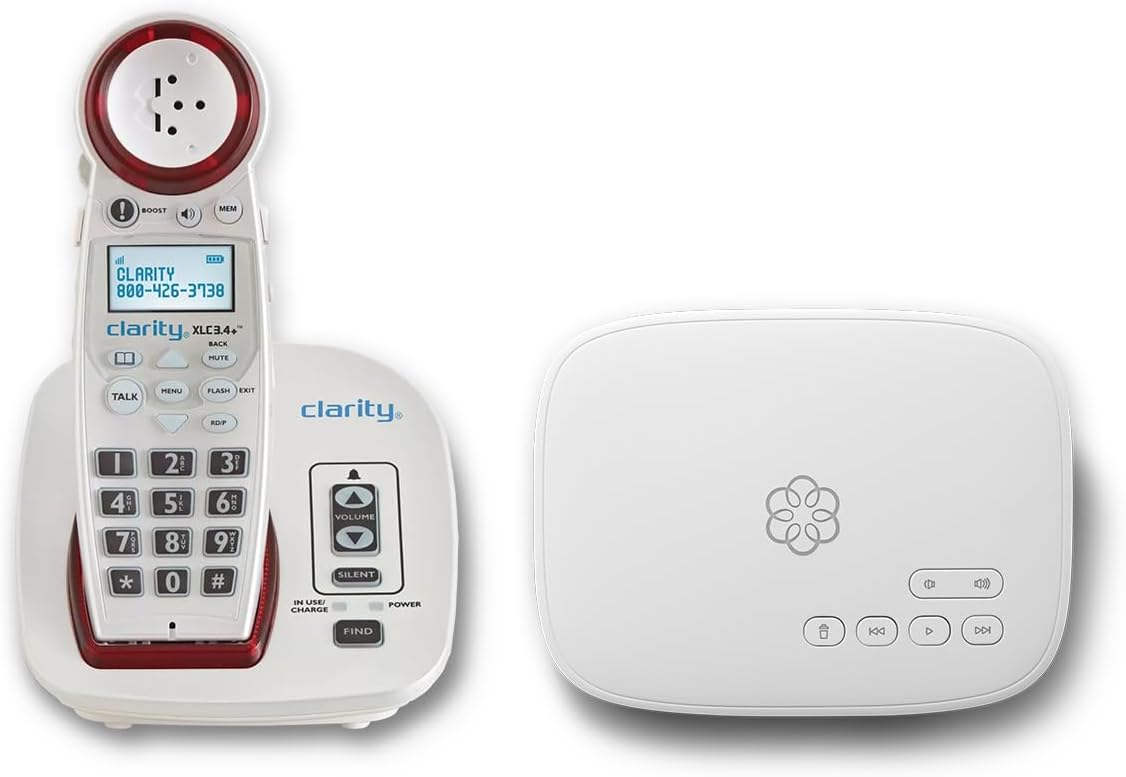
The Ooma Telo with Clarity XLC3.4+ Amplified Cordless Phone Service Bundle is the strongest service-based option in the list. It has a supplied rating of 4.5 and combines a cordless amplified phone with Ooma service, a 24/7 concierge plan, personal setup assistance, call blocking, and emergency-related features. It is aimed at households that want a complete communications system rather than a single basic telephone.
We may earn a commission when you buy through this link, at no additional cost to you.
The accessibility features include a visual ringer, adjustable ringer volume, adjustable speaker volume, hearing aid compatibility, a talking keypad, and Caller ID. The service provides nationwide calling in the U.S., Canada, and Mexico within the stated plan, along with international calling options. Advanced robocall blocking and a contacts-only calling option can help reduce unwanted interruptions and maintain privacy.
The trade-off is a required subscription and dependence on the service provider. The listed plan is monthly, with taxes and fees applying, so the long-term cost is more than a one-time hardware purchase. The phone also does not provide real-time captions. Its emergency features are useful, but users should understand that 911 behavior and text alerts depend on the registered service address, available service, and the terms of the plan.
Choose this bundle for a user who values a cordless phone integrated with modern calling service, automated blocking, and guided setup. It is a strong alternative to a traditional amplified landline, especially for someone who wants fewer incoming interruptions. It is less appropriate when the priority is written captions or when the household wants to avoid recurring service charges.
A visual ringer, adjustable speaker and ringer volume, hearing aid compatibility, and a talking keypad give the user several ways to interact with the phone. This can make everyday calls more manageable across different hearing and vision needs.
Personal setup assistance and step-by-step instructions can ease the transition to a service-based system. Concierge support adds another layer of help for users who may not be comfortable configuring internet calling, contacts, and call-blocking preferences.
We may earn a commission when you buy through this link, at no additional cost to you.
The Voice Dialer Phone is a feature-rich traditional telephone that lets users dial, answer, and end calls by voice. It has a supplied rating of 2.1, the lowest among the rated products here, which makes careful evaluation especially important. Despite that rating, the stated feature set is extensive and includes 17 voice memories, a two-line LCD, speaking Caller ID, hands-free operation, a visual LED ringer, and programmable 911 access.
We may earn a commission when you buy through this link, at no additional cost to you.
Three voice prompt words control the primary actions: dial, end, and answer. The prefix feature speaks the number before it is dialed, which can help the user confirm that the intended contact has been selected. Caller details can be spoken and shown on the LCD, while the programmable memories give voice-controlled access to frequent contacts without manually entering a complete number.
Audio and awareness options include low, medium, and high earpiece settings up to 40dB, a hands-free volume control, an off/low/high ringer switch, and a bright LED indicator. Lifetime memory backup and power-failure protection are designed to preserve important settings. On the other hand, the extensive menu, command programming, and voice behavior can create a learning curve. Speech recognition may also be less reliable in a noisy environment or for a user whose speech patterns are not recognized consistently.
This phone is best for a technically patient user or caregiver who wants voice control, spoken caller information, and many stored contacts in a conventional device. The low rating means it should not be selected solely on its long specification list. Confirm command recognition, contact programming, and local service compatibility before making it an essential communication tool.
Separate commands for answering, dialing, and ending calls can reduce the need to locate specific buttons. Spoken number confirmation and voice memories make the system useful for people who have difficulty with small keys or complex manual dialing.
The LCD and spoken Caller ID provide both visual and audible information about who is calling. Large buttons, a visual ring indicator, and multiple volume controls complement the voice features for users with different accessibility needs.
We may earn a commission when you buy through this link, at no additional cost to you.
The Nine-Photo Senior Landline is an accessible corded phone centered on one-touch photo dialing, very loud ringing, and simple line-powered operation. It has a supplied rating of 4.2. Nine picture memory keys allow a user to store family and friends more visibly than a standard numeric keypad, while the traditional RJ11 connection keeps the setup uncomplicated.
We may earn a commission when you buy through this link, at no additional cost to you.
The ringer reaches over 110dB and the earpiece volume exceeds 90dB, with three independent volume settings. A flashing LED call alert provides a visual notification for users who cannot hear the ring or who are in a noisy environment. Hands-free calling is useful for people with arthritis, tremors, Parkinson’s disease, limited grip strength, or difficulty holding the receiver for a full conversation.
There are important exclusions. The phone does not support Caller ID, voicemail, or message recording, so buyers who need to screen or review missed calls should look elsewhere. It also has no live captioning function, and the user must not disconnect the telephone line because doing so can erase the programmed photo contacts. The lack of batteries or a separate power supply is beneficial during outages but also means functionality depends entirely on the active phone line.
Best for a senior or care setting where a family member can install and program nine photo contacts, and where the priority is immediate, unmistakable calling rather than message management. Compared with the other line-powered photo phone in the list, it offers more picture keys and a louder stated ringer, making it a strong choice when visual access to frequent contacts is especially valuable.
Nine photo keys provide more visible speed-dial choices than most models in the guide. A caregiver can arrange the most important contacts around the phone so the user is less likely to need to remember a number or interpret a small label.
The exceptionally loud ringer, visual LED alert, and hands-free mode make the phone easier to notice and use. These features support users who have reduced hearing, limited mobility, or both.
We may earn a commission when you buy through this link, at no additional cost to you.
The right accessible telephone depends on whether written captions, stronger audio, easier dialing, voice control, or service integration matters most. Consider the user’s hearing, vision, dexterity, cognition, home connection, and willingness to maintain service before comparing individual features.
A genuine captioned telephone displays speech as text while the call is taking place. That is different from an amplified phone, which mainly increases call and ring volume. If the user frequently asks what was said, misses names, or needs written confirmation, the Hamilton CapTel is the only product in this list whose supplied features explicitly include real-time captions on incoming and outgoing calls. A shopper should not assume that large buttons, a loud ringer, or the word amplified means a product provides captions.
Choose real-time captioning when reading conversation text is the central need. Choose amplification when the main problem is ordinary call volume. Some households may use both approaches, keeping a captioning phone for important conversations and a simpler amplified landline as a backup.
The Hamilton CapTel needs high-speed internet, standard electrical power, and potentially telephone service, while its captioning service has eligibility and registration requirements. The FLYINGVOICE FIP12WP requires an active VoIP service, SIP server, or PBX system and cannot connect directly to a standard analog wall jack. The Ooma bundle includes phone service with a recurring subscription. By contrast, the photo-button corded phones use a standard RJ11 line and do not require batteries, Wi-Fi, or cellular service.
Match the device to the infrastructure the household already has and can maintain. Check whether internet outages affect calling, whether recurring service is acceptable, and who will help with setup. A simple line-powered phone may be more dependable for some users, while a captioning or service-based phone may provide the needed communication features when the necessary connection is available.
Amplification specifications range from adjustable gains of up to 40dB on the Hamilton and the Big Button Care Assist Phone to stated earpiece levels above 90dB and speakerphone levels above 110dB on high-output models. The VTech adds up to 50dB of audio boost and a 90dB ringer, while the Voice Dialer Phone offers earpiece settings up to 40dB. Hearing aid compatibility is explicitly mentioned for the Hamilton and Ooma products.
Look for both call-volume and ringer-volume controls, because a user may hear speech more easily than an incoming ring. Consider the environment, existing hearing aids, and any recommendation from an audiologist. A louder setting is not automatically the best setting, so begin conservatively and allow the user to adjust the level.
Visual incoming-call indicators appear on the Hamilton, the photo-button phones, the VTech, the FLYINGVOICE, the Voice Dialer Phone, and the Ooma bundle. These alerts are valuable for users with severe hearing loss or those in noisy rooms. Large high-contrast controls are especially helpful for low vision, while oversized pictorial buttons can reduce misdials and make the interface less intimidating for people with memory or cognitive impairment.
Prioritize the combination that best matches the user rather than simply choosing the largest display. A user with strong eyesight but weak hearing may need only a visual ringer, while a user with low vision may need high-contrast digits, large labels, or spoken controls. Test the physical layout when possible and consider how the phone will be reached in a bedroom, chair, or care facility.
Picture speed-dial buttons translate familiar faces into direct contact shortcuts, reducing reliance on memory and small numeric labels. The products offer varying capacities: eight photo buttons on the Dementia Photo Button Phone, three on the Big Button Care Assist Phone, four on the VTech, and nine on the Nine-Photo Senior Landline. The FLYINGVOICE takes the concept further with customizable image keys, a dedicated help key, and VoIP call handling.
Choose based on how many frequent contacts need one-touch access and whether a caregiver can install the photographs. Clear, recognizable images matter more than decorative ones, and the photos should be placed in a consistent position. Users with dementia may also benefit from a dedicated help key, but the helper should understand that a programmed button does not automatically summon emergency services.
Hands-free calling lets a user talk without continuously holding the receiver, which can help with arthritis, tremors, weak grip strength, Parkinson’s disease, or limited upper-body mobility. Several products include speakerphone functions. The dedicated Voice-Controlled Home Telephone goes further by allowing voice-based answering, dialing, and ending, while the Voice Dialer Phone adds command words, 17 programmable memories, spoken number confirmation, and talking Caller ID.
Voice control can preserve independence, but recognition quality may be affected by accents, background noise, and speaking patterns. A hands-free speakerphone can also produce feedback or sound less private. For essential calls, retain a conventional method of answering or ending the call and program any emergency shortcuts carefully.
Call management features vary substantially. The Hamilton displays captioned voicemail on its screen, while the VTech includes a 22-minute digital answering machine with remote access, slow playback, and spoken Caller ID. The Ooma service includes advanced robocall blocking and contacts-only calling. The Nine-Photo Senior Landline deliberately supports no Caller ID, voicemail, or message recording, and the Hamilton and several basic photo phones focus on different combinations of accessibility and simplicity.
Decide whether the user mainly needs to avoid unwanted calls or needs to review recorded messages. Screen-reader or caption support for voicemail is particularly valuable when hearing is difficult. If call filtering is important, verify the size of block lists and whether existing telephone numbers can be retained. If simplicity is more important, too many menus and message systems may create unnecessary confusion.
The VTech includes a corded base that can work during power outages, and the two photo-button corded phones draw power from the RJ11 line without batteries or a separate power supply. The Hamilton requires standard electrical power, the Ooma bundle depends on its service and power setup, and the FLYINGVOICE requires compatible VoIP infrastructure. Setup ranges from a four-step line-phone process to guided installation and personal assistance.
Consider who will install and maintain the phone. A line-powered model can be a dependable backup during outages, but only if the service line remains active. A service-based product may offer easier assistance but introduces subscription and network dependencies. The best choice is the one that remains understandable and usable after the initial novelty has worn off.
Begin setup with the user present whenever possible. Confirm the required line type, internet connection, electrical power, and any service eligibility before unpacking the phone. Register a captioning service when required, connect the appropriate equipment, and test both incoming and outgoing calls. Avoid choosing a device based only on an attractive feature list; the user should complete a familiarization call with a family member and confirm that captions, sound, and controls are understandable.
Personalize the accessibility features after the basic connection works. Add recognizable family photographs, store frequently dialed numbers, enlarge caption text where applicable, and adjust the ringer, receiver, and speakerphone volume for the actual home. Program emergency contacts and test the behavior of a help or SOS key with the intended caregiver. Do not assume a memory key will automatically call emergency services, and document the setup in case a replacement phone must be configured.
For ongoing care, wipe the handset and screen gently according to the manufacturer’s instructions, keep charging equipment and replacement batteries in good condition, and inspect cords for damage. Keep photo labels and emergency programming current, especially after a family member’s contact details change. Review service notifications and update calling features when prompted. If caption accuracy, amplification, or voice recognition changes, reset only the documented settings and contact the manufacturer or service provider rather than opening the equipment.
A captioned telephone displays speech as real-time text while the conversation is happening. An amplified telephone primarily increases incoming speech, ringer, or speaker volume and does not necessarily display the words being said. Among the products listed, the Hamilton CapTel 2400iSPNBT is the one that explicitly provides real-time captions.
No live captioning is listed for the large-button, photo-dialing, amplified, or voice-controlled products. Their accessibility comes from visual controls, loud alerts, hands-free operation, voice commands, or easy dialing. Buyers who require written conversations should treat the Hamilton as the dedicated captioning option and confirm the service requirements before ordering.
The Hamilton CapTel 2400iSPNBT requires high-speed internet and standard electrical power, and telephone service may also be needed. Its service is stated to be available only to eligible U.S. residents with hearing loss who complete registration. By contrast, the photo-button landlines use an ordinary RJ11 line without Wi-Fi.
The best choice depends on whether the priority is familiar photographs, a dedicated help key, line-powered reliability, or an expanded number of contacts. The FLYINGVOICE offers customizable image keys and a help key, the Nine-Photo Senior Landline provides nine picture shortcuts, and the Dementia Photo Button Phone combines eight photo keys with a loud ringer and no subscription.
The Dementia Photo Button Phone and Nine-Photo Senior Landline are described as drawing power from an RJ11 phone line and requiring no batteries or separate power supply. Their ability to remain usable during an outage therefore depends on the landline service staying active. The Hamilton and Ooma options require electrical power as well as their relevant service connections.
Start with the type of assistance that is needed: written captions, stronger call audio, a louder ringer, a visual alert, or a combination. Then consider hearing aid compatibility, sound levels, text size, button clarity, and whether the user can comfortably hear speech while using speakerphone. A hearing professional can provide useful guidance when hearing-aid compatibility or appropriate amplification is uncertain.
The line-powered photo-button phones are designed for standard RJ11 service and do not require a smartphone. The Hamilton and Ooma are service-based systems that require additional connectivity or plan setup, while the FLYINGVOICE needs compatible VoIP infrastructure. The supplied information for the two voice-control products does not fully define every connection requirement, so those details should be confirmed.
The documented photo-speed-dial capacity varies by model. The Dementia Photo Button Phone has eight photo keys, the Big Button Care Assist Phone has three, the VTech has four, and the Nine-Photo Senior Landline has nine. The FLYINGVOICE uses customizable image keys, while the Voice Dialer Phone lists 17 voice memories and a two-line LCD.
The Hamilton CapTel 2400iSPNBT is the strongest recommendation for a user whose essential need is to read live conversations, with real-time captions, assisted and automated options, amplified sound, and captioned voicemail. For households prioritizing simple accessible calling without a captioning subscription, the Dementia Photo Button Phone offers photo speed-dialing, a loud ringer, visual alerts, and line-powered operation. The VTech SN5147 is the most complete conventional amplified system, combining corded and cordless handsets with strong audio, call blocking, and a digital answering machine.
Prioritize the feature that removes the user’s largest daily barrier. Written conversation text is different from louder sound, and each product has specific service, power, and connection requirements. Large controls, picture buttons, visual ringer lights, hands-free calling, and voice commands may be highly valuable even when a device does not provide captions, but the correct setup depends on the person’s hearing, vision, dexterity, memory, and familiarity with technology.
Before ordering, verify the current feature details, service availability, compatibility, and return terms for the intended home. Product features and pricing can change, and subscription-based options should be evaluated for their ongoing cost. The most useful telephone is not necessarily the one with the longest specification list; it is the one the user can understand, operate, and reliably use every day.
