
TP-Link AC1900 Range Extender RE550
4.3Editor score
AC1900 dual-band wireless
Gigabit Ethernet port
EasyMesh-compatible design
Distance WiFi Extender guide comparing 10 indoor and outdoor options for range, WiFi speed, coverage, ports, setup ease, and outdoor durability in 2026.
A distance WiFi extender can carry a usable signal into bedrooms, basements, offices, garages, yards, and other areas where your router struggles. The right model depends on building layout, obstructions, device count, available wiring, and whether the connection must work indoors, outdoors, or between separate structures.
This guide compares ten extenders and wireless bridges based on documented wireless standards, stated coverage, supported modes, antenna design, Ethernet connectivity, setup requirements, and intended deployment environment. It includes indoor dual-band options, a weather-resistant outdoor access point, and a directional point-to-point system rather than treating every product as a conventional room booster.
The selections show that maximum advertised range is only one consideration. We also examine balance between bands, dedicated backhaul options, wired ports, mesh compatibility, PoE requirements, and installation complexity. Product listings and prices change, so check the current listing and compatibility details before ordering.
4.3Editor score

4.1Editor score
4.5Editor score
This side-by-side comparison highlights the most important differences among indoor range extenders, outdoor access points, and directional wireless bridges, including radio generation, connection methods, environmental resistance, and the scale each product is designed to serve.


The TP-Link AX3000 WiFi 6 Dual-Band Range Extender is a versatile indoor choice for homes that need more capacity than a basic 2.4GHz repeater. It carries a 4.1 rating and combines advertised rates of up to 2404 Mbps on the 5GHz band and 574 Mbps on 2.4GHz with beamforming antennas, a Gigabit Ethernet port, and support for up to 64 connected devices.
We may earn a commission when you buy through this link, at no additional cost to you.
Its most useful feature is the choice between wireless placement and wired backhaul. A home user can position the unit near a dead zone and link it to the router by Ethernet, while the gigabit port also supports access-point mode. The Tether app provides setup assistance, an intelligent signal indicator, and firmware updates, making the unit more approachable than basic WPS-only boosters.
The important limitation is that a wireless extender cannot create internet speed that the upstream connection cannot supply. TP-Link states that actual wireless extender speeds may be 50% or less than current speeds, and performance also depends on distance, walls, interference, and device capabilities. Its EasyMesh support is useful, but the listing specifically says it is not compatible with Deco mesh systems.
This is the most balanced recommendation for a reader who wants modern WiFi 6 hardware, a wired option, and app-based management without moving into specialized outdoor equipment. It suits medium and large homes with ordinary indoor dead zones, provided the extender can be placed where it receives a strong source signal. For outdoor areas or long building-to-building links, the WAVLINK and CPE660 options address more specialized needs.
The Gigabit Ethernet port allows a wired connection to the router, which is generally preferable when running cable is practical. This can preserve more throughput than relying on a wireless link between the router and extender.
Beamforming, dual-band operation, EasyMesh compatibility, and a stated capacity of up to 64 devices make this model suitable for households with numerous phones, computers, televisions, and connected accessories.
We may earn a commission when you buy through this link, at no additional cost to you.
The Baetaey 15000-Square-Foot WiFi Extender carries a 5.0 rating and focuses on straightforward coverage expansion for users who want a 2.4GHz network across a large home or small business. It offers four external antennas, WPS setup, support for 70-plus devices, and an Ethernet port within a compact general-purpose design.
We may earn a commission when you buy through this link, at no additional cost to you.
One notable strength is operating-mode flexibility. It can work as a repeater, bridge, access point, or router, allowing the same device to serve as a basic range booster, create a wireless network from a wired connection, or bridge networks. WPS pairing is advertised as taking about 30 seconds, although buyers should still be prepared to enter the device's network name and password during the initial setup.
Its radio is limited to 2.4GHz with a stated processor rate of 300Mbps. That makes it better suited to browsing, email, smart-home devices, and basic streaming than to demanding use on modern 5GHz networks. Likewise, the stated 15000-square-foot figure is a maximum coverage claim rather than a guarantee that every part of a large property will receive a strong signal.
This model makes sense for expanding a basic network into a distant room, garage, or small office where a 5GHz connection is not essential. Its 5.0 rating and broad device compatibility may appeal to budget-conscious shoppers, but the TP-Link RE550 is a stronger choice when dual-band performance and Gigabit Ethernet backhaul matter more.
Pressing WPS on the router and extender provides a quick initial connection path. The extender also includes repeater, bridge, access-point, and router modes for users who need a specific network arrangement.
The 300Mbps 2.4GHz radio is best treated as a general connectivity solution. It can serve many compatible devices, but it does not offer the higher 5GHz throughput available from several dual-band alternatives.
We may earn a commission when you buy through this link, at no additional cost to you.
The TP-Link AC1900 WiFi Range Extender RE550 has a 4.3 rating and remains a practical way to extend a home network without adopting the newest radio generation. It provides up to 1300 Mbps on 5GHz and 600 Mbps on 2.4GHz, three adjustable antennas, a Gigabit Ethernet port, and support for up to 32 devices.
We may earn a commission when you buy through this link, at no additional cost to you.
Its biggest advantage over inexpensive 2.4GHz-only boosters is the separate 5GHz band. Devices near the extender can use the faster band for streaming, downloads, and other bandwidth-sensitive tasks, while the 2.4GHz band can support compatible accessories over longer distances. The Tether app also assists with setup, signal placement, and firmware management.
This is a WiFi 5 extender, so it does not offer the 6GHz band or the newest WiFi 6 and WiFi 7 features. The listing also notes that wireless extender speeds may be 50% or less than the current connection speed, and it is not compatible with Deco mesh systems. Its stated 2100-square-foot coverage is also more modest than the largest claims made by several generic competitors.
For readers who want a proven dual-band design, useful app support, and a wired connection at a relatively modest cost, the RE550 is a strong budget-oriented choice. It is particularly suitable for apartments and medium homes with one or two troublesome areas rather than properties that genuinely need 10000 to 18000 square feet of coverage.
The 5GHz band gives compatible nearby devices a faster route to the network, while the 2.4GHz band can help with distance and connected accessories. That makes the RE550 a more versatile starting point than a single-band repeater.
The intelligent signal indicator and Tether app help users identify a better position for the unit. Firmware updates through the app also provide a straightforward way to maintain the extender after installation.
We may earn a commission when you buy through this link, at no additional cost to you.
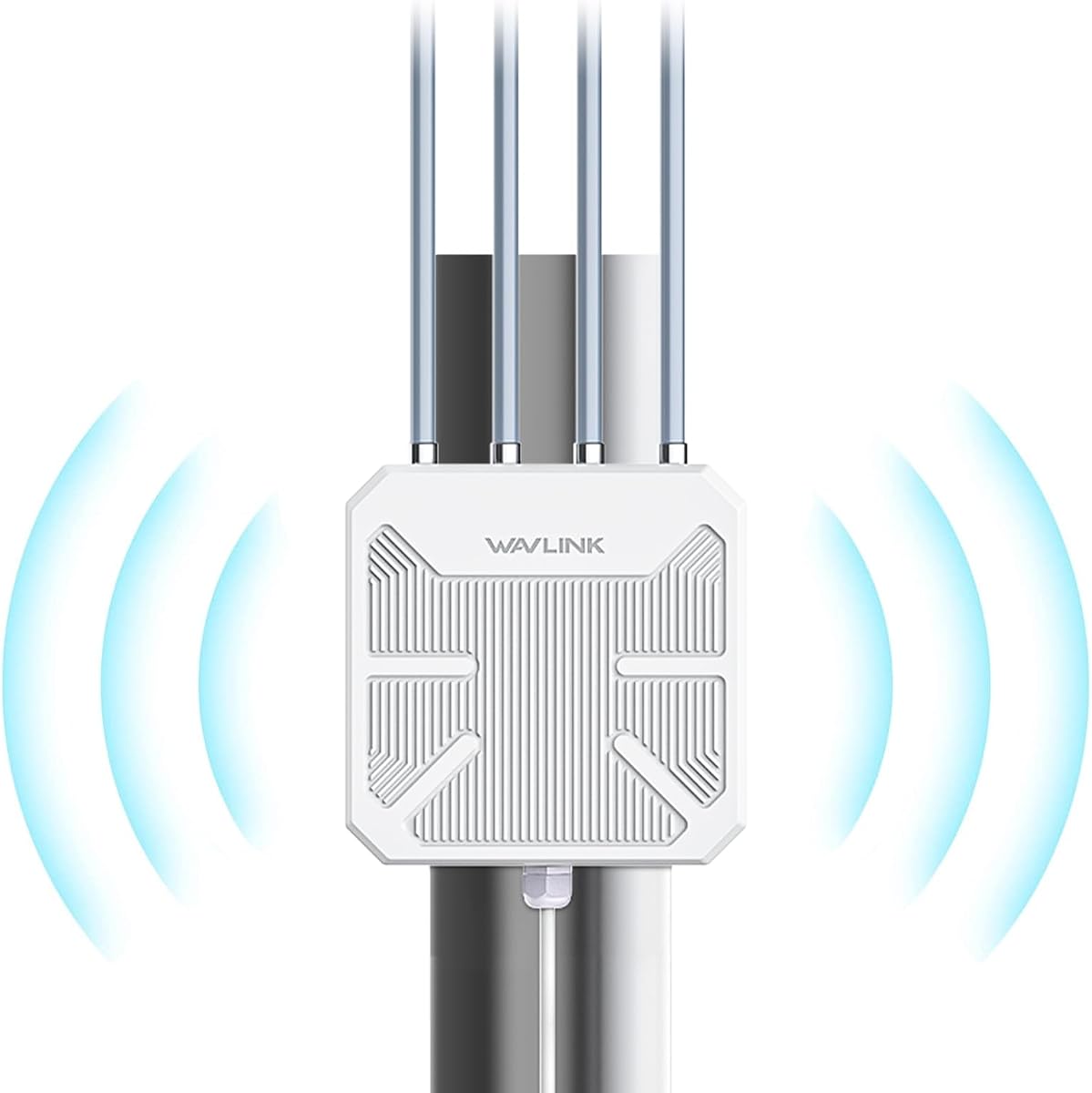
The WAVLINK AX1800 Outdoor WiFi 6 Extender has a 4.5 rating and is designed for yards, farms, garages, estates, and other exposed locations. Its dual-band WiFi 6 radio advertises up to 1201 Mbps on 5GHz and 574 Mbps on 2.4GHz, while an IP67 sealed housing is intended to resist moisture, dust, heat, and cold.
We may earn a commission when you buy through this link, at no additional cost to you.
Four detachable 8dBi fiberglass antennas provide substantial directional options, and the listing describes clear-line-of-sight coverage of roughly 200 to 300 meters in radius. The unit supports mesh, access-point, router, repeater, and combined AP-plus-repeater modes, giving installers several ways to integrate it with an existing network.
Power can be delivered through active 802.3af/at PoE or passive PoE, allowing a single Ethernet run to provide both connectivity and electricity in suitable installations. The included passive adapter is not weatherproof and must be kept dry, while the unit is specified for temperatures from -20°C to 50°C. Clear line of sight remains essential for the longest advertised distances.
This is the premium recommendation for readers who specifically need outdoor coverage rather than another indoor room booster. It is especially relevant for outdoor cameras, larger properties, and remote structures near the main building. It is overkill for a small apartment, and a conventional indoor dual-band extender will usually be simpler.
The IP67 casing and sealed design distinguish this model from indoor extenders. Its documented temperature range and resistance to moisture and dust make it appropriate for exterior installations where weather exposure is unavoidable.
Active and passive PoE options can carry power and network data over one suitable Ethernet cable. This is useful at gardens, farms, and other locations where access to a nearby power outlet is limited.
We may earn a commission when you buy through this link, at no additional cost to you.
The TP-Link BE3200 Wi-Fi 7 Dual-Band Range Extender RE223BE has a 4.2 rating and is the forward-looking option in this roundup. It advertises up to 2594 Mbps on 5GHz and 688 Mbps on 2.4GHz, four positioned antennas, beamforming, EasyMesh compatibility, and support for up to 64 devices.
We may earn a commission when you buy through this link, at no additional cost to you.
Its most interesting feature is Multi-Link Operation when paired with a compatible WiFi 7 router. The listing also highlights Multi-RUs, 160MHz channels, and 4K-QAM as part of the WiFi 7 feature set. These capabilities can improve throughput, latency, and reliability for compatible devices, but they do not make a WiFi 6 or WiFi 5 router suddenly equivalent to a WiFi 7 network.
The extender remains a dual-band device and does not support the 6GHz band. Users should also expect reduced wireless extender throughput compared with the source connection, and the unit is not compatible with Deco systems. Buying it without WiFi 7 equipment may provide little immediate advantage over a mature WiFi 6 alternative.
The RE223BE makes the most sense for a household that already owns or plans to buy WiFi 7 networking equipment and wants easy expansion or roaming across multiple areas. For an existing WiFi 6 network, the AX3000 or AX1800 TP-Link models may deliver a more logical upgrade path.
Multi-Link Operation can combine the 2.4GHz and 5GHz bands with a suitable WiFi 7 router. The benefits are most relevant to newer phones, laptops, and other clients that also support the required WiFi 7 features.
Four antennas, beamforming, an intelligent signal indicator, and automatic roaming help expand coverage through a multi-room home. The Tether app assists with setup and ongoing network management.
We may earn a commission when you buy through this link, at no additional cost to you.
The Generic 10000-Square-Foot Internet Booster carries a 5.0 rating and offers a broad set of installation options. It includes four external antennas, a 2.4GHz processor, an Ethernet port, WPS setup, and five modes: repeater, client, access point, bridge, and router.
We may earn a commission when you buy through this link, at no additional cost to you.
That operating-mode range is the defining feature. A user can extend an existing wireless network, connect the device as a client, create Wi-Fi from a wired connection, bridge networks, or use it as a router. The product listing also states compatibility with most WiFi routers and support for more than 65 devices, including cameras, consoles, phones, laptops, and tablets.
The limitation is that the listing centers on a 2.4GHz processor and does not describe a 5GHz radio. The stated 10000-square-foot coverage should therefore be treated as a broad maximum claim, with real results influenced by the router, building materials, placement, and interference. The phrase that it is 80% faster also does not provide a standardized baseline for independent comparison.
This booster is a reasonable choice for users who value simple setup, multiple modes, and broad device compatibility more than high-band throughput. It may serve a small office, garage, or older home well. Homes with numerous high-bandwidth devices should favor a dual-band extender such as the TP-Link RE550 or RE615X.
The combination of repeater, client, access-point, bridge, and router modes lets the device adapt to different layouts. This flexibility is useful when the main router or an existing Ethernet drop is in an awkward location.
A WPS button on the extender and router creates a quick initial connection path. The setup remains accessible to nontechnical users, although the network's existing security settings still need to be considered.
We may earn a commission when you buy through this link, at no additional cost to you.
The Hyzom WiFi Extender Signal Booster has a 4.8 rating and is positioned as an easy way to reach bedrooms, garages, and basements in a large home. Its listing includes four high-gain antennas, an Ethernet port, WPS and browser-based installation, and support for more than 65 connected devices.
We may earn a commission when you buy through this link, at no additional cost to you.
The product is designed around stability rather than a specific new WiFi generation. Its stated strengths include smooth 4K video, clear calls, and a bionic chip, but the listing does not provide a detailed dual-band rate table comparable with the TP-Link specifications. It is therefore better evaluated as a general long-range booster than as a high-throughput gaming radio.
There is also a wording inconsistency worth noting. The product title refers to coverage of up to 18000 square feet, while the detailed description states up to 15000 square feet. Regardless of which figure is used, both are maximum claims that depend on placement, the source router, walls, floors, and nearby interference. A large stated footprint does not guarantee strong performance in every room.
The Hyzom option is best for users who need a simple way to bring a basic network to a far-away indoor area and want a wired fallback for a computer, console, or television. Buyers seeking known 5GHz throughput, app management, or mesh integration should choose a model with more detailed radio and software information.
WPS setup offers a quick starting point, while browser-based installation provides an alternative configuration route. These options make the unit approachable for extending a network into a distant room or garage.
The Ethernet port allows a nearby computer, television, or console to use a wired connection. Wireless clients can use the extender for broader room coverage, making the device adaptable to different household needs.
We may earn a commission when you buy through this link, at no additional cost to you.
The Eboous 15000-Square-Foot WiFi Extender has a 5.0 rating and stands out visually for its set of eight external antennas. It supports 65-plus devices, an Ethernet connection, WPS setup, and five operating modes covering repeater, bridge, access-point, mesh, and router functions.
We may earn a commission when you buy through this link, at no additional cost to you.
The large number of antennas gives users several placement choices, which can be useful when a unit must communicate in a specific direction or navigate around furniture. The product description also emphasizes stable connections through walls and floors and coverage extending from a basement to a backyard. Those are useful goals, but outcomes still depend on the existing router and the building's construction.
The advertised six-times-faster claim does not provide enough context to serve as a direct comparison with other products. The listing likewise does not offer the same granular band-rate information found in the TP-Link products. Buyers should interpret the headline speed language as a feature claim rather than a guaranteed increase over the current internet connection.
This is a flexible option for homes that need both wireless extension and several possible network roles. It is worth considering when the exact placement of the booster is uncertain. However, a model with explicit dual-band rates, app management, and clearer backhaul guidance may be easier to evaluate and maintain for users who care about consistent performance.
The numerous external antennas can be adjusted to suit the unit's orientation. This may help optimize communication with the source router, although proper placement remains more important than antenna quantity alone.
Repeater, bridge, access-point, mesh, and router modes allow the extender to serve different network arrangements. WPS pairing keeps the initial setup relatively simple for common household installations.
We may earn a commission when you buy through this link, at no additional cost to you.
The TP-Link RE615X AX1800 WiFi 6 Range Extender has a 4.2 rating and offers a straightforward way to add WiFi 6 coverage to an existing home network. It advertises up to 1201 Mbps on 5GHz and 574 Mbps on 2.4GHz, uses two high-gain directional antennas, and includes a Gigabit Ethernet port.
We may earn a commission when you buy through this link, at no additional cost to you.
Beamforming strengthens signal direction and reliability, while the Ethernet port gives users the option of a wired connection between the router and extender. The unit supports up to 64 devices, EasyMesh-compatible routers, smart adaptive roaming, and access-point mode. Setup and management are available through the Tether app for Android and iOS.
Compared with the TP-Link AX3000, the RE615X has lower advertised 5GHz throughput and a smaller stated coverage figure of 2100 square feet. The listing also includes a 6GHz-band warning, and it is not compatible with Deco mesh systems. Like other wireless extenders, it improves coverage rather than increasing the underlying internet connection.
The RE615X is a strong choice for a medium home with WiFi 6 routers and one troublesome area. It is particularly attractive when a short Ethernet cable can be run, since that avoids the largest performance penalty associated with wireless backhaul. The AX3000 model is the stronger option for users who need a higher 5GHz ceiling, while this unit focuses on a more modest indoor footprint.
The AX1800 radio provides a clear upgrade over older WiFi 5 extenders while avoiding the size and complexity of specialized outdoor hardware. It is well suited to extending modern dual-band home networks.
Connecting the extender to the router with Ethernet can provide a more reliable and faster extension than a wireless link. The same port also supports access-point operation and wired devices.
We may earn a commission when you buy through this link, at no additional cost to you.
The AdaLov CPE660 3KM Outdoor Wireless Bridge has a 4.4 rating and solves a different problem from ordinary room extenders. It is designed to create a point-to-point 5.8GHz link between buildings up to 3KM apart with clear line of sight, making it relevant to farms, barns, garages, warehouses, shops, and remote surveillance locations.
We may earn a commission when you buy through this link, at no additional cost to you.
Its integrated 14dBi directional antenna focuses the radio link, while the IP65 housing protects the unit in exterior installations. Two 100Mbps Ethernet ports provide wired endpoints, and one supports 24V PoE while the other accepts 24–48V PoE. Users must match the correct port and voltage because connecting a PoE switch to the 24V-only port could damage the unit.
The units arrive pre-programmed in WDS bridge mode, which simplifies the initial process: mount both ends, connect the PoE adapters, aim the directional antennas, and power them. Adjustable wall or pole brackets and included cable ties support proper alignment. Unlike a household repeater, however, the system works best as a fixed outdoor link and cannot bypass obstructions such as buildings or dense trees.
The CPE660 is the specialist recommendation for people who need a network between two locations and want to avoid a long Ethernet run. It is not a practical substitute for an indoor booster, and its use requires a pair of units plus careful planning. For basic in-home coverage, the TP-Link models are much simpler and more versatile.
The 14dBi directional antenna and documented 3KM clear-line-of-sight capability are designed for stable links across open space. Proper mounting and alignment are essential to achieving the advertised long-distance performance.
The IP65 housing, PoE support, mounting brackets, and cable ties cover the practical requirements of an exterior deployment. Users should also follow the specified Ethernet and PoE voltage limits to protect the bridge.
We may earn a commission when you buy through this link, at no additional cost to you.
The right range extender depends less on the largest advertised coverage number and more on matching the radio, installation method, and antenna design to the location. Consider distance, walls, power access, bandwidth requirements, and whether the system needs to operate indoors, outdoors, or between separate buildings.
Map the areas where the signal fails before choosing a model. A nearby wall, an older router, a closed room, or a distant floor can create a dead zone even when other parts of the home perform well. A moderately powerful dual-band extender placed halfway toward the problem area may work better than a high-gain model positioned beside the router. The stated square-foot figures are maximum marketing claims rather than guaranteed performance across every floor plan.
Identify what types of devices need help. General browsing and smart-home accessories may be satisfied by a 2.4GHz booster, while 4K video, large downloads, and online gaming benefit from a strong 5GHz connection. Check the distance from the router and the number of walls between the router, extender, and target device.
A wireless extender receives your router's signal over the air and rebroadcasts it, often on the same radio used to serve clients. This halves the available airtime for data and can reduce throughput. TP-Link explicitly notes that actual wireless extender speeds may be 50% or less than the current connection, depending on conditions. A wired Ethernet backhaul avoids much of that penalty and generally produces more consistent results.
Prioritize a Gigabit Ethernet port if running a cable is realistic. If a cable cannot be installed, look for good source-router signal at the chosen extension point, dual-band operation, adjustable antennas, and an intelligent placement indicator. Avoid positioning the extender exactly where the phone signal is weak, because it needs a strong incoming connection to create a strong outgoing one.
A WiFi 6 extender can provide a good match for modern dual-band routers and compatible devices. A WiFi 7 extender, such as the TP-Link RE223BE, makes the most sense when the source router and primary clients also support WiFi 7 features such as Multi-Link Operation. Older AC1900 equipment remains useful, but it does not add newer capabilities to the source network.
Do not confuse theoretical radio rates with the speed of the internet service. The extender can improve signal reliability and available throughput, but it cannot create bandwidth beyond the upstream connection. Compare each product's band rates with the needs of nearby devices, and pay more attention to a balanced setup than to the largest headline number.
Indoor extenders are designed for dry, temperature-controlled spaces and usually include an app or simple WPS setup. Outdoor access points add sealed housings, weather ratings, outdoor antennas, and PoE options. Point-to-point bridges are narrower still: they use directional antennas to link fixed locations and usually require a matched pair, clear line of sight, and careful alignment.
Do not place a basic indoor repeater in an exposed shed or yard unless its documentation permits it. For exterior use, choose a product with an appropriate IP rating and operating-temperature specification. For a separate building, an outdoor bridge can outperform a room extender because its directional design focuses energy toward the receiving unit.
External antennas are useful when a unit must be aimed toward a router or a target area, while internal or fixed antennas are often simpler for general room coverage. Adjustable antennas can help with orientation, but more antennas do not automatically guarantee better performance. Signal strength, interference, distance, and source-router capability remain more important.
Look for coverage descriptions that include realistic deployment conditions. A stated 300-meter radius in an open yard is different from 10000 square feet inside a home with several walls. Review whether the product is designed for a single router connection, a large property, or a point-to-point link before relying on its stated range.
Several products in this roundup state support for approximately 65 to 70 or more devices, while the TP-Link AX3000, RE550, RE615X, and RE223BE list capacities of 32 or 64. Those figures are useful comparisons, but they do not describe every workload equally. Video calls, high-resolution streaming, gaming, and large file transfers consume substantially more capacity than many small connected sensors.
Consider Ethernet ports as well. A gigabit port can connect a desktop, game console, or smart television without relying on the wireless signal. It can also create a wired backhaul or operate in access-point mode. For a heavily connected home, support for 5GHz clients and a stable wired path may matter more than the largest stated device count.
Repeater mode extends an existing network, access-point mode creates Wi-Fi from Ethernet, and router or bridge modes serve more specialized networks. WPS makes initial pairing simple, while an app can assist with placement, firmware updates, and network management. Products that support EasyMesh can work with compatible routers, but the listings note that the TP-Link extenders are not compatible with Deco systems.
Security matters because a range extender becomes another radio in the household network. WPA2 or WPA3 support, current firmware, and a password matching or extending the existing network are important. For outdoor equipment, also protect Ethernet connections and keep non-weatherproof power adapters indoors and dry.
Outdoor deployments should account for weather, direct sun, temperature, and cable routing. PoE can carry power and network data over a single cable, but the exact standard and voltage must match the device. The WAVLINK supports active 802.3af/at and passive PoE, while the AdaLov CPE660 has two Ethernet ports with different supported PoE ranges.
For a long bridge, verify line of sight before ordering. Trees, hills, buildings, and other obstructions can prevent a directional link from reaching its stated distance. Plan both endpoint locations, mounting height, antenna alignment, Ethernet length, and protection for any adapter that is not rated for outdoor exposure.
Begin by identifying the existing router, its WiFi generation, and the area that needs better coverage. Place the extender roughly halfway between the router and the weak zone, where a phone or laptop should receive a strong signal from the router. For a wired setup, connect the Gigabit Ethernet port to the router and use an outlet that supports both power and the network cable.
Power on the unit and follow its setup method. WPS pairing requires pressing the compatible buttons on the router and extender, while app-based products may guide the user through connection and placement. If using access-point mode, connect Ethernet first and configure the extender as a new wireless network. After setup, compare speed and signal strength in the target room rather than judging performance only next to the extender.
For an outdoor unit, mount it securely, aim the antennas as instructed, and use the correct PoE port and voltage. For a point-to-point bridge, align both directional units toward one another and check the link before running permanent cables. Periodically check firmware, reposition the unit after furniture or router changes, and keep non-weatherproof adapters and connectors dry and protected.
Actual reach depends on the router, radio bands, antennas, obstacles, interference, and the extender's placement. Stated square-foot and distance figures represent maximum or ideal conditions rather than guaranteed performance throughout an entire building. A clear outdoor line of sight may allow a directional system to cover a much larger distance than an indoor repeater placed through several walls.
A wired extender usually performs more consistently because it avoids sending the source traffic through the air twice. Ethernet backhaul can provide higher effective throughput and lower ambiguity about signal quality. Wireless placement is more convenient when running cable is impossible, but it works best when the extender receives a strong signal from the original router.
No extender can increase the speed supplied by the internet service. It can improve the speed available to a client by providing a stronger or more reliable connection where the original signal was weak. TP-Link's listings warn that actual wireless extender speeds may be 50% or less than current speeds, and performance varies with distance and obstacles.
A WiFi 6 extender is generally the more practical choice for an existing WiFi 6 home network. WiFi 7 can deliver more advanced features when paired with a WiFi 7 router and compatible clients, but older equipment cannot use every advantage. Check that the extender also supports the bands and features used by your existing network.
Many outdoor access points, including the WAVLINK AX1800, can be installed with a single Ethernet cable when compatible PoE supplies both power and data. Other models may require separate power and network connections. A point-to-point bridge also normally uses Ethernet at each endpoint even though the link between them is wireless.
That depends on the brands and standards involved. Several TP-Link models here support EasyMesh-compatible routers but explicitly do not work with Deco mesh systems. Other extenders offer a mesh operating mode, while conventional repeaters may create a separate network name. Confirm compatibility with the existing system before installation.
Place it between the router and the dead zone, not at the farthest point of the house. The location should receive a strong signal from the router, have access to power, and be close enough to the target area that its rebroadcast signal remains useful. Wired backhaul is preferable whenever a cable can be installed.
A range extender is generally designed to rebroadcast a router's wireless network within a home. A wireless bridge establishes a more directed link, often between two buildings or a remote structure and the main network. Bridges use focused antennas, fixed alignment, and outdoor-rated hardware, making them better for point-to-point coverage but less convenient for ordinary room expansion.
The TP-Link AX3000 WiFi 6 extender is the strongest all-around indoor recommendation, offering modern dual-band hardware, Gigabit Ethernet, EasyMesh compatibility, and app-assisted setup. The TP-Link AC1900 RE550 is the budget-oriented alternative for users who want dual-band operation and a wired port without moving to WiFi 6. For exterior coverage, the WAVLINK AX1800 stands apart with its IP67 housing, high-gain antennas, and PoE flexibility.
Prioritize the installation rather than the largest range claim. Measure the source signal where the extender will sit, identify whether a cable can be run, match the radio generation to your router, and account for the devices that need service. Specialized needs call for specialized equipment: the AdaLov CPE660 is a point-to-point bridge for separate locations, not a substitute for an indoor room extender.
Product specifications, availability, and prices can change, so confirm the current listing before making a purchase. Review the supported bands, operating modes, PoE requirements, and compatibility with your existing router. With those details checked, you can choose a distance WiFi extender that solves the actual coverage problem without expecting it to create speed your internet service does not provide.