
Kayoubi 14.5-Inch LCD Writing Tablet
4.6Editor score
Large child-friendly canvas
One-button erase control
Lock protects saved artwork
An electronic sketch pad can turn blank ideas into drawings, handwritten notes, diagrams, and portable creative workspaces. The right choice depends on whether you want a traditional pen-and-paper feel, a child-friendly mess-free board, a computer-connected drawing surface, or a fully standalone tablet that works without external hardware.
We compared the ten products in this guide across their core functions, including stylus behavior, active drawing area, portability, standalone capability, display features, app support, and intended users. The list intentionally mixes dedicated writing tablets, paper-based note systems, pen displays, and simple LCD boards because each serves a different sketching or notetaking need.
Each pick highlights the strongest qualities found in the supplied product information while also identifying important limitations. Ratings and specifications can evolve, and current prices and availability change frequently, so readers should verify the latest listing details before making a purchase.
4.6Editor score

4.4Editor score
4.2Editor score
As an Amazon Associate we earn from qualifying purchases.
This side-by-side comparison shows how the products differ in purpose, hardware, connectivity, and user experience, helping you choose between a simple writing board, a connected graphics tablet, a pen display, and a standalone creative tablet.




The HUION Note is an app-based notebook that combines a digital pen, a standard A5 paper pad, and the Huion Note application. With a 4.2 rating, its strongest quality is the way it preserves the tactile experience of writing on ordinary paper while simultaneously capturing vector versions of each stroke. That makes it unusual among electronic sketch pads because it does not ask users to replace paper with a glowing screen for the primary writing experience.
We may earn a commission when you buy through this link, at no additional cost to you.
Its real-time and offline synchronization gives users a practical way to move handwritten work into a digital archive. Vector lines preserve stroke information, while the option to record synchronized audio helps capture the reasoning behind a note rather than merely its final appearance. Notes can be organized into groups, edited with a highlighter, and exported as images, PDF documents, or MP4 files. Automatic Bluetooth 5.0 pairing through Bluetooth 5.0 reduces the setup burden once the Huion Note app is open.
There are still trade-offs. This is not a large standalone tablet, and its strongest digital workflow revolves around the mobile app rather than a desktop display. The 18-hour active battery life and roughly 30-day standby period are useful, but users will need to recharge it periodically. Those limitations are acceptable if the goal is to write naturally on paper while producing organized, shareable digital records.
Choose the HUION Note for students, professionals, and creative thinkers who prefer ink on paper but want searchable, transferable, and editable digital copies. It is especially compelling for meeting notes, classroom work, brainstorming, and informal sketches. For people who want a self-contained tablet with a large display, however, the XPPen Magic Note Pad offers a more conventional standalone alternative.
Writing directly on the included A5 pages feels more familiar than sketching on a backlit screen. The pen captures strokes as vectors, so users can keep the tactile workflow while gaining editing, sharing, and organizational tools in the app.
Replacing the notebook pages with the supplied panel turns the device into a connected graphics tablet. That versatility allows the same hardware to serve as both a traditional paper notebook and a conventional digital drawing surface.
We may earn a commission when you buy through this link, at no additional cost to you.
The XPPen Magic Note Pad combines a 10.95-inch paper-textured display with a standalone Android 14 system, giving it the balance of a notebook and a compact creative tablet. Its 4.4 rating reflects a product designed to handle sketching, note-taking, reading, and document annotation rather than a single narrow task. The 90Hz refresh rate and support for 16,384 pressure levels make it especially relevant to artists who want responsive lines and controlled shading.
We may earn a commission when you buy through this link, at no additional cost to you.
The AG nano-etched surface is intended to provide texture and friction resembling traditional paper. Combined with the battery-free X3 Pro Pencil 2 and tilt support, it offers a convincing alternative for pencil users. Natural Mode provides a full 16.7-million-color palette, while Light and Black-and-White modes can make annotation, sketching, and reading more comfortable in different environments. Low-blue-light certification and anti-glare treatment also support longer creative sessions.
The main limitation is that it runs as an Android tablet rather than a dedicated drawing display, so software choice and app behavior matter. It offers three built-in viewing modes, which may not reproduce every color-critical workflow. It also lacks the direct drawing-on-screen experience of the HUION Note, even though the paper-like texture is more prominent than on many conventional tablets.
This is the strongest recommendation for a user who wants one portable device for both handwritten notes and substantial digital illustration without carrying a computer. Artists, students, and professionals who value texture, pressure control, color, and portability will appreciate its balance. It is also a sensible choice for readers who want downloadable apps and multiple creative modes rather than a fixed-purpose sketch surface.
The etched screen offers more tactile resistance than a smooth glass panel. Full-color Natural Mode then makes the device useful for illustration, while alternate modes support clearer note annotation and distraction-free reading.
Android 14, Google Play access, and the preinstalled XPPen Notes app let users work away from a desk. The 495-gram body and 7mm thickness support portable use, while the battery-free stylus eliminates routine stylus charging.
We may earn a commission when you buy through this link, at no additional cost to you.
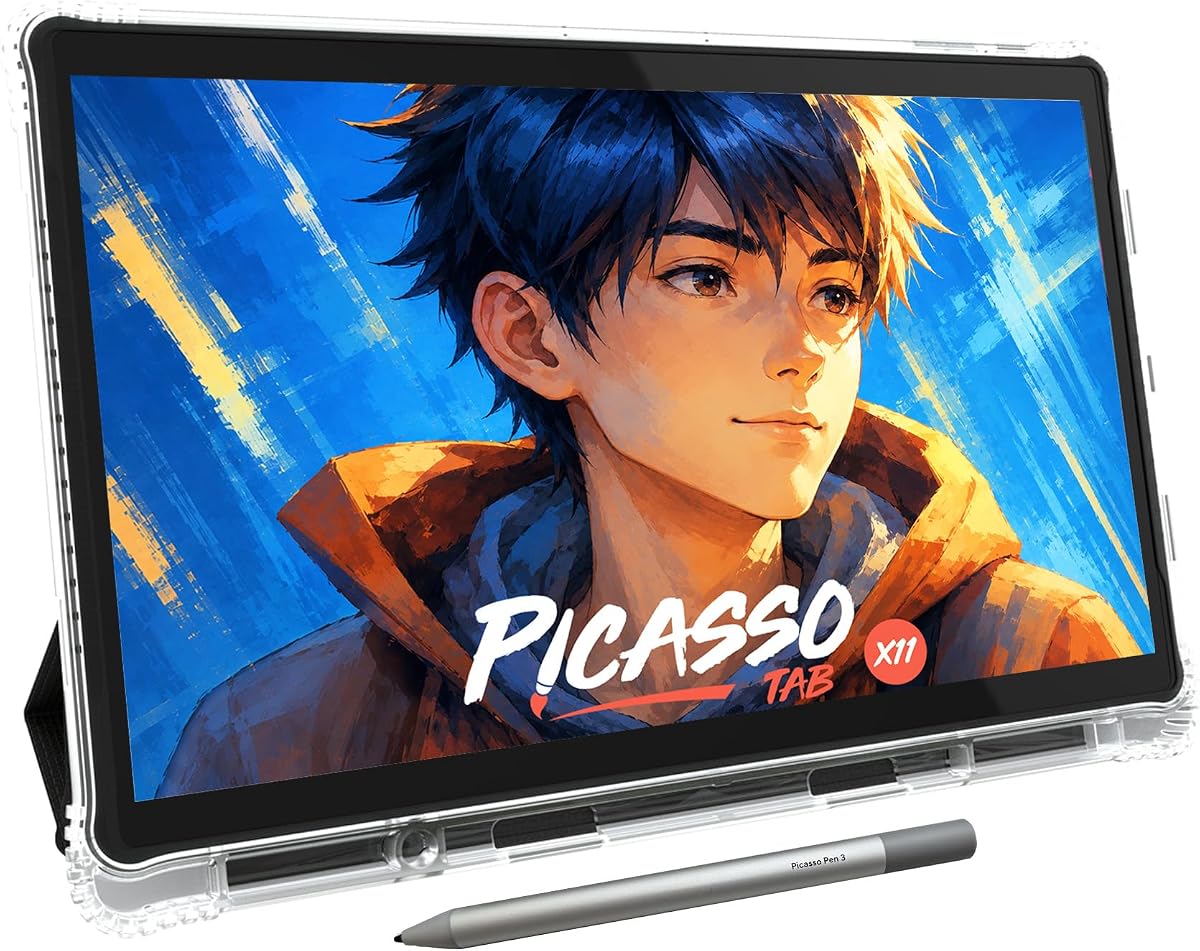
The PicassoTab X11 is a full standalone 11-inch drawing tablet rather than a simple accessory or pen display. Its 4.2 rating reflects an all-in-one package aimed at students, hobby artists, and beginners who want to sketch, paint, animate, follow tutorials, and complete general tablet tasks without connecting to a computer. The laminated 2K display is designed to reduce parallax and glare while preserving a paper-like drawing sensation.
We may earn a commission when you buy through this link, at no additional cost to you.
Five preloaded applications cover sketching, painting, animation, tutorials, and guided lessons. The included lifetime upgrades for Concepts and Artixo add long-term creative and instructional value, while the Xplore app provides drawing guides and assistance. An octa-core processor, 6GB of RAM, and 128GB of expandable storage create enough capacity for drawing software, schoolwork, streaming, and multitasking. The supplied case, glove, adapter, and screen protector make the package more complete than a bare tablet.
Its upgraded stylus offers 4096 pressure levels, which is ample for everyday sketching, shading, and illustration, though it does not match the 16,384 levels offered by the XPPen Magic Note Pad. The larger footprint can also be less convenient for very compact travel. Because it is a general Android-style tablet, users should check application requirements before committing to a demanding professional workflow.
The PicassoTab X11 is a particularly good fit for beginners who value guided instruction alongside drawing tools. It also suits students who need a single device for art, homework, and entertainment. Experienced illustrators who prioritize maximum pressure resolution may prefer the XPPen option, while buyers wanting a computer-based workflow should examine the UGEE M708 or Wacom Intuos.
Step-by-step Artixo lessons and drawing support in the Xplore app make the X11 less intimidating for first-time creators. This instructional layer complements the drawing and painting applications, helping users progress beyond random practice.
The octa-core processor and 6GB of RAM allow the tablet to handle creative software alongside schoolwork and streaming. Expandable storage adds room for larger files, while the laminated screen provides a more comfortable drawing surface than an untreated glossy panel.
We may earn a commission when you buy through this link, at no additional cost to you.
The Kayoubi writing tablet is a large-format LCD doodle board designed primarily for children. Its 4.6 rating and 14.5-inch screen distinguish it from smaller, more basic writing toys. The generous canvas gives young artists more room for drawings, stories, practice letters, and collaborative sketches, while the simple pressure-sensitive surface keeps the experience approachable.
We may earn a commission when you buy through this link, at no additional cost to you.
A one-button erase control lets users clear the screen quickly, and a lock function protects artwork from accidental deletion. This makes the board practical for children who may press buttons enthusiastically during creative bursts. It can also serve older children, teens, and adults who want a simple place for casual notes, planning, or recreational drawing without managing complicated software.
The device does not offer the pressure range, color depth, file storage, or export functions found in a professional digital sketch system. Its value rests on the large screen, simple operation, and reusable paperless format. Buyers seeking an advanced illustration tool should look beyond this category of device.
Choose the Kayoubi board for young creators who need more drawing space than a conventional compact LCD tablet offers. It is also well suited to car trips, quiet family activities, classroom play, and simple household creative sessions. Adults looking for the easiest way to entertain a child with drawing and writing will likely find its uncomplicated design especially useful.
The 14.5-inch active area gives children a noticeably broader canvas than most entry-level writing boards. That extra space is valuable for large doodles, collaborative drawings, and early handwriting practice.
A dedicated one-click erase button and artwork lock reduce accidental losses. These simple safeguards make the tablet approachable for younger users while preserving the fun of immediate digital reset.
We may earn a commission when you buy through this link, at no additional cost to you.
The Bravokids 10-inch LCD writing tablet is a portable creative toy for children ages three to eight. Its 4.6 rating reflects a straightforward design that performs familiar jobs well: drawing lines, making colorful doodles, practicing simple writing, and providing quiet entertainment. The display uses pressure sensitivity to vary line thickness according to how hard the stylus, nail, or another hard object presses.
We may earn a commission when you buy through this link, at no additional cost to you.
At only 150 grams, the rounded plastic tablet is easy to carry in a school bag, handbag, or travel bag. Its durable construction and anti-fall, anti-shock design suit children who may drop it. The screw-secured battery door adds an extra layer of safety around the power source, while the one-second erase control and lock key make the operation simple for young users.
Unlike app-based sketch systems, this is a fixed-purpose LCD board rather than a storage or export platform. It does not provide layers, professional pressure response, color calibration, or a substantial note-taking workspace. Its reusable format avoids ordinary paper waste, but the user must accept a basic visual environment in exchange for simplicity.
This tablet is best for families seeking a lightweight, quiet activity for children during travel, meals, or downtime. It can also serve adults who want a straightforward surface for lists, reminders, and casual sketches. Buyers ready for creative software and digital organization should instead consider the XPPen Magic Note Pad or PicassoTab X11.
The slim, lightweight body is easy to pack for flights, road trips, and family outings. Its pressure-sensitive surface creates varied strokes without requiring fine motor control or complicated settings.
Rounded corners, durable plastic, and a secured battery door suit regular use by children. The lock control preserves favorite drawings, while the erase button resets the board quickly between activities.
We may earn a commission when you buy through this link, at no additional cost to you.
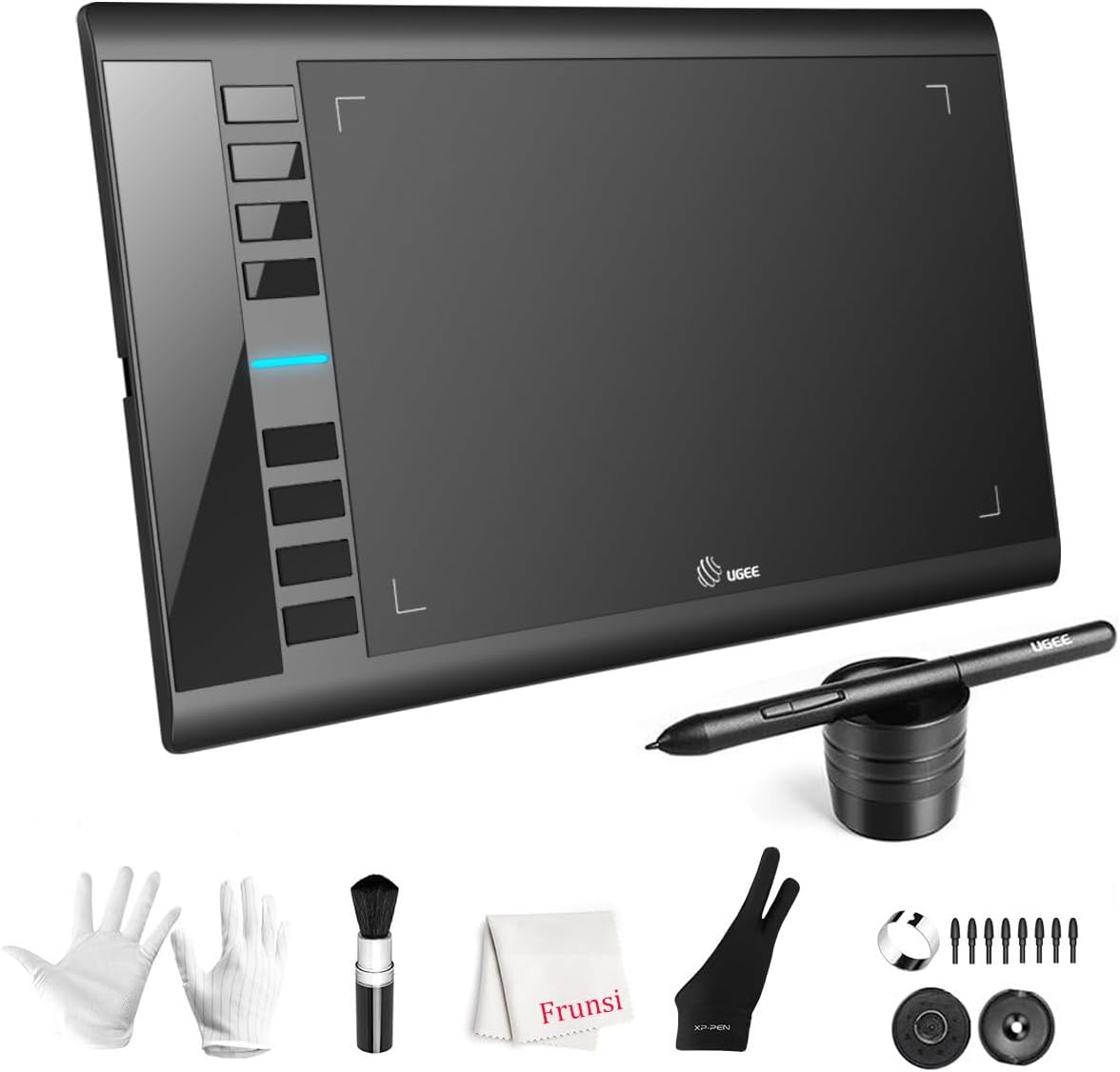
The UGEE M708 is a connected drawing tablet aimed at new artists, hobbyists, and students who want a generous working surface. With a 4.4 rating, it stands out for combining a 10-by-6-inch papery-textured area with 16,384 pressure levels and eight customizable express keys. It is not an all-in-one sketch pad, but it can be an effective bridge between traditional drawing and professional desktop software.
We may earn a commission when you buy through this link, at no additional cost to you.
The passive stylus supports accurate changes in line weight and opacity, making it useful for illustration, brush effects, design, and basic photo retouching. Compatibility covers common Windows, Mac, Android, Chrome OS, and Linux environments, along with established creative programs such as Photoshop, Illustrator, SAI, Comic Studio, ZBrush, and 3D software. USB-to-USB-C connectivity and included adapters simplify setup across different computers.
The principal drawback is dependence on a host device. There is no built-in screen, onboard storage, or standalone app system, so the tablet cannot provide a complete sketch experience by itself. A separate monitor may also be necessary for users who want to see their full cursor movement comfortably.
Choose the M708 when you already own a capable computer and want an affordable, roomy graphics tablet for learning digital art. Its shortcut keys can streamline erasing, zooming, scrolling, and undoing, while the textured surface offers a more paper-like experience than many basic models. It is less suitable for someone who wants a portable, self-contained notebook.
The wide active area gives beginners more space than compact beginner tablets. With the supplied stylus and standard computer connection, users can move directly from handwritten practice into drawing and painting applications.
Eight configurable buttons place frequently used tools within reach. Users can adapt the layout for erasing, zooming, scrolling, undoing, and other actions that improve efficiency in supported software.
We may earn a commission when you buy through this link, at no additional cost to you.
The Mafiti 8.5-inch LCD tablet is a compact, practical memo and doodle pad for children, offices, and quick household notes. Its 4.2 rating suits a device focused on dependable basic writing rather than sophisticated illustration. The update version provides thicker, easier-to-view strokes, a simple one-key erase button, and a lock-protection switch for preserving content.
We may earn a commission when you buy through this link, at no additional cost to you.
Its stylus has a second useful function: it serves as a kickstand, allowing the written screen to face family members, coworkers, or classmates. A built-in dock stores the stylus when it is not in use. The tablet is only one-eighth of an inch thick, making it easier to carry than many electronic pads with larger frames.
The coin-cell battery is replaceable and can support more than 100,000 writing and erasing cycles. That makes the device reusable without relying on a built-in rechargeable cell. However, the monochrome surface and limited pressure response mean it is better for lists, reminders, and casual drawings than detailed artwork or color-based projects.
Choose the Mafiti for quick notes at home, in an office, or during travel. It works especially well when a user wants to leave a message visible on a desk or counter. Students can use it for early writing practice, while artists should choose a more expressive model such as the XPPen Magic Note Pad or UGEE M708.
The stylus transforms into a kickstand, giving the 8.5-inch display a practical role beyond drawing. Notes can remain visible for a family message, office reminder, or classroom demonstration.
One press clears the screen, allowing rapid reuse during lists or brainstorming. The lock switch helps retain a finished message, and the replaceable CR2016 battery supports long-term use.
We may earn a commission when you buy through this link, at no additional cost to you.
The TEKFUN writing tablet is a colorful 10-inch LCD drawing pad built for children and travel. Its 4.5 rating indicates a well-rounded combination of a generous screen, simple operation, and durable portability. Pressure-sensitive technology produces strokes with the supplied stylus or another hard object, while the one-button erase system resets the canvas in about a second.
We may earn a commission when you buy through this link, at no additional cost to you.
The built-in battery is described as lasting around six months and supporting as many as 100,000 writing and drawing cycles. It can also be replaced for continued use. At 150 grams, the tablet is easy to place in a school bag or travel bag, and its waterproof, anti-fall construction helps it withstand common accidents during travel.
The lock switch prevents accidental erasure, which is useful while a child is carrying the device or when a favorite drawing should remain visible. As with other LCD writing boards, there are no layers, files, export tools, or serious pressure control. Its value lies in dependable entertainment, early writing practice, and mess-free creativity.
The TEKFUN is an excellent choice for airplane trips, road journeys, restaurant outings, and quiet after-school activities. Families can use it for drawing, storytelling, and basic handwriting without carrying paper, crayons, and cleanup supplies. For a fuller creative platform, choose one of the standalone tablets or a computer-connected graphics tablet instead.
The thin, 150-gram design packs easily without adding much weight. Waterproof and anti-fall construction adds reassurance for road trips, flights, and outdoor family activities.
The replaceable battery system is designed for extensive writing and erasing. Combined with instant clearing and a lock switch, it supports repeated creative sessions with little setup.
We may earn a commission when you buy through this link, at no additional cost to you.
The Wacom Intuos Small is a wired graphics tablet for drawing, painting, photo and video editing, and document markup. Its 4.6 rating reflects the strong reputation of Wacom's pen technology and its straightforward suitability for learning. The battery-free EMR pen creates a pen-on-paper feel without charging, making it a dependable option for everyday creative work.
We may earn a commission when you buy through this link, at no additional cost to you.
Its broad software compatibility is one of the most valuable features. Because the tablet works with application programs rather than running a locked operating system, users can move between established drawing, painting, editing, and design tools according to their own workflow. Registration provides access to creative software and online training, giving beginners a practical place to begin.
The main limitation is the compact active surface. It works well for sketches, annotations, and small illustrations, but artists producing larger compositions may prefer a larger connected tablet. It also requires a computer and does not offer an integrated display, onboard storage, or mobile note applications.
Choose the Intuos Small for a first serious drawing tablet, a compact desk accessory, or a reliable way to add pen input to creative work. Its pen feel, broad compatibility, and included training make it a lower-friction introduction to digital art. Users needing a larger area should compare it with the UGEE M708, while those wanting a screen should consider the XP-PEN Artist12.
Wacom's battery-free EMR technology provides direct, pressure-responsive input without requiring a rechargeable stylus. The result feels familiar to users who already write or draw with a traditional pen.
Included software and online instruction help new users move beyond simply purchasing hardware. This makes the tablet a more complete starting point for learning illustration, editing, and design.
We may earn a commission when you buy through this link, at no additional cost to you.
The XP-PEN Artist12 is an 11.6-inch pen display for artists who want to draw directly on the image rather than work on a separate tablet. Its 4.4 rating makes it a compelling all-in-one station for illustration, animation, photo editing, 3D sculpting, online education, and remote collaboration. The 1920-by-1080 IPS panel shows detailed artwork at a useful size for a compact workspace.
We may earn a commission when you buy through this link, at no additional cost to you.
The included P06 pen provides 8192 pressure levels, a hexagonal shape, a flexible nonslip grip, and a digital eraser at the opposite end. Eight replacement nibs support different markmaking preferences, and the pen holder keeps accessories organized. A slim touch bar can handle zooming and scrolling, while six customizable shortcut keys can be reassigned through the XP-PEN driver for different applications.
As a display-based product, it must be connected to a computer. Compatibility covers Windows, Mac, and Linux, along with major creative programs and online meeting platforms. The computer needs suitable HDMI and USB-A connections, or an appropriate adapter. This requirement also means the setup is larger and less mobile than a compact pad-only tablet or standalone Android device.
Choose the Artist12 when direct hand-to-screen drawing, an integrated monitor, and programmable controls are central to your work. It is a strong option for students in remote learning, illustrators who want accurate cursor placement, and professionals working across multiple creative applications. For travel without a computer, the XPPen Magic Note Pad offers the more convenient alternative.
The active display removes the hand-to-screen offset found on traditional pad tablets. Artists can place strokes precisely over visible reference material while working in compatible illustration and editing software.
The touch bar and six shortcut keys reduce dependence on repeated mouse or keyboard commands. Users can tailor navigation and common functions to suit their preferred software and workflow.
We may earn a commission when you buy through this link, at no additional cost to you.
The best electronic sketch pad depends on the environment in which you create, the sophistication of your work, and whether you need a display, a computer connection, a paper-like surface, or a simple reusable canvas.
In short, choose a basic LCD board for casual family use, a connected tablet for desktop creation, a pen display for direct drawing, and a standalone tablet for portable independence.
Prioritize enough writing area for your typical projects, then confirm that the device fits your intended workspace or travel bag.
For serious illustration, favor higher pressure resolution, a textured surface, and broad application support; for simple notes, basic pressure sensitivity is enough.
Choose standalone hardware for mobility and independence; choose a connected model when your priority is professional software, a larger desktop setup, or direct pen-display work.
Choose a colorful, anti-glare display for illustration and long sessions, while monochrome modes can improve readability for notes and documents.
Prioritize storage, page organization, and export when your sketches must become shareable files; choose a basic board only when temporary canvas use is enough.
Match the device to the user's age, skill level, and daily environment rather than selecting solely by technical specifications.
Consider battery replaceability, included cases, screen protection, and available nib replacements when estimating long-term convenience.
Begin by reading the quick-start instructions and identifying whether the product is a fixed-purpose LCD board, an app-based notebook, a connected graphics tablet, or a standalone device. Install the required applications and connect the stylus or paper system as directed. For the HUION Note, open the app so the device can pair automatically over Bluetooth; for a standalone model, complete the initial operating-system setup and install the drawing applications you need; for a connected tablet, install the appropriate driver before opening advanced creative software.
For the best writing experience, use a light grip and allow the stylus to move naturally across the surface. Build pressure gradually when you need darker or thicker lines, particularly on pressure-sensitive models. On an LCD board, keep the lock switch off while drawing and turn it on when you want to preserve an image. Use the erase or clear control only when the saved work is no longer needed, and avoid forcefully pressing with a nail or unrelated object when a supplied stylus is available.
Store the device in its supplied case or on a flat, dry surface, and keep liquids away from non-waterproof connected equipment. Clean screens with the soft cloth recommended by the manufacturer rather than abrasive cleaners. Protect pen tips from impact, recharge or replace batteries as directed, and keep spare nibs available for compatible models. Back up standalone and app-based notes to a separate location, and confirm that exports are complete before clearing a device or changing notebooks.
An LCD writing tablet is a fixed-purpose, paperless canvas that records simple strokes and then clears them. A drawing tablet generally captures detailed pressure-sensitive input for creative software, and it may be connected to a computer or run as a standalone device. The Kayoubi, Bravokids, Mafiti, and TEKFUN products are basic writing boards, while the UGEE, Wacom, XP-PEN Artist12, and standalone models support more advanced work.
It depends on the model. The XPPen Magic Note Pad and PicassoTab X11 are standalone tablets, while the HUION Note uses a mobile app for synchronization. The UGEE M708, Wacom Intuos Small, and XP-PEN Artist12 require a compatible computer. Standalone operation offers convenience, whereas connected products generally provide broader access to established professional creative software.
A higher rating can provide finer control over line weight and opacity, but it is only one part of the drawing experience. Surface texture, stylus tracking, application response, and display quality also affect the result. The Kayoubi and other basic boards are intended for casual creativity, while advanced illustration benefits from the higher resolutions offered by the UGEE M708 and XPPen Magic Note Pad.
Some workflows are designed to do so, particularly with the standalone tablets and the HUION Note's digital capture system. However, many artists still prefer real paper for certain studies or may use a paper-based capture system and a tablet for different stages. Basic LCD boards are better viewed as paperless scratchpads than full replacements for a dedicated sketchbook.
The Kayoubi tablet stands out for its unusually large 14.5-inch canvas, while the Bravokids and TEKFUN models emphasize portability and durability. All three are basic LCD boards intended for accessible, mess-free drawing rather than advanced illustration. The appropriate choice depends primarily on screen size, portability, durability, and the age of the child.
Yes, although the experience varies by category. The XPPen Magic Note Pad and PicassoTab X11 provide full note-taking applications and broader app support. The HUION Note captures real handwriting on paper and synchronizes it digitally, while the XP-PEN Artist12 can annotate documents in connected software. The simpler LCD boards work best for temporary lists and reminders that can be erased.
The XP-PEN Artist12 is specifically designed as a pen display, allowing the pen to draw directly on the visible artwork. Its 11.6-inch FHD IPS screen, 8192 pressure levels, touch bar, and customizable shortcut keys make it suitable for illustration and editing. The alternative standalone tablets offer more independence but depend on touchscreen behavior and Android application support.
Basic LCD boards generally keep the visible drawing only until the screen is cleared, and they do not provide normal file storage or export. Use them for temporary doodles unless the manufacturer specifies a storage function. For permanent work, choose a connected or standalone model that can save files and export them to images, documents, or other formats.
The XPPen Magic Note Pad is the most versatile all-round recommendation for someone who wants detailed pressure response, a paper-textured color display, and standalone operation. The PicassoTab X11 is especially appealing to beginners because it combines drawing applications with guided lessons, adequate performance, and expandable storage. The Kayoubi board offers the best simple option for a young artist who needs a large, approachable canvas, while the HUION Note serves people who want to write on real paper and still retain editable digital copies.
Before buying, prioritize the way you will actually use the device. Choose a standalone tablet for mobility, a pen display for direct on-screen drawing, a connected graphics tablet for professional desktop software, and an LCD writing board for simple and reusable entertainment. Pressure sensitivity, surface texture, storage, portability, and app compatibility should be weighed in that order according to your needs rather than by one specification alone.
Ratings, features, and product availability can change, and current prices also fluctuate. Review the latest product listing, confirm device and operating-system compatibility, and check which accessories are included before placing an order. That final verification helps ensure the selected electronic sketch pad remains a good fit long after the initial purchase.