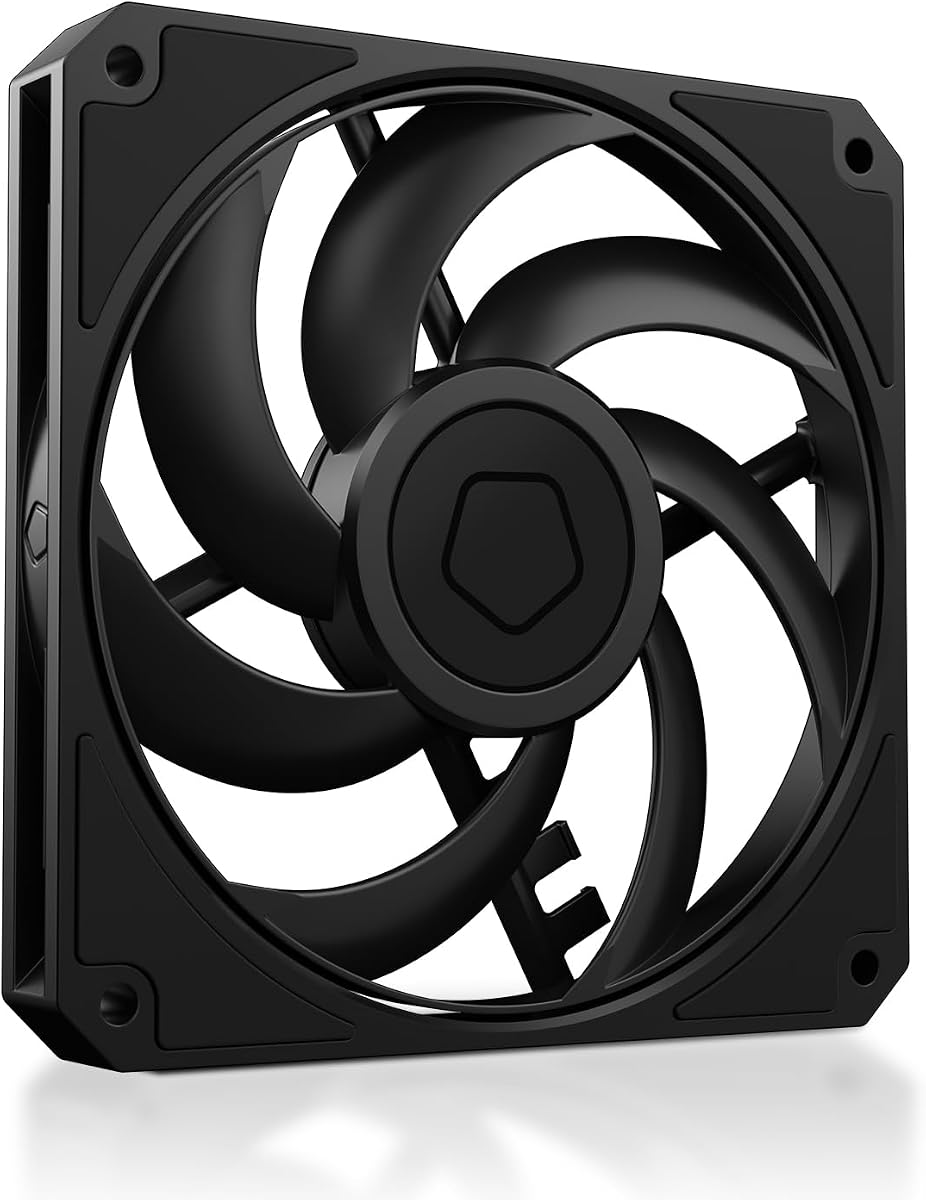
ID-COOLING AM-120-SLIM
4.8Editor score
15mm compact fan depth
500–2500 RPM PWM range
59.6 CFM maximum airflow
2.7 mmH₂O static pressure
Maximum noise of 31 dB(A)
Discover the best low profile case fans, comparing slim dimensions, PWM control, airflow, static pressure, noise levels, and ideal uses in compact PC cases.
Low profile case fans help cool compact PCs where standard 25mm-thick fans simply will not fit. A slim fan can bring controlled airflow into a small-form-factor chassis, support a low-profile CPU cooler, or fit beneath a radiator, but the best choice depends on depth, airflow, static pressure, connector type, and acoustic priorities.
This guide compares ten slim case fans using the specifications and feature details supplied for each model. The list covers 92mm and 120mm options, 14mm and 15mm-thick designs, four-pin PWM and three-pin control, different bearing systems, and fans intended for cases, coolers, heat sinks, or radiators.
Each review explains where the fan stands out, identifies practical trade-offs, and identifies the builds most likely to benefit from it. The top selections highlight different priorities, including strong compact-PC cooling, quiet PWM operation, and a versatile premium option. Product listings and market conditions can change, so confirm current specifications and compatibility before purchasing.
4.8Editor score

4.6Editor score

4.8Editor score
The comparison below places all ten slim fans by size, thickness, control method, airflow, pressure capability, and intended application. It is designed to make the key technical differences clear before you check the physical space and headers available in your system.



The ARCTIC P12 Slim PWM PST is a 120mm fan with an installation depth of only 15mm, making it one of the most practical options for genuinely space-constrained PCs. It carries a 4.6 rating and stands out through its broad 200–2100 RPM PWM range, pressure-optimized construction, and inclusion of three fans. That combination makes it especially useful when a build requires more than one replacement or an organized set of slim exhaust and intake fans.
We may earn a commission when you buy through this link, at no additional cost to you.
Its defining strength is the balance between depth and cooling capability. The listed airflow reaches 34.51 cfm, while static pressure is rated at 1.33 mmH₂O. Those figures are particularly relevant when the fan must pull air through a restrictive heat sink, compact radiator, or other component that creates resistance. The 4-pin connector also gives the motherboard a useful degree of control, allowing a quiet profile under lighter workloads and greater speed when cooling demand rises.
The fan is not as acoustically specified as several Noctua alternatives in this list. Its noise is given as 0.3 Sone rather than a decibel figure, and its maximum speed of 2100 RPM is higher than that of many competing slim designs. As a result, a demanding curve could make it more noticeable than a slower or deliberately quiet fan, particularly when several units run at once. The supplied information nevertheless presents it as a fan designed to keep noise to a minimum through PWM control.
This is a strong recommendation for compact gaming PCs, small-form-factor systems, ITX cases, and low-profile CPU coolers where a standard 25mm fan cannot be installed. Choose it when physical clearance, radiator support, multi-fan flexibility, and precise motherboard-controlled speed matter most. It is less compelling for a builder whose only goal is the lowest possible acoustic output, but for a high-airflow slim installation it remains a versatile choice.
At only 15mm thick, the P12 Slim leaves more clearance than a standard 120mm case fan. Its 1.33 mmH₂O static-pressure rating makes it suitable for heat sinks and radiators where merely moving a nominal amount of open-air flow is not enough.
The unusually broad 200–2100 RPM range allows a motherboard curve to span near-idle and high-load conditions. A three-fan pack also makes it easier to create coordinated intake and exhaust arrangements in a compact chassis.
We may earn a commission when you buy through this link, at no additional cost to you.
The ARCTIC P14 Slim PWM PST offers a distinctive combination of a large 140mm frame and a shallow 16mm profile. Its 4.6 rating reflects a well-regarded design that remains practical for compact systems where the chassis can accept a 140mm footprint but not a full-depth fan. Compared with a 120mm slim model, it has a larger swept area and a substantially higher listed airflow of 47 cfm.
We may earn a commission when you buy through this link, at no additional cost to you.
The motor is designed to support quiet operation, with a listed noise level of 0.3 Sone. Its four-pin PWM connector and 120–1800 RPM range make it easy to match airflow to the system's thermal requirements rather than running it continuously at full speed. Static pressure of 1.31 mmH₂O places it in the same pressure-capable category as the P12 Slim, making it suitable for heat sinks and radiators rather than only open case positions.
The main limitation is obvious but important: not every low-profile case supports 140mm mounting. A 140mm fan may fit physically in a larger chassis but not in a compact model with a 120mm mount. Its 16mm thickness is also slightly deeper than the 14mm and 15mm options elsewhere in this guide. Builders should therefore verify both the available screw pattern and the clearance around the intake or exhaust opening.
For someone assembling a compact workstation, small-form-factor gaming system, or constrained HTPC with a 140mm mount, this fan provides a compelling mix of frame size, shallow depth, PWM control, and pressure capability. It is less suitable for an ITX build limited to 92mm or 120mm fans, but where a 140mm position exists, it can deliver more airflow without returning to a thick 25mm design.
The 140mm frame gives this fan a meaningful coverage advantage over conventional 120mm options. At the same time, the 16mm depth preserves compatibility with compact layouts that cannot accept a standard 25mm fan.
A listed 0.3 Sone noise level and 1.31 mmH₂O static pressure combine acoustic restraint with useful performance behind restrictive components. Four-pin PWM control lets the system reduce speed during lighter periods.
We may earn a commission when you buy through this link, at no additional cost to you.
The ID-COOLING AM-120-SLIM is a performance-oriented 120x15mm fan with a 4.8 rating and some of the strongest headline figures in this group. It delivers up to 59.6 CFM of airflow and 2.7 mmH₂O of static pressure, both considerably higher than the stated figures of several established slim alternatives. That makes it particularly interesting for compact builds where available volume is extremely limited and every millimeter of fan performance matters.
We may earn a commission when you buy through this link, at no additional cost to you.
Its 4-pin PWM control supports a 500–2500 RPM range, giving users meaningful control over the acoustic and thermal balance. A premium hydraulic bearing is specified to reduce friction and vibration while extending operating life. The listed maximum noise level is 31 dB(A), which is reasonable for a high-output fan but not as restrained as the 23.6 or 23.9 dB(A) maxima quoted by several Noctua products.
The trade-off is that maximum output comes with the potential for a more noticeable operating profile. A system configured with a gentle PWM curve can use the fan more quietly under moderate loads, while its speed range gives headroom for demanding components. The high static-pressure figure also suggests suitability for restrictive installations, such as small radiators, CPU air coolers, NAS systems, and compact all-in-one liquid-cooling radiators.
This is a compelling recommendation for a Mini-ITX, HTPC, small-form-factor, or compact gaming build where airflow and pressure capability are the highest priorities. It is also suitable for a desktop case if a 15mm fan is preferred. Builders who value near-silence above maximum cooling should compare it with the quieter Noctua options, but for aggressive compact cooling it offers exceptional specifications in a genuinely slim package.
The stated 59.6 CFM maximum provides considerable headroom for compact builds. A smaller fan frame with a high-speed motor can move a large volume of air without increasing thickness beyond the 15mm target.
Static pressure of 2.7 mmH₂O is the standout figure in this specification set. It makes the fan a practical choice for small radiators, dense heat sinks, and other locations where open-air airflow ratings alone do not tell the full story.
We may earn a commission when you buy through this link, at no additional cost to you.
The Noctua NF-A12x15 PWM carries a 4.9 rating, the highest customer rating among the listed products. It is a 120x15mm, four-pin PWM fan built around Noctua's A-series design, with Flow Acceleration Channels and an Advanced Acoustic Optimisation frame. Its appeal is not based on one headline metric; rather, it combines proven slim dimensions, refined acoustics, long expected service life, and broad installation flexibility.
We may earn a commission when you buy through this link, at no additional cost to you.
Maximum speed is 1850 RPM, and maximum noise is listed at 23.9 dB(A). A supplied Low-Noise Adaptor allows operation at up to 1400 RPM when reduced output is acceptable. Four-pin PWM allows automatic control from a compatible motherboard header, making it simple to keep the fan quiet during lighter workloads and increase its speed as system temperatures rise.
The accessories add considerable practical value. Anti-vibration mounts can reduce the transfer of vibration into a case or heatsink, while an extension cable and y-cable make it easier to place the fan or run two PWM units from one header. The downside is that this product does not chase the highest listed airflow or static-pressure figures, so a builder whose priority is maximum raw output may find another model more suitable.
For a quiet HTPC, office-focused ITX system, workstation, or compact gaming PC, the NF-A12x15 PWM is a strong all-around recommendation. It is particularly attractive when the system will run continuously and subtle acoustic refinement is just as important as raw cooling. The 4.9 rating, quiet specification, and included accessories justify its place as one of the most balanced premium choices.
The maximum noise specification of 23.9 dB(A) is notably restrained for a 120mm slim PWM fan. The optional Low-Noise Adaptor provides another way to reduce output when the system's thermal load is light.
Anti-vibration mounts, screws, an extension cable, and a y-cable cover several common installation needs. This is particularly useful in a compact chassis where reaching a header or routing a short cable can be inconvenient.
We may earn a commission when you buy through this link, at no additional cost to you.
The Noctua NF-A12x15 PWM chromax.Black.swap is a 120x15mm four-pin PWM fan with a 4.8 rating. It carries the same core 1850 RPM maximum speed and 23.9 dB(A) maximum noise as the standard brown model, but distinguishes itself with an all-black appearance and a broad 450–1850 RPM range. The ability to stop at 0% PWM also supports semi-passive system behavior.
We may earn a commission when you buy through this link, at no additional cost to you.
That broad speed range and standstill capability are valuable in compact PCs that frequently operate below full cooling demand. During idle periods, the fan can reduce output or stop entirely, then respond automatically as temperatures rise. The all-black finish also integrates more discreetly with dark cases, low-profile coolers, and other understated components, avoiding the visual contrast created by traditional brown-beige fan frames.
This edition includes self-adhesive anti-vibration pads in red, black, white, blue, yellow, and green. The ability to coordinate the pad colors with a build is a subtle but genuine advantage for enthusiasts who want a case that looks carefully assembled. The supplied data does not provide airflow or static-pressure figures, so quantitative comparisons with high-output models are more limited than they are for several alternatives in the list.
The NF-A12x15 PWM chromax.Black.swap is best suited to a black-themed HTPC, compact workstation, or minimalist gaming PC where appearance and controlled acoustics matter. It is less compelling if you specifically need a verified maximum-airflow rating or require a very high maximum speed. Within the slim category, however, it delivers a refined combination of PWM response, semi-passive behavior, and visual customization.
Stopping at 0% PWM lets the fan remain inactive when cooling demand is low. The 450–1850 RPM range then provides responsive headroom without requiring manual intervention during normal motherboard control.
The all-black fan body suits cases and coolers with restrained styling. Multi-colored anti-vibration pads allow the visible contact points to match red, white, blue, green, yellow, or black accents.
We may earn a commission when you buy through this link, at no additional cost to you.
The be quiet! Pure Wings 3 is a 120mm PWM case fan with a 4.7 rating and a clear focus on combining airflow with low acoustic output. Its seven airflow-optimized blades are designed to reduce noise while maintaining performance in demanding configurations. The frame outlet is optimized for peak performance on radiators, giving the fan relevance beyond a conventional open-air case position.
We may earn a commission when you buy through this link, at no additional cost to you.
One of its most appealing features is the ability to operate at a very low minimum RPM. That matters because fan noise is not simply a function of maximum speed; sustained operation at unnecessarily high RPM can be more distracting than a brief increase under load. A low minimum allows the fan to match cooling demand while remaining quiet during ordinary desktop use.
The supplied specifications identify a long-life rifle bearing rated for 80,000 hours, offering a clear expectation of service life. However, the product data does not supply exact airflow, static-pressure, maximum-RPM, or noise figures. Consequently, the Pure Wings 3 is best judged by its design priorities and feature set rather than direct numerical comparisons that might not be available for every alternative.
It is a good match for builders who want a refined 120mm PWM fan for a compact or conventional case, especially those who intend to use it beneath a radiator. The main precaution is to verify its physical depth against the available clearance, since the supplied data does not state an exact thickness. For a radiator-oriented installation where quiet low-speed operation is important, it is a particularly relevant recommendation.
Very low minimum RPM operation allows the motherboard to keep airflow subdued when the CPU and other components do not require maximum cooling. This can make a noticeable difference in a system used for browsing, media, or office tasks.
Seven optimized blades work with a radiator-focused frame outlet. Those features make the Pure Wings 3 more versatile than a basic open-case fan when the installation involves a heat exchanger.
We may earn a commission when you buy through this link, at no additional cost to you.
The Thermalright TL-C12015 is a 15mm-thick, 120mm PWM fan with a 4.7 rating. Its 1500 RPM maximum speed is lower than many high-performance alternatives, but that restraint helps define it as a balanced option for small-form-factor cases and low-profile CPU coolers. The supplied data lists airflow of up to 52 CFM, static pressure of 1.24 mmH₂O, and maximum noise of 24.1 dB(A).
We may earn a commission when you buy through this link, at no additional cost to you.
The fan is designed to work as a case fan, a downward cooler fan, or part of a low-profile CPU air-cooling arrangement. A four-pin PWM connection allows automatic motherboard control, and the fan can reach its stated maximum speed when cooling demand increases. Four vibration-absorbing pads sit at the corners to reduce vibration and friction-related noise, which is useful when a slim fan is mounted close to a large heatsink or thin case panel.
Its S-FDB bearing is intended to combine low noise, dependable cooling performance, and extended service life. Compared with the very high-speed ID-COOLING option, the TL-C12015 uses a more moderate maximum speed. The trade-off is lower pressure capability and less high-RPM headroom, but it may also offer a gentler acoustic profile and sufficient airflow for many compact cooling tasks.
This fan is a strong recommendation for a compact PC that needs a standard 120mm mount, motherboard PWM control, and enough airflow to serve as a case or downward-cooling fan. It is particularly suitable for builders seeking a middle ground between quiet-focused Noctua designs and extremely high-speed models. For very dense radiators, the ID-COOLING AM-120-SLIM offers higher stated pressure, but the TL-C12015 remains versatile for general compact cooling.
A 1500 RPM ceiling avoids the very high maximum speeds used by some aggressive slim fans. Combined with PWM control and listed noise of 24.1 dB(A), it presents a balanced profile for continuous operation.
Besides standard case mounting, the fan can support a downward-blowing CPU cooler or contribute to a low-profile air-cooling setup. Vibration-absorbing pads help manage the added vibration that can accompany fan placement against dense hardware.
We may earn a commission when you buy through this link, at no additional cost to you.
The Noctua NF-A9x14 HS-PWM chromax.Black.swap is the smallest fan in the selection, measuring just 92x92x14mm. That compact footprint makes it relevant for mini-ITX cases, HTPCs, and 9cm low-profile CPU coolers such as the Noctua NH-L9 series. Its 4.8 rating demonstrates that the reduced size does not prevent it from offering a strong feature set.
We may earn a commission when you buy through this link, at no additional cost to you.
A broad 500–2500 RPM range provides more speed headroom than many 120mm slim alternatives. The four-pin HS-PWM connection supports automatic control, including a standstill at 0% PWM for semi-passive operation. Maximum noise is listed at 23.6 dB(A), marginally the lowest maximum-noise figure among the Noctua models listed here, despite the fan's ability to reach 2500 RPM.
The trade-off comes from frame size. A 92mm fan moves air across a smaller area than a 120mm model, and it cannot be mounted in a standard 120mm position without a bracket that is not specified in the supplied data. Builders must have an actual 92x92mm mounting pattern. For an appropriately sized enclosure or cooler, however, the small footprint can be more valuable than maximum swept area.
This is a specialist recommendation for the smallest compatible systems. It is particularly attractive beneath a compatible 9cm low-profile CPU cooler, where a 120mm fan simply cannot be used. Its combination of 14mm thickness, wide PWM control, semi-passive stopping, and low listed noise makes it a refined solution for tightly designed ITX builds and compact home-theater computers.
The 92x92mm frame is ideal where a 120mm fan would overlap neighboring components or fail to mount. At only 14mm thick, it also adds useful depth clearance in a compact chassis.
The 500–2500 RPM range and 0% PWM stopping behavior provide a useful operating span. Maximum noise is listed at 23.6 dB(A), allowing the fan to combine speed capability with a quiet premium design.
We may earn a commission when you buy through this link, at no additional cost to you.
The Noctua NF-A12x15 FLX is a 120x15mm slim fan with a 4.8 rating and a three-pin Molex connection. Unlike PWM variants, it provides three defined speed settings—1850, 1400, and 950 RPM—through the included Low-Noise Adaptors. This makes it a practical option for systems that do not expose a four-pin PWM header or for builders who prefer deliberate, fixed settings over automatic curve-based control.
We may earn a commission when you buy through this link, at no additional cost to you.
The lowest setting is particularly attractive for quiet use. At 950 RPM, the fan can prioritize near-silent operation while still moving air through a compact case or low-profile cooler. Maximum noise is listed at 23.9 dB(A), and the Flow Acceleration Channels and Advanced Acoustic Optimisation frame support the A-series emphasis on efficient, quiet cooling.
Its main limitation is the absence of native PWM. The supplied data identifies a three-pin Molex connector and requires a separate 3-to-4-pin adaptor to connect directly to a four-pin header. That arrangement may offer manual speed selection rather than full automatic control, depending on how it is connected. As a result, users should confirm their motherboard's control capabilities before choosing this version over a PWM model.
The NF-A12x15 FLX is recommended for legacy or unusual builds, quiet systems where a fixed low setting is sufficient, and users who value the option of choosing among three speeds. Anti-vibration mounts, fan screws, an extension cable, and the power adaptor make installation flexible. For a modern motherboard with native four-pin PWM, however, the standard PWM model is generally the more convenient choice.
The 1850, 1400, and 950 RPM options let the installer select output according to the build. This is helpful when automatic control is unavailable or when one fixed operating level better suits the system.
Using the included Low-Noise Adaptor at 950 RPM provides a straightforward way to reduce sound. The three-pin format remains useful with power sources that do not support four-pin PWM signaling.
We may earn a commission when you buy through this link, at no additional cost to you.
The standard Noctua NF-A12x15 PWM is a 120x15mm four-pin PWM fan with a 4.8 rating. It uses the established A-series design, including Flow Acceleration Channels and an Advanced Acoustic Optimisation frame, to combine strong cooling performance with low acoustic output. Maximum speed is 1850 RPM, and maximum noise is listed at 23.9 dB(A).
We may earn a commission when you buy through this link, at no additional cost to you.
Its most important advantage is the combination of compact dimensions and straightforward automatic control. A compatible four-pin PWM header allows the motherboard to vary fan speed according to temperature, avoiding the need to maintain a fixed setting. The supplied Low-Noise Adaptor can cap the fan at 1400 RPM when an even lower acoustic profile is preferred, while the main speed ceiling remains available for demanding workloads.
The package includes anti-vibration mounts, fan screws, an extension cable, and a y-cable for running two PWM fans from one header. These accessories improve installation flexibility in compact systems. Compared with the high-output ID-COOLING AM-120-SLIM, however, the supplied data does not indicate a maximum airflow or static-pressure figure, so this fan is best viewed as a refined, acoustically conscious option rather than the most aggressive performer.
For a premium compact build, the NF-A12x15 PWM remains a versatile recommendation. It works well in HTPCs, low-profile CPU coolers, compact workstations, ITX systems, and restrained gaming PCs. Choose it when PWM control, refined acoustics, accessories, and established A-series design are the priorities. Users who need maximum pressure capability should make sure the chosen mounting position is not severely restrictive.
Native four-pin PWM support lets the motherboard manage the fan according to system demand. The included Low-Noise Adaptor provides a lower-speed alternative when additional acoustic restraint is desirable.
Anti-vibration mounts help reduce transferred vibration, while the extension cable improves cable routing. A y-cable also makes it easier to operate two compatible PWM fans from one header.
We may earn a commission when you buy through this link, at no additional cost to you.
A low-profile fan is only a good fit when its frame, thickness, connector, and cooling performance suit the exact installation. Before comparing models, measure the available space, identify the mounting pattern, and determine whether the fan will move open case air or push through restrictive hardware.
The first step is to distinguish between a fan's face size and its total depth. A model described as 120x120x15mm has a 120mm square frame but measures only 15mm from front to back. That extra millimeter or two can be the difference between a successful installation and an obstruction involving a radiator, drive cage, side panel, or CPU cooler. Measure both the fan opening and the free depth behind it rather than relying on the nominal face size alone.
Also confirm that the case uses a matching mounting pattern. The 120mm options require 120mm positions, while the 92mm Noctua NF-A9x14 needs a genuine 92mm mount. The 140mm ARCTIC P14 offers more swept area but cannot simply replace a 120mm fan without the correct pattern. A careful measurement prevents an attractive specification from becoming an incompatible part.
Open case positions usually benefit from high overall airflow, while heatsinks and radiators require a fan capable of sustaining movement through resistance. Static pressure is the more revealing specification in restrictive installations, although airflow remains important for moving enough volume through the enclosure. Look for products that combine a useful CFM rating with a clearly stated pressure capability when mounting beneath a radiator or against a dense cooler.
A compact chassis may also need more than one fan to establish a directed intake-to-exhaust path. Evaluate airflow at the individual-fan level, then determine whether adding fans improves the total path without causing turbulence. Two fans positioned without sufficient separation or opposing each other in the wrong direction can be less effective than a smaller number of well-placed fans.
Four-pin PWM fans are the most convenient choice for most modern PC systems because the motherboard can adjust speed automatically. A three-pin fan typically runs at a fixed voltage-controlled speed unless paired with appropriate adapters. The Noctua NF-A12x15 FLX provides fixed 1850, 1400, and 950 RPM settings through its Low-Noise Adaptors, which can work well in older systems or installations without PWM headers.
Do not assume that every four-pin socket guarantees full control. Some older motherboards and small adapters may provide power without PWM signaling, while proprietary cases may use nonstandard headers. Check the case wiring and motherboard manual before ordering. A compatible connector avoids unnecessary adapters and makes temperature-based fan curves much easier to implement.
Maximum speed indicates the cooling headroom available during severe loads, but minimum speed is equally important for an always-on system. A model with a low minimum can run quietly during browsing, media playback, or office work, then increase its speed only when temperatures demand it. Fans such as the Pure Wings 3 are explicitly designed for very low minimum RPM operation, while several Noctua models support semi-passive stopping.
A higher maximum is not automatically better. Some of the most aggressive slim fans use high maximum speeds to reach their airflow and pressure figures, which can be noticeable under sustained load. Compare maximum RPM alongside noise specifications rather than treating speed as a standalone quality measure. The ideal curve provides enough performance for the hottest components without spending the entire range unnecessarily.
Noise figures are most useful when they use the same unit and describe comparable maximum-speed conditions. The supplied data mixes sone and dB(A) measurements, so direct numerical equivalence is not possible without additional testing. Even within the same unit, a stated maximum is not the same as the sound produced during typical PWM-controlled use.
Account for the number of fans, mounting material, and operating curve. A quiet individual fan can still create noticeable sound in a multi-fan arrangement or transmit vibration into a thin case panel. Anti-vibration mounts can help with the latter. For a near-silent build, prioritize a design with a low listed maximum, then program the motherboard to keep it at a modest speed unless higher temperatures justify more airflow.
Case fans, low-profile CPU coolers, heat sinks, and radiators do not necessarily create the same operating conditions. Some products are explicitly optimized for radiators, while others are suitable for downward-blowing CPU coolers or standard chassis positions. The ARCTIC P12 Slim is highlighted for heat sinks and radiators, and the Thermalright TL-C12015 can support case or downward-cooler duties.
Use the included mounting hardware only as a starting point. A fan with 105mm or 120mm screw holes may still require longer screws or spacers in a different location. Conversely, a 92mm fan may fit a low-profile cooler perfectly while being unable to serve a 120mm case mount. Match the product's specified use to the physical component where it will be installed.
The bearing system influences noise, vibration, and expected longevity. The Thermalright TL-C12015 uses an S-FDB bearing, the ID-COOLING AM-120-SLIM uses a hydraulic bearing, and the be quiet! Pure Wings 3 uses a rifle bearing with an 80,000-hour operating lifetime. The Noctua products advertise an MTTF of more than 150,000 hours. These figures come from different sources and should not be treated as identical laboratory results.
Consider the bearing specification together with mounting quality and dust exposure. A quality bearing does not prevent debris from affecting a compact system, and a good fan curve can reduce unnecessary bearing wear during idle periods. Ensure that airflow does not circulate large amounts of dust through the fan and that the frame is mounted without introducing wobble.
Slim cases often have very little room for excess cable, making extension cables, low-noise adapters, and Y-cables more than convenience accessories. Noctua's PWM models include extension and Y-cables, while the FLX version includes a 3-to-4-pin power adapter. These can make a difficult installation cleaner, but they should not create a sharp bend, interfere with a fan blade, or block a removable component.
Plan the cable route before installation and check whether the case already provides PWM extension cables. Keep connectors away from rotating blades and hot components. If multiple fans share a header through a Y-cable, confirm that the combined electrical draw remains within the header's intended limits and use motherboard control rather than an unsafely high fixed setting.
Install the fan only after confirming that the frame, depth, connector, and mounting pattern match the case or cooler. Remove any protective material from the blades, align the airflow direction with the intended intake or exhaust path, and secure the screws evenly. In a compact chassis, check clearance around the connector, cable bend, and neighboring components before fully tightening the fasteners.
Connect a four-pin fan to a compatible PWM header and configure a temperature-based curve in the motherboard software. Begin with a moderate setting and observe whether the system remains stable and quiet at normal temperatures. For a three-pin model, select the desired fixed speed and verify that the adaptor does not interfere with the fan or limit chassis clearance.
Periodically inspect the blades, mounting points, and airflow path for dust. Hold the fan blade still before cleaning it, and do not allow liquids or compressed air at excessive pressure to enter the bearing. Confirm that the system maintains useful airflow after cleaning, especially if the compact enclosure has filters, restrictive meshes, or a densely packed internal layout.
A slim fan has a shallower frame depth than a standard 25mm case fan while retaining a familiar 120mm or 140mm face size. That reduced depth makes it easier to fit beneath a radiator, inside a thin case, or against a low-profile CPU cooler. Standard fans generally provide more internal room for blades and motors, while slim fans trade some physical volume for compatibility.
They can be, but static pressure matters more than the fan's nominal frame size. The ID-COOLING AM-120-SLIM is listed at 2.7 mmH₂O, while the ARCTIC P12 Slim provides 1.33 mmH₂O, giving both models useful pressure capability. The radiator fan must also have enough physical depth for the fan, and the mounting arrangement must not obstruct the radiator fins.
It may be possible with the correct adapter, but the fan will not necessarily gain native PWM control. The Noctua NF-A12x15 FLX includes a 3-to-4-pin power adaptor and uses Low-Noise Adaptors to offer three fixed speeds. Check the adapter and motherboard manual to understand the speed behavior before installation.
The correct choice depends on the available mount. The Noctua NF-A9x14 HS-PWM is only 92x92x14mm and is suited to systems with a genuine 92mm mounting position. If the case supports 120mm fans, the ID-COOLING AM-120-SLIM, ARCTIC P12 Slim, or a Noctua NF-A12x15 model offers a larger frame while remaining only 15mm or less in depth.
No. Airflow is only one part of the comparison. Static pressure determines how well a fan can move air through a restrictive heat sink or radiator, while noise, bearing design, minimum RPM, and PWM control affect the experience in practice. The best choice is the fan whose pressure capability and acoustic profile match the actual installation.
Leave enough space for the complete fan depth, its connector, cable bend, and nearby components. A nominal 15mm thickness does not include every part of the installation. Measure from the mounting surface to the nearest obstruction and check the cable route, especially beneath a radiator or beside a thick motherboard heatsink.
Yes, provided the fan stops only when the system is genuinely cool. Noctua models listed here support stopping at 0% PWM, allowing the fan to remain stationary during appropriate conditions and restart as temperatures rise. Correct motherboard configuration is important so the fan does not remain stopped while heat continues to accumulate.
Intake and exhaust fans serve different purposes, so they do not necessarily need to point in the same direction. The chassis layout should establish a coherent path from cool air intake to warm air exhaust. Placing fans without enough separation or allowing intake and exhaust to fight can create recirculation and reduce the system's effective cooling performance.
The ARCTIC P12 Slim PWM PST is the most versatile overall selection because it combines a 15mm frame, wide PWM control, pressure-oriented cooling, and a three-pack configuration. The ID-COOLING AM-120-SLIM is ideal when maximum airflow and static pressure are the central priorities, while the Noctua NF-A12x15 PWM stands out for refined acoustics, automatic control, and installation accessories.
Before choosing, prioritize the constraint that cannot be changed: physical clearance. Then match the fan to the location, confirm the connector, and select a speed range that suits the system's noise tolerance. A 92mm fan may be the only practical option for a tiny low-profile cooler, while a 120mm or 140mm model can be more appropriate when those frames fit.
Finally, verify the current listing details, included accessories, and compatibility before ordering. Fan revisions, bundles, and included cables can vary, and a product's usefulness ultimately depends on how well its dimensions and specifications match your chassis. With the right fit established, these ten options cover the major needs for quiet, powerful, and highly compatible slim cooling.