
ART P16
4.8Editor score
Sixteen balanced XLR channels
Shielded steel 1U chassis
Reversible rack mounting
A studio patchbay creates a centralized routing point for microphones, preamps, consoles, monitors, and outboard processors. A worthwhile model should make signal connections easy to reach, keep rear-rack wiring organized, and provide a dependable balanced signal path without adding unnecessary complexity to daily workflow.
This guide compares ten studio patchbays spanning XLR, balanced 1/4-inch TRS, TT, and DB-25 formats, with capacities from eight to 96 points. We evaluated the supplied specifications for connector type, channel count, operating modes, construction, mounting options, signal-routing features, and suitability for professional studio configurations.
Each selection represents a different way to organize studio routing, from compact eight-point panels to expansive multi-mode systems. The guide explains the practical strengths and limitations of every product, identifies the strongest options for particular workflows, and reminds readers that ratings, availability, and prices can change over time.
4.8Editor score

4.6Editor score

4.8Editor score
As an Amazon Associate we earn from qualifying purchases.
The following comparison highlights the connector formats, point counts, routing controls, and chassis designs that distinguish these studio patchbays and help identify the most appropriate option for a particular recording or live-sound rack.



The AA AUDIO ACCESSORY AP16 is a 16-channel balanced XLR patch panel built around four independent four-channel blocks. Its 4.6 rating reflects a practical approach to studio routing, with factory-assembled modules, a full-steel chassis, dual-layer PCB, and 24K gold-plated XLR pins. The result is a flexible choice for studios that want organized connections without complicated panel preparation.
We may earn a commission when you buy through this link, at no additional cost to you.
Its most interesting feature is the modular construction. Traditional PCB-based patch panels can require cutting and soldering when a studio needs a different channel count, but the AP16 arrives as four ready-to-use blocks. Each four-channel section can be assigned to a separate system zone, such as microphones, playback systems, monitor feeds, or outboard equipment. That makes it easier to adapt the panel as the studio's routing requirements evolve.
The electrical and mechanical specifications also set it apart from a basic fixed panel. Gold-plated XLR pins are intended to resist corrosion and support stable signal transmission, while the dual-layer PCB is described as having insulation resistance above 5.5GΩ and a design focused on minimizing leakage and interference. The full-steel enclosure provides a more substantial structure than a lightweight aluminum panel and is intended to limit vibration and resonance.
The trade-off is that modularity is not the only consideration. Studios with a fixed 16-channel layout and no need for replaceable blocks may find a simpler panel sufficient, while the AP16's specialized construction may not be necessary for a small project. Even so, it offers an unusually clear combination of balanced XLR routing, configurable capacity, maintainability, and physical durability. It is our most adaptable overall recommendation for a modern studio patchbay.
Because every four-channel block can be assigned independently, the AP16 can mirror the logical zones of a studio signal flow. Removing or replacing one module also avoids the need to rework an entire printed circuit board, making long-term maintenance more approachable.
The steel chassis and dual-layer PCB are particularly relevant in rooms where patchbays receive frequent handling. Together, they provide a sturdy base for repeated cable changes while supporting a clean, balanced signal path.
We may earn a commission when you buy through this link, at no additional cost to you.
The ART P16 is a straightforward 16-point balanced XLR patchbay that earns a 4.8 rating and a place among the strongest choices in this guide. It uses 32 XLR connectors, with 16 female connectors on the front and 16 male connectors at the rear. Its 19-inch, 1U rack format and fully shielded black steel enclosure make it especially practical for studios where simple, dependable access matters more than elaborate switching.
We may earn a commission when you buy through this link, at no additional cost to you.
The design focuses on doing one job well: providing a central point for balanced XLR connections. All connections are made through PCB wiring, so a studio can organize front-of-rack patching while keeping corresponding connections at the rear. Reversible rack ears allow the panel to be oriented according to the rack layout, which is useful when cable access and service space are limited.
Unlike the Samson and Behringer models in this list, the ART P16 does not advertise front-panel normalled, half-normalled, parallel, or bypass modes. That is not necessarily a disadvantage. Many studios use their outboard equipment as fixed insert points and do not need switchable routing for every channel. For that type of installation, fewer controls can mean less setup complexity and less opportunity for an incorrect switch position.
The P16 is a compelling value-oriented choice for project studios, edit rooms, mobile racks, and small production suites. It combines a highly rated format, a rugged steel body, reversible mounting, and a three-year warranty. Those qualities make it a strong alternative for buyers who want the ART brand and a conventional balanced XLR layout without paying for features their workflow will never use.
The P16's front female and rear male XLR arrangement creates an intuitive patching workflow. It suits studios that want to replace frequently accessed rear-rack cables with clearly numbered front connections.
Its shielded all-steel enclosure and 1U format provide a robust, space-efficient panel. The lack of channel mode switches is a practical trade-off for installations where the routing is fixed.
We may earn a commission when you buy through this link, at no additional cost to you.
The Samson S-Patch Plus is a 48-point balanced 1/4-inch TRS patch bay with a 4.8 rating. It is designed for studios that want a large, central routing system with front-panel control over how each channel behaves. The four rows of miniature toggle switches support normalled, half-normalled, and through operation, making this one of the most functionally complete patchbays in the group.
We may earn a commission when you buy through this link, at no additional cost to you.
Forty-eight front and 48 rear 1/4-inch phone connections provide enough capacity for a substantial mix of analog channels, effects, preamps, and playback devices. Balanced construction supports a clean analog signal path, while the front controls allow a technician to change routing without reaching behind a console or equipment rack. That accessibility is a major advantage in a busy control room or a touring production workspace.
The three operating modes provide meaningful flexibility. In through mode, the upper front output receives the rear upper input, while the opposite applies to the lower row. The front lower inputs then pass audio to the corresponding rear lower outputs. Understanding the relationship between the rows is important, but the labeled layout and familiar toggle arrangement make the panel practical once the system is documented.
The main limitation is physical and cable-related. Forty-eight points in one panel occupies more space than a compact XLR patchbay, and TRS cables may not be as readily available or convenient as XLR in every studio. Even so, the S-Patch Plus offers exceptional capacity, mode control, and a high rating. It is the premium selection for facilities that require extensive, adaptable analog routing.
Normalled, half-normalled, and through settings can prevent signal duplication, support insert-style workflows, or simply bypass the panel when needed. These controls make the patch bay useful for both permanent studio infrastructure and temporary signal routing.
Forty-eight points create a substantial central routing hub in a single unit. The design is better suited to larger control rooms than a small home studio with only a handful of external processors.
We may earn a commission when you buy through this link, at no additional cost to you.
The Behringer ULTRAPATCH PRO PX3000 is a 48-point balanced patchbay with one of the most versatile routing schemes in this roundup. Its 4.6 rating reflects a well-established professional design, while the available channel settings include parallel, half-normalled, normalled, and open functions. That makes it a strong option for studios that routinely change analog signal paths.
We may earn a commission when you buy through this link, at no additional cost to you.
Rather than treating a patchbay as a passive connection panel, the PX3000 allows each channel to be assigned to a mode suited to the task. Parallel mode can route a source to multiple destinations, while the normal and half-normal choices support common insert relationships. Open mode can provide separation when the patchbay is not acting as a pass-through point. These options make the panel more versatile than fixed-layout alternatives.
The benefit is clearest in facilities with a large collection of analog outboard equipment. Instead of repatching cables every time a session changes, a user can adjust front-panel switches to alter the relationship between equipment. The design also contributes to the stated goal of eliminating cable clutter and adding clarity to a working studio, especially when rear-rack connections would otherwise be difficult to reach.
There is a learning element. A four-mode system gives the user more ways to make mistakes if routing is not labeled and documented. Its 48-point size also requires adequate rack capacity, and TRS connectivity may not align with an XLR-centered workflow. Even with those considerations, the PX3000 is one of the strongest choices for a studio seeking active analog switching rather than a simple fixed panel.
The ability to place a channel into parallel operation is valuable when a signal must feed more than one processing path. It reduces repeated cable changes and supports a faster, more repeatable studio workflow.
The PX3000 emphasizes high-quality components and rugged construction. That focus suits a permanent installation where technicians will operate the switches regularly rather than treating the patchbay as temporary equipment.
We may earn a commission when you buy through this link, at no additional cost to you.
The Black Lion Audio PBR XLR is a 16-point patchbay with 32 gold-plated XLR connectors. Its 4.4 rating places it among the solid conventional choices in the guide. The product targets the familiar studio requirement for a clean central XLR point, giving users a way to reach frequently changed connections without physically routing around the back of a console or rack.
We may earn a commission when you buy through this link, at no additional cost to you.
Sixteen points strike a practical balance between capacity and rack efficiency. That capacity is enough for a focused collection of microphones, stereo playback paths, monitor feeds, or selected outboard devices, but it is not intended to replace a complete large-console infrastructure. The 32 XLR connectors provide front and rear access for the 16 channels, and gold plating is intended to support dependable contact and corrosion resistance.
Compared with the AA AUDIO AP16 and ART P16, the Black Lion model's supplied specification is concise. It confirms the point count, connector count, plating, and XLR format, but it does not describe modular blocks, operating modes, insulation figures, or reversible rack ears. Buyers should therefore check the physical details and connector orientation in the current listing before making a final decision.
That limited documentation is the main reason this model does not rank higher. Nevertheless, its format is easy to understand, the 16-point capacity is useful for many studios, and the gold-plated connectors align with professional expectations. It is a sensible option for a project studio or fixed installation that prioritizes XLR convenience over advanced front-panel routing options.
Sixteen XLR points provide enough centralized access for common external equipment without occupying the space required by a 48-point TRS panel. The format suits studios managing a focused set of analog routes.
Gold-plated XLR connectors are designed for repeated mating cycles and long-term reliability. In a patchbay used during sessions, that contact quality can be more relevant than unadvertised convenience features.
We may earn a commission when you buy through this link, at no additional cost to you.
The Black Lion Audio PBR TRS is a 48-point patchbay containing 96 gold-plated TRS connectors. Its 4.1 rating is the lowest among the products with numerical feedback in this list, so prospective buyers should balance its high-density design against a more cautious assessment of the available customer feedback.
We may earn a commission when you buy through this link, at no additional cost to you.
Its principal appeal is capacity in a relatively compact patchbay format. Forty-eight balanced points can consolidate a broad collection of line-level analog routes, including preamp outputs, mixer sends, effects, compressors, monitor distribution, and external recording paths. Gold-plated connectors support the kind of dependable contact expected in a permanent studio installation, while the TRS format carries balanced analog signals when wired appropriately.
Unlike the Samson S-Patch Plus and Behringer PX3000, the supplied product information does not identify front-panel operating modes. It also does not describe grounding, shielding, or rack-ear flexibility. As a result, it is best positioned as a straightforward high-density routing panel rather than a configurable switching centerpiece. A buyer may need to inspect the current product page and confirm exact jack orientation before installation.
The lower rating does not automatically make the patchbay unsuitable. It does, however, make independent product research especially important, particularly for a permanent studio purchase. For studios seeking a large TRS routing point with a straightforward format, the PBR TRS offers a useful capacity-to-space proposition, but buyers should compare its current specifications and customer feedback carefully.
The 48-point format is appropriate for a control room handling numerous analog devices. It creates one recognizable destination for signals that would otherwise be distributed across several locations.
Because the supplied listing highlights connector count and point count but not detailed switching behavior, prospective buyers should verify signal flow, grounding, and jack orientation. Clear documentation is essential in a dense patch system.
We may earn a commission when you buy through this link, at no additional cost to you.
The DIYTECH 16 Port XLR is a rack-mount patch panel designed for studios, live-sound rigs, theaters, houses of worship, and broadcast carts. With a 4.3 rating, it offers a familiar 16-channel XLR format and a feature set centered on practical installation: reversible connectors, a steel chassis, and included mounting hardware.
We may earn a commission when you buy through this link, at no additional cost to you.
Reversibility means the panel can support different male and female connector arrangements without having to decide on one permanent orientation at purchase. This is valuable when the equipment on one side of the routing system uses different cable conventions from the equipment on the other. Standard XLR cables can then be used to connect microphones, mixers, preamps, consoles, recorders, snakes, and other compatible devices.
The heavy-duty steel chassis has a black powder coat intended to resist scratches, drops, and touring wear. The product also includes the screws required for standard 19-inch rack installation, which removes a small but useful step from installation. Balanced three-pin wiring is also described as helping minimize noise and interference, which is beneficial in longer cable runs and high-gain signal paths.
The key limitation is that the listed product does not advertise selectable normalled, half-normalled, through, or parallel modes. It is therefore best viewed as a conventional routing panel with flexible connector orientation. Studios that need automated or switchable behavior may prefer one of the multi-mode alternatives, while fixed-routing facilities can appreciate the straightforward approach.
The reversible connector arrangement lets the panel adapt to the gender and cable requirements of the surrounding equipment. That flexibility can be valuable during installation, upgrades, and changes to a studio signal flow.
Including the rack mounting screws improves the setup experience for a straightforward 19-inch panel. The powder-coated steel body also provides a practical level of protection for mobile or frequently serviced racks.
We may earn a commission when you buy through this link, at no additional cost to you.
The Black Lion Audio PBR TT LIT is a 96-point TT and DB-25 patchbay with gold-plated construction, 96 TT connectors, 12 DB-25 ports, and customizable LED displays for macOS and Windows. It is the most specialized product in this guide, offering substantially more routing density than the conventional XLR and TRS panels while introducing a more complex connection ecosystem.
We may earn a commission when you buy through this link, at no additional cost to you.
A 96-point architecture is compelling for facilities that route a large number of small-format analog signals, particularly studios using TT-style connection conventions. The DB-25 ports add another layer of consolidated wiring capability, potentially simplifying the rear of a densely populated rack. Gold-plated construction supports reliable contact across the many exposed connections that define a patchbay's purpose.
The customizable LED displays are the standout feature. Visual routing feedback can help a technician understand the state of a complex patch system without relying entirely on physical inspection or written documentation. Software support for both macOS and Windows broadens the potential usefulness of that feature, although buyers should confirm compatibility details and the practical scope of the display software in the current listing.
This is not a general-purpose choice for a small studio seeking a few microphone or line connections. Its scale, specialized connectors, and digital monitoring features are better aligned with a purpose-built facility that already uses TT or DB-25 infrastructure. It also has no numerical rating in the supplied data, so the absence of a visible score should prompt additional research rather than an assumption of proven customer satisfaction.
Ninety-six points compress a very large amount of routing into one rack unit. Facilities already standardized on TT connections can use that density to simplify complex analog signal distribution.
Customizable displays can make active signal routes easier to identify in a busy system. Visual feedback is especially useful when a patchbay contains far more connections than an operator can track from memory.
We may earn a commission when you buy through this link, at no additional cost to you.
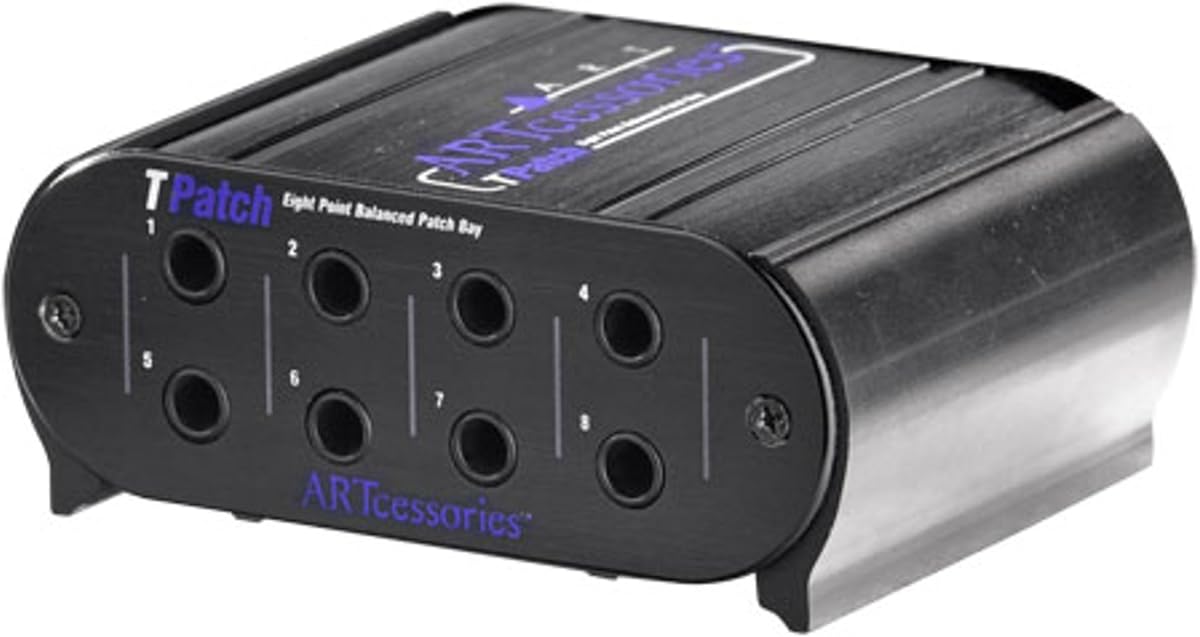
The ART TPatch is an eight-point balanced patch bay with a 4.6 rating, four linked input/output pairs, and switchable normal and half-normal operating modes. Its rugged extruded aluminum case and 1/4-inch TRS connectors make it a compact solution for studios that need a small number of clearly accessible analog routes.
We may earn a commission when you buy through this link, at no additional cost to you.
The panel organizes its eight points into four linked pairs, which can suit stereo equipment, paired analog processors, or grouped signal paths. Its normal and half-normal modes offer useful switching without the complexity of a 48-point multi-mode system. A technician can change how a route behaves through the front panel instead of moving permanent cable connections.
This product is particularly well suited to a smaller studio, edit room, rehearsal space, or a project that needs only a handful of centralized connections. Its smaller scale makes channel labeling easier and keeps the routing matrix manageable. It also uses less rack space than a high-density panel, although the exact rack height should be confirmed with the current product listing.
The limitation is capacity. Studios with numerous preamps, outboard processors, and monitor destinations may quickly exceed eight points and need a larger model. The aluminum case is also a different structural approach from the full-steel designs offered by some competitors. Even so, the TPatch provides a focused, balanced, switchable solution in a manageable format.
Four linked input/output pairs make the layout easy to interpret for stereo or dual-channel assignments. This structure can reduce labeling complexity in a compact studio routing system.
Normal and half-normal settings add operational flexibility while keeping the panel approachable. A small, well-labeled patchbay is often easier to manage than a larger system with unused capacity.
We may earn a commission when you buy through this link, at no additional cost to you.
The Hosa PDR-369 is a 12-point balanced XLR patchbay with reversible connectors and a 4.4 rating. It provides a middle ground between a small eight-point panel and a more expansive 16-channel unit, making it relevant to studios that need a focused XLR routing point without committing to a larger matrix.
We may earn a commission when you buy through this link, at no additional cost to you.
Balanced XLR connections are familiar in recording environments and work with common microphone, preamp, console, and recorder connections. The reversible design offers installation flexibility, allowing the patchbay to be arranged according to the connector gender and cable routing needed by the surrounding equipment. This is useful when integrating a panel with gear that has mixed front-panel and rear-panel connection conventions.
The supplied information is limited, so careful attention to the current listing is warranted. It does not identify operating modes, exact chassis material, mounting details, or grounding arrangement. The model should therefore be evaluated primarily as a conventional balanced XLR routing panel, not as a configurable insert system. Prospective buyers should confirm the physical dimensions and signal orientation before installation.
For a studio with a modest but meaningful collection of analog routes, the Hosa's 12-point capacity can provide a useful middle ground. It offers straightforward XLR access without the footprint of a 48-point panel. Its 4.4 rating and reversible balanced format make it a credible compact option, particularly for projects where a full-sized 16-point patchbay would leave several channels unused.
Twelve points can be more appropriate than 16 for a studio with a defined set of shared sources and destinations. It offers central access while avoiding unnecessary empty rows.
The reversible connector arrangement gives installers more freedom when matching the panel to existing equipment. It can simplify cable selection in racks that contain a mixture of connector orientations.
We may earn a commission when you buy through this link, at no additional cost to you.
The right studio patchbay depends on signal format, channel count, routing behavior, physical space, and how frequently cables will be changed. Use the following factors to narrow the options before checking current product availability and customer feedback.
Connector format is the first practical filter because it determines which cables and studio equipment the patchbay can support. XLR is common for microphone and balanced audio paths, TRS is widely used for line-level stereo and balanced mono routing, TT offers very high connection density, and DB-25 can consolidate multiple circuits into a compact multipin interface. A studio that already relies heavily on one format will usually be better served by adding a matching panel rather than maintaining several incompatible cable ecosystems.
The intended signal should guide this decision more than general popularity. Consider the front-panel connections on the preamps, consoles, recorders, and outboard equipment that will connect to the patchbay. Also account for cable bend radius and accessibility; a theoretically compatible connector is less useful if dense spacing prevents plugs from being removed safely. Match the format to the studio's existing infrastructure.
Capacity should reflect real signal paths rather than the largest possible panel. An eight-point model may perfectly serve a compact room, while a 48-point system makes sense for a facility with extensive analog outboard equipment. Too little capacity forces the studio to split routes across several panels, potentially recreating the cable confusion the patchbay was meant to solve. Too much capacity consumes rack space and may create a large matrix that is difficult to label and maintain.
List the sources and destinations that need to be reached from the front of the rack, then include any insert, bypass, or parallel paths required by the workflow. Account for both stereo pairs and individual mono channels. The 12- and 16-point XLR options cover many focused studios, while 48-point TRS models suit more complex control rooms and 96-point systems are primarily relevant to specialized facilities.
A normalled connection automatically links a rear input to a corresponding output when no patch cable is inserted. This is useful for a default signal path that can be interrupted with a front-panel cable. A half-normalled design also provides a way to break or maintain the signal relationship. A through mode passes the signal without the usual normalized relationship, and a parallel option may distribute a source to multiple destinations.
For simple fixed routing, a conventional panel with no per-channel mode switches can be easier to operate. For an outboard-heavy studio that changes configurations often, selectable modes can save significant time. The crucial point is to choose behavior that matches the workflow rather than paying for complexity that will remain unused. Read the manufacturer's signal-flow explanation and label the panel once its behavior is understood.
A patchbay lives in a rack where it may be handled, moved, and exposed to vibration. Steel enclosures are well suited to touring and high-use studio environments, while extruded aluminum can provide a lighter professional alternative. Whatever the material, the mounting points, fasteners, and connector shells need to feel robust. Gold-plated pins or connectors can support reliable contact and resist corrosion, although plating should be considered alongside the overall wiring and shielding rather than as the only quality indicator.
Balanced wiring, shielding, insulation, and low-leakage PCB design all influence performance in high-gain or long cable runs. For a multi-mode analog patchbay, check whether the manufacturer documents signal routing clearly. For a modular panel, consider whether sections can be removed and replaced. The best construction is the one that fits the installation environment and can be serviced without disrupting unrelated channels.
Most studio patchbays use a 19-inch rack format, but height and depth can still matter. Confirm the product's rack height, particularly for compact models, and leave enough front space to operate switches and remove plugs. Deep racks can provide a useful cable-management cavity behind the panel, while shallow installations may require careful cable dressing. Reversible rack ears can help orient the rear connectors to suit the rack or allow front and rear mounting in different layouts.
The environment also matters. A permanently installed control-room rack may prioritize easy front access, while a mobile or touring case may benefit from a particularly robust enclosure and secure fasteners. Check whether rack screws are included and whether the connector orientation can be changed. A panel that installs cleanly and presents cables predictably is easier to operate than one that looks suitable but creates rear-rack strain.
The purpose of a patchbay is to make front-of-rack access convenient, but the rear still needs organized wiring. Consider removable rear panels, labels, patch-cord holders, and enough depth to separate outgoing and incoming leads. Connector density also affects usability. A 96-point panel can fit many circuits into one space, but it may be difficult to reach or label individual connections when a dense group of cables is attached.
For a smaller panel, leaving one or more channels open can make the routing matrix easier to understand, although unused capacity is not inherently wasteful if the studio expects to grow. Standardize cable lengths and color-code signal categories where helpful. Keep front connections readable and avoid creating sharp bends in XLR or TRS plugs, since strain on the cable can undermine the benefit of an otherwise well-designed patch system.
Small project studios often benefit from a modest XLR panel that matches their existing equipment. Larger studios and production rooms may require a dense TRS or TT system with front-panel switching and visual status information. A specialized facility already built around multipin connections may find DB-25 useful, but a more conventional studio may gain little from that complexity.
Consider how often the patchbay will be changed. A session-based room may be reconfigured daily, making mode switches and rapid front access highly valuable. A fixed installation with stable inserts may be better served by a durable passive panel. The most suitable model is therefore not necessarily the one with the most features, but the one that makes the studio's normal routing tasks clearer, faster, and less error-prone.
Before installing a patchbay, plan the signal flow on paper and label both the front and rear connections. Group related sources and destinations, reserve enough space for future routes, and mark any channel that uses a specialized mode such as normalled, half-normalled, through, or parallel operation. For a modular panel, identify which four-channel section belongs to each studio zone and avoid moving a block without updating the documentation.
Install the panel securely in a 19-inch rack, using the provided hardware where available. Route rear cables with service loops, keep signal and power wiring separated where practical, and avoid placing sharp bends directly at the connectors. When changing a route, mute or otherwise protect the associated signal path, remove the relevant patch cable, check the mode setting, and reconnect the new cable without forcing it into an awkward angle.
Regular care should be gentle. Keep the rack closed when it is not being serviced, remove dust from around connectors with a soft dry method, and inspect cables for damaged strain relief or intermittent contacts. Do not use aggressive cleaners on connector shells or the panel finish. When routing problems occur, check the patch cable, mode switch, and rear connection before assuming the patchbay itself has failed. Periodic labeling and an updated routing chart will prevent most avoidable confusion.
A patchbay provides a centralized connection point between microphones, preamps, consoles, outboard processors, recorders, and monitor systems. It lets a user change signal routes from the front of the rack instead of reaching behind equipment. A well-organized patchbay can reduce cable clutter, speed up recalls, and make complex routing easier to document.
XLR is usually the easiest choice when the studio primarily manages microphone or balanced equipment connections and already has XLR cables. TRS is useful for line-level stereo and balanced mono routing, especially in larger analog systems. Choose the format that matches your equipment, cable inventory, and routing density rather than mixing formats without a clear purpose.
In normalled mode, the rear input and corresponding output are normally connected until a front patch cable interrupts that relationship. This creates a convenient default route that can be changed without moving the rear connection. Half-normalled and through modes provide different switching behaviors, so consult the manual and label the intended function clearly.
The correct count depends on the number of sources, destinations, inserts, and alternate paths that must be reached from the front. An eight- or twelve-point panel may be enough for a focused room, while 16 points suits many project studios and 48 points fits a larger outboard-heavy control room. Inventory the actual routes before purchasing a larger model.
Gold plating can help resist corrosion and maintain dependable contact through repeated mating cycles, which is valuable in a frequently patched studio. Plating is only one part of signal quality, however. Balanced wiring, shielding, clean construction, secure connectors, and proper installation are also important. A complete design should be judged as a system.
Yes, provided the panel matches the rack's 19-inch format and its height, depth, and connector orientation suit the space. Small home studios can benefit from a compact eight- or twelve-point panel, while larger cases may support a 16-point XLR unit. Confirm clearance for plugs, switches, labels, and rear cable bends before installation.
No. Selectable modes are useful when inserts, parallel paths, or bypass routes change frequently. A fixed balanced patch panel is simpler and often sufficient when the studio has a stable routing plan. Choose controls based on how often the signal path changes, not simply on the number of features.
Use consistent cable lengths, label both sides of every connection, and keep input and output groups visually separated. Leave service loops without creating excessive slack, and use rear panels or patch-cord organizers where space allows. Connector density should also be considered, since very crowded panels can be difficult to service even when they fit neatly into the rack.
The AA AUDIO AP16 stands out as the most adaptable overall option because its four modular blocks can be organized by studio zone, removed individually, and supported by a rigid steel chassis and dual-layer PCB. The ART P16 is a compelling value choice for straightforward balanced XLR routing, while the Samson S-Patch Plus delivers the richest combination of capacity and front-panel operating control among the conventional choices.
For a studio with a fixed analog signal flow, prioritize connector compatibility, adequate point count, a secure rack fit, and durable construction. For a room that changes inserts and parallel paths regularly, invest in normalled, half-normalled, through, or parallel modes and document the signal flow. High-density systems such as the Black Lion TT LIT make sense primarily when the facility already uses TT or DB-25 conventions.
Ratings and prices can change over time, so check the current listing, availability, warranty details, and recent customer feedback before purchasing. Confirm dimensions, connector orientation, included hardware, and operating modes against the studio's existing equipment. With those details verified, the right patchbay can become a dependable centerpiece for cleaner routing and a faster studio workflow.