
KIWITATA 2X Classic SNES USB Controller
4.3Editor score
Wired USB connection
Windows and Mac support
Two-controller pack
Finding a replacement SNES controller can mean restoring a classic console, replacing damaged internal pads, or adding authentic-feeling controls to an emulator setup. The right choice depends primarily on connection type, console compatibility, control layout, and whether you need a complete controller or a repair component.
This guide compares ten replacement options across full wired gamepads, 2.4GHz wireless controllers, USB receiver models, and conductive silicone repair pads. We considered compatibility, button design, power options, range, operating-system support, and the setup each product requires, with particular attention to the many similarly named models that serve very different purposes.
The list reveals that there is no universal winner: original-console owners need a compatible SNES adapter, emulator users need a USB controller, and repair-focused buyers need internal pads rather than a complete gamepad. Ratings and availability can change over time, so compare the current listing details before ordering.
4.3Editor score

4.4Editor score

4.6Editor score
As an Amazon Associate we earn from qualifying purchases.
The comparison below separates complete controllers from repair pads and distinguishes original-console models from USB devices built for emulators. Connection method, supported platforms, power source, and included hardware are the most important differences.


The KIWITATA 2X Classic SNES USB Controller is a two-controller wired solution for people who want SNES-style controls on a computer, Raspberry Pi, or other supported emulator setup. Its 4.3 rating reflects a generally favorable reception, while the included pair makes it practical for cooperative games or for keeping a second controller ready.
We may earn a commission when you buy through this link, at no additional cost to you.
The principal attraction is the combination of a familiar retro layout and broad software compatibility. The listing supports Windows systems from Windows 98 through Windows 11, modern Mac systems, Linux, and Raspberry Pi. It also identifies common emulators such as RetroArch, OpenEmu, and several NES-focused programs. The USB plug-and-play approach means no separate driver is required, although buttons and directional axes still need to be assigned manually inside the emulator.
The controls use a frosted, concave cross-key along with responsive action and function buttons. The shape is designed to follow the contours of the hands, and the anti-sweat and anti-slip treatment may be helpful during extended sessions. The main limitation is absolute platform clarity: this is a USB controller and cannot be connected directly to an original SNES console. Its five-foot cable also gives less freedom than a wireless option.
This is a strong budget choice for PC and Raspberry Pi players who want two controllers without dealing with wireless pairing or battery charging. Buy it if authentic-looking SNES controls and a two-pack matter more than connecting to an original console. For original hardware, choose a dedicated wired or wireless SNES-compatible model instead.
Receiving two controllers makes local multiplayer more convenient, particularly for games that support two players. Each controller plugs directly into a USB port, and the absence of a required driver installation keeps the initial setup straightforward.
The contoured shell, concave directional pad, and anti-slip directional key are intended to improve comfort and control. These details make the pack more suitable for long emulator sessions than a basic flat gamepad.
We may earn a commission when you buy through this link, at no additional cost to you.
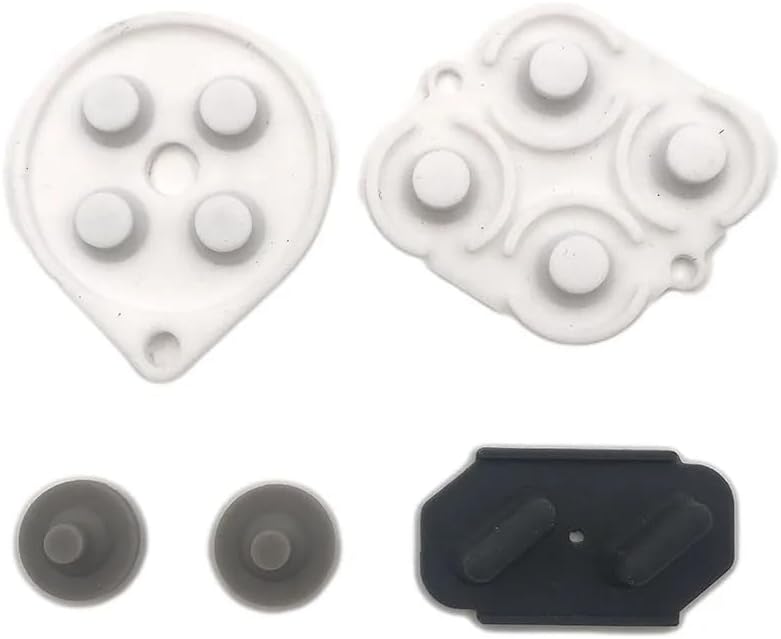
This conductive pad set is a repair component rather than a playable controller. It is intended for owners whose original SNES or SFC controller still works mechanically but has deteriorated conductive pads, causing missed, sticky, or intermittent button inputs. Its 3.7 rating is the lowest among the rated products in this list, which makes sense for a specialized part whose success depends heavily on the condition and layout of the controller being repaired.
We may earn a commission when you buy through this link, at no additional cost to you.
The package contains one set of silicone rubber button replacement pads. Their conductive surfaces are designed to restore the electrical contact between the controller buttons and the underlying membrane. Because the product is specifically labeled for the Nintendo SNES and SFC, it is a better fit than a universal pad assortment for owners who know the exact platform they own.
The tradeoff is that this is not a plug-and-play purchase. Opening a controller, carefully positioning each conductive pad, and reassembling the shell all add time and introduce the possibility of incorrect alignment. It will not replace a cracked housing, missing buttons, a failed circuit board, or a badly damaged cable, and it offers none of the convenience of a new wired or wireless gamepad.
Choose this option when your controller's physical condition is good and only the electrical contact surface has failed. It can preserve the original appearance and feel of a vintage controller. If you lack repair experience, want a ready-to-use product, or need an entire controller, one of the complete replacements will be a more practical purchase.
Replacing worn conductive pads can restore button response while retaining the original housing, artwork, and external appearance. That makes the repair set attractive for vintage collectors who value originality.
The set is most appropriate when buttons still travel normally but fail to register consistently. Mechanical damage, cable faults, and electronic failures require a different solution.
We may earn a commission when you buy through this link, at no additional cost to you.
The KIWITATA 2.4GHz Wireless Controller is a two-controller pack designed for an original SNES console. Its 4.4 rating makes it one of the stronger-rated complete controllers in this comparison, particularly for buyers seeking wireless freedom rather than a USB emulator accessory. It uses 2.4GHz radio technology and includes a seven-pin connector adapter for the original console.
We may earn a commission when you buy through this link, at no additional cost to you.
The rechargeable lithium-ion battery is specified at 3.7V and 500mA, with a stated continuous runtime of more than ten hours. Pairing is described as simple: connect the SNES adapter and press the start button. The controller also uses a concave, anti-slip cross-key and a hand-contoured body, bringing familiar SNES proportions and a wireless connection to a couch-based setup.
There are important limits. The listing says that two controllers cannot operate simultaneously on Super Famicom hardware and that the product supports only one-player games. It also does not work with the SNES Classic, SNES Mini, NES Classic Edition, Switch, Raspberry Pi, or a PC. The stated wireless range is up to 30 feet, but actual performance can vary with interference and room conditions.
This model fits owners of an original SNES who want two modern wireless controllers and dislike trailing cables. It is less versatile than the multi-platform KIWITATA option because it lacks a USB dongle. Verify that your console is the original style before ordering, and confirm that any multiplayer games you want to play support the required player configuration.
The included seven-pin adapter allows the controllers to connect without plugging a cable into the console. This is particularly useful for displays positioned at a distance from the seating area.
A stated runtime of more than ten hours reduces the likelihood of mid-session interruption. The rechargeable battery also removes the need to keep a supply of disposable batteries nearby.
We may earn a commission when you buy through this link, at no additional cost to you.
The ZAMPAM 2.4GHz USB Gamepads provide a wireless, SNES-style alternative for modern platforms. The set includes two controllers and uses a USB receiver, with stated compatibility for Windows, Mac, Linux, Raspberry Pi, RetroPie, Recalbox, Nintendo Switch, and common emulator software. Its 4.0 rating indicates a generally positive but less emphatic reception than the highest-rated picks.
We may earn a commission when you buy through this link, at no additional cost to you.
The controllers use sensitive buttons and a familiar retro arrangement. Their 2.4GHz connection has a stated range of up to 10 meters, or 32 feet, and no separate driver or configuration utility is required for compatible devices. A 240mAh rechargeable battery is rated for up to three hours of continuous play, with a full charge taking about one hour. A battery-level indicator helps prevent unexpected shutdowns.
Compatibility deserves careful attention. The product supports the original Nintendo Switch model but not Switch 2. It is designed for programs and emulator platforms that recognize a standard USB game controller, so the receiving device must have an available USB port. The shorter battery runtime and need to recharge each controller are less convenient for marathon sessions than the ten-hour option listed for another wireless model.
This is a versatile choice for PC, Raspberry Pi, and emulator users who value wireless freedom and want a two-controller pack. It is also suitable for Nintendo Switch owners who have confirmed they own the supported Switch version. Those playing on an original SNES console should choose a controller with a native SNES adapter instead.
The included USB receiver allows the wireless controllers to be used with computers and other USB-capable systems. This makes the pack more adaptable than an original-console-only wireless controller.
The built-in battery indicator gives players a quick way to check remaining power. That is useful in wireless setups where a low battery would otherwise interrupt play.
We may earn a commission when you buy through this link, at no additional cost to you.
The Hyperkin Scout Premium Wired Controller is the highest-rated complete controller in this guide, with a 4.6 rating. It is explicitly made for SNES systems and states compatibility across all Super NES models, making it a particularly compelling option for owners who want a dependable wired replacement with a more premium feel.
We may earn a commission when you buy through this link, at no additional cost to you.
Its main benefits are straightforward: premium build quality, an ergonomic design, and a 10-foot cable. The long lead provides more freedom to sit at a natural distance from a television while retaining the reliability and zero-latency simplicity of a wired link. The controller's SNES-oriented design avoids the wireless pairing process and does not depend on batteries.
The major constraint is that it is a console replacement rather than a universal emulator controller. The supplied information does not state USB connectivity or emulator-platform compatibility, so it should not be assumed to work with a PC, Raspberry Pi, Switch, or emulator. Anyone whose goal is to recreate an authentic original-console experience will value the stable connection, but buyers seeking cross-platform versatility should look at a USB model.
Choose the Hyperkin Scout when you own an SNES, prefer a cable, and prioritize construction and comfort. Its combination of strong rating, universal SNES model support, and extended cable length makes it a leading choice for a dedicated original console. Pair it with an emulator-specific controller only if you also want computer support.
The wired design removes charging, radio interference, and pairing concerns. For a console placed close to the seating area, this dependable approach can be preferable to a wireless controller.
The stated compatibility with all Super NES models makes it easier to buy without worrying about a particular regional console revision. Ergonomic construction is another central selling point.
We may earn a commission when you buy through this link, at no additional cost to you.
The ZAMPAM Wireless USB Controller is a single-controller 2.4GHz model intended for Windows, Linux, and Android devices used with game emulators. Its 4.2 rating reflects solid consumer reception, and its most notable specification is the claim that one rechargeable lithium-ion charge can last around 100 hours.
We may earn a commission when you buy through this link, at no additional cost to you.
The USB receiver produces a stated wireless range of up to 24 feet, which is enough for most living-room computer or Android emulator arrangements. The controller also includes a configurable turbo function: holding Select while pressing A, B, X, or Y turns that turbo option on or off in USB mode. This adds flexibility for games that benefit from rapid repeated input.
Its limitations are significant for SNES hardware. The listing expressly says that it does not work with a Mini SNES or Super Nintendo, so it is not a console replacement despite its retro design. Some users may also need a joystick-mapping utility and the product description refers to setup instructions for configuring keys. While drivers are not emphasized as mandatory, button assignment can still depend on the emulator and operating system.
This is a good match for PC or Android emulator users who want a wireless controller and exceptionally long intervals between charges. It is less suitable for original-console owners, local multiplayer buyers seeking a pack, and users who want the simplest possible plug-and-play experience without mapping software.
The stated approximately 100-hour charge life substantially reduces routine charging compared with shorter-runtime wireless alternatives. That makes the controller convenient for occasional or regular emulator sessions.
The configurable turbo input can be enabled directly through the face buttons and Select. It is a useful addition for supported software that benefits from automatic repeated presses.
We may earn a commission when you buy through this link, at no additional cost to you.
The miadore 2 Pack USB Controller is the most versatile complete option for emulator-focused buyers in this comparison. Its 4.4 rating, two-controller bundle, and support for Windows, Mac, Linux, Raspberry Pi, and RetroPie make it a strong all-around recommendation for PC and Raspberry Pi gaming.
We may earn a commission when you buy through this link, at no additional cost to you.
The pair uses simple USB plug-and-play connectivity and does not require drivers or dedicated setup software. It supports an eight-way directional pad and six digital action buttons, arranged to resemble the classic SNES layout. The directional pad is arrow-shaped, the X and Y buttons are concave, the A and B buttons are convex, and Start and Select use a rubber finish. These details offer tactile differences between inputs while preserving a familiar retro appearance.
The controller is not a replacement for an original SNES console, and some emulator configurations will still require button mapping. As with many USB gamepads, compatibility also depends on the emulator recognizing standard input. The approximately five-foot cord is useful on a desk but does not offer the freedom of a wireless controller or the placement flexibility of the Hyperkin Scout's ten-foot cable.
This product is best for players who want a pair of classic-style controllers for a broad range of computers and emulation systems. It is particularly attractive for two-player games and Raspberry Pi setups. Choose it when platform flexibility and coordinated multiplayer matter more than native original-console support.
Support spans multiple generations of Windows, Mac OS X, Linux, Raspberry Pi versions, and RetroPie systems. The included guidance also explains how to map inputs when an emulator does not recognize them automatically.
Two controllers support local multiplayer without a second purchase. Their five-foot cables provide practical reach for a desk or living-room media setup.
We may earn a commission when you buy through this link, at no additional cost to you.
The 2 Pack Wireless USB SNES Controller combines a retro-style layout with two wireless gamepads for computer-based emulation. Its 4.2 rating indicates a generally favorable reception, and the package includes controllers, USB receivers, charging cables, and a user manual, making it a more complete wireless bundle than some competing listings.
We may earn a commission when you buy through this link, at no additional cost to you.
The system uses a stable 2.4GHz connection with a stated range of 10 meters, or 33 feet, and is intended for Windows, macOS, Linux, and Raspberry Pi. The included receivers use a standard USB connection, and no drivers are needed for compatible devices. High-sensitivity buttons support precise control, while a built-in rechargeable battery provides a stated 10-hour runtime.
Compatibility exclusions are worth checking before purchase. The listing specifically rules out Android TV boxes, Fire TV, Chromebook, SteamOS, Tesla, C64, and Nintendo Switch. It also notes that the controllers lack the button configuration required for Switch. As with all wireless controllers, battery level and radio interference can affect performance, and the receiver must have access to an available USB port.
This pack is a balanced option for PC, Mac, Linux, and Raspberry Pi players who want two wireless controllers with charging accessories included. It is well suited to emulator-focused living-room setups. If you need Switch support, select a model specifically designed for that platform; if you need an original SNES console, choose a controller with a native SNES adapter.
Controllers, receivers, charging cables, and documentation are included. That package makes it easier to set up a two-player wireless station without separately sourcing essential accessories.
The high-sensitivity buttons are designed for accurate control, while the receiver-based 2.4GHz link removes cable clutter. The system is compatible with major desktop operating systems and Raspberry Pi.
We may earn a commission when you buy through this link, at no additional cost to you.
The KIWITATA Multi-Platform Wireless Controller bridges two common retro-gaming needs by supporting an original SNES console and USB-based computers. It includes both a seven-pin SNES adapter and a 2.4GHz USB dongle, allowing the same controller style to serve console and PC or Mac setups. No customer rating is currently shown for this listing, so its reception cannot be compared numerically with the rated products.
We may earn a commission when you buy through this link, at no additional cost to you.
The console connection uses the included adapter and follows a simple pairing sequence involving the Start button. The USB mode supports a wide list of Windows versions, Mac OS X 10.0 or later, and several Raspberry Pi models. Wireless range is stated at up to 30 feet, and the rechargeable 3.7V, 500mA lithium-ion battery is specified to work continuously for more than ten hours.
As a third-party controller, it should not be confused with an official Nintendo product. Although the hardware supports both SNES and computer modes, platform-specific behavior can still differ, and the listing does not claim Switch support. The lack of a rating means buyers should pay close attention to current customer feedback and the return terms available from the seller. It is also a single-controller purchase rather than a multiplayer pack.
This is an appealing choice for a household that uses both an original SNES console and emulators on a computer. It reduces the need to maintain two different controller types. It is less attractive for buyers seeking a two-player set, official hardware, or a product with a long and visible customer-review history.
The included seven-pin adapter and USB dongle are the key features. This dual approach allows the controller to move between an original console and supported computer platforms.
A stated 30-foot range and more than ten hours of continuous battery life support comfortable use away from the console or computer. The wireless connection also avoids managing a controller cable.
We may earn a commission when you buy through this link, at no additional cost to you.
The GUANKE Conductive Rubber Pad is a one-set repair gasket for SNES controllers whose button contacts have worn down. It does not provide a complete gamepad, so its relevance depends on the condition of the controller you already own. No customer rating is shown for this product, and the listing itself advises buyers to compare pictures, descriptions, and machine models carefully.
We may earn a commission when you buy through this link, at no additional cost to you.
The conductive silicone pads are intended to restore communication between the controller's buttons and membrane. When original rubber contacts become hardened, torn, or intermittent, a correctly positioned replacement can restore reliable input while keeping the original shell and overall appearance. The package contains one complete set of conductive button pads rather than individual loose pieces.
Repair work is the main compromise. The controller must be opened, the old pads removed carefully, and the replacements aligned before the shell is reassembled. Incorrect positioning can cause persistent button problems or create pressure on the membrane. This product is not appropriate when the cable, housing, circuit board, buttons, or other components have failed, and it offers no immediate way to play without completing the repair.
Choose the GUANKE set when you own a mechanically sound SNES controller and want to repair deteriorated conductive pads. It can be especially appealing for preserving a vintage controller's original look. Buyers wanting immediate play should instead choose a complete wired or wireless controller from the guide.
The conductive silicone set is intended for controllers whose buttons move normally but no longer register reliably. Replacing the contact layer can restore electrical communication without replacing the complete gamepad.
An internal repair leaves the existing housing and exterior intact. That makes this option relevant to owners who prefer retaining the visual character of an original controller.
We may earn a commission when you buy through this link, at no additional cost to you.
The most important first step is identifying whether you need a working original-console controller, a USB gamepad for emulation, a wireless controller, or an internal repair pad. Once that distinction is clear, compatibility, control design, power, range, and setup requirements become easier to compare.
Original SNES hardware and later mini or Classic editions are not interchangeable in the way many listings imply. A controller designed for an original console may use a seven-pin plug and separate adapter, while mini and Classic systems usually have their own integrated controller ports and distinct requirements. Check the shape of the console's controller port and confirm whether the seller explicitly supports the model you own. Do not assume that a controller marketed for retro gaming will connect to every Nintendo release.
Wired controllers offer immediate, dependable connections to compatible original consoles, while USB controllers are mainly designed for computers, Raspberry Pi systems, and emulators. Wireless products add another distinction: some include a proprietary original-SNES adapter, while others require a USB receiver. A wireless controller labeled for PC is not automatically compatible with an original console, and an original-console wireless controller may not work with a computer. Read the compatibility list before considering wireless convenience.
A replacement gamepad is the simplest choice when the controller is missing, badly damaged, or no longer worth repairing. A conductive pad set is a targeted solution for a controller that still opens, runs, and has responsive buttons but occasionally misses inputs. Pads cannot solve a broken cable, cracked housing, missing button, or failed electronics. They also require disassembly and careful alignment, so consider your repair experience before ordering a repair-only product.
For USB models, look for the operating systems and software environments listed by the manufacturer. Broad support may include Windows, macOS, Linux, Raspberry Pi, RetroPie, and Recalbox, but compatibility with an operating system does not guarantee that every game or launcher will recognize the controller. RetroArch, OpenEmu, and other programs may present separate mapping menus. The best listings also note when manual button assignment is necessary rather than promising universal automatic recognition.
Wireless controllers require attention to both radio range and battery life. Stated ranges in this category range from roughly 10 meters to 30 feet, but walls, furniture, interference, and nearby wireless equipment can affect real-world performance. Battery runtimes also vary widely, from about three hours to much longer claims, and some packs include charging cables while others require a particular charging method. Compare range with your actual room layout and battery life with the length of typical gaming sessions.
An authentic-looking replacement should offer a directional pad and the button arrangement you are used to. Features mentioned across these products include concave X and Y buttons, convex A and B buttons, an arrow-shaped eight-way D-pad, rubber Start and Select buttons, and textured or anti-slip directional pads. These distinctions may influence comfort and tactile recognition, especially in games where quick access to different action buttons matters. Some wireless controllers also include configurable turbo functions.
Two-controller packages can simplify local multiplayer and avoid sourcing a matching second device later. However, compatibility may differ by product and console. One original-SNES wireless listing specifically states that two controllers cannot work simultaneously on Super Famicom hardware and notes one-player game limitations. Other wireless packs use USB receivers and are intended for PC or emulator multiplayer. Check both the hardware's player support and the games' supported player counts before assuming a two-pack is immediately usable.
Simple setup matters for plug-and-play use. Wired USB models may require no drivers but still need button mapping, while wireless products may involve pairing and receiver placement. Cable length is also relevant: five feet suits a computer desk, while a ten-foot lead offers more placement flexibility around a television. Confirm whether a package includes receivers, console adapters, charging cables, and documentation. Those included accessories can determine whether the controller is immediately useful after purchase.
Begin by identifying the correct connection method. For an original-console wired controller, power the console off before connecting or removing the controller. For a USB model, plug the controller into the computer, start the emulator, and open its controller or input configuration menu. If directions or buttons do not respond, assign them manually instead of assuming the controller is defective.
For a wireless controller, install the supplied batteries or charge the built-in rechargeable battery, then connect and pair the receiver or console adapter according to the included instructions. Wireless controllers that require a USB receiver need that receiver plugged into an active system before pairing. Keep the receiver within the stated range and away from obvious sources of radio interference. Low battery power can also cause pairing failures or input interruptions, so recharge before long sessions.
Care for the controller according to its construction. Keep wired models from being pulled by the cable, and avoid sharply bending the connector. Do not clean a conductive repair pad with liquids unless the seller specifically permits it, and never spray cleaner directly onto a controller. For silicone or plastic shells, use a lightly dampened cloth and let the device dry completely before connecting it. Store wireless controllers with adequate battery charge if they will remain unused for an extended period.
Some products include both a seven-pin SNES adapter and a 2.4GHz USB dongle, allowing them to use original-console and computer connection modes. Most controllers, however, support only one of these methods. Check the included accessories and compatibility description before buying, and confirm that your computer operating system and emulator are supported.
Usually, no. The USB models in this guide are intended for computers, Raspberry Pi systems, and emulators rather than an original SNES console. Original-console replacements need the appropriate console connector or a specifically supported wireless adapter. Likewise, a controller with a native SNES plug should not be assumed to work as a USB emulator gamepad.
Compatibility varies by model. Several listings expressly state that they support the original SNES console but not the SNES Classic, SNES Mini, or NES Classic Edition. Mini consoles generally require controllers designed for their own ports. Always verify the exact console version and port style before ordering.
Most of the listed USB controllers use plug-and-play operation and do not require driver installation for compatible devices. Button mapping may still be necessary inside an emulator or game. Wireless PC models may also include mapping software or setup instructions for particular operating systems.
Open the emulator's input or controller settings and manually assign the directional pad and face buttons. Make sure the controller is connected before launching the emulator, and try a supported mapping preset if one is available. If another USB port or emulator produces the same problem, the controller may require additional configuration or troubleshooting.
You can repair a controller whose only major issue is worn conductive pads. The listed silicone pad sets are designed for that specific failure and can restore consistent input while preserving the original casing. They will not fix a damaged cable, broken circuit board, cracked housing, missing button, or other structural failure, and opening the controller requires care.
A two-controller USB pack is usually the simplest choice for emulators because both controllers share the same broad platform support. For an original console, verify simultaneous-player support because some wireless models work only with one player. You should also check whether the specific games support the number and mode of controllers you plan to use.
No. The 2.4GHz products described here use dedicated receivers or console adapters rather than Bluetooth. Their compatibility depends on the included receiver and the target device's USB support. If you want Bluetooth, verify that a product specifically states Bluetooth compatibility rather than assuming 2.4GHz wireless support includes it.
The strongest general recommendation is the miadore 2 Pack USB Controller for emulator users because it combines a 4.4 rating, two controllers, broad operating-system support, and a classic layout. The KIWITATA 2X Classic USB Controller is a practical budget alternative, while the Hyperkin Scout stands out for original SNES owners seeking a premium wired design with broad console compatibility.
Prioritize the connection that matches your actual hardware. Use an original-SNES-compatible model for an original console, a USB gamepad for emulators and Raspberry Pi, and a repair pad only when worn button contacts are the sole problem. Wireless buyers should also compare range, battery life, receiver compatibility, and player limitations rather than choosing on appearance alone.
Ratings, product details, availability, and prices can change, so review the current listing before purchasing. Confirm the included cable, adapter, receiver, or charging accessories and verify that every named console, operating system, or emulator appears in the current compatibility notes. Those checks will prevent most disappointments with replacement controllers.