
Hosyond 7 Inch Touchscreen IPS DSI Display
4.4Editor score
Direct MIPI DSI connection
Compact 7-inch IPS panel
Driver-free Raspberry Pi setup
A touchscreen can transform a Raspberry Pi from a headless computer into an intuitive control panel, portable workstation, learning device, or dedicated project interface. The best option depends on screen size, resolution, touch technology, interface type, mounting needs, operating system support, and how neatly the Pi can be integrated into the finished setup.
This guide compares ten touchscreens for Raspberry Pi spanning compact MIPI DSI panels and larger HDMI monitor-style designs. We evaluated the supplied specifications for compatibility, resolution, viewing angle, touch points, installation requirements, audio, cooling, portability, and practical features such as stands, wall mounting, and protected Pi compartments.
Each review identifies the strongest use case and the compromises worth considering before purchase. The top selections include a compact budget model, a feature-rich everyday monitor, and a premium 10.1-inch option. Product availability and selling prices can change, so compare current listings and bundle contents before ordering.
4.4Editor score

4.4Editor score

4.4Editor score
As an Amazon Associate we earn from qualifying purchases.
The comparison highlights the major differences among direct DSI panels, HDMI touch monitors, and larger portable displays, making it easier to match screen size and features to a particular Raspberry Pi project.


The Hosyond 7 Inch Touchscreen IPS DSI Display is a straightforward compact panel for Raspberry Pi projects that need a dedicated interface without occupying a full monitor-sized workspace. Its 4.4 rating reflects a generally favorable user response, while the supplied specifications highlight an IPS panel, capacitive touch, 800 by 480 resolution, and a direct MIPI DSI connection.
We may earn a commission when you buy through this link, at no additional cost to you.
Its biggest practical advantage is the simple connection method. Instead of requiring a separate video and touch arrangement over HDMI and USB, the display connects to a compatible Raspberry Pi through the MIPI DSI interface. It is listed as compatible with the Raspberry Pi 5, 4B, 3B+, 3B, 3A+, and 2B, making it useful for owners with several generations of hardware. The product is also described as driver-free and ready for plug-and-play use in new or unchanged configurations.
The 7-inch format and 800 by 480 resolution are the principal limitations. They are reasonable for status dashboards, sensor interfaces, menus, and compact embedded controllers, but less suitable for dense documents, extensive code, or a desktop-style workspace. It also lacks HDMI and is not designed as a general-purpose display for unrelated devices. The listed operating-system support includes Raspbian, Ubuntu, Kali, and Windows 10 IoT, with single-touch outside older Raspbian configurations.
This is the choice for makers who prioritize compactness, straightforward installation, and a direct Raspberry Pi connection. It is less compelling for users who want a large workspace, multiple simultaneous touch points, integrated speakers, or the ability to use the same screen with a laptop. For the intended Pi-specific use case, however, it provides a practical combination of size, touch capability, and uncomplicated setup.
The 7-inch footprint makes this display useful where every centimeter matters. It suits compact control panels, portable projects, status dashboards, and installations where a standard monitor would be unnecessarily large.
Using the Raspberry Pi's MIPI DSI interface removes the need for a separate touchscreen-over-USB arrangement. The stated driver-free operation also reduces setup work for projects that must remain operational with minimal configuration.
We may earn a commission when you buy through this link, at no additional cost to you.
The 10.1 Touchscreen Monitor is the most complete general-purpose choice in this guide. It combines a 10.1-inch IPS display with 1920 by 1200 resolution, ten-point capacitive touch, built-in speakers, a cooling fan, and a rear compartment designed to hold a Raspberry Pi. Its 4.4 rating also places it among the better-rated products in the comparison.
We may earn a commission when you buy through this link, at no additional cost to you.
The display specification is especially useful for a Pi touchscreen because it provides more room for code, documents, monitoring interfaces, and other desktop content than the common 800 by 480 compact panels. A 16:10 aspect ratio, 400cd/m² brightness, 72% NTSC color coverage, 178-degree viewing angles, flicker-free operation, and low-blue-light technology are all stated features that make it suitable for extended work.
The integrated rear compartment is especially valuable for portable installations. The Raspberry Pi can be mounted inside the monitor, helping protect the board and conceal cables. Audio is handled by built-in stereo speakers and a 3.5mm headphone output, while rear controls adjust volume and brightness. A built-in fan is intended to provide steady airflow to the display and Pi during long sessions or demanding multitasking.
Setup is more involved than with a DSI-only panel, but the listed procedure remains approachable: connect HDMI for video and the included three-pin cable for touch. The monitor also accepts USB-C touch from Windows and Mac computers. It works without additional drivers, although all three connection modes require the included 12V DC power supply. The product is a strong recommendation for users who want a polished, portable workstation rather than a bare embedded panel.
The 1920 by 1200 resolution gives users substantially more usable workspace than 800 by 480 panels. That difference matters when a Raspberry Pi project displays code, web dashboards, configuration pages, or multiple application windows.
The detachable rear cover and internal Pi compartment reduce visual clutter and protect the board. Integrated speakers, a cooling fan, and a headphone jack make the unit feel more like a complete portable workstation than a simple external display.
We may earn a commission when you buy through this link, at no additional cost to you.
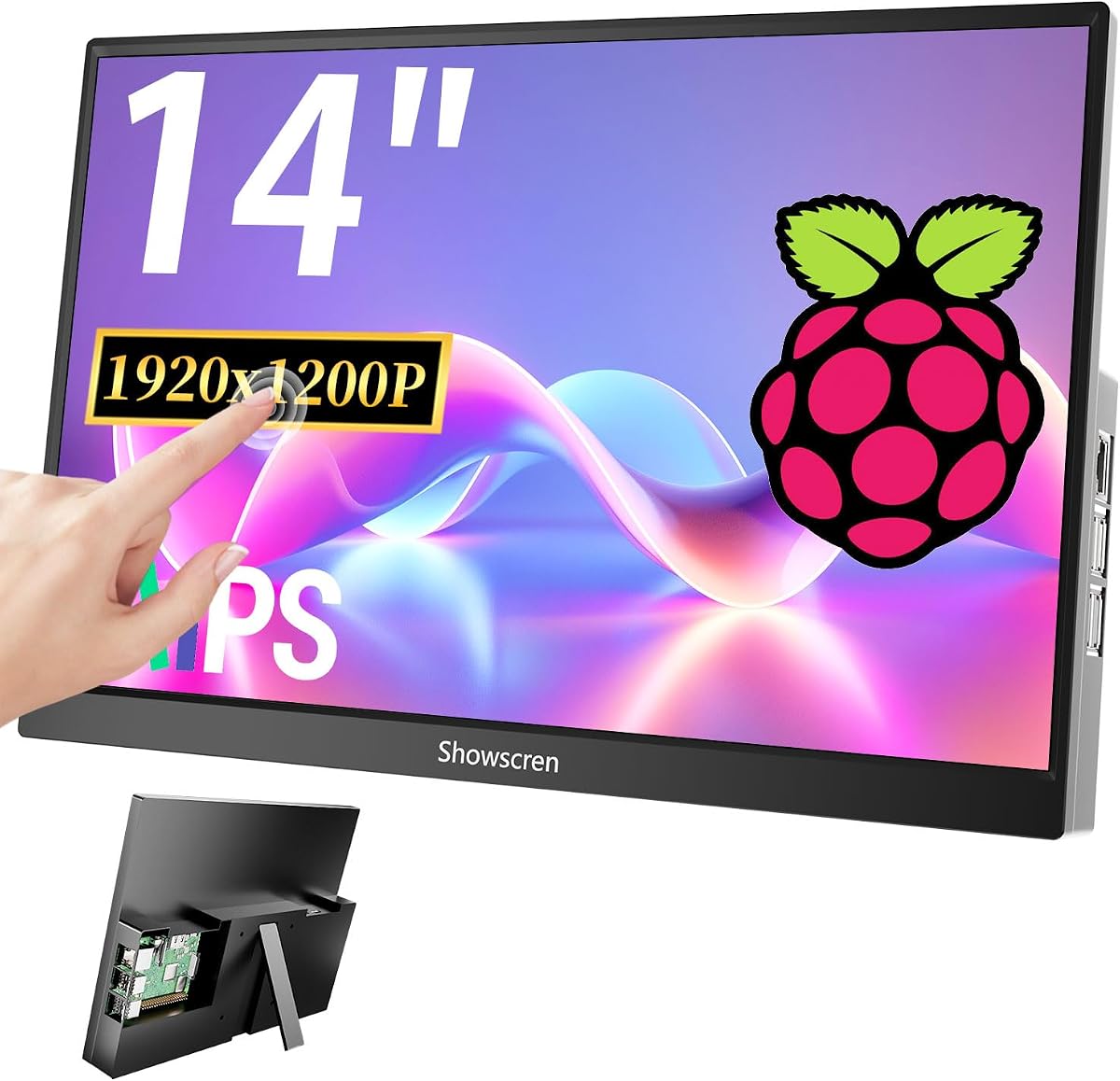
The 14 Inch Touchscreen Monitor offers the largest working area among the products reviewed. Designed around the Raspberry Pi 5, 4B, 3B, and 3B+, it can function as a portable monitor, an enlarged Pi terminal, or a larger shared display for development and control tasks. Its 3.5 rating is the lowest in the lineup, so buyers should weigh its size and versatility against that mixed user feedback.
We may earn a commission when you buy through this link, at no additional cost to you.
Its standout feature is the combination of a 14-inch screen and a back-cover mounting system that allows supported Raspberry Pi boards to be installed inside the display. A built-in mini cooling fan is included for the mounted Pi. The monitor also supports HDMI and USB-C connections, duplicate and extended display modes, and both landscape and portrait orientations.
Physical installation flexibility is another strength. A built-in kickstand makes the monitor easy to position, while support for 75 by 75mm VESA mounting allows wall installation. The display can also be used with PCs, laptops, Xbox consoles, PlayStation systems, TV sticks, TV boxes, Raspberry Pi Zero, Nintendo Switch, and compatible Android phones with the necessary full-function port.
Touch is more limited than the headline capacity might initially suggest. The product supports multiple-point touch, but the USB-A cable must be connected for touch to function. Touch is not offered through the listed Xbox, PlayStation, Switch, or MacBook connections. The small fan may also produce noticeable voice, although the product description says it can be used selectively. This monitor suits users who prioritize a large display and flexible mounting over a minimal cable setup.
A 14-inch panel can make complex Raspberry Pi interfaces easier to read and operate. It is particularly appealing for 3D printer control, portable development, dashboards, and projects where smaller screens force frequent scrolling.
The integrated kickstand supports temporary use, while the 75 by 75mm VESA pattern enables more permanent wall placement. Landscape and portrait modes further help match the screen to different workflows.
We may earn a commission when you buy through this link, at no additional cost to you.
The Raspberry Pi Touch Display 2 is a compact seven-inch LCD touchscreen designed specifically for Raspberry Pi boards. It carries a 4.5 rating, the highest numerical rating among the ten products, and its 720 by 1280 resolution provides a meaningful increase in pixel density over the common 800 by 480 configuration. The black bezel gives the panel a clean, purpose-built appearance.
We may earn a commission when you buy through this link, at no additional cost to you.
The display supports 24-bit RGB color, which is intended to provide vibrant and accurate reproduction. Its responsive touch interface allows direct navigation without requiring a separate keyboard or mouse for every operation. The product is described as purpose-built for seamless Raspberry Pi integration, making it a natural candidate for embedded interfaces, portable projects, and dedicated appliances.
The supplied information does not state the number of supported simultaneous touch points, the exact connection method, viewing-angle specification, brightness, or included mounting accessories. Those details are worth confirming with the seller before purchase, especially if your project depends on gestures, a particular Raspberry Pi model, or a specific cable arrangement. A high rating indicates favorable user response, but it should not replace checking current documentation and package contents.
This is a strong recommendation for buyers who want more visual clarity than a basic 800 by 480 panel but still prefer the footprint of a seven-inch screen. It may be especially suitable for projects involving menus, status pages, small forms, and simple controls. Confirm the exact Raspberry Pi connection requirements before installation, but its focused design and strong rating make it one of the most interesting compact choices here.
The 720 by 1280 resolution provides a sharper canvas than standard 800 by 480 compact screens. That can improve readability while preserving the portability associated with a seven-inch panel.
The product is explicitly designed around Raspberry Pi boards rather than general-purpose use. That focus makes it a natural option for embedded projects that need a dedicated, integrated visual interface.
We may earn a commission when you buy through this link, at no additional cost to you.
The Hosyond 5 Inch Touchscreen is the smallest display in the guide, but its size is exactly what makes it useful for highly integrated projects. It combines a five-inch IPS panel, 800 by 480 capacitive touchscreen, and direct MIPI DSI output in a compact unit. The 4.4 rating indicates a favorable reception despite the modest resolution inherent in this size class.
We may earn a commission when you buy through this link, at no additional cost to you.
Installation is refreshingly direct. The panel connects to the Raspberry Pi's MIPI DSI interface, and no separate driver installation is required. Its compatibility list covers the Raspberry Pi 5, 4B, 3B+, 3B, 3A+, 2B, 1B+, and 1A+, giving it broad relevance for owners with older boards as well as current models. PWM backlight brightness adjustment is supported for controlling the display in embedded installations.
The limitation is obvious: five inches provides very little workspace. It is suitable for status indicators, simple menus, sensor readings, and single-purpose control panels, but text-heavy applications and detailed graphics will feel cramped. It has no HDMI connection and is not intended to function as a general-purpose monitor for phones, laptops, or game consoles.
Choose this model if the project requires the smallest practical Raspberry Pi display and you value direct DSI operation over workspace. For classroom instruction, a kitchen controller, a small industrial interface, or a wearable-style build, the size can be an advantage. It is less suitable for general desktop use, coding, or media viewing, where a 7-inch or 10.1-inch display would be considerably easier to use.
A five-inch screen consumes very little physical space and can be incorporated into a custom enclosure. It works well when the interface presents a few controls, readings, or status messages rather than complex documents.
The listed support extends back through several older Raspberry Pi models, including 1A+ and 1B+. Direct DSI operation also keeps the intended installation free from separate touchscreen drivers.
We may earn a commission when you buy through this link, at no additional cost to you.
The ROADOM 10.1 Inch Touchscreen Monitor combines a 10.1-inch IPS panel with five-point capacitive touch and a fully enclosed portable design. Its 4.3 rating is among the stronger results in the guide. At 1024 by 600 pixels with 300cd/m² brightness and a 700:1 contrast ratio, it targets users who value a roomy, protected touchscreen more than a very high pixel count.
We may earn a commission when you buy through this link, at no additional cost to you.
The display supports a 178-degree viewing angle, which is useful when the screen is viewed from the side or mounted in an enclosure. Touch response is stated at three to five milliseconds, and the panel supports gestures such as tapping, zooming, swiping, and mouse clicks. It connects through HDMI for video and USB Type-C for touch, with no driver installation required.
This model is particularly well prepared for Raspberry Pi use. The included GPIO cable can power the Pi and screen from one source, and the package contains HDMI and Micro-HDMI cables, USB-A-to-Type-C and Type-C-to-USB-A cables, a power adapter, a Pi mounting kit, and a manual. Dual built-in one-watt speakers, an adjustable stand, and duplicate, extend, and second-screen display modes broaden its use beyond a bare touchscreen board.
The main compromise is resolution. Although 1024 by 600 provides more room than seven-inch 800 by 480 panels, it remains below the 1280 by 800 and 1920 by 1200 alternatives in the guide. Touch is also unavailable on iOS and macOS according to the product information. This ROADOM model is a compelling choice for portable Raspberry Pi workstations, classroom projects, security displays, and 3D printer interfaces where accessories and tidy construction matter.
The included cables, GPIO power lead, adapter, mounting hardware, and manual reduce the need to source extra accessories. This is helpful for portable deployments and projects intended to be moved between locations.
A stated three-to-five millisecond response time supports responsive interaction, while five-point capacitive touch allows common multi-finger gestures. The 178-degree IPS viewing angle also helps maintain visibility from different positions.
We may earn a commission when you buy through this link, at no additional cost to you.
The 8 Inch Touchscreen occupies a useful middle ground between compact DSI panels and larger 10.1-inch portable monitors. It provides a 1280 by 800 IPS display, five-point capacitive touch, and built-in dual speakers. The 4.1 rating is respectable but trails the strongest products, making it important to consider whether its particular size and mounting features fit the intended project.
We may earn a commission when you buy through this link, at no additional cost to you.
The 1280 by 800 resolution gives users more room than 800 by 480 or 1024 by 600 displays, which is useful for code, menus, and browser-based interfaces. Its glossy IPS panel is advertised with 178-degree viewing angles and clear picture quality. Touch is activated through a USB connection, while HDMI handles the display signal.
Installation is straightforward because no driver is required, and a dedicated power switch can turn the screen off when it is not needed. The detachable backboard supports 100, 75, and 50mm wall-mount patterns and works in horizontal or vertical orientations. Compatibility is broad, covering Raspberry Pi 5, 4, 3B+, 3B, 3, 2, and Zero models, as well as other single-board computers, game consoles, computers, and TV boxes.
This is a good fit for users who want a sharp, portable screen larger than seven inches but smaller and more manageable than a 10.1-inch or 14-inch monitor. It is particularly suitable for wall-mounted dashboards, classroom use, and portable Raspberry Pi workstations. The need for both HDMI and USB connections adds a little setup work, and touch is not offered on iOS systems, but the resolution and flexible mounting remain persuasive.
Eight inches provides enough area for more useful interfaces while remaining easier to carry than the larger alternatives. It suits users who want a dedicated Pi display without turning the project into a full desktop arrangement.
Support for 100, 75, and 50mm mounting patterns broadens the available wall-mount options. The detachable stand and vertical orientation make it easier to adapt the panel to a finished installation.
We may earn a commission when you buy through this link, at no additional cost to you.
The ELECROW 10.1 Inch Touchscreen Monitor combines a 10.1-inch IPS display with 1280 by 800 resolution and a portable protective case. It has a 4.4 rating and is positioned for Raspberry Pi, Jetson Nano, Banana Pi, PC, and related maker projects. Its relatively light 521-gram weight and compact 24 by 15.7cm dimensions make it easier to transport than a conventional desktop monitor.
We may earn a commission when you buy through this link, at no additional cost to you.
The screen delivers crisp visuals and wide viewing angles through its IPS panel. Touch behavior depends on the operating system: five-point touch is supported on Windows 11, 10, 8, and 7, while Raspberry Pi OS, Ubuntu, Kali Linux, and Windows 10 IoT provide single-point touch. That distinction matters for gesture-driven applications, so users should verify their intended platform before purchase.
Connection follows the familiar portable-monitor pattern, with HDMI supplying video and USB supplying power and touch functionality. It is advertised as plug-and-play and does not require driver installation. The acrylic case protects the screen, while four rear mounting holes allow wall mounting or integration with a Raspberry Pi or another single-board computer.
The ELECROW is a strong option for portable coding, CCTV viewing, maker projects, and compact Raspberry Pi workstations where 1280 by 800 provides a better balance of clarity and size. It does not list built-in speakers, so audio requires another device. For users who need multi-finger gestures specifically under Raspberry Pi OS, this limitation may outweigh its otherwise attractive lightweight design.
At 521 grams and 24 by 15.7cm, the monitor is designed to move between workspaces more easily than a conventional display. The protective acrylic case helps it travel safely while preserving a clean appearance.
Windows systems support five-point interaction, while Raspberry Pi OS and several Linux environments are listed as single-point. Projects that depend on complex gestures should test the intended operating system before committing.
We may earn a commission when you buy through this link, at no additional cost to you.
The MAGEX 10.1 Inch Touch Screen Monitor is the most premium-focused Raspberry Pi workstation in the guide. It combines a 1920 by 1200 IPS touchscreen, ten-point capacitive touch, a protective enclosure, built-in speakers, a cooling fan, a stand, and VESA support. The 4.4 rating reflects a strong overall reception, while the feature set makes it especially appealing for polished, portable builds.
We may earn a commission when you buy through this link, at no additional cost to you.
Its 1920 by 1200 resolution provides one of the sharpest canvases in the list and is well suited to code, monitoring dashboards, documents, and media. The glossy IPS panel offers 178-degree viewing angles, and the product includes blue-light reduction and flicker-free technology for longer viewing sessions. A stated three-to-five millisecond touch response helps gestures feel immediate.
The case is designed around the Raspberry Pi, allowing the board to be installed directly inside while a detachable back cover conceals the cables. The monitor is listed as compatible with the Pi 5, 4, 3B+, 3, 2, and Zero. It also works with OctoPi, BB Black, Banana Pi, Orange Pi, RetroPi, game consoles, computers, and TV boxes, with stated support for Windows, Raspbian, Noobs, Kali Linux, Debian, Ubuntu, and Kodi.
The built-in stereo speakers and mini fan add functionality that bare displays do not provide. Touch works through HDMI for video and a USB touch port without additional drivers. As with many capacitive displays, touch is unavailable when connected to an iPhone, iPad, or Mac. This is a strong recommendation for users who want high resolution, integrated hardware, and a tidy all-in-one Pi enclosure in one device.
The 1920 by 1200 panel makes text-dense interfaces more readable and provides enough space to organize multiple windows. Wide viewing angles help preserve image quality when the monitor is not viewed perfectly head-on.
Mounting the Pi inside the enclosure hides the board and cables while protecting them from accidental contact. Integrated speakers, cooling, a stand, and VESA mounting reduce the need for several separate accessories.
We may earn a commission when you buy through this link, at no additional cost to you.
The ROADOM 10.1 Inch Touchscreen Monitor is an approachable portable display for Raspberry Pi users who want a protected, roomy interface. It combines a 10.1-inch IPS panel, 1024 by 600 resolution, five-point capacitive touch, dual speakers, and a Raspberry Pi mounting kit. Its 4.2 rating indicates reasonable user satisfaction.
We may earn a commission when you buy through this link, at no additional cost to you.
The 1024 by 600 panel is described as a significant improvement over standard 800 by 480 displays, and it provides more usable space for menus, media, and light desktop work. Brightness is listed at 300cd/m², contrast at 700:1, and viewing angles at 178 degrees. Touch response is stated at three to five milliseconds and supports tapping, zooming, swiping, and scrolling.
Its Raspberry Pi focus is clear. The included GPIO cable can power the Pi and screen from one source, and a mounting kit lets the board attach to the back with cables concealed. The stated Raspberry Pi compatibility includes the Pi 5, 4, 3, Zero, and 400. HDMI provides video, while MicroUSB handles touch. The product also works with computers, game consoles, and TV boxes and supports several common desktop and maker operating systems.
The main limitation is resolution, which is lower than several 10.1-inch alternatives. Touch also does not work with iOS devices, as explicitly noted in the product information. Even so, the bundled accessories, built-in speakers, protected construction, and rear Pi mounting make this a convenient option for portable projects, classroom installations, CCTV use, and Raspberry Pi control panels where simple touch interaction is sufficient.
The included GPIO cable supports a cleaner installation by combining Raspberry Pi and display power. Rear mounting hardware keeps the board protected and allows cables to remain out of view.
Dual speakers add audio without another peripheral, while the 10.1-inch size creates a more comfortable interface than the smallest embedded displays. The included cable set and mounting hardware simplify portable deployment.
We may earn a commission when you buy through this link, at no additional cost to you.
The right Raspberry Pi touchscreen depends on the connection method, available space, operating system, required gestures, and desired level of integration. These factors help separate simple embedded panels from complete portable workstations.
A MIPI DSI display connects directly to the compatible connector on the Raspberry Pi and often provides the cleanest installation for a dedicated Pi system. The Hosyond 5-inch and 7-inch models use this approach and are described as driver-free. An HDMI monitor-style display is more versatile because it can also serve as a general-purpose monitor, but touch usually requires a second USB connection in addition to the HDMI video cable.
Choose DSI for a permanent Raspberry Pi-specific project, and choose HDMI when the same display may be shared with a laptop, desktop, game console, or other device.
Five-inch screens are ideal for status displays and compact controllers, while seven-inch panels provide a better balance for embedded interfaces. A 10.1-inch monitor offers a familiar portable-computer format, and the 14-inch model creates the largest workspace but is less convenient to carry. Consider the complete enclosure, viewing distance, stand, and wall-mount arrangement rather than judging the display by diagonal size alone.
For frequent travel, choose a lightweight 8-inch or 10.1-inch unit. For a fixed workstation, prioritize usable workspace and resolution over portability.
Resolution determines how much information can appear without scrolling. The 800 by 480 panels are appropriate for menus and simple status interfaces, while 1024 by 600 and 1280 by 800 models suit more detailed desktop work. The 1920 by 1200 options provide the sharpest canvas, which is valuable for code, documents, monitoring, and media. IPS technology is also specified across many products for broad viewing angles.
Match resolution to the content. A larger but low-resolution screen is not automatically better than a smaller, sharper one for every project.
Single-point touch supports tapping and basic cursor control, while five-point and ten-point capacitive panels can recognize more complex gestures. Operating-system support still matters: some products provide five-point touch on Windows but only single-point touch under Raspberry Pi OS, Ubuntu, or Kali Linux. Several displays specify three-to-five millisecond response times, and two larger products also advertise sub-millisecond or very fast response.
For kiosk controls, single-point input may be enough. For drawing, zooming, pinch gestures, or multitouch applications, verify both the hardware touch count and the operating system's behavior.
Compatibility varies across the list, but most products support several Raspberry Pi generations. The Hosyond DSI displays cover broad model ranges, including older boards, while many HDMI monitors list the Pi 5, 4, 3, 3B+, 2, and Zero. Some products also mention the Pi 400. Check the exact model, connector location, and included cable before making a final selection.
A broad compatibility claim is useful, but the specific Raspberry Pi version in your build should be confirmed in the current product listing and instructions.
The larger monitor-style products often include a detachable rear cover, mounting compartment, or bracket designed to hold a Raspberry Pi. This protects the board, reduces clutter, and makes the assembly easier to carry. Integrated cooling fans are offered by several 10.1-inch and 14-inch models, although the 14-inch unit notes that its fan may produce some audible noise.
For permanent or portable installations, prioritize a protected back, concealed cables, and a suitable cooling arrangement. A built-in fan should be considered in terms of both performance and acoustic output.
A freestanding stand is convenient for temporary use, while VESA support or rear mounting holes allow more permanent wall installation. The 8-inch display supports several common mounting sizes, the 14-inch model supports 75 by 75mm VESA, and the MAGEX includes VESA support. Several products can operate in landscape or portrait orientation, which can help when an interface is vertically arranged.
Confirm both the mounting pattern and included hardware. A suitable enclosure may require adapters or additional fasteners not included with the display.
Some displays can power a Raspberry Pi through a GPIO cable, while others need a separate power connection. The larger ROADOM model includes an adapter and extensive cable set, and the MAGEX product provides HDMI, USB touch, speakers, cooling, and an enclosure. Compatibility claims include Raspberry Pi OS, Raspbian, Noobs, Debian, Ubuntu, Kali Linux, Windows, and Kodi, but iOS touch is consistently excluded across the relevant HDMI models.
Review the cable list, power requirements, operating-system support, and included mounting accessories before ordering. Those details determine how much additional setup the project will require.
Begin by confirming the display's connection type and the ports available on your particular Raspberry Pi. For a DSI panel, attach the touchscreen ribbon cable to the correct MIPI DSI connector and follow the supplied instructions. For an HDMI model, connect HDMI for video, USB for touch, and the appropriate power supply. Do not connect or adjust the ribbon cable while the Pi is powered.
Install and configure the operating system before making any operating-system-dependent changes. DSI models are described as driver-free, while HDMI displays generally use standard HID touch input, but drivers, rotation settings, display duplication, and touch calibration may still vary by system. Update Raspberry Pi OS or the intended Linux distribution, enable the correct interfaces, and test the display before installing it permanently in a case or enclosure.
Protect the panel by using a clean, soft cloth and avoiding excessive pressure on the touch surface. Some products include a removable screen protector, and the ROADOM instructions specifically recommend removing it for the best touch experience. Keep liquids away from the display, provide ventilation for the Pi and any cooling fan, and use the included power supply rather than an inadequately rated source. Secure loose cables and confirm that a kickstand, wall mount, or custom bracket can support the assembled unit.
Many displays in this guide are advertised as driver-free, particularly the Hosyond DSI panels and the HDMI monitor-style products. They normally use operating-system-supported touch interfaces after connecting the appropriate video, power, and touch cables. However, configuration can differ by Raspberry Pi model and operating-system version, so updating the software and following the current instructions remains important.
Most of the HDMI monitor-style products can display a laptop or desktop image through HDMI and use USB for touch. The stated compatibility varies by operating system, and touch is explicitly unavailable on iOS systems and on several Mac configurations. Check whether the computer's USB-C or USB-A port supports the required touch-data function before purchase.
A 7-inch screen is more portable and often better for embedded controllers, while a 10.1-inch screen provides more room for code, documents, dashboards, and media. Resolution matters as much as size: the best choice is the one that provides enough readable detail for the intended content without making the project unnecessarily bulky.
Five-point or ten-point touch means the display can recognize multiple simultaneous fingers for gestures such as pinch-zoom or multi-finger navigation. The supported gesture count can depend on the operating system, even when the hardware itself supports more points. Confirm the behavior of the specific Raspberry Pi OS or Linux distribution you intend to use.
Several products in this guide are designed for that arrangement. The 10.1-inch monitor, MAGEX display, 14-inch model, and ROADOM products include rear compartments, covers, brackets, or mounting kits that can secure a supported Raspberry Pi. Installation details vary, so use the supplied hardware and follow the manual to avoid obstructing ports, cooling, or the detachable cover.
The 14-inch Touchscreen Monitor explicitly supports landscape and portrait modes, and several other monitors can be physically positioned vertically. Rotation may also be configured in the operating system. Confirm both physical orientation and software rotation support for your project before final installation.
It depends on the workload, enclosure, and ambient conditions. The 10.1-inch monitor and MAGEX display include cooling fans, and the 14-inch model has a mini fan for a mounted Pi. The 14-inch listing notes that the fan may create some audible noise, so consider whether continuous or selective cooling better suits the installation.
The exact requirements depend on the product. DSI displays generally need the correct ribbon connection and power, while HDMI displays need video, USB touch, and power connections. Some bundles include GPIO power leads, adapters, HDMI cables, USB cables, mounting kits, and manuals, whereas more specialized panels may require the buyer to source compatible accessories separately.
The Hosyond 7 Inch is the most straightforward compact choice, offering direct MIPI DSI connection, a 7-inch IPS panel, and driver-free operation. The 10.1 Touchscreen Monitor is the strongest all-around option, combining sharp 1920 by 1200 resolution, ten-point touch, an integrated Pi compartment, speakers, and cooling. The MAGEX 10.1 Inch stands out as the premium integrated workstation with similar high resolution and extensive enclosure features.
For a small embedded controller, prioritize direct DSI connectivity and low physical size. For a portable desktop, evaluate 1280 by 800 or 1920 by 1200 resolution, multi-point touch, cooling, and cable management. Larger users may prefer the 14-inch monitor for maximum workspace, while the 5-inch Hosyond remains useful when size matters more than viewing area.
Before ordering, verify the exact Raspberry Pi model, required cables, power arrangement, operating-system support, touch behavior, and mounting hardware. Product listings and selling prices can change, so review the current details and bundle contents at the time of purchase to ensure the selected touchscreen fits the finished project.