
KIWITATA 2.4GHz Wireless Original SNES Controller
4.4Editor score
Original console wireless adapter
Rechargeable integrated battery
Thirty-foot wireless range
A SNES controller replacement can solve worn buttons, failed contacts, damaged cables, or the need for a modern connection to an emulator. The right option depends on whether you need to repair an original controller, replace it for a classic console, or add a retro-style gamepad to a computer.
We compared ten products by examining intended platform compatibility, connection type, control layout, repair scope, power requirements, and supported operating systems. The list includes silicone contact pads, wired console controllers, USB emulation controllers, and 2.4GHz wireless gamepads for original SNES systems and PCs.
Each pick highlights a different use case, from restoring an original controller to enjoying SNES-style games through emulators. Ratings reflect the supplied customer feedback, while availability and pricing can change, so verify the current listing and device requirements before buying.
4.4Editor score

4.6Editor score

4.4Editor score
As an Amazon Associate we earn from qualifying purchases.
The table below compares all ten options by their main connection method, intended platform, power arrangement, and defining feature, making it easier to separate true console replacements from repair pads and USB controllers designed for emulators.


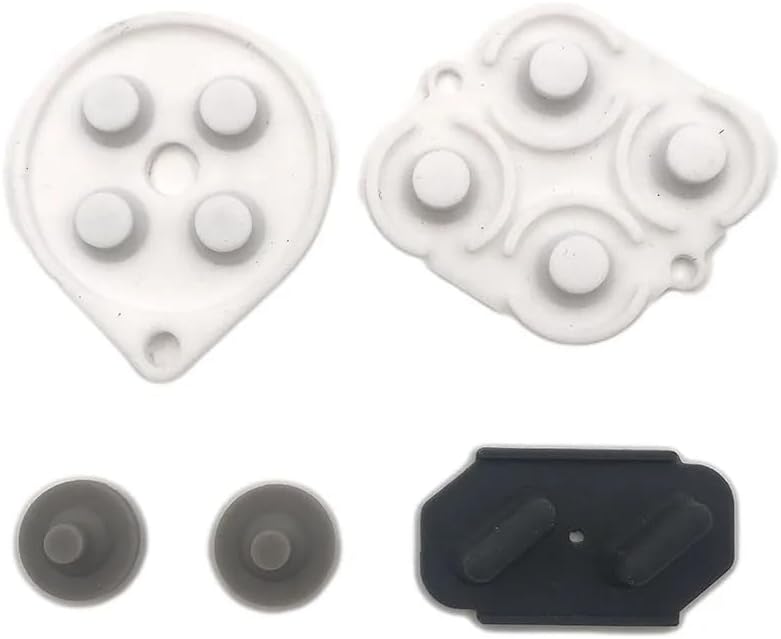


This product is a conductive silicone button-pad set intended to replace the contact membrane inside an original Nintendo SNES or SFC controller. It is not a gamepad, console adapter, or complete replacement unit. For an owner whose original controller still has a solid shell and responsive-looking buttons but intermittently registers inputs, that distinction makes this a focused repair solution rather than a general-purpose alternative.
We may earn a commission when you buy through this link, at no additional cost to you.
The set contains one group of silicone rubber conductive pads. Those pads sit between the controller buttons and their underlying contact mechanisms, allowing a press to complete the electrical path. Replacing a worn, cracked, dirty, or degraded membrane can restore consistent button response without replacing the entire controller. The material specification and limited compatibility make it particularly relevant to technicians restoring a genuine SNES-style controller rather than shopping for a modern PC gamepad.
The principal trade-off is that this is a more technical repair. The controller must be opened, the old pads carefully removed, and the replacements positioned and seated correctly. A poor fit, a loose contact, or damage to the flexible board can turn a straightforward membrane replacement into a larger repair. It also has no cable, controls, housing, or electronics of its own, so it cannot address a broken connector, failed circuit board, or missing controller altogether.
This is best for someone who values restoring an original controller and has diagnosed the problem to the button-contact layer. Compare the pad shape and controller model carefully with the supplied pictures before opening the controller. If the goal is simply to gain a new controller for an original console or emulator, choose a complete wired or wireless gamepad instead. Within repair pads, however, this option directly addresses a common source of inconsistent SNES input.
The conductive silicone pads are intended to restore the electrical contact created when a button is pressed. This makes them useful when inputs work intermittently, trigger in the wrong way, or no longer register cleanly.
The listed compatibility is specifically for Nintendo SNES and SFC controllers. A similar-looking gamepad may have different button spacing or contact-board construction, so model verification matters before purchasing.
We may earn a commission when you buy through this link, at no additional cost to you.
This KIWITATA set replaces wired original SNES controllers with two rechargeable 2.4GHz wireless gamepads. It is designed for the original Nintendo SNES console and includes the 7-pin connector adapter needed to bridge the console and wireless system. The supplied rating is 4.4, placing it among the strongest-rated choices in this guide, particularly when wireless freedom is the main objective.
We may earn a commission when you buy through this link, at no additional cost to you.
Its defining advantages are the supplied adapter, a built-in 3.7-volt 500mAh lithium-ion battery, and a stated continuous runtime of more than ten hours. The listed wireless range reaches as far as 30 feet, allowing comfortable couch-distance play without a controller cable. The D-pad uses a frosted concave design intended to resist slipping and sweating, while the controller body follows a familiar curved shape intended to sit comfortably in the hands.
Compatibility is narrower than some product names might initially suggest. The set does not support simultaneous use of both controllers for Super Famicom games and only supports one-player games. It also does not work with SNES Mini, SNES Classic, or NES Classic Edition, and it has no Bluetooth or wireless USB mode for PC, Switch, or Raspberry Pi. A third-party controller may also behave differently from an official Nintendo unit in software that expects a particular input profile.
This is a strong choice for a living-room SNES setup where cable distance is annoying and the system is an original-style console. It is less suitable for a player who needs two-player Super Famicom support, Bluetooth, or one controller that works across console and computer platforms. Confirm the console model, confirm that the relevant games are single-player where necessary, and read the seller’s setup instructions before ordering.
A 2.4GHz connection and stated 30-foot range give players more freedom to sit or move around than a conventional wired controller. The included console adapter makes this approach relevant to original SNES hardware.
The built-in rechargeable battery is specified to operate continuously for more than ten hours. That makes the set practical for long retro-gaming sessions, although the controller should be recharged between major uses.
We may earn a commission when you buy through this link, at no additional cost to you.
This two-pack of KIWITATA USB controllers is built for computer-based retro gaming rather than an original SNES console. Each controller uses a wired USB 2.0 connection with a 1.5-meter, or five-foot, cable. The supplied 4.3 rating reflects generally favorable customer feedback, while the inclusion of two controllers makes it convenient for local multiplayer through compatible emulators.
We may earn a commission when you buy through this link, at no additional cost to you.
Compatibility is broad on the systems named in the product information. It supports Windows versions ranging from Windows 98 through Windows 11 and later, Mac OS X 10.0 or later, Linux, and Raspberry Pi. The listed emulator support includes tools such as RetroArch, OpenEmu, snes9x variants, Nestopia-related options, and other classic game emulators. The precise controls include a concave cross-shaped D-pad, face buttons, and Start and Select functions.
The most important limitation is that the controller does not plug into an original SNES console. Despite the familiar appearance, the USB lead and electronics serve computer input rather than the proprietary console connection. Button assignments are also not automatic: users must manually configure the controls and directional axes inside the chosen emulator, and the emulator itself must already be installed. This makes setup less immediate than a console-specific controller.
Choose this product if your main objective is playing legally obtained games through emulation on a PC, Mac, or Raspberry Pi and you want two matching gamepads. Check your emulator’s input instructions before starting, and do not assume that the physical SNES shape guarantees plug-and-play behavior. For an original console owner, the Hyperkin wired controller is the more directly compatible replacement.
Two matching controllers allow more than one player to participate in supported emulator games. The standard USB connection also avoids receiver pairing and wireless interference, making it a predictable choice for a stationary computer setup.
The controller uses a standard USB connection and needs no separate driver, but individual emulators may still require button and directional-axis assignments. Read the product’s setup guidance and the emulator’s input menu before launching a game.
We may earn a commission when you buy through this link, at no additional cost to you.
The Hyperkin Scout is a premium wired replacement for an original SNES controller. It is compatible with all Super NES models and includes a 10-foot cable, making it a straightforward choice for players who want the console-native experience without replacing their console setup with a wireless system. Its 4.6 rating is the highest numerical rating among the supplied products.
We may earn a commission when you buy through this link, at no additional cost to you.
The product information highlights premium build quality and an ergonomic design. Unlike USB emulator controllers, the Scout is intended to work directly with the original console connection, eliminating the need for a computer, receiver, software mapping, or battery charging. The 10-foot cable also gives a player substantially more placement freedom than the short leads used by some original-style controllers.
The primary limitation is its wired nature. Players who want to sit far from the television or remove the controller from the console completely may find the cable restrictive. The supplied information does not state compatibility with Windows, Mac, Linux, Raspberry Pi, or an original SNES wireless adapter, so this should be treated as a console-focused wired controller rather than a universal replacement.
This is the most straightforward recommendation for someone replacing a worn original SNES controller and wanting to retain the familiar plug-in-and-play experience. It suits players who value the console’s authenticity, prefer reliable wired input, and do not need a wireless link or computer functions. Its broad Super NES model compatibility, long cable, premium construction, and strong supplied rating make it the editor’s choice.
Compatibility with all Super NES models makes this a less complicated option than a controller designed around a specific regional console variation. Confirm that the original console and controller port are in good condition before installation.
A physical cable avoids receiver pairing, radio interference, and battery management. The 10-foot length adds useful flexibility while preserving the direct console connection.
We may earn a commission when you buy through this link, at no additional cost to you.
The GUANKE repair kit consists of one set of conductive rubber button pads for an SNES controller. It is a component-level solution for restoring the membrane contacts that carry button signals inside the controller. No numerical customer rating is supplied for this product, so its evaluation here rests on the stated function, package contents, and SNES-specific design rather than a rating-based comparison.
We may earn a commission when you buy through this link, at no additional cost to you.
The pads are intended to restore contact between the physical buttons and the controller’s internal switches or contacts. This can be helpful when a button feels soft, sticky, unresponsive, or unreliable, and when replacing the entire controller would be unnecessary. The listing also frames the set as a way to make an existing controller look and feel renewed, though appearance should remain a secondary consideration when functionality is the goal.
Installation is the central limitation. The controller must be opened, and the old conductive material must be removed carefully so that the new pads do not overlap incorrectly or pull away from the contact points. The listing specifically asks buyers to compare pictures and descriptions and verify their machine. Similar controller shells do not necessarily have identical internal membrane layouts, so shape and contact placement are more important than the outer appearance.
This kit is best for a repair-oriented owner who has already confirmed that the controller’s conductive membrane is the failed part. It is not a complete controller, a cable, or a wireless adapter, and it cannot solve a dead circuit board or damaged port. For a less technical solution, choose one of the complete gamepads; for preservation of an original controller, this option can be an efficient and focused repair.
Replacing the internal pad set allows an owner to retain the original controller housing and external parts. It is a more conservative repair when the shell and electronics remain in good condition.
The instruction to compare images and descriptions is important. The pads must align with the controller’s individual button contacts, and visual similarity alone does not guarantee a correct fit.
We may earn a commission when you buy through this link, at no additional cost to you.
This ZAMPAM set includes two SNES-style 2.4GHz wireless gamepads with USB receivers for computer and retro-gaming use. The 4.0 supplied rating indicates a generally positive but not exceptional customer consensus. The set is positioned as a flexible emulator option, with support listed for Windows, Mac OS, Linux, Raspberry Pi, RetroPie, Recalbox, Nintendo Switch 1, and other compatible USB-controller platforms.
We may earn a commission when you buy through this link, at no additional cost to you.
The wireless system provides a stated range of up to 10 meters, or 32 feet, while the rechargeable 240mAh battery is rated for up to three hours of continuous play. A battery indicator helps users monitor remaining charge, and the controllers recharge in about an hour. Setup is described as plug-and-play: the USB receiver goes into the device, and no separate driver or software installation is required for compatible systems.
Compatibility still depends on the software and platform. The product works with many programs and emulator environments that accept a standard USB gamepad, including RetroArch, BSNES, and OpenEmu, but not every program necessarily recognizes every control. It is explicitly incompatible with Nintendo Switch 2, and the stated battery life is shorter than that of several competing wireless controllers. A two-controller setup may also require two receivers or a receiver arrangement for the intended use.
This is a good choice for a multi-platform retro-gaming setup that includes more than just classic SNES software. It offers useful operating-system reach and a familiar control layout without a wired connection to the player. For an original SNES console, the dedicated console adapters offered by other picks are more appropriate. For a stationary PC and shorter cable-free sessions, the broad platform support may outweigh the shorter stated battery runtime.
Support for major desktop and retro platforms makes the set more versatile than a controller tied to one console family. The familiar SNES-style layout can also reduce the learning curve when moving between emulators.
The rechargeable battery and included level indicator simplify ongoing use. With up to three hours of stated continuous gameplay, charging between long sessions is advisable.
We may earn a commission when you buy through this link, at no additional cost to you.
The ZAMPAM wireless gamepad uses a USB receiver and is intended primarily for computer and emulator play. Its 4.2 supplied rating reflects reasonably favorable feedback. The controller offers a familiar retro layout, 2.4GHz wireless communication, and a rechargeable lithium-ion battery, while explicitly excluding original SNES, Mini SNES, and SNES Classic consoles.
We may earn a commission when you buy through this link, at no additional cost to you.
The stated wireless range reaches 24 feet, and one charge is described as lasting around 100 hours. The unusual figure may depend on usage conditions, so it should be treated as a manufacturer claim rather than a guarantee. More significant for emulator users is the programmable turbo function: in USB mode, holding Select with A, B, X, or Y can turn the corresponding turbo function on or off.
A USB adapter is used to connect the controller to a PC or an Android device that supports an emulator. Users may need a joystick-mapping utility, such as Joystick Mapper, to configure keys correctly before playing on Mac or Windows. This makes the product more configurable than a basic USB controller but less immediately plug-and-play than options that expose mappings directly in the emulator. The original SNES console is expressly unsupported, so a console owner should not mistake the retro styling for native compatibility.
This controller is best for a player who wants a wireless PC gamepad and values programmable functions beyond a standard button layout. It is also useful for Android-based emulator setups when the device accepts the included receiver. Users should verify the required receiver behavior, install appropriate mapping software, and test the controls before starting a game. It is a strong emulation accessory, but not a genuine console replacement.
The ability to assign turbo behavior to A, B, X, or Y in USB mode is useful for emulator titles that benefit from rapid repeated input. The stated shortcut makes the feature accessible without replacing the controller.
Because the receiver communicates as a standard-style USB gamepad, some systems may need mapping software or manual input configuration. Testing in a small test program can reveal incorrect axes and buttons before a full game begins.
We may earn a commission when you buy through this link, at no additional cost to you.
This two-pack of wireless USB SNES-style controllers is designed for retro emulation on Windows, macOS, Linux, and Raspberry Pi systems. It has a supplied 4.2 rating and combines a 2.4GHz receiver connection, a stated 33-foot range, and rechargeable batteries with an advertised 10-hour runtime. Two controllers are included, making it practical for local multiplayer where the software supports it.
We may earn a commission when you buy through this link, at no additional cost to you.
The setup is described as plug-and-play, with no drivers required on compatible devices. Each controller has sensitive face buttons and a familiar retro layout. The package includes the controllers, USB receivers, charging cables, and a user manual. A stated zero-lag experience and the 10-meter operating range are intended to provide responsive play without a cable tethering each player to the computer.
The exclusions are important. The product is not compatible with Android TV Box, Fire TV, Chromebook, SteamOS, Tesla, C64, or Nintendo Switch, and the missing Switch button configuration is specifically cited as the reason. It also requires a USB receiver connection, so “wireless” describes the controller-to-receiver link rather than a direct Bluetooth connection. A receiver must occupy an available USB port, and software support still depends on the emulator.
This set is a balanced choice for a home computer dedicated to retro games, especially when two people want to play. It offers stronger stated battery life than some other wireless options and avoids the need to install drivers on supported systems. Choose it when Windows, macOS, Linux, or Raspberry Pi is the intended platform and the excluded devices are outside your setup.
The listed 10-hour runtime and 33-foot range provide comfortable room for extended emulator sessions. The system is designed for play at a normal distance from a computer or television.
The package includes two controllers and the necessary USB receivers. Players should confirm that their computer has enough open USB ports and that the emulator supports simultaneous gamepads.
We may earn a commission when you buy through this link, at no additional cost to you.
The miadore two-pack provides two wired USB controllers with a classic SNES-inspired shape. It is built for Windows, Mac, Linux, Raspberry Pi, and RetroPie systems running emulators rather than for an original SNES console. Its supplied 4.4 rating matches the stronger-rated group, and the two-controller bundle is a notable feature for local multiplayer.
We may earn a commission when you buy through this link, at no additional cost to you.
The controllers use standard USB plug-and-play connections and require no drivers. The stated operating-system coverage includes several generations of Windows, Mac OS X and later, Raspberry Pi models, and RetroPie OS. Their controls include an eight-way directional pad, six digital face buttons, concave X and Y buttons, convex A and B buttons, and rubber Start and Select buttons. The approximately five-foot cable offers a practical distance from a desk or media center.
As with most USB retro controllers, automatic assignment should not be assumed. The product information notes that users may need to open the emulator’s input settings and map the buttons, and recommends having the controller plugged in before starting the emulator. It is also a third-party controller that does not connect to an original SNES or NES console, despite its period-inspired appearance.
This is a strong general-purpose choice for emulator use, particularly when two players want matching gamepads without dealing with wireless receivers or batteries. It offers broad platform coverage, a simple USB connection, and a responsive control set. Choose it instead of an original-console model when your games run through emulators, and consult the emulator’s configuration guide before the first session.
The pair avoids receiver pairing, radio interference, and battery charging. Each controller connects directly through USB, which can simplify a permanent retro-gaming station.
Support extends across major desktop systems, Raspberry Pi, and RetroPie environments. The controller is described as working with a wide range of emulators, though button mapping may still be required.
We may earn a commission when you buy through this link, at no additional cost to you.
This KIWITATA wireless controller is designed to bridge original SNES console gaming and computer-based retro play. It includes a wireless pairing adapter for the original console and a 2.4GHz USB dongle for Windows or Mac use. No numerical customer rating is supplied, so this recommendation is based on the product’s stated dual-platform design and the included accessories rather than customer feedback.
We may earn a commission when you buy through this link, at no additional cost to you.
The controller has a built-in 3.7-volt 500mAh lithium-ion battery with a stated continuous runtime of more than ten hours. Its 2.4GHz signal is specified to cover up to 30 feet, and the controller uses a concave, anti-slip D-pad design intended to improve directional control. The console connection uses a 7-pin SNES adapter, while the USB dongle expands compatibility with desktop and Raspberry Pi systems.
The supplied information lists support for numerous Windows versions, Mac OS X 10.0 or later, and Raspberry Pi models including the Pi 3, Pi 4, and Zero W. However, computer input may still require recognition and configuration in the emulator or application being used. The product is a third-party controller, and no Bluetooth mode is provided. It also includes only one controller, so it does not solve multiplayer needs by itself.
This is a compelling choice for someone who uses an original SNES console but also plays through emulators and wants one familiar gamepad for both roles. The included console adapter and USB dongle reduce the need to keep separate controllers on hand. Verify that the console and software recognize the third-party wireless input, and check the emulator’s configuration process before relying on it for a game.
The console adapter and USB dongle let the same gamepad serve an original SNES and a compatible computer setup. This is useful for users who move between console and emulator play.
The rechargeable 500mAh battery is specified for more than ten hours of continuous use. Combined with the stated 30-foot range, it supports flexible placement around a television or desktop.
We may earn a commission when you buy through this link, at no additional cost to you.
The right replacement depends on the platform you play on, the failure affecting your current controller, and whether you prioritize a direct console connection, wireless freedom, or emulator support.
Begin by identifying exactly where the controller will be used. An original SNES console requires a controller with the appropriate original-console connection, whether wired or supplied with a compatible wireless adapter. A Windows, Mac, Linux, or Raspberry Pi setup requires a USB controller that the operating system and emulator recognize. Similar appearance is not proof of compatibility because console ports, signal protocols, and button layouts can differ.
A controller with intermittent inputs may only need new conductive button pads, especially if its cable, housing, D-pad, and circuit board remain intact. Complete replacement makes more sense when multiple components have failed, the shell is cracked, the connector is unreliable, or you want a new connection standard. Repair pads are inexpensive components but demand disassembly, accurate alignment, and more patience than plugging in a finished gamepad.
Wired controllers connect directly to the console or USB port, generally providing a simple and consistent path. Wireless controllers add mobility but require either a rechargeable battery or replaceable power source, a receiver, and successful pairing. For an original SNES, verify that the wireless system includes the correct console adapter and supports the specific games or regional hardware you intend to use. For computers, a standard USB receiver is often more practical than assuming Bluetooth support.
A USB controller may work at the operating-system level while still requiring button assignments inside an emulator. Check whether the product supports your operating system and whether the emulator recognizes generic USB gamepads. The list of stated compatible emulators is useful, but configuration menus can still be necessary. Plug the controller in before starting the emulator, assign each direction and button, and save the profile when the software supports it.
Classic games place a premium on precise directional input. Look for a responsive directional pad, stable face buttons, and a comfortable grip. The KIWITATA products mention frosted concave directional pads designed to resist sweat and slip, while the miadore controller distinguishes concave X and Y buttons from convex A and B buttons. Comfort and control feel are partly subjective, so carefully check the shape and dimensions against the space available at your television or desk.
A two-controller bundle is useful for local multiplayer, but platform restrictions still matter. The KIWITATA original-console wireless set is limited to one-player games and does not support simultaneous use of both controllers for Super Famicom titles. Computer-oriented packs generally include multiple receivers, which means the system needs enough open USB ports. Confirm the number of players supported by your games and the input mode of your console or emulator before choosing a multi-controller set.
Wireless specifications vary substantially across the list. Stated runtimes range from about three hours for the ZAMPAM two-pack to more than ten hours for the KIWITATA sets, while stated ranges extend from 24 feet to 33 feet. Consider the distance to your screen and the length of typical sessions. A longer advertised range is useful, but battery life, recharge time, and reliable receiver placement often have a greater effect on daily convenience.
Conductive pad kits must correspond to the controller’s internal contact arrangement. Compare the supplied pictures, button shapes, and overall model description before opening the controller. Replacement work is safer when the battery is removed, the controller is placed on a soft surface, and the original adhesive is cleaned without damaging the flexible board. The GUANKE and first conductive-pad listing both stress careful comparison, a reminder that exterior similarity does not confirm interior compatibility.
Start by identifying the connection type. A wired original-console controller connects directly to the appropriate controller port. A wireless original-console controller requires the supplied pairing adapter, a charged battery, and the correct receiver or console-side adapter. For a USB controller, connect it to the computer, start the emulator or game, and open its input settings to assign directions, face buttons, Start, and Select before playing.
For a complete controller, test every input before beginning a game. Press each face button, move the directional pad through all directions, and activate Start and Select. If a control is reversed or remains active, revisit the emulator’s mapping menu. Wireless users should also confirm the receiver connection, check the battery indicator, and keep the controller within the stated range. Original-SNES owners should test supported multiplayer games because not every third-party wireless set handles the same modes.
For conductive pad repairs, power down and disassemble the controller according to the controller’s own service guidance, noting the position of each pad before removing it. Clean the contact surfaces carefully, align each replacement pad over the correct button contact, and test the controller before fully reassembling it. Store complete controllers away from heat, moisture, and direct sunlight, recharge wireless units periodically, and keep the receiver accessible rather than tucked behind a television or cabinet.
Repair pads replace the conductive silicone membrane inside a controller whose buttons no longer register reliably. A complete controller includes a housing, controls, cable or radio electronics, and either console or USB connectivity. Pads suit a narrow membrane failure, while a complete unit is easier to install and better when several parts are damaged.
Usually not directly. The original console uses its own controller port and signal connection, while the USB products in this list are designed for emulators and compatible computers. A wireless model explicitly made for the original SNES console is a better choice, provided its included adapter and platform limitations meet your needs.
The listed KIWITATA and ZAMPAM wireless options use 2.4GHz radio communication with included receivers or console adapters. They should not be treated as Bluetooth gamepads merely because they are wireless. A computer must have access to the correct USB receiver, and an original console requires the appropriate console adapter.
They commonly appear as standard USB input devices, but the operating system and emulator may not assign every control automatically. Plug in the controller, open the emulator’s input configuration, assign the directions and buttons, and save the profile. The product instructions for the KIWITATA and miadore controllers both note that manual mapping may be necessary.
The two-pack wired controllers are straightforward choices because they avoid receiver pairing and battery charging. The miadore set supports Windows, Mac, Linux, Raspberry Pi, and RetroPie, while the KIWITATA USB pair also uses standard USB but requires emulator mapping. Confirm that your computer has enough USB ports and that the emulator supports two controllers.
Not every model. The KIWITATA two-pack for the original console expressly supports only one-player games and does not support simultaneous use of both controllers for Super Famicom. If two-player original-console play is essential, review the product limitations carefully or consider a wired controller designed for the console.
Symptoms such as intermittent inputs, unresponsive buttons, sticky controls, or a need to press harder can indicate worn conductive material, though they can also result from dirty contacts or a faulty circuit board. Opening the controller and inspecting the membrane can confirm the cause. If only the contact pads are deteriorated, a correctly matched repair set may be sufficient.
It depends on the specific product. The Hyperkin wired controller and the KIWITATA wireless controllers that include an SNES adapter are explicitly intended for original or compatible SNES systems. The USB products are for computers and emulators, and their console-style appearance does not make them compatible with the original controller port.
The best choice depends on the kind of replacement you actually need. The Hyperkin Scout is the strongest direct wired option for an original SNES, the KIWITATA original-console wireless set adds cable-free play, and the miadore USB pair is a practical two-controller solution for emulators. The conductive pad kits serve the narrower role of restoring failed contact membranes inside compatible original controllers.
Prioritize connection compatibility before features such as wireless range, turbo functions, or two-controller bundles. Verify the console model, operating system, emulator requirements, player limitations, and included adapter. For a repair, compare the internal pad layout carefully; for a complete controller, check the control layout, power method, and whether manual software configuration will be required.
Customer ratings and product availability can change, and third-party controllers may receive firmware or software compatibility updates. Review the current listing, package contents, seller guidance, and platform notes before ordering. Choosing a controller that matches both your hardware and your preferred way of playing will provide the most dependable long-term result.