Amazon Basics Bluetooth Computer Speakers
4.4Editor score
Bluetooth 5.3 wireless connectivity
USB audio and AUX input
Individual control pod
Bluetooth computer speakers can transform a crowded desk into a more enjoyable workspace, whether you listen to music, watch videos, join calls, or game. The right pair should balance useful wireless connectivity with clear sound, practical controls, and a footprint that suits your setup.
We compared the ten featured models using their published specifications, connection options, driver configurations, power requirements, controls, and intended uses. The list covers compact desktop systems, powered bookshelf speakers, studio-style monitors, and a larger Bluetooth home speaker designed to serve a room.
Each review explains the strongest reasons to consider a model and the compromises involved. Ratings reflect the supplied customer feedback, while features and fit may matter more to some shoppers. Prices and promotions can change, so verify current listings before purchasing.
4.4Editor score

4.5Editor score

4.7Editor score
As an Amazon Associate we earn from qualifying purchases.
This side-by-side overview highlights each system's wireless version, power arrangement, headline audio configuration, and connection flexibility, making it easier to identify the model that best matches your computer, listening habits, and desk.


The Logitech Z207 is a straightforward 2.0 desktop system with a 4.3 customer rating, and it remains one of the most approachable choices for a computer or home office. Its appeal comes from versatility rather than elaborate specifications: Bluetooth, a 3.5mm cable, front-panel controls, and a headphone jack cover the essential functions expected from desktop speakers.
We may earn a commission when you buy through this link, at no additional cost to you.
Each enclosure contains one active, powered driver for full-range sound and a passive radiator that extends the bass response. The passive radiator does not require its own power connection, allowing the pair to provide more low-end weight than many similarly simple systems. Logitech Easy-Switch technology also makes it convenient to move between two Bluetooth sources by pausing playback on one and starting it on another.
The main limitation is the inclusion of Bluetooth 4.2 rather than a newer wireless standard. That version remains useful for ordinary music and media streaming, but buyers who specifically want the latest Bluetooth capabilities may prefer newer options in this list. There are also no dedicated bass or treble controls, so listeners who want precise tonal shaping will have less flexibility.
The Z207 is a strong recommendation for someone who wants uncomplicated speakers, multiple ways to connect, and convenient volume and playback access. It works well with computers, televisions, phones, tablets, and music players, making it a practical general-purpose system for a desk or compact entertainment area.
Bluetooth pairing is supported alongside a wired 3.5mm option, so the system can serve a computer as well as phones, tablets, televisions, and other compatible sources. Easy-Switch makes it easier to alternate between two Bluetooth devices without repeatedly navigating device menus.
Power, volume, and Bluetooth pairing are accessible on a speaker, reducing the need to reach for keyboard or system controls. A headphone jack adds another practical option for private listening, although the product data does not specify whether a separate mute control is included.
We may earn a commission when you buy through this link, at no additional cost to you.
The Nylavee PC Sound Bar has a 4.3 rating and uses an elongated soundbar format rather than two separate speaker boxes. Its four speaker units and two independent bass diaphragms give it a more elaborate internal layout, while the single enclosure may appeal to users who want a wide, coordinated presence across a desk.
We may earn a commission when you buy through this link, at no additional cost to you.
Nylavee uses double-layer neodymium magnets and mica fiber diaphragms within its drivers, with a cavity design intended to improve loudness across the audio range. Bluetooth 5.0 and 3.5mm AUX cover wireless and wired sources, and the stated compatibility includes laptops, desktop PCs, phones, tablets, Xbox consoles, and PS5 systems.
The speakers are powered through USB and have no built-in battery. That keeps setup simple but means a free USB port or suitable power source is required. A single side knob handles operation, which reduces control clutter, although it also means there is no separate tone-control panel for detailed adjustment.
This model is well suited to a user who prefers a soundbar footprint, wants stronger internal driver capacity, and needs compatibility across several types of devices. It is less appropriate for someone seeking a completely self-contained battery-powered system or extensive manual sound shaping.
A single elongated enclosure can create a visually organized desk because the speakers do not need to be positioned as separate boxes. Its internal cavity and four driver positions are designed to produce a broad stereo presentation across the available horizontal space.
Connecting USB power turns the system on, avoiding the need for a wall adapter dedicated to the speakers. This arrangement suits fixed computer desks where a permanent cable route is acceptable and wireless audio is used only for occasional mobile playback.
We may earn a commission when you buy through this link, at no additional cost to you.
The Creative Pebble V3 carries a 4.4 rating and specializes in straightforward digital audio for modern computers. Its USB-C connection carries both power and audio, reducing cable clutter, while Bluetooth 5.0 and a 3.5mm input add flexibility when the system is used away from the desk.
We may earn a commission when you buy through this link, at no additional cost to you.
The pair uses 2.25-inch full-range drivers and delivers 8W RMS, with peak output listed at up to 16W. A built-in gain switch is designed to produce stronger amplification when connected to a 10W USB-C or USB-A port, giving compatible computers more control over available output.
Clear Dialog processing is a notable feature for videos, spoken presentations, and movies. It is designed to make dialogue clearer without reducing the presence of background effects. The 45-degree elevated drivers direct sound toward the listener, while a longer inter-speaker cable provides some placement flexibility.
The Pebble V3 is a compelling choice for a laptop or modern desktop user who values a tidy setup and clear speech reproduction. The main caveat is that the AUX cable is not included, so buyers using the analog input should plan to supply one. It is also less flexible tonally than systems with dedicated bass and treble controls.
A single USB-C cable handles both power and audio for compatible computers. A USB-C-to-USB-A converter is included for older systems, making the speakers accessible to users whose available ports do not include USB-C.
Clear Dialog processing is especially relevant to video, streaming, and online instruction. It emphasizes intelligible speech while retaining background audio effects, reducing the need to raise the overall volume simply to follow dialogue.
We may earn a commission when you buy through this link, at no additional cost to you.
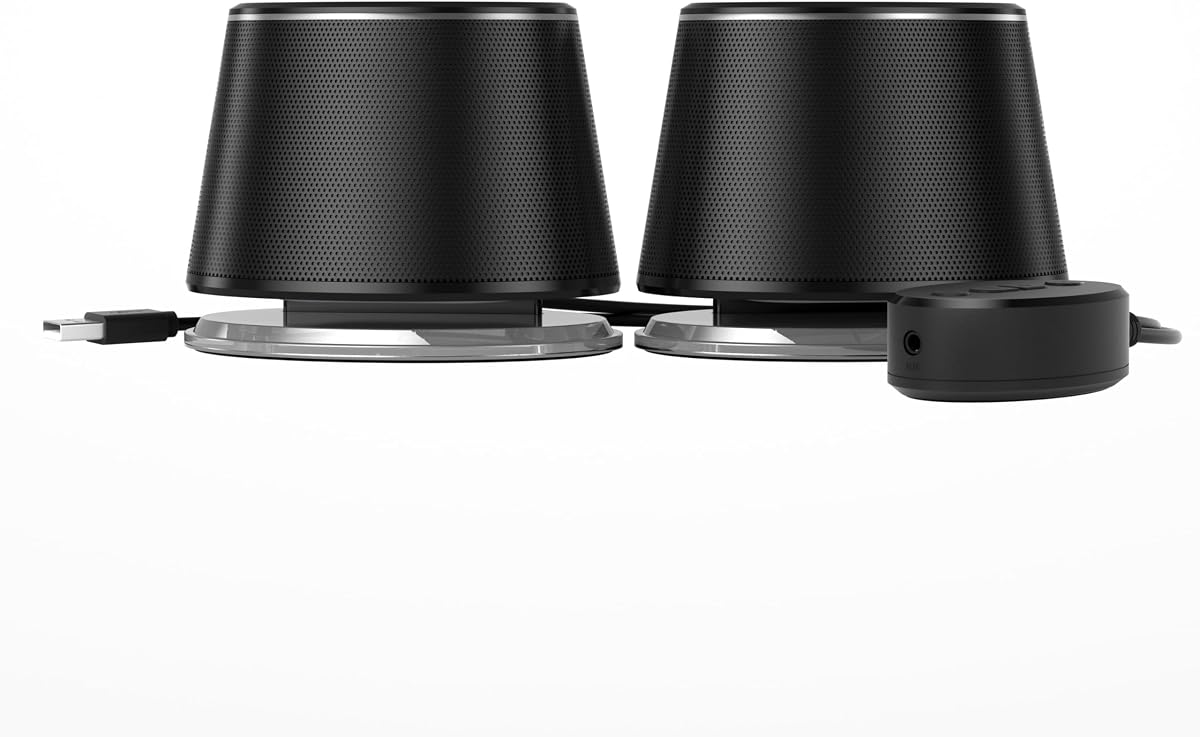
The Amazon Basics Bluetooth Computer Speakers offer a 4.4 rating and an accessible entry into desktop audio with wireless support. Their combination of Bluetooth 5.3, USB audio, and a 3.5mm AUX input makes them more versatile than a basic wired-only pair, while the individual control pod simplifies everyday operation.
We may earn a commission when you buy through this link, at no additional cost to you.
Custom-tuned 1.75-inch full-range drivers provide the sound source, and blue lights create an illuminated accent around the speaker cabinets. The control pod includes source selection, volume, an LED on/off function, and the AUX input, allowing key functions to be reached without navigating software controls.
There is no built-in battery, so the system must remain connected to USB power. The product information also notes that USB ports on televisions usually do not support audio transmission, making it important to check the television manual before assuming the USB connection will carry sound.
This is the most budget-conscious recommendation in the guide and should appeal to shoppers who want modern wireless convenience without moving into larger powered bookshelf systems. Its limitations are the lack of battery operation and the absence of advanced tuning controls, but the core connection options are admirably broad.
Bluetooth handles phone and tablet playback, while USB provides a convenient wired option for compatible computers. The AUX input expands support to televisions, laptops, and other devices with an analog headphone-style output.
Keeping the volume, source, lighting, and AUX controls in a dedicated pod prevents a crowded speaker cabinet. It may also make common adjustments easier to find when the speakers sit at different positions on a larger desk.
We may earn a commission when you buy through this link, at no additional cost to you.
The Bluedee Computer Speakers have a 4.4 rating and combine a compact two-speaker setup with modern wireless connectivity, USB options, and customizable lighting. Their stated 20W peak output positions them as a lively compact system rather than a primary high-volume home-audio setup.
We may earn a commission when you buy through this link, at no additional cost to you.
Each speaker contributes two tweeters, two full-range drivers, and two passive radiators, allowing the system to balance vocals, upper frequencies, and bass. DSP tuning is included to reduce distortion and smooth harsh highs, while a single control knob handles volume, playback, lighting, and connection-mode changes.
Bluetooth 5.4 is the newest Bluetooth version represented in this guide, and the speakers also support USB and USB-C connections. They are powered directly through those connections and are described as working without software or drivers, which helps keep setup uncomplicated.
The system is a good match for a gaming desk or colorful workspace where lighting and compact dimensions matter. It may not be the right choice for listeners seeking deep manual tonal control or a large-room system, but its wide connection selection and integrated controls make it particularly convenient for everyday use.
Bluetooth 5.4 supports streamlined wireless playback, while USB and USB-C offer convenient options for a stationary computer setup. Direct USB power removes the need for a separate speaker power adapter in compatible arrangements.
The multifunction knob combines several frequently used functions without adding a bank of separate buttons. Eight selectable RGB effects, plus an off option, let the speaker appearance change with the desk setup or stay completely unlit.
We may earn a commission when you buy through this link, at no additional cost to you.
The H1 Computer Speakers hold a 4.6 rating and offer the most substantial published output among the dedicated desktop systems in this list. With 60W of system power, multiple digital and analog inputs, and front-panel tone controls, they are designed for listeners who want more authority and flexibility than a basic compact pair.
We may earn a commission when you buy through this link, at no additional cost to you.
Each cabinet combines a 3-inch carbon-fiber woofer with a 1-inch silk-dome tweeter. A rear bass reflex port supports the low-frequency response, while the stated 40Hz-20KHz frequency coverage and signal-to-noise ratio of at least 95dB indicate an emphasis on clean, balanced output.
Wired playback can use the 24-bit USB-C DAC, optical input, or 3.5mm AUX, and Bluetooth 5.3 handles wireless sources. Master volume, bass, and treble controls sit on the front panel, allowing quick changes for music, gaming, video, and different listening positions without software-based equalization.
The H1 is an excellent choice for a serious workstation, gaming desk, or monitor setup where output headroom and physical tone adjustments matter. It is less suited to a tiny desk or a completely portable arrangement because its powered system is larger and requires a fixed power connection.
The USB-C DAC provides a direct digital route for compatible computers, while the optical input supports additional digital sources and AUX covers analog equipment. Bluetooth 5.3 provides a convenient wireless option for phones, tablets, and other compatible devices.
Separate bass, treble, and master volume controls make it easy to respond to different media without opening an equalizer. This is particularly useful when switching between dialogue-heavy video, music, and gaming.
We may earn a commission when you buy through this link, at no additional cost to you.
The OHAYO 60W Computer Speakers have a 4.4 rating and bring a traditional bookshelf-speaker appearance to the desktop category. Each enclosure combines a 0.75-inch carbon-fiber silk-dome tweeter with a 3-inch carbon-fiber full-range driver, supported by a rear bass port and an integrated independent sound card.
We may earn a commission when you buy through this link, at no additional cost to you.
The stated output is 30W per speaker, making the system more substantial than many compact models. MDF wooden enclosures are used to reduce box resonance, while a front-panel volume knob provides quick level adjustment during music or gaming sessions.
Bluetooth 5.3 is joined by RCA, AUX, and USB inputs, creating one of the broadest wired connection selections in the guide. The published compatibility list includes smartphones, turntables, desktop and laptop computers, televisions, audio mixers, streaming devices, gaming PCs, media players, subwoofers, and audio receivers.
The OHAYO system is a good candidate for a larger desk, compact home office, or small-room setup that could benefit from a bookshelf-style form. It may be more than a shopper needs for a laptop-only workspace, but the variety of inputs makes it adaptable to a broader collection of equipment.
The MDF cabinets and separate tweeter-and-driver layout give the speakers a more traditional hi-fi appearance. Their rear bass ports are designed to add low-end depth while the front control keeps common volume changes accessible.
RCA, AUX, and USB inputs allow the system to work with modern computers, analog stereo equipment, and media devices. Bluetooth 5.3 expands the list further, making it useful when the computer is not the only audio source.
We may earn a commission when you buy through this link, at no additional cost to you.
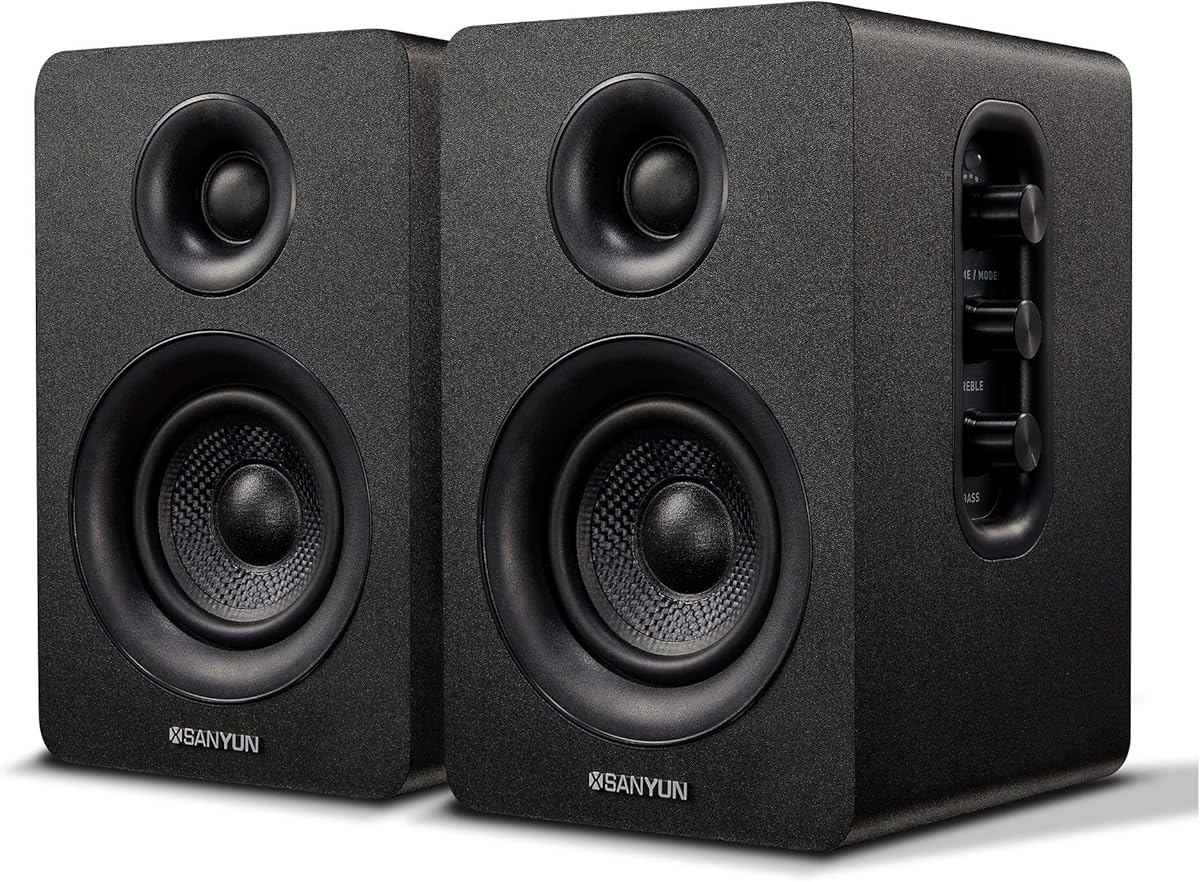
The Sanyun SW208 has a 4.3 rating and combines a compact bookshelf design with Bluetooth 5.0, USB digital audio, and manual sound adjustment. Its carbon-fiber speaker units and 30W-per-speaker output target a fuller, more deliberate desktop-hifi experience.
We may earn a commission when you buy through this link, at no additional cost to you.
The built-in 24-bit DAC can receive a digital signal directly through USB, avoiding an additional digital-to-analog conversion step before the signal reaches the speakers. Bluetooth 5.0 provides a second connection route, while side-panel knobs control total volume, treble, and bass independently.
A noise-elimination system and intelligent input filter are designed to keep the speakers quiet during standby and reduce unwanted input noise. The product information also references energy-saving design and compliance with the EU ER2 standard, which helps the system avoid unnecessary consumption when it is not in use.
The SW208 suits listeners who want compact hi-fi styling, direct digital playback, and more tonal control than a basic mini system. It is less compelling for someone prioritizing the newest Bluetooth version, and its side-mounted adjustment controls may be slightly less convenient than front or top controls.
The internal 24-bit DAC lets the speakers accept digital audio over USB and perform the conversion internally. For compatible computers, this can provide a cleaner and more direct route than starting with an analog 3.5mm signal.
Independent bass and treble knobs make it possible to adapt the presentation to different music, video, and gaming content. Keeping the controls on the main speaker also avoids adding a separate remote or software dependency for basic adjustments.
We may earn a commission when you buy through this link, at no additional cost to you.
The Edifier MR3 has a 4.5 rating and is the most clearly oriented toward accurate, adjustable listening in this group. It combines Hi-Res Audio certification with studio-monitor-style drivers, multiple analog inputs, Bluetooth multipoint, and app-based equalization for a feature-rich desktop system.
We may earn a commission when you buy through this link, at no additional cost to you.
Hi-Res Audio certification covers a flat response from 52Hz to 40kHz. Each speaker uses a 3.5-inch mid-low driver and a 1-inch tweeter, producing 18W RMS per speaker and a peak SPL of 92.5dB. The MDF cabinet is designed to reduce distortion, which is especially relevant for audio production and video editing.
The speakers can switch among Music, Monitor, and Custom modes, and the EDIFIER ConneX app provides deeper EQ control. Connectivity includes balanced TRS, RCA, AUX, headphone output, and Bluetooth. Multipoint support can simplify moving between a computer and a phone, while simultaneous RCA and AUX connections support multiple wired devices.
The MR3 is the strongest recommendation for creators, musicians, and listeners who want finer control than a conventional desktop pair provides. It is also a capable everyday system for a home office. The main trade-off is its higher cost, and the flattest monitoring profile may not be the most enjoyable choice for every room or consumer.
The 52Hz-to-40kHz Hi-Res Audio certification and dedicated mid-low and high-frequency drivers support a detailed presentation. Flat response is valuable for judging recordings, editing video, or understanding the balance of an audio mix.
Music, Monitor, and Custom modes provide quick starting points for different uses. The EDIFIER ConneX app goes further by allowing more detailed EQ adjustments, making the system adaptable when a room or source calls for a different tonal balance.
We may earn a commission when you buy through this link, at no additional cost to you.
The Marshall Acton III has the highest customer rating in the list at 4.7 and offers a distinctive alternative to conventional two-speaker computer systems. It is a single Bluetooth home speaker with a wide soundstage, an iconic exterior, and enough scale to function as the focal point of a room.
We may earn a commission when you buy through this link, at no additional cost to you.
Marshall states that the Acton III has a wider soundstage than its predecessor and is designed to deliver immersive, room-filling signature sound. The simple pair-and-play approach avoids a complicated setup, making it approachable for users who want music and media from a computer, phone, or another compatible Bluetooth device.
As a home speaker rather than a compact desktop stereo, it may not provide the same speaker-to-speaker separation as a traditional 2.0 system. It also takes up more space than mini desktop speakers. Its next-generation Bluetooth positioning and emphasis on future features distinguish it from models built around a specific current version number.
The Acton III is the premium choice for a home office, studio, bedroom, or living area where design and room presence matter. It is less appropriate for a confined workstation or for listeners who specifically want two separate desktop enclosures. Its PVC-free construction includes 70% recycled plastic and vegan materials.
The cream finish and stripped-back silhouette draw attention in a way that most utilitarian computer speakers do not. It is intended to function as part of the room's decor while serving as a central source for music and media.
The pair-and-play design keeps setup uncomplicated for everyday use. A computer can serve as the audio source, while Bluetooth also makes the speaker convenient for switching to media from compatible phones or tablets.
We may earn a commission when you buy through this link, at no additional cost to you.
The right desktop speaker depends on how you work, where the system will sit, how loud you need it to become, and whether sound quality or convenient connectivity deserves the greatest priority.
Bluetooth is useful for switching between a computer, phone, or tablet, but it should be considered alongside USB and analog connections. Newer computers often favor USB-C digital audio, while televisions, laptops, and older desktops may rely on a 3.5mm jack. A model with both wired and wireless options gives you more ways to use the speakers without replacing them when a device changes.
Choose Bluetooth speakers with at least one dependable wired alternative. A USB or AUX connection can be simpler for a fixed computer station, while Bluetooth remains valuable for casual phone and tablet playback.
Published wattage is most useful as a rough comparison between similarly sized systems. The H1 and OHAYO are the most powerful dedicated desktop choices in this guide, while the Creative Pebble V3 and Marshall Acton III serve different roles: one is a compact digital desktop system, and the other is a larger room-oriented speaker. Look for the number of powered drivers, passive radiators, bass ports, and amplification as well as the headline power figure.
For ordinary computer use, a compact powered system may be sufficient. Choose a higher-output model when you listen at a distance, play games, watch movies, or want greater volume without pushing the system hard.
A larger full-range driver can move more air and often produces a fuller sense of volume than a small mini driver. Separate tweeters support higher-frequency detail, while passive radiators and rear bass ports are intended to improve low-end extension. Cabinet material also matters: MDF is commonly used to reduce unwanted enclosure resonance, whereas a soundbar relies on a single elongated cavity.
Do not judge sound from driver size alone, but use the configuration to understand the speaker's intended scale. Check whether a system prioritizes compact portability, detailed monitoring, or room-filling output.
A single volume control is sufficient for many users, but separate bass and treble controls can make a system easier to adapt to different content and room positions. Software EQ provides finer adjustment, while physical controls are convenient for quick changes. The H1, OHAYO, and Sanyun offer dedicated tone controls, and the Edifier adds app-based customization and multiple listening modes.
Choose at least one method of tonal adjustment if accurate playback, music, movies, and gaming all share the same speakers. Otherwise, you may repeatedly reach for device equalizers or software that the system does not directly support.
Most desktop speakers in this guide require USB or another wired power connection, and many include no built-in battery. That arrangement is ideal for a permanent desk because it avoids charging and supports continuous use. A battery-powered portable design would be preferable for moving sound between rooms, but none of the listed specifications describes a built-in rechargeable battery.
Measure the available space and plan the cable route before buying. A single soundbar may clean up a small desk, while separate bookshelf speakers or the larger Acton III need more visual and physical room.
Bluetooth versions range from 4.2 in the Logitech Z207 to 5.4 in the Bluedee system, with 5.0 and 5.3 used by several other choices. Newer versions generally represent a more current feature set, but basic audio remains the central purpose. Easy-Switch in the Z207 and multipoint Bluetooth in the Edifier MR3 are especially relevant to users who regularly move between two devices.
If wireless switching matters, look for explicit multipoint or easy-switch functions rather than assuming every Bluetooth speaker can maintain several connections. Otherwise, re-pairing or selecting the intended device through system controls may be necessary.
Compact speakers are easier to position around a monitor, while raised drivers can direct sound toward a seated listener. The Creative Pebble V3 uses a 45-degree elevated design, and elongated or bookshelf-style enclosures can provide a more substantial visual presence. Controls, headphone sockets, lighting, and bass ports should all be considered according to where the equipment will be placed.
Choose a design that leaves room for your mouse, keyboard, and monitor while keeping frequently used controls accessible. Lighting can add atmosphere, but it is not a substitute for sound quality and should remain a secondary preference.
A computer speaker, studio monitor, and home speaker serve different priorities. Creative and Logitech models focus on straightforward desktop use, the H1 and OHAYO prioritize powered output and tone controls, the Sanyun supports direct digital playback, and the Edifier targets detailed monitoring. The Marshall is designed to fill a room and act as a visible piece of furniture.
Match the product to your primary activity. Choose a monitor-style system for creation, a compact pair for a workstation, or a larger home speaker for relaxed listening beyond the immediate desk area.
Begin by deciding whether the system will operate mainly through Bluetooth, USB, or a wired analog input. Place both speakers symmetrically, keep the listening position centered, and leave enough clearance around rear bass ports or ventilation areas. Connect power first when using a USB-powered model, then select the source and adjust the volume gradually before moving to a preferred listening level.
For Bluetooth pairing, activate the speaker's pairing function and choose the model from the Bluetooth menu on the relevant computer, phone, or tablet. Confirm the connection in system settings, then play a familiar track or video to check the balance. If the sound is quiet, distorted, or unbalanced, reduce the source volume, reposition the speakers, and check that the correct input is selected.
Keep the drivers free from dust and avoid placing papers or objects against them. Clean the cabinets with a soft, dry cloth, and do not use liquids unless the manufacturer specifically permits them. Route cables to prevent strain on connectors, and consult the included guide before changing inputs, updating software, or using features such as multipoint Bluetooth.
Yes, provided the desktop computer has Bluetooth capability or a compatible USB Bluetooth adapter. Most Bluetooth computer speakers can also use USB audio, USB-C digital audio, or a 3.5mm connection, depending on the model. A wired input can be more dependable for a fixed workstation, while Bluetooth makes it easier to switch to a phone or tablet.
No. Wattage can indicate potential output, but driver size, cabinet design, amplification, and intended placement also affect the result. A higher-output system may be useful for a large desk, gaming, or movies, while a compact pair can sound appropriately balanced in a smaller space. Compare specifications within similar product types rather than treating wattage as the only measure of quality.
USB audio can carry a digital signal from the computer, which is useful for modern USB-C systems and may avoid an early analog conversion. A 3.5mm AUX connection carries an analog stereo signal and works with many laptops, desktops, and televisions. Compatibility should be checked because not every device includes a 3.5mm output, and some USB ports do not support audio.
Bluetooth version is one consideration, but basic playback remains the core function. Newer versions can represent updated wireless capabilities, and features such as multipoint or easy device switching can be more noticeable in daily use. Confirm the supported device types, required USB hardware, and any included adapters before relying on a particular connection method.
Many of the systems support a 3.5mm connection and Bluetooth, which can make them usable with televisions, phones, tablets, and other compatible devices. Console-specific support varies, so check the product's compatibility information and the available outputs on your console or television. For the lowest-latency gaming experience, a wired digital or analog connection is generally the more predictable choice.
A soundbar offers a single, coordinated enclosure that can simplify placement and provide a wide soundstage. Two separate speakers may produce a stronger sense of stereo separation and are easier to position around a large monitor. Choose based on desk space, preferred sound characteristics, and how much flexibility you need in speaker placement.
Most models featured here are powered by USB, USB-C, or an internal power supply and do not include a built-in rechargeable battery. They should be connected to a suitable power source for operation. If you need portable speakers, look specifically for a product that states that it includes a battery and describes its playback time and charging method.
Use a wired USB, optical, RCA, or 3.5mm connection when the speaker and computer support it, since wireless transmission can add delay. Bluetooth codecs and implementation vary, so a paired connection does not guarantee zero latency. Also check the game and operating system for usable audio-delay settings if any delay remains.
The Logitech Z207 is the most approachable all-rounder, offering Bluetooth, a 3.5mm connection, Easy-Switch behavior, and a headphone jack. The Amazon Basics pair is the leading budget option, while the Edifier MR3 stands out for Hi-Res Audio, app-based control, and monitor-oriented versatility. The Marshall Acton III takes the premium position for buyers who value room-filling presentation and distinctive design.
Prioritize the connection method you will use most, the amount of output appropriate for your space, and the controls that matter to your routine. Compact systems suit minimal desks, powered bookshelf speakers handle larger output needs, and the Edifier offers the most refined control for creative work. A soundbar may be the tidest option, while a home speaker can become the room's central audio source.
Ratings and listed specifications provide a useful starting point, but current prices, promotions, package contents, and device compatibility can change. Before buying, verify the inputs, included adapters, power requirements, desk space, and return terms on the current product page so the selected Bluetooth computer speakers fit your setup as expected.