
ASUS Vivobook 14 Flip
4.0Editor score
360-degree Flip hinge
WUXGA OLED touchscreen
MIL-STD-810H durability
A laptop hinge affects more than how a screen opens. A smooth, durable hinge helps a machine feel stable, keeps the display aligned, and determines whether a traditional laptop or convertible suits your work. The best laptops with good hinges balance dependable construction with useful performance, comfortable displays, and practical everyday features.
We compared ten models from Lenovo, HP, ASUS, Dell, and other brands using their stated hinge designs, screen qualities, processors, memory, storage, connectivity, and convertible functionality. The guide covers 360-degree displays, standard clamshell designs with lifted hinges, and budget models intended for schoolwork, browsing, documentation, and routine productivity.
Each section explains who the laptop suits, the advantages supported by its specifications, and any relevant trade-offs. Convertibles stand out for people who regularly switch between typing and touch-oriented work, while conventional laptops generally prioritize larger displays, numeric keypads, and familiar everyday usability. Product listings and prices can change.
4.0Editor score

4.6Editor score

4.5Editor score
As an Amazon Associate we earn from qualifying purchases.
The comparison below highlights each laptop's hinge style, display, core performance, and primary use case, making it easier to identify the model that best matches your work, mobility, and entertainment needs.


The Lenovo Yoga 7i 2-in-1 pairs a flexible 360-degree flip-and-fold hinge with a 16-inch 1920 by 1200 IPS touchscreen, making it one of the strongest all-around choices in this guide. Its listed rating is 4.6, and the balance between a large, detailed display, modern processor, flexible positioning, and generous connectivity makes it especially versatile.
We may earn a commission when you buy through this link, at no additional cost to you.
The hinge enables laptop, tablet, tent, and stand modes, while Lenovo Transition adjusts applications when the orientation changes. That flexibility is valuable for presentations, web browsing, video viewing, note-taking, and hands-free use. The 16-inch touchscreen has wide viewing angles, and the Core Ultra 7 155U provides a 12-core processor with Turbo Boost and energy-efficient operation.
Connectivity is another strength. The system lists Wi-Fi 6E, Gigabit Ethernet, two USB-A ports, two USB-C ports, HDMI, a microSD reader, and a headphone-microphone combination jack. These features make it less dependent on adapters than many slim convertibles. The trade-off is its large format, which can be less convenient to carry than a compact 14-inch model.
Choose this Yoga if you want a substantial screen and a hinge that meaningfully expands how you use a laptop. It is particularly suitable for students, creative professionals, office users, and households that want one device to handle typing, presentations, media, and ordinary productivity. For most convertible buyers, it offers the most compelling balance here.
The central benefit is not merely that the display folds backward, but that it can support four practical arrangements. Laptop mode preserves a conventional workspace, while tablet and tent modes suit browsing and media, and stand mode helps with presentations or watching.
The 2K-class IPS panel offers room for detailed documents and comfortable media viewing. A full complement of legacy and modern ports also means that external monitors, storage devices, wired networking, and accessories can be connected with less inconvenience.
We may earn a commission when you buy through this link, at no additional cost to you.
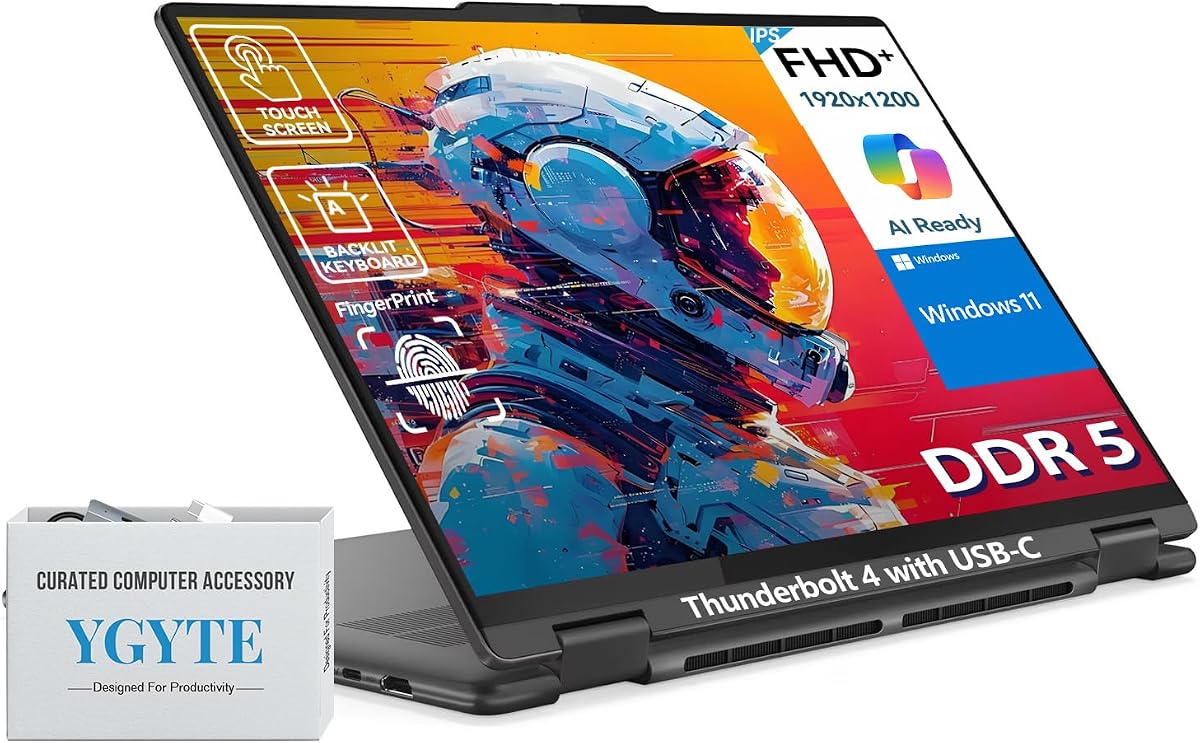
This 16-inch Yoga 7i configuration emphasizes business utility, a metal chassis, and a flexible 360-degree hinge. Its Core Ultra 7 155U processor, 16GB of LPDDR5x memory, and 512GB SSD make it a capable workstation-style convertible, although no customer rating is currently supplied for this particular listing.
We may earn a commission when you buy through this link, at no additional cost to you.
Its FHD+ IPS touchscreen uses reduced-blue-light features and slim bezels, creating a useful combination of screen space and portability within a 16-inch body. The listed features include a backlit numeric keypad, fingerprint sensor, Thunderbolt USB-C connectivity, Wi-Fi 6E, Bluetooth 5.3, an IR camera, and Dolby Audio-tuned stereo speakers.
The principal limitation is that this listing does not provide the same visible customer feedback as the first Yoga 7i. Its large convertible proportions may also make it less appealing for frequent travelers. However, the durable metal construction, Windows 11 Pro environment, and 360-degree design provide clear advantages for workplace users who need flexible positioning and business features.
This model makes sense for office professionals, students, and organization members who want Windows 11 Pro, biometric access, and a display that can serve as a tablet or presentation screen. Those prioritizing a lighter form factor may find the 14-inch ASUS Vivobook 14 Flip more convenient, while those wanting a 2K panel can consider the earlier Yoga 7i.
Windows 11 Pro, a fingerprint reader, and a Thunderbolt-capable USB-C port support a professional workflow. The 360-degree hinge lets the same computer serve as a conventional notebook, a tablet, a tent, or a presentation display.
The combination of 16GB LPDDR5x RAM and a 512GB SSD provides a solid foundation for browser-heavy work, office applications, communication tools, and creative applications that do not require a dedicated graphics card.
We may earn a commission when you buy through this link, at no additional cost to you.
The HP OmniBook 3 is a conventional 17.3-inch laptop built around a large FHD IPS display, everyday Ryzen 3 30 processing, 8GB of LPDDR5 memory, and a 512GB PCIe NVMe SSD. Its 4.5 rating reflects a generally well-received configuration, while the standard laptop design keeps the hinge focused on stable everyday use.
We may earn a commission when you buy through this link, at no additional cost to you.
The display offers 178-degree viewing angles, which is useful for sharing information across a desk. Radeon 610M integrated graphics are designed for streaming, casual gaming, and multitasking. HP also lists up to 14 hours and 15 minutes of battery life, with Fast Charge able to restore the battery from zero to 50 percent in approximately 45 minutes.
Its limitations are fairly predictable. A 17.3-inch panel is not as convenient to carry as the smaller models in this guide, and 8GB of RAM may feel limited when many browser tabs and applications remain open simultaneously. It also lacks the 360-degree flexibility offered by the Yoga and Vivobook convertibles.
This OmniBook is a practical choice for students, home-office users, and families who want a roomy display for documents, lessons, streaming, and video calls. Choose it when screen area, familiar laptop ergonomics, long stated battery life, and generous storage matter more than touchscreen versatility or a highly portable chassis.
A 17.3-inch FHD IPS panel gives documents, spreadsheets, lessons, and video calls more room than a compact laptop. Wide viewing angles also help when the screen is not viewed perfectly straight on.
The Ryzen 3 30 processor, Radeon 610M graphics, 8GB memory, and 512GB NVMe SSD form a practical configuration for web browsing, communication, casual gaming, photo viewing, and standard office tasks.
We may earn a commission when you buy through this link, at no additional cost to you.
The ASUS Vivobook 14 Flip is the premium convertible in this group, combining a 360-degree Flip hinge with a 16:10 WUXGA OLED touchscreen. Its listing emphasizes a Core Ultra 9 386H processor, 32GB of memory, a 1TB SSD, Wi-Fi 7, and a 70Wh battery, although no customer rating is supplied for this exact configuration.
We may earn a commission when you buy through this link, at no additional cost to you.
Flip Smart adapts the display for laptop, tablet, stand, and tent modes, making the hinge central to the experience rather than merely a design feature. The OLED panel has an 85 percent screen-to-body ratio, and the system includes 360-degree adaptive audio with Dolby Atmos, a microphone array, and Smart Amp-enhanced speakers.
Its 70Wh battery is listed at up to 38 hours depending on use, with fast charging reaching 60 percent in 49 minutes under specified conditions. The port selection includes USB-A, two USB-C options including Thunderbolt 4, HDMI 2.1 TMDS, an audio jack, and a microSD reader. Microsoft Pluton and Windows Hello facial recognition add security features.
Choose this Vivobook if visual quality, flexible positioning, a generous memory configuration, and modern connectivity matter most. It is a strong option for creative users, mobile professionals, and students who will use the touchscreen in multiple orientations. Those wanting a simpler and less expensive convertible should look toward the first Lenovo Yoga 7i.
The combination of a high-quality OLED touchscreen and a 360-degree hinge supports both precise work and media consumption. The different modes make it convenient to present, browse, watch video, or type without carrying a separate device.
With 32GB of RAM, a 1TB SSD, a Core Ultra 9 386H processor, and Wi-Fi 7, the Vivobook 14 Flip is equipped for demanding multitasking and AI-oriented workflows while remaining suited to travel.
We may earn a commission when you buy through this link, at no additional cost to you.
The HP Envy x360 15-inch combines a convertible form factor, an edge-to-edge FHD touchscreen, and a 12th-generation Intel Core i7 processor. Its 4.4 rating and established model designation make it a practical alternative to newer premium convertibles, especially for users who value a familiar HP design and ample storage.
We may earn a commission when you buy through this link, at no additional cost to you.
Intel Iris Xe graphics support everyday creativity, entertainment, and light gaming, while 16GB of RAM gives the system more headroom for simultaneous applications than many 8GB configurations. The 1TB SSD provides ample room for applications, documents, photographs, and media without requiring immediate storage expansion.
HP Fast Charge is listed as taking the battery from zero to 50 percent in approximately 30 minutes, which is useful for short breaks between work sessions. The main drawback is that the Core i7-1260P belongs to an older processor generation, so it may not match the newest systems in specialized workloads or efficiency.
This Envy x360 is a good fit for students, home users, and professionals who want a touchscreen and rotating display but do not need the latest processor or premium OLED panel. Its balance of memory, storage, and convertible flexibility makes it a sensible general-purpose choice.
The rotating display supports laptop-style productivity and touch-oriented activities such as browsing, media viewing, and presenting. That flexibility is the main reason to choose this Envy over a conventional HP notebook.
A 1TB SSD and 16GB of RAM provide a generous foundation for a family or small office computer. They accommodate many common applications and files without the tight storage limits found in smaller everyday laptops.
We may earn a commission when you buy through this link, at no additional cost to you.
The Dell DC15250 is a conventional 15.6-inch laptop whose most relevant hinge feature is explicit: lifted hinges raise the keyboard into a more ergonomic typing position. Its 4.3 rating indicates solid reception, and the design is aimed at everyday users who spend substantial time typing documents, spreadsheets, and email.
We may earn a commission when you buy through this link, at no additional cost to you.
The Intel Core i5-1334U processor provides a capable foundation for routine productivity, while Dell ComfortView software is designed to reduce harmful blue-light emissions during extended screen use. Express Charge supports convenient power management, and a roomy keyboard, separate numeric keypad, and calculator hotkey benefit users who enter numerical data often.
Dell Services includes one year of Onsite Service, allowing covered hardware issues that cannot be resolved remotely to be addressed at the customer's home, office, or chosen location. The trade-off is that the supplied listing provides fewer component details than most entries in this guide, including no listed memory or storage capacity.
This Dell suits writers, administrators, students, and office workers who want a stable clamshell with a more comfortable typing angle. It is less appropriate for someone who wants to fold the display into tablet mode, though that is not the goal of this traditional ergonomic design.
The lifted hinge elevates the keyboard when the laptop is open, supporting a more natural wrist and arm position. This makes the DC15250 especially relevant to users who type for long periods during the workday.
A separate numeric keypad, calculator hotkey, Express Charge, and ComfortView software make this model practical for office routines. Onsite Service adds another layer of convenience for business and home-office users.
We may earn a commission when you buy through this link, at no additional cost to you.
The HP 17.3-inch laptop prioritizes screen space, 16GB of memory, and fast storage. Its 4.3 rating reflects a well-regarded configuration, and the 17.3-inch FHD IPS display makes it attractive for users who prefer a permanent desktop-style workspace over a compact or convertible design.
We may earn a commission when you buy through this link, at no additional cost to you.
The 13th-generation Intel Core i5-1334U processor and Intel Iris Xe graphics support multitasking, photo viewing, communication, entertainment, and light creative work. A 512GB PCIe NVMe M.2 SSD provides quick file access, while 16GB of DDR4 RAM offers enough capacity for many browser-heavy workflows and several applications at once.
HP True Vision HD camera supports video communication, and a physical camera shutter adds a straightforward privacy feature. The 178-degree viewing angles make the large panel easier to share across a desk. The unavoidable trade-off is size and weight, since a 17.3-inch laptop is easier to use in a fixed workspace than in a travel bag.
Choose this HP for students, home-office workers, and families who need a large display for research, coursework, spreadsheets, streaming, and video calls. It is especially sensible when 16GB of memory is a priority but a 360-degree hinge and touchscreen are not.
The large FHD IPS panel gives users room to keep reference material, applications, and video calls visible together. It is a strong fit for desks, dorm rooms, and family computers where screen area is valued.
The 16GB RAM helps sustain multitasking, while the NVMe SSD improves startup and file-access responsiveness. Together they form a more balanced specification than many entry-level laptops limited to 8GB of memory and smaller drives.
We may earn a commission when you buy through this link, at no additional cost to you.
The HP 14-inch Laptop is built around portability, with a slim 0.71-inch profile, a listed weight of 3.24 pounds, and a compact anti-glare display. Its 4.5 rating makes it an appealing budget choice for anyone who prioritizes moving a computer between home, school, and work.
We may earn a commission when you buy through this link, at no additional cost to you.
The Intel N150 processor has four cores and four threads with speeds up to 4.4 GHz, providing efficient performance for web browsing, document work, online learning, communication, and light multitasking. The 14-inch panel offers 250 nits of brightness and an anti-glare coating, making it practical in environments where reflections can be distracting.
Connectivity includes USB-C, USB-A, HDMI, and a combined headphone-microphone jack, supported by Wi-Fi and Bluetooth. The major limitations are the 4GB of RAM and 128GB SSD. Those specifications are restrictive for numerous open applications or a large local media library, although the listed 1TB of cloud storage offers an additional place to keep files.
Choose this laptop for browsing, school assignments, email, simple documents, and travel. It is a sensible option for light users who value a slim chassis over demanding performance. Users who regularly multitask should consider a model with 16GB of memory and more substantial local storage.
The slim chassis and low listed weight reduce the burden of transporting the computer. Its 14-inch anti-glare screen also provides a practical middle ground between a tiny netbook and a much larger home-office display.
This laptop is best treated as a focused everyday device. Web research, writing, learning platforms, and video calls are central use cases, while the limited memory and storage make heavier multitasking less comfortable.
We may earn a commission when you buy through this link, at no additional cost to you.
The HP 17-inch Business Laptop combines a roomy 17.3-inch FHD anti-glare display with 16GB of RAM, 512GB of SSD storage, and a numeric keypad. Its 4.5 rating and business-oriented feature list make it a compelling option for office work, home businesses, and students who handle substantial documents.
We may earn a commission when you buy through this link, at no additional cost to you.
The listing describes a latest-generation AMD Ryzen 5 processor, though it does not provide the exact processor model. A brushed full-size keyboard with a 10-key number pad supports efficient data entry. A 720p Wide Vision camera and digital microphones are included for calls, while HP Fast Charge helps reduce downtime between sessions.
Windows 11 and Office 365 for the Web support document editing, presentations, and spreadsheets without requiring full desktop installations for every service. The main downside is portability: a 17.3-inch display is roomy but unsuitable for users seeking a compact travel companion. The unspecified processor model also limits finer comparison.
This HP suits administrative work, accounting, inventory tasks, coursework, and home-office use. Its large display, numeric keypad, 16GB memory, and storage capacity offer a useful package for users who spend most of their time at a fixed desk.
The full-size keypad is especially useful for financial records, spreadsheets, data entry, and other numerical tasks. Paired with a large anti-glare panel, it creates a practical office-oriented workstation.
Windows 11, Office 365 for the Web, and Copilot access cover common writing, spreadsheet, presentation, and communication needs. The 16GB RAM configuration supports smoother multitasking than memory-limited entry models.
We may earn a commission when you buy through this link, at no additional cost to you.
The generic 15.6-inch laptop is a basic computing option centered on a Pentium Gold 6500Y processor, 12GB of RAM, a 128GB SSD, and a 15.6-inch FHD IPS display. Its listed 5.0 rating is the highest numerical rating in the group, although the absence of a recognizable manufacturer name is an important consideration.
We may earn a commission when you buy through this link, at no additional cost to you.
The processor supports everyday browsing, document editing, online classes, video conferencing, and routine office tasks. Twelve gigabytes of memory is unusually helpful at this basic level, offering more breathing room for multiple open programs than a typical 4GB or 8GB compact laptop. The M.2 slot supports storage expansion up to 1TB.
Connectivity is broad for the category, with USB-C, HDMI, USB 3.2, USB 2.0, Wi-Fi 5, Bluetooth 5.0, and a TF card slot. The FHD IPS screen offers wide viewing angles. The trade-offs are modest local storage, an older wireless standard than the newest models, and limited brand-specific support information in the listing.
Choose this computer if your needs are limited to browsing, coursework, documents, spreadsheets, streaming, and communication, and you want a large FHD screen without a premium specification. Buyers who require established warranty support, a known brand ecosystem, or stronger performance should favor a clearly identified HP, Dell, Lenovo, or ASUS model.
The 12GB RAM configuration helps the system remain responsive across browsing, messaging, classes, and document applications. It is one of the more attractive specifications within this entry-level group.
The M.2 storage slot allows the local drive to be expanded when files outgrow the included 128GB SSD. Multiple USB and display connections offer flexibility for peripherals, external storage, and monitors.
We may earn a commission when you buy through this link, at no additional cost to you.
A useful hinge should feel stable, support the intended screen positions, and match the way you work. Consider convertible capability, chassis quality, display size, performance, and everyday ergonomics together rather than judging the hinge alone.
A standard clamshell hinge is designed primarily to open and close the display. It generally provides a straightforward typing setup and may be a better fit for office work, gaming, or users who never need touch input. Convertible hinges rotate the display into tablet, stand, and tent positions, making them more versatile for presentations, reading, drawing, and media viewing. The ASUS Vivobook and Lenovo Yoga models in this guide explicitly use 360-degree hinges, while the HP Envy x360 is identified as a convertible.
A hinge that remains stable prevents the display from wobbling while typing or viewing video. Chassis material, hinge design, and intended use all contribute to the feel of the mechanism. The Lenovo Yoga 7i listing highlights a metal chassis, while the ASUS Vivobook 14 Flip meets US MIL-STD-810H durability standards. For conventional laptops, look for positive customer feedback regarding screen movement and a chassis that feels appropriately rigid.
Screen size affects portability, workspace, and viewing comfort. The guide includes 14-inch models for mobility, 15.6-inch models for a conventional balance, and 17.3-inch models for fixed desk use. Convertibles benefit from touchscreens because the folding design is more useful when the display can be touched directly. IPS panels offer wide viewing angles, while OLED displays add richer contrast and color for media and creative work.
A modern Core Ultra processor, Ryzen 5, or Core i5 provides a stronger foundation for multitasking than entry-level N-series or Pentium hardware. Integrated graphics such as Intel Iris Xe or Radeon 610M are suitable for streaming, communication, casual gaming, and lighter creative work. Dedicated graphics are not featured in these ten models, so buyers should not expect advanced 3D rendering or high-end gaming performance.
Memory determines how comfortably several applications and browser tabs can remain open. Eight gigabytes is adequate for light use, 12GB provides useful flexibility, and 16GB is preferable for heavier multitasking. Storage should be considered alongside cloud services: a 128GB SSD is workable for a focused user, while 512GB or 1TB gives more room for applications and media. The generic laptop supports M.2 expansion, which can extend the life of a smaller storage configuration.
Hinge design can influence wrist and shoulder comfort. The Dell DC15250 specifically uses lifted hinges to create an ergonomic typing angle. Large models may also provide roomier keyboards, separate numeric keypads, and more spacing between keys. Conversely, compact laptops are easier to carry but may offer smaller key travel and less separation between the keyboard and display. Touch-oriented convertible use can also lead to more frequent screen positioning than a fixed laptop setup.
Battery claims should be treated as maximum-use scenarios because real results vary with display brightness, wireless activity, workloads, and power settings. The HP OmniBook 3 lists up to 14 hours and 15 minutes, while the ASUS Vivobook lists up to 38 hours under stated conditions. Rapid charging is useful across several models, including HP Fast Charge, Dell Express Charge, and the Vivobook's stated 60-percent recharge in 49 minutes.
A good hinge should be supported by a laptop that remains convenient outside docking stations. USB-C, USB-A, HDMI, a card reader, and an audio jack reduce adapter dependence. Wi-Fi 6E or Wi-Fi 7 can improve wireless performance, while Gigabit Ethernet is useful for stable wired networking. Security features include fingerprint readers on the Lenovo Yoga, facial recognition and Microsoft Pluton on the ASUS Vivobook, and a physical camera shutter on the HP 17.3-inch laptop.
Open and close a convertible only from its edges or corners, using two hands when necessary. Avoid twisting the display while the hinge is partially folded, and do not lift a portable model by the screen. A conventional clamshell can still be damaged if the lid is pulled from one corner, so support the base whenever possible. When switching a 360-degree laptop into tent or stand mode, place it on a firm, stable surface.
Keep the hinge and nearby seams free of dust, grit, and sticky residue. Use a soft microfiber cloth and a small amount of suitable cleaner if needed, but do not spray liquid directly onto the laptop. Avoid closing the screen while objects are trapped between the keyboard and display, as the lid and panel may be pressed against each other.
Use the modes that suit your task: laptop mode for prolonged typing, stand mode for presentations or video, tent mode for compact viewing, and tablet mode for touch interaction. On standard laptops, adjust the screen angle to a comfortable level rather than forcing the display backward. Periodic updates, adequate storage space, and careful transport help preserve both hinge operation and overall system performance.
Not automatically. A 360-degree hinge adds more moving parts and supports several positions, so quality depends on the model's engineering and construction. The Lenovo Yoga 7i and ASUS Vivobook 14 Flip highlight durable designs, including a metal chassis and MIL-STD-810H testing respectively. Proper handling remains important for any convertible.
A conventional clamshell with a stable standard hinge is often the most straightforward choice. The Dell DC15250 adds lifted hinges for an ergonomic typing angle, while larger models such as the HP 17.3-inch laptop offer roomy keyboards. A backlit keyboard and comfortable key travel are also useful features for extended sessions.
They can be, particularly when a student wants to annotate with a stylus, watch lessons in stand mode, or type notes in laptop mode. The Lenovo Yoga 7i and ASUS Vivobook 14 Flip combine flexible hinges with touchscreens. Students should also consider weight, battery claims, keyboard comfort, and whether a dedicated pen is supported.
A quality hinge moves smoothly, holds a stable angle, and does not allow visible screen wobbling during use. Chassis rigidity, the fit of the screen, and consistent support across positions also contribute to the experience. For convertibles, reliable software that recognizes each orientation adds to the practical quality of the hinge.
It can be an excellent combination for users who value both visual quality and flexible positioning. The ASUS Vivobook 14 Flip pairs a 360-degree Flip hinge with a WUXGA OLED touchscreen. Its higher-end processor and large memory configuration are also relevant, so it is better suited to users who value a premium display and performance.
Hinge quality and memory serve different purposes, but a strong hinge cannot compensate for insufficient memory during heavy multitasking. Four gigabytes suits basic tasks, eight gigabytes handles moderate use, and 16GB offers more comfortable room for many applications. A 512GB or 1TB SSD can also reduce pressure when software and files accumulate.
The HP 14-inch Laptop is the most explicitly portable model, with a listed weight of 3.24 pounds and a profile of 0.71 inches. The 14-inch ASUS Vivobook 14 Flip is smaller in display size but has a much more premium specification set. Actual carrying comfort also depends on charger size, bag space, and battery condition.
Review customer photos, questions, and comments for reports of looseness, screen movement, cracking, or unusual resistance. Confirm that the display holds each intended position and that the keyboard remains level when opened. If buying used, inspect the hinge closely and verify that the manufacturer warranty remains available.
The Lenovo Yoga 7i 2-in-1 is the strongest overall recommendation because its 360-degree hinge, 16-inch 2K touchscreen, Core Ultra 7 processor, and broad port selection balance flexibility with everyday capability. The ASUS Vivobook 14 Flip stands out as the premium OLED option, while the HP 14-inch Laptop represents the most portable budget-oriented choice.
Your priorities should guide the decision. Choose a convertible when touch input and multiple display positions will be used regularly. Pick a 17.3-inch conventional laptop for a spacious fixed desk, and consider 14-inch models for mobility. Before purchasing, verify memory, storage, ports, display features, and the exact configuration listed by the manufacturer.
Product listings, configurations, customer ratings, and prices can change over time, so confirm the current details at the linked listing before making a final decision. A good hinge should feel smooth and stable, but the best laptop is also the one whose screen, performance, portability, and everyday features align with how you intend to work.