
Belkin 140W Thunderbolt 5 Dock
4.8Editor score
Fourteen ports in one dock
Triple 4K display support
140W laptop charging
This Thunderbolt 5 Hub guide compares ten leading docks and hubs for speed, charging, displays, ports, portability, and compatibility.
A Thunderbolt 5 hub can transform a compatible laptop into a compact workstation, but the strongest options differ dramatically in port selection, display support, charging capacity, and physical design. The best model depends on whether you need maximum bandwidth, a travel-friendly adapter, dedicated media readers, or a permanent desk setup.
This guide compares ten products using the published specifications supplied for each model, with particular attention to Thunderbolt generation, host connections, display modes, power delivery, networking, storage, security, and included accessories. The list includes true Thunderbolt 5 docks, Thunderbolt 4 hubs, and more conventional USB-C hubs so readers can distinguish the right level of performance.
Each review explains the practical use case for the product and identifies the compromises that matter most. Our top picks highlight strong all-around performance, a premium multi-display option, and a more affordable route into a Thunderbolt-based setup. Product specifications and prices can change, so verify the latest details before purchasing.
4.8Editor score
4.2Editor score

4.2Editor score
The table below compares each hub's core capabilities, from Thunderbolt generation and display support to charging and expansion options, making it easier to identify the model that fits a particular workstation.
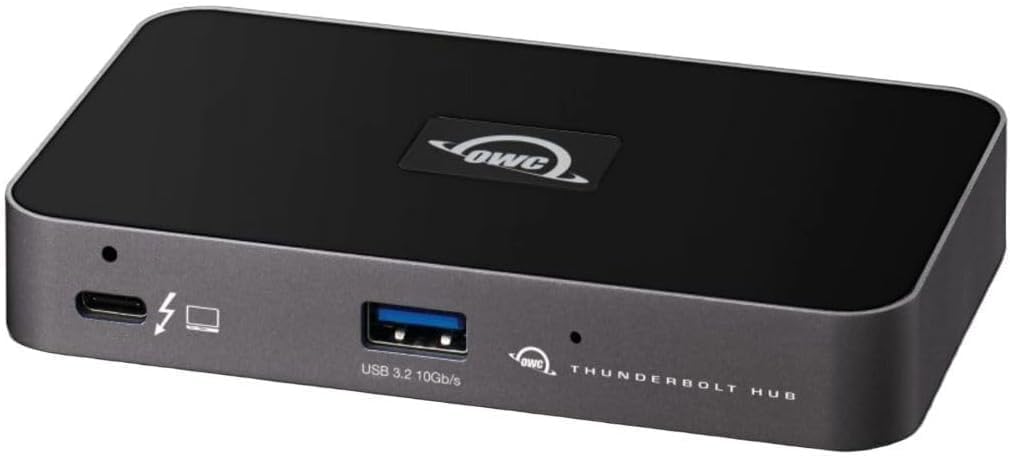


The OWC Thunderbolt Hub 5-Port Connectivity Solution is a compact Thunderbolt 4 expansion option with a 4.4 rating. It provides three Thunderbolt 4 ports and one USB 3.2 Gen 2 Type-A port, making it most appropriate for users who want fast external expansion without carrying a large desktop dock.
We may earn a commission when you buy through this link, at no additional cost to you.
Its standout feature is display flexibility. The hub supports resolutions up to 8K, while the related OWC listing also describes support for a single 5K, 6K, or 8K display or dual 4K displays. That makes it useful for demanding graphics, reference imagery, video previews, and a laptop that normally has too few display outputs.
The main limitation is that it uses Thunderbolt 4 rather than the newest Thunderbolt 5 standard. It also offers less peripheral variety than larger docks because there is no Ethernet, audio jack, or built-in media reader. Those omissions are reasonable in a compact hub but may matter to someone building a complete permanent desk setup.
This is an especially good match for creative professionals and frequent travelers who prioritize a small footprint and Thunderbolt performance over maximum port count. It is also the most budget-conscious way to build a multi-display workstation around Thunderbolt, provided the host computer supports the required displays and peripherals.
Three Thunderbolt 4 ports create room for external storage, a display, and another Thunderbolt accessory through one host connection. The small port count keeps the unit easier to manage than a full docking station while preserving high-speed wired expansion.
Support for a single high-resolution display or dual 4K displays gives the hub practical value for CAD, intensive image editing, large video projects, and detailed productivity workflows where visual clarity matters.
We may earn a commission when you buy through this link, at no additional cost to you.
The Belkin USB-C Hub 5-Port is a portable multiport adapter rated 4.5 out of 5. It combines an HDMI 2.0 display output, 100W Power Delivery, and 10Gbps USB-C data transfer in a lightweight housing, making it a strong everyday companion for a compatible MacBook, iPad, or laptop.
We may earn a commission when you buy through this link, at no additional cost to you.
The hub can connect an external display through HDMI and up to four additional devices. Its dedicated USB-C power and data port allows charging and file transfer at the same time, while 12W is shared among the USB-C ports. The stated 100W host charging capability is particularly useful for users who need to keep a demanding laptop powered throughout the day.
It is not a Thunderbolt 5 hub, however, and that distinction is important. It lacks the raw bandwidth and broad downstream expansion of the premium Thunderbolt 5 docks in this guide. It also lacks Ethernet, audio, and memory-card slots, making it a focused travel adapter rather than a complete desk replacement.
Choose this model for mobile work, presentations, hotel desks, and lightweight productivity setups. It offers the most broadly useful combination of display support, charging, and fast data in a portable form, but buyers seeking the highest transfer speed or a full workstation should move up to a Thunderbolt dock.
The five-port arrangement covers the most common travel connections without requiring users to carry a separate charger, display adapter, and card reader. Its slim enclosure also makes it practical to keep in a laptop sleeve.
The 100W host charging specification is well suited to notebooks that require substantial power, while simultaneous data transfer helps preserve productivity when the hub is used for more than an external monitor.
We may earn a commission when you buy through this link, at no additional cost to you.
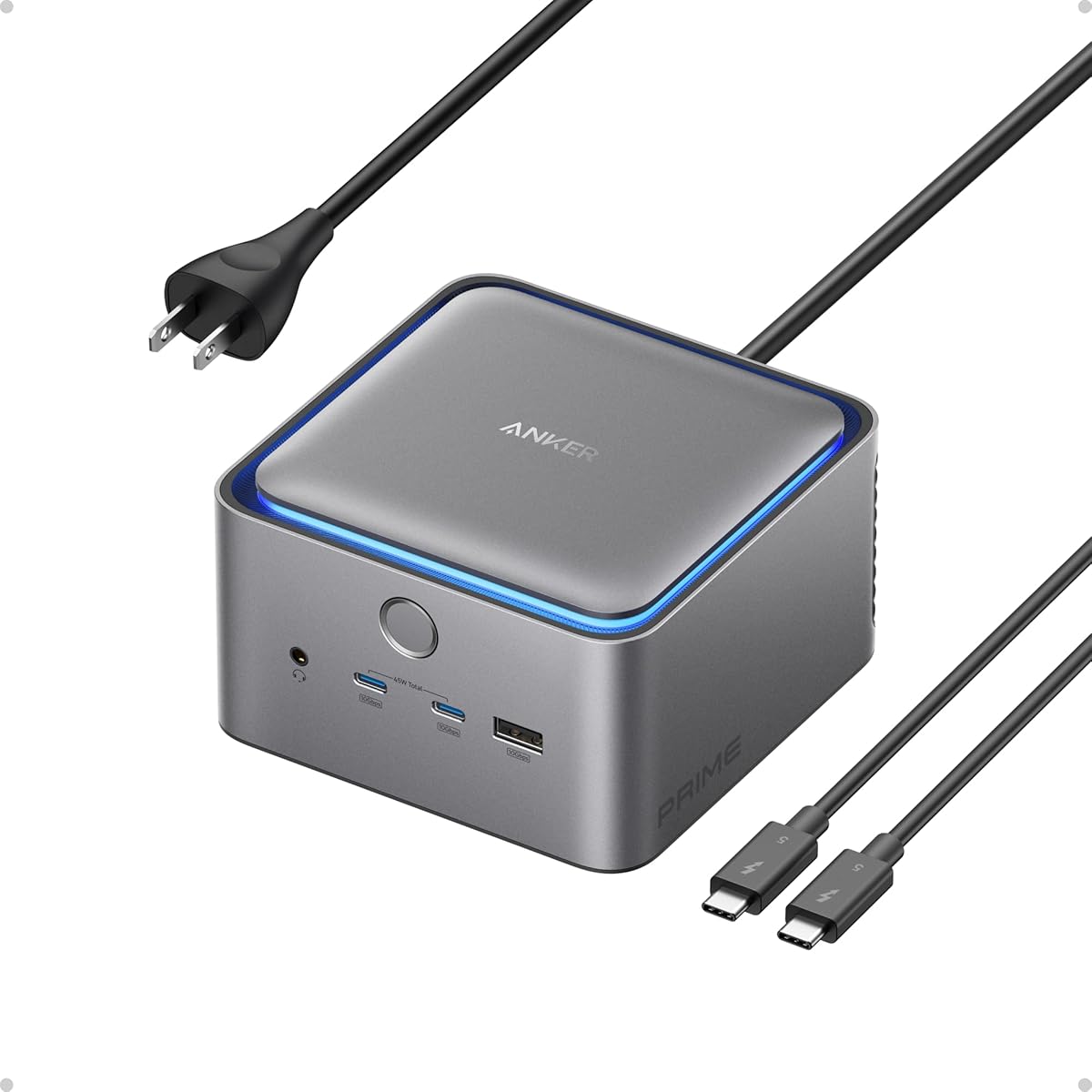
The Anker Prime TB5 Docking Station is a feature-rich Thunderbolt 5 dock with a 4.2 rating. Its 14-in-1 design includes one upstream and two downstream Thunderbolt 5 ports, two additional USB-C ports, three USB-A ports, SD and TF readers, 2.5Gbps Ethernet, an audio jack, and either HDMI 2.1 or DisplayPort 2.1 output.
We may earn a commission when you buy through this link, at no additional cost to you.
The dock is built for demanding desk setups. Published specifications support a single 8K display at 60Hz or dual 8K displays at 60Hz with compatible Thunderbolt 5 Windows laptops. Its upstream port can deliver up to 140W, while the front-facing USB-C ports share 45W for attached devices.
This level of capability comes with trade-offs. The dock requires a compatible Thunderbolt 5 host, and the highest display configurations depend on the computer, operating system, display configuration, and cables. It is also a stationary accessory rather than a minimalist travel adapter, although its active cooling helps it maintain performance under sustained loads.
The Anker Prime is the strongest general recommendation for users who want a broad selection of ports and genuine Thunderbolt 5 performance. It is especially compelling for Windows creators, video professionals, and developers who regularly move large files, connect several displays, and need reliable wired networking.
Four Thunderbolt 5 connections, high-speed USB expansion, media readers, Ethernet, and audio remove the need for several separate desk accessories. The included Thunderbolt 5 cable and AC power cable support a ready-to-configure setup.
Single or dual 8K output can benefit detailed timelines, high-density interfaces, financial dashboards, and professional previews. Actual display counts and refresh rates depend on host compatibility, making system verification essential.
We may earn a commission when you buy through this link, at no additional cost to you.
The Belkin Connect Thunderbolt 4 Docking Station is a five-in-1 core dock with a 3.8 rating. It includes three upstream and one downstream Thunderbolt 4 USB-C port, allowing up to six daisy-chained devices and transfer rates up to 40Gbps.
We may earn a commission when you buy through this link, at no additional cost to you.
Its display support covers a single 8K display at 30Hz or two high-resolution 4K displays at 60Hz. The 96W Power Delivery capability keeps the host laptop charging while other devices are connected, and the package includes both a Thunderbolt 4 cable and a power supply.
Its most noticeable limitation is the lower customer rating compared with most products in the list. The limited port assortment also means there is no dedicated Ethernet, card reader, or audio connection. As a result, it functions more like a focused Thunderbolt expansion hub than a comprehensive desktop dock.
This is a sensible choice for someone who already owns a Thunderbolt 4 ecosystem and values daisy chaining, compact construction, and straightforward host charging. It is less appropriate for buyers seeking the newest standard, a larger selection of legacy connectors, or the highest multi-monitor refresh rates.
The combination of upstream and downstream Thunderbolt 4 connections allows multiple compatible devices to share one host cable. This can produce a cleaner desk and reduce the number of cables running back to the computer.
The 96W charging and support for one 8K or dual 4K displays cover the central needs of many professional desks without the complexity of a larger multiport station.
We may earn a commission when you buy through this link, at no additional cost to you.
The WAVLINK Thunderbolt 5 Dock is a 12-in-1 Intel-certified docking station with a 4.1 rating. It combines an upstream Thunderbolt 5 connection rated at 120Gbps with three downstream Thunderbolt 5 ports rated at 80Gbps, plus 2.5G Ethernet, four USB-A 3.2 ports, an SD 4.0 reader, an audio and microphone jack, and a Kensington slot.
We may earn a commission when you buy through this link, at no additional cost to you.
Its display capabilities are ambitious, with published support for a single 8K display at 144Hz, dual 8K at 60Hz, or triple 4K at 144Hz. The triple-display configuration requires Windows 11 or later with Thunderbolt 5, while macOS supports two external displays through the dock.
Compatibility is the central caveat. Display resolution and refresh rates vary with the connected computer, and USB-C-to-HDMI or DisplayPort cables are not included. The device also has a larger footprint than a simple travel hub, although the anti-slip design and security slot suit a permanent desk.
This model is best for technical professionals who want high bandwidth, lots of Thunderbolt expansion, fast card access, and wired networking. Confirm the host operating system and display requirements before buying, particularly if the plan involves three external screens.
Three downstream Thunderbolt 5 ports support high-speed peripherals, storage, and displays while retaining 80Gbps per port. This makes the dock useful for users who intend to grow beyond a basic laptop-and-monitor arrangement.
The integrated SD 4.0 reader and 2.5Gbps Ethernet suit photographers, video editors, and remote workers who want quicker media access and a stable alternative to an uncertain wireless connection.
We may earn a commission when you buy through this link, at no additional cost to you.
The UGREEN Maxidok Thunderbolt 5 Docking Station is a 17-port workstation hub with a 4.2 rating. Its defining feature is a built-in PCIe Gen4x4 M.2 slot for external NVMe SSDs up to 8TB, allowing compatible storage to operate as part of the dock rather than as a separate desktop accessory.
We may earn a commission when you buy through this link, at no additional cost to you.
The port selection is extensive, with three 10Gbps USB-A ports, three 10Gbps USB-C ports, SD and TF 4.0 readers, three audio connections, 2.5G Ethernet, DisplayPort 1.4, and two downstream Thunderbolt 5 ports. The dock also supports up to 240W total system power and uses active cooling with a 60mm fan.
There are important constraints. The internal SSD must be an NVMe drive no more than 12mm high and 24mm wide, and several heatsink-equipped models are explicitly excluded. The DisplayPort output does not support DP++, so an active adapter or cable is required for HDMI. Fan noise is also possible during heavy use.
This is the ideal choice for users who want a consolidated editing, backup, networking, and display hub. Its storage slot and extensive power delivery distinguish it from conventional docks, although buyers should check drive dimensions and display-adapter requirements before ordering.
The M.2 NVMe bay turns the dock into a combined storage and connectivity platform. It is especially valuable for media caches, working drives, and compact backup workflows when a compatible SSD is installed.
Seventeen ports and 240W total system power can support an elaborate workstation with multiple displays, legacy devices, network equipment, and powered accessories without relying on several separate hubs.
We may earn a commission when you buy through this link, at no additional cost to you.
The Belkin USB-C Hub 5-Port is a compact adapter with a 3.9 rating. It offers HDMI 2.0 output up to 4K at 60Hz, 100W host power delivery, and data transfer at up to 5Gbps for users who want a simple way to connect a display and several peripherals.
We may earn a commission when you buy through this link, at no additional cost to you.
Its dedicated USB-C port supports charging and data transfer simultaneously, while the remaining connections handle the external display and up to four additional devices. The housing is described as slim and lightweight, making it easier to carry than a full desktop docking station.
The trade-off is speed. This model does not provide Thunderbolt 5 bandwidth, and its stated 5Gbps transfer rate is considerably lower than that of the premium Thunderbolt docks. It also omits Ethernet, audio, and card readers, so it works best as a focused travel accessory rather than a full office station.
Buy this hub for commuting, short business trips, classroom presentations, and occasional desk changes. It provides the most important convenience features without the bulk of a permanent dock, while users who move large files or require multiple high-refresh displays should choose a Thunderbolt model.
Display output, host charging, and data connections make it possible to turn a compatible laptop into a functional workspace temporarily. Its small form is especially useful when every bag gram and cable counts.
Five ports, 4K video, and 100W charging cover common productivity requirements without requiring users to learn a complex docking system. It is a sensible middle ground for occasional extended work away from a home desk.
We may earn a commission when you buy through this link, at no additional cost to you.
The OWC Thunderbolt Hub 5-Port Connectivity Solution is a budget-focused Thunderbolt hub with a 4.2 rating. The OWC TB4HUB5P can connect to a 5K, 6K, or 8K display or support dual 4K displays, giving compact Thunderbolt users meaningful high-resolution options.
We may earn a commission when you buy through this link, at no additional cost to you.
The hub is intended for work that benefits from visual precision. Its published use cases include detailed CAD drawings, Photoshop images, large-format video editing with a separate preview screen, and simultaneous meeting and editing workflows. It offers a practical way to add screens without adopting a large full-size dock.
It uses Thunderbolt 4 rather than Thunderbolt 5 and does not provide the broad collection of USB-A, Ethernet, audio, and card-reader connections found on larger docks. Buyers seeking the latest bandwidth or maximum charging capability may need to spend more, but the essential Thunderbolt expansion remains useful.
This OWC model is a strong value recommendation for budget-conscious creators and productivity users with compatible Thunderbolt 4 equipment. Choose it when high-resolution dual-screen support and a compact footprint matter more than having every possible port built into one enclosure.
The ability to drive a single very high-resolution display or two 4K screens makes the hub relevant to visual workflows without requiring a larger premium desktop station.
Creative applications, time-consuming spreadsheets, and communication tools can each occupy a separate screen. The compact form reduces desk clutter while preserving Thunderbolt device expansion.
We may earn a commission when you buy through this link, at no additional cost to you.
The Belkin USB-C Hub 7-Port has a 4.9 rating, the highest listed rating among the products in this guide. It combines HDMI 2.0 output up to 4K at 60Hz, 100W host charging, 5Gbps data transfer, and built-in SD and microSD readers in a compact seven-port design.
We may earn a commission when you buy through this link, at no additional cost to you.
The media readers distinguish it from simpler travel adapters. Photographers, filmmakers, and content creators can move media from compatible cards without relying on a separate reader, while the host remains connected to a display, power, and other accessories.
It remains a USB-C hub rather than a Thunderbolt 5 product. The 5Gbps transfer speed is modest for large media libraries, and it does not offer Ethernet, audio, downstream high-speed expansion, or the multi-display capabilities of a full Thunderbolt docking station.
This is an excellent pick for a mobile creative workflow that values media-card convenience, charging, and portability more than maximum bandwidth. It also works well for general productivity users who want more ports than a compact five-port adapter but do not need a permanent desk dock.
Separate SD and microSD readers make the hub especially useful for photographers and videographers. Media can be reviewed or transferred while the laptop remains connected to power and an external display.
Seven ports cover a display, charging, data, and media access in a travel-friendly enclosure. That balance makes it useful for students, hybrid workers, and creative professionals who work in different locations.
We may earn a commission when you buy through this link, at no additional cost to you.
The Belkin 140W Thunderbolt 5 Dock is a premium 14-in-1 docking station with a 4.8 rating. It combines Thunderbolt 5 performance, up to three extended 4K displays, 140W host charging, 2.5Gbps Ethernet, and extensive USB expansion for users building a demanding permanent workstation.
We may earn a commission when you buy through this link, at no additional cost to you.
Its display specification is one of the most notable in the guide. Belkin lists support for up to three extended monitors at 4K and 144Hz, as well as 8K at 60Hz. Data transfer reaches up to 80Gbps, with a 120Gbps bandwidth-boost mode, and up to six Thunderbolt devices can be daisy-chained through the host laptop.
A 14-port design naturally creates more desk clutter than a travel adapter, and the advanced display modes depend on host-device capabilities. The supplied information also notes that an appropriate HDMI 4K cable may be needed for certain monitor arrangements. These points make careful host and display planning important.
This dock is the premium recommendation for serious Thunderbolt 5 users who value high-refresh multi-screen productivity, strong charging, wired networking, and a broad selection of connections. It is less appropriate for occasional travel, but excellent as the central interface for an ambitious desk setup.
Triple 4K high-refresh support can improve clarity and responsiveness in trading, engineering, development, creative review, and multitasking environments where multiple live applications need to remain visible.
With display, network, power, card-reader, and USB connectivity combined, the dock can replace several separate adapters. Its 140W host charging and 2.5Gbps Ethernet make it particularly useful for a permanent office configuration.
We may earn a commission when you buy through this link, at no additional cost to you.
The right choice depends on host compatibility, display ambitions, device mix, charging needs, and whether the product will travel or remain at a desk. Evaluate these factors before narrowing the list.
A product marketed broadly as a USB-C hub may not include a Thunderbolt 5 controller. Genuine Thunderbolt 5 docks provide up to 120Gbps of bandwidth in their upstream connection and can expose downstream Thunderbolt 5 ports, while conventional USB-C hubs may top out at 5Gbps or 10Gbps. Check the exact generation, the number of upstream and downstream Thunderbolt ports, and whether the advertised bandwidth refers to the host link or individual peripherals.
The computer must support Thunderbolt 5, Thunderbolt 4, or the exact USB-C features required by the hub. Display behavior also varies by operating system. The WAVLINK dock's triple-display mode is specified for Windows 11 or later with Thunderbolt 5, while macOS supports two external displays through that model. Review the manufacturer's compatibility list before assuming a dock can drive the desired number of screens.
Single-display, dual-display, and triple-display support are not interchangeable. Look for the exact maximum resolution and refresh rate, including 4K at 60Hz, 4K at 144Hz, 8K at 60Hz, or dual 8K support. Also check which output carries which resolution, whether DisplayPort or HDMI adapters are needed, and whether the host runs macOS or Windows.
Host power delivery keeps a notebook running while a dock powers displays and peripherals. The premium docks in this guide offer up to 140W host charging, while the OWC and conventional Belkin alternatives use lower or different charging arrangements. UGREEN additionally advertises up to 240W total system power for the entire dock. Compare host requirements with available charging and any shared downstream power limits.
Port count is useful only when the right connectors are present. USB-C hubs prioritize display output, charging, and a small set of USB connections. Desktop docks may add 2.5Gbps Ethernet, SD and microSD readers, audio jacks, display standards, and multiple USB-A ports. Thunderbolt hubs can also daisy-chain compatible devices and support more external monitors.
High-speed storage is one of Thunderbolt's strongest advantages. External NVMe drives can take advantage of the bus speed, while UGREEN's model adds a built-in M.2 slot for SSDs up to 8TB. The stated card-reader rates and 2.5Gbps Ethernet are also meaningful for creative and remote-work setups, but they should be considered alongside your devices' own read, write, and network capabilities.
Travel users should prioritize a slim enclosure, low weight, and a single host connection, while permanent desks can accommodate larger docks. Active cooling may be beneficial under sustained heavy loads, but it adds a fan and potentially noticeable sound. The UGREEN dock notes that cooling noise is normal and below 30dB in its laboratory testing.
An integrated Kensington slot can help deter casual removal of a permanent desk dock. The OWC and Belkin Thunderbolt models include security provisions, while the UGREEN dock also mentions a reliable lock. Build materials matter for portable products, and Belkin's premium Thunderbolt 5 dock includes a six-point safety system addressing over-voltage, overload, over-current, temperature, short circuits, and fire-resistant materials.
Begin by checking the host computer's Thunderbolt or USB-C capabilities, its operating system, and the display limits published for the dock. Connect the appropriate upstream cable to the host, attach the power supply if the model includes one, and wait for the system to recognize the new accessories before changing display settings.
Connect displays first, then network and storage devices, followed by peripherals such as keyboards, mice, and card readers. Use the manufacturer's recommended cables, particularly for high-resolution or high-refresh outputs. If an HDMI adapter is required, verify that it is active, because passive adapters may not carry the intended signal.
For routine care, keep the enclosure unobstructed and away from moisture, excessive heat, and strong physical impact. If the dock uses active cooling, allow adequate ventilation. Safely eject removable storage before unplugging it, and inspect the power supply and cables periodically for damage.
No. USB-C describes the physical connector, while Thunderbolt 5 is a specific high-speed protocol. A USB-C hub may provide useful HDMI, charging, and USB connections without offering Thunderbolt bandwidth. Check the product specifications for the upstream protocol, maximum data rate, and Thunderbolt version.
A Thunderbolt 5 host is needed to access the full capabilities of a true Thunderbolt 5 dock. A Thunderbolt 4 computer may still work with reduced bandwidth or different display behavior, depending on the dock. USB-C hosts may support only basic functions, so check the dock's compatibility list before purchasing.
Some models can, but the result depends on the dock, computer, operating system, output arrangement, and attached monitors. The Belkin 140W model lists triple 4K support, while the WAVLINK model requires Windows 11 or later with Thunderbolt 5 for its specified triple-display mode. macOS support may be more limited.
It indicates the maximum power the dock's upstream connection can provide to the host laptop under supported conditions. The actual amount delivered depends on the computer, cable, power supply, and attached devices. Some docks also distribute power to downstream accessories, so shared charging limits matter.
Yes, especially when you need multiple displays, fast external storage, numerous peripherals, and a clean one-cable setup. For occasional travel with only a monitor and a few accessories, a simpler USB-C hub may be lighter and easier to carry. Thunderbolt 5 is most compelling for demanding or expandable desks.
Usually, yes, through the dock's USB-A and USB-C ports. The speed of each device will depend on its own controller and the port to which it is connected. Thunderbolt peripherals and fast NVMe storage benefit most from the native Thunderbolt connections.
Verify maximum resolution, refresh rate, supported operating system, host requirements, and required cable or adapter types. Also check whether the listed multi-screen mode is extended display or mirrored output. Compatibility charts are more reliable than assuming that every modern laptop can use every advertised mode.
They are particularly useful for photographers, filmmakers, and others who regularly move media from cards. The Belkin seven-port USB-C hub includes both SD and microSD readers, while some Thunderbolt docks offer the same convenience. If you rarely use memory cards, those ports may not justify a larger or more expensive model by themselves.
The Anker Prime TB5 Dock stands out as the best overall choice because it combines genuine Thunderbolt 5 expansion, multiple high-resolution display options, strong host charging, fast networking, and media readers. The Belkin 140W model is the premium option for demanding multi-screen desks, while the OWC Thunderbolt Hub provides the best budget-oriented route into compact Thunderbolt expansion.
Prioritize host compatibility first, followed by the display configuration you genuinely need. After that, consider charging, storage, networking, media access, security, and whether the hub must travel. A simpler USB-C model may serve an occasional mobile setup better, while creative professionals and power users will benefit more from the bandwidth and expansion of Thunderbolt 5.
Specifications, compatibility details, availability, and prices can change over time. Before making a final purchase, confirm the dock against your computer and displays, review the current manufacturer guidance, and check the latest Amazon listing. That final compatibility check can prevent a powerful dock from becoming an expensive source of frustration.