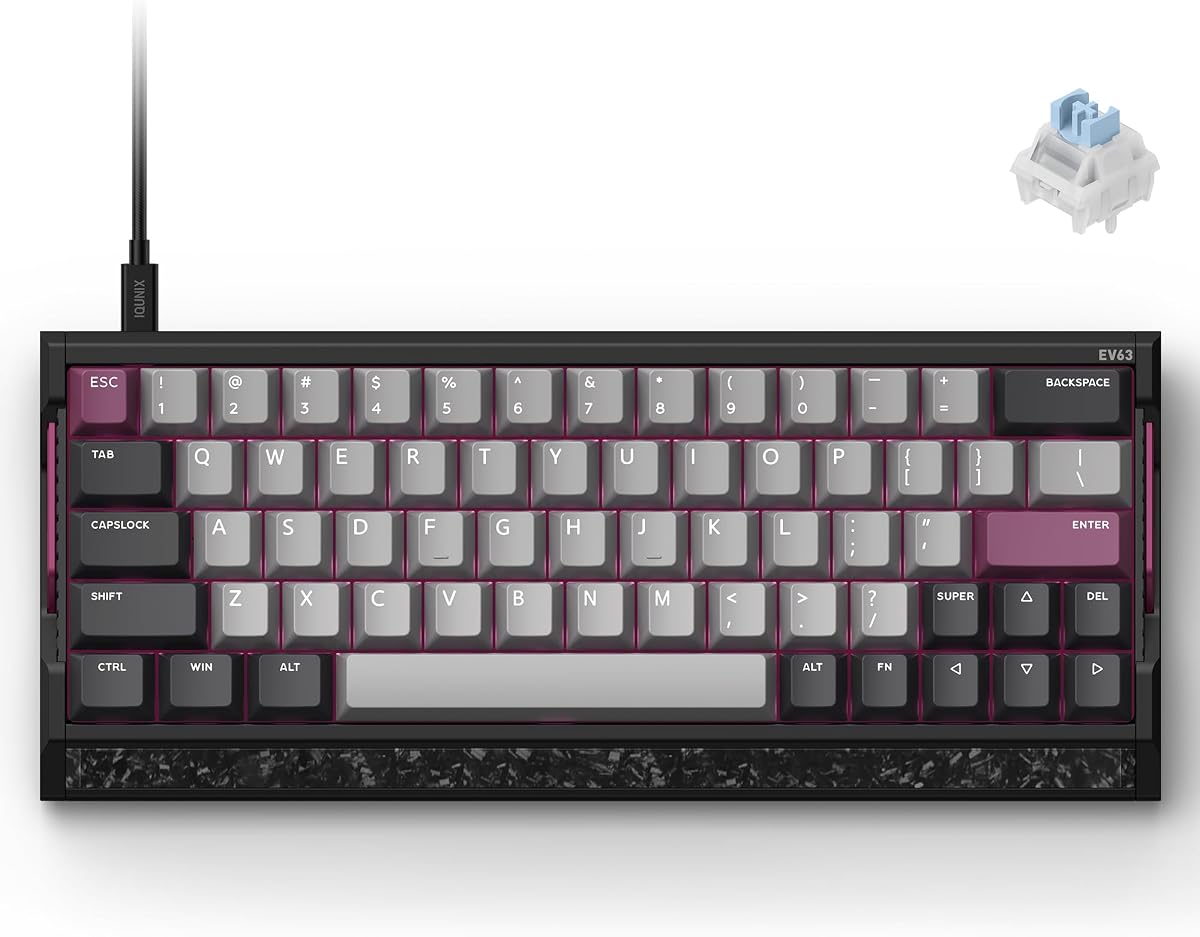
IQUNIX EV63 Hall Effect Gaming Keyboard 60%
4.5Editor score
0.01mm rapid trigger precision
8K wired polling rate
Custom 64-key FPS layout
CNC aluminum and forged carbon
Discover the best keyboard for CS2, comparing rapid trigger, polling, layouts, switches, build quality, comfort, and competitive features.
A keyboard for CS2 should deliver fast, repeatable inputs, clear key identification, and a layout that leaves enough desk space for comfortable mouse movement. Rapid Trigger, adjustable actuation, Snap Tap, and high polling rates can make directional changes feel more immediate, while a compact form factor can benefit low-sensitivity aiming styles.
We compared ten gaming keyboards using their published specifications, including switch technology, actuation controls, polling rate, key layout, audio profile, build materials, programmable features, and practical extras. The list covers magnetic Hall Effect models, analog optical boards, a one-handed keypad, and a membrane alternative for buyers with different priorities.
Each review explains the product's strongest CS2-oriented qualities, practical trade-offs, and ideal user profile. Rankings reflect how closely the available specifications align with competitive Counter-Strike 2 play, but current prices, availability, software updates, and personal preferences can change the right choice over time.
4.5Editor score
4.4Editor score

4.3Editor score
This side-by-side comparison highlights the switch systems, polling rates, layouts, adjustable features, and physical designs that matter most for Counter-Strike 2.



The Redragon K617 HE earns the budget position by bringing the most important modern competitive keyboard features into a comparatively accessible model. Its Hall Effect magnetic switches detect movement rather than relying on a fixed physical contact point, while 8,000Hz polling, Rapid Trigger, and PRCS target the rapid movement and counter-strafing demands of CS2.
We may earn a commission when you buy through this link, at no additional cost to you.
The strongest feature is software-adjustable actuation. Players can tune each key from 0.1mm to 3.4mm, save multiple profiles, and calibrate the switches through the desktop or web-based driver. That level of control allows an aggressive setup for movement keys and a deeper setting for typing or less-used commands, all without replacing the keyboard.
The 60% layout is another practical advantage for low-sensitivity mouse users because it removes the number pad and navigation cluster. The trade-off is that users coming from a full-size board may need time to adapt to the smaller arrangement. Driver compatibility, profile management, and the learning curve for rapid-trigger settings should also be considered before purchase.
The K617 HE is a strong choice for CS2 players who want Hall Effect control and an 8K polling rate without moving to a premium analog or metal-enclosure board. It is especially appealing to competitive-minded beginners who want a compact, configurable starting setup and are comfortable spending time tuning actuation values.
Per-key actuation and Rapid Trigger can make repeated movement inputs more consistent, while PRCS is intended to remove redundant keystrokes during abrupt direction changes. The result is a feature set aimed squarely at the stop-and-shoot rhythm that dominates competitive shooters.
Its compact 60% frame leaves more open desk area for broad mouse swipes. This makes the board particularly relevant to lower-sensitivity aiming setups, provided the player is willing to adapt to the reduced key count.
We may earn a commission when you buy through this link, at no additional cost to you.
The Redragon K686 HE combines competitive magnetic-switch features with a softer, more refined acoustic design. It carries a 4.4 rating and stands out through UltraMag POM magnetic switches, 8,000Hz polling, Rapid Trigger, PRCS, and adjustable actuation from 0.1mm to 3.4mm.
We may earn a commission when you buy through this link, at no additional cost to you.
Its dual-module floating structure uses an independent switch plate and dampening layers to reduce harsh clacking and create a silkier feel. That design may be particularly useful during long CS2 sessions because it softens the impact of repeated movement commands without removing the audible feedback players use to confirm inputs.
The single control knob provides convenient access to backlight brightness and media playback, reducing the need for software shortcuts. However, the deeper competitive settings still require the desktop or web-based driver, and users will need to learn how actuation, Rapid Trigger, and PRCS interact before they can exploit the hardware fully.
This keyboard suits players who want a balance between rapid input features and a more comfortable sound and feel. It is less minimal than a 60% board, but the additional separation around the main typing area can make navigation easier for someone moving between CS2 and everyday typing or communication tasks.
The floating switch plate and layered dampening reduce the rigid clack associated with many mechanical boards. Players still receive tactile feedback, but the overall sound is designed to feel softer and more controlled during rapid repeated presses.
Rapid Trigger resets a key as soon as it lifts sufficiently, and PRCS is intended to eliminate redundant inputs during quick directional changes. Together with 8,000Hz polling, these features target the short, decisive movements CS2 demands.
We may earn a commission when you buy through this link, at no additional cost to you.
The Redragon K673 HE offers the same core competitive technology as the K686 HE but has a 4.1 rating, making it a less established selection among the strongest options. Hall Effect sensing, 8,000Hz polling, Rapid Trigger, PRCS, and a 0.1–3.4mm adjustment range remain central to its design.
We may earn a commission when you buy through this link, at no additional cost to you.
A dual-module floating structure and dampening layers create a softer key feel, while the one-knob control handles lighting brightness and media playback. For CS2, the more meaningful benefit is the ability to tune individual keys and store profiles for different games or play styles.
As with other driver-dependent Redragon magnetic keyboards, the feature set only becomes useful after careful setup. Users should verify driver compatibility with their operating system and understand the difference between actuation depth, Rapid Trigger sensitivity, and PRCS before committing to a final configuration.
The K673 HE is a reasonable option for players attracted to the same UltraMag platform but seeking a specific variant with its own styling. Its 4.1 rating suggests somewhat less consistency in customer feedback, so buyers should pay close attention to warranty coverage, software support, and the availability of replacement parts.
The independent floating plate and noise-dampening construction help suppress the harshest vibrations. This gives rapid movement keys a smoother presentation while preserving the consistent magnetic sensing needed for competitive play.
Saving multiple actuation configurations allows movement, shooting, and utility keys to have separate trigger characteristics. Profiles can also be adapted when switching from CS2 to other games with different control demands.
We may earn a commission when you buy through this link, at no additional cost to you.
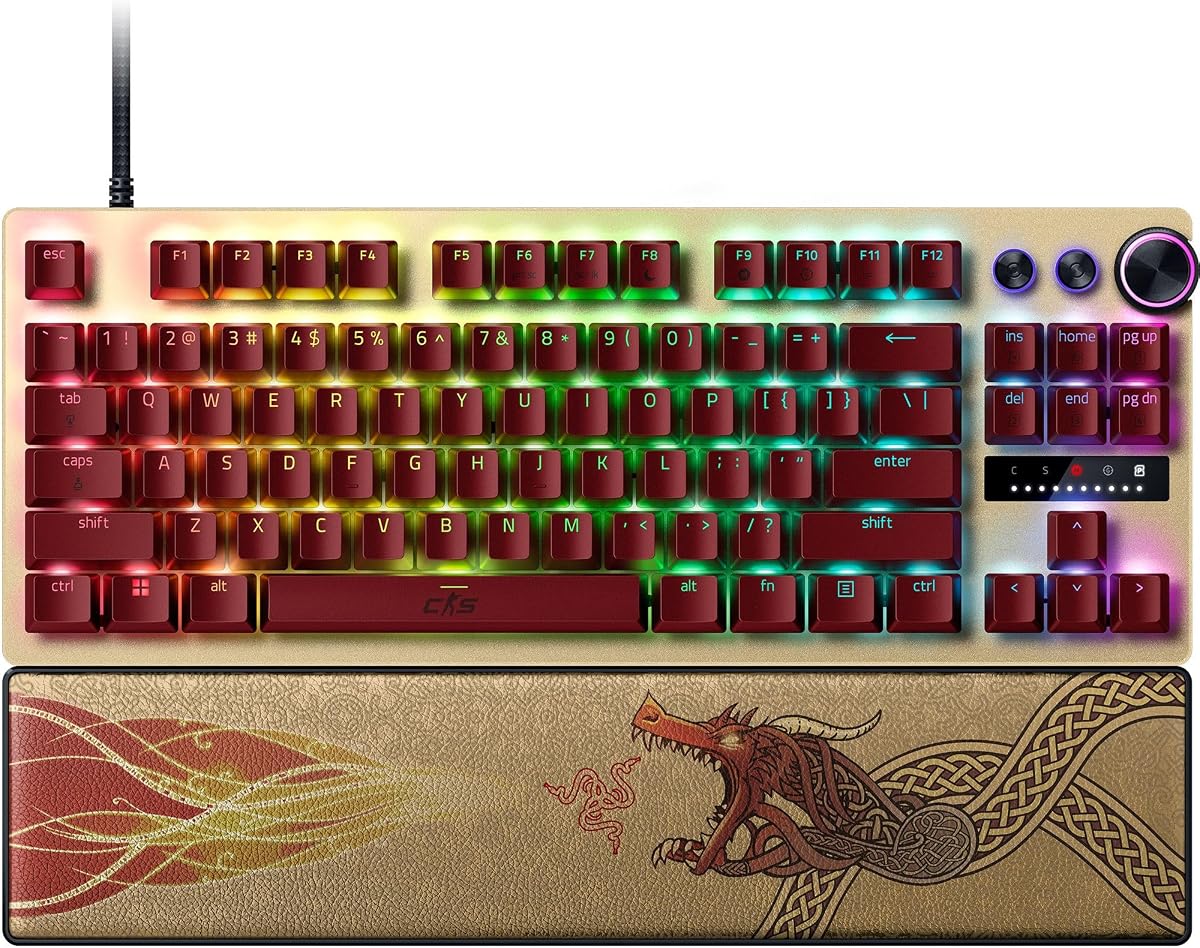
The Razer Huntsman V3 Pro TKL Counter Strike 2 Edition is the most explicitly themed selection in the guide. It carries a 4.4 rating and wraps Razer's analog optical Gen-2 technology, Rapid Trigger, Adjustable Actuation, and Snap Tap in a competition-oriented tenkeyless design.
We may earn a commission when you buy through this link, at no additional cost to you.
One of its most useful qualities is the onboard LED array, which helps players change actuation height and Rapid Trigger sensitivity without opening software. The dedicated digital dial handles volume and analog switch settings, while three control buttons provide media functions and custom macros. Rapid Trigger resets keys after minimal lift, and Snap Tap prioritizes the latest of two selected inputs for fast directional changes.
The main caveat is that this is a premium board, and the competitive features reach their fullest potential only after correct configuration. Snap Tap specifically requires a recent firmware update, which means buyers should update the keyboard promptly. Some players may also find the TKL less desk-saving than the 60% models in this list.
This model is best suited to a CS2 player who values a purpose-built esports package, easy onboard tuning, and established competition features. The included magnetic leatherette wrist rest adds long-session comfort, while textured PBT double-shot keycaps are designed to withstand heavy use without developing the shine associated with lower-cost caps.
The onboard LED array makes actuation and Rapid Trigger changes possible without navigating software. That convenience is valuable when a fine adjustment is needed between rounds or while practicing movement patterns.
The magnetic wrist rest attaches directly to the keyboard and offers firm support. Combined with durable PBT keycaps, it creates a setup intended to remain comfortable and stable through extended training sessions.
We may earn a commission when you buy through this link, at no additional cost to you.
The Corsair Clipper PRO MINI 60 is a compact Hall Effect board built specifically around competitive FPS play. Its 4.4 rating reflects a well-rounded feature set that includes Rapid Trigger, Multi-Action, Smart Tap, Tap Lock, FlashTap SOCD, and up to 8,000Hz polling through CORSAIR AXON hyper-processing.
We may earn a commission when you buy through this link, at no additional cost to you.
MGX Hyperdrive Core Hall Effect switches provide linear operation with adjustable actuation from 0.2mm to 3.8mm. The claimed 100-million-keystroke durability and zero-drift positioning target stable long-term behavior, while the 60% US QWERTY format gives low-sensitivity players more room for mouse movement.
Dual-layer sound dampening keeps the board quieter, which can reduce distraction in a shared environment. Its IP57 rating adds water and dust resistance, though the product guidance calls for a 72-hour drying period after submersion. The compact layout also means there is no dedicated number pad or full navigation cluster.
This is an attractive option for a CS2 player who prioritizes desk space and advanced input controls over a fuller layout. It is particularly relevant to competitive FPS enthusiasts already comfortable with 60% boards, and the inclusion of Smart Tap and Tap Lock provides alternatives for players who do not want to rely on a single movement behavior.
Multi-Action, Smart Tap, and Tap Lock let players explore different ways of combining movement commands. That flexibility can be useful for experimenting with movement patterns before settling on the configuration that feels most natural.
PBT double-shot keycaps resist wear, while the dampened construction helps keep the keyboard quiet. Together with its water and dust resistance, these features suit players who regularly game for extended periods.
We may earn a commission when you buy through this link, at no additional cost to you.
The Redragon K745 HE is a magnetic gaming keyboard aimed at players who value a quiet key feel alongside competitive input controls. Its 3.9 rating is the lowest among the selections, but the specification sheet includes several useful features: UltraMag POM switches, 8,000Hz polling, Rapid Trigger, PRCS, and adjustable RGB lighting.
We may earn a commission when you buy through this link, at no additional cost to you.
The main physical distinction is the five-layer noise-dampening structure, paired with an anti-wobble floating switch plate. It is designed to produce a softer, silkier response than a rigid mechanical board, which may be beneficial for late-night sessions, shared rooms, or streamers who prefer a quieter keyboard.
The trade-off is that the 3.9 rating gives less confidence about consistency than the higher-rated models. Buyers should also expect to use the desktop or web-based driver for per-key calibration, 0.1–3.4mm actuation adjustment, profile saving, and lighting controls. Software quality and operating-system support deserve close attention.
Despite that lower rating, the K745 HE remains relevant for CS2 players who prioritize dampening more than brand prestige or metal construction. It is best approached as a feature-focused option for testing whether a quiet magnetic board with extensive competitive controls fits the player's setup.
The layered construction and floating switch plate reduce harsh movement between components. The result is intended to soften both sound and impact while maintaining Hall Effect sensing.
Rapid Trigger and PRCS address fast movement, while adjustable RGB modes and brightness let the board match a player's desk setup. Saved profiles add convenience when switching between games.
We may earn a commission when you buy through this link, at no additional cost to you.
The Keychron C0 HE 8K is a 35-key, one-handed gaming keypad rather than a standard replacement keyboard. It carries a 4.2 rating and uses Hall Effect magnetic switches, an 8,000Hz polling rate, Rapid Trigger, and 0.01mm adjustment precision for CS2 and other FPS titles.
We may earn a commission when you buy through this link, at no additional cost to you.
Its layout places essential commands within one hand's reach, reducing the distance between movement keys and mouse movement. This is a compelling format for players who want maximum desk freedom, although it requires learning a different key arrangement and assigning essential functions to unfamiliar positions.
The browser-based configurator is a meaningful convenience because it allows key mapping, actuation changes, and per-key RGB settings without installing a traditional desktop utility. Compatibility with both Windows and macOS also makes the keypad easier to move between systems, while its programmable keys can support OBS, push-to-talk, editing, and macro-like workflows.
The C0 HE 8K is ideal for a player who wants a dedicated CS2 control pad, stream keypad, or portable editing tool. It should not be chosen by someone expecting a conventional typing layout, since its 35-key format is designed around quick access to specific actions rather than complete everyday typing.
Rapid Trigger and 8,000Hz polling support fast, repeatable inputs, while the one-handed layout keeps frequently used actions close. This can reduce hand travel and leave the other hand entirely free for aiming.
Programmable keys can operate OBS scenes, push-to-talk, editing shortcuts, and other command-heavy workflows. Browser-based configuration keeps setup straightforward across Windows and macOS.
We may earn a commission when you buy through this link, at no additional cost to you.
The renewed Razer Huntsman V3 Pro TKL brings advanced analog optical hardware to a more accessible version of Razer's competition keyboard. It carries a 3.5 rating, placing it last in this ranking, but its core features include Rapid Trigger, Snap Tap, and adjustable actuation from 0.1mm to 4.0mm.
We may earn a commission when you buy through this link, at no additional cost to you.
Gen-2 analog optical switches are designed for ultra-fast repeated inputs, while Snap Tap prioritizes the latest input between two selected keys without requiring the earlier key to be fully released first. As with the dedicated Counter Strike 2 Edition, Snap Tap requires a recent firmware update, so the keyboard should be configured before competitive use.
The onboard LED array allows players to adjust actuation height and Rapid Trigger sensitivity without software, and a multifunction dial handles volume and analog settings. A brushed aluminum top plate, PBT keycaps, and a magnetic wrist rest give the renewed board many of the physical qualities associated with Razer esports equipment.
Its lower rating and renewed status require more caution. Cosmetic condition, warranty coverage, and included accessories should be examined carefully, and a 3.5 rating may reflect issues that are not visible in the specifications. It is most appropriate for a knowledgeable buyer who specifically wants the Huntsman V3 Pro platform and can accept the variable condition of a renewed product.
Snap Tap allows the latest of two selected inputs to take priority, reducing the need to fully release the original key. When properly configured, this supports the quick direction reversals used in competitive movement.
The LED array provides visual guidance for changing actuation and Rapid Trigger settings. Players can make meaningful adjustments without leaving the keyboard or opening a configuration utility.
We may earn a commission when you buy through this link, at no additional cost to you.
The Corsair K55 RGB PRO is the conventional option in this guide. Its 4.4 rating is strong, and while it does not offer the advanced input systems of the magnetic and analog models, it provides a practical full-size layout, a detachable palm rest, dedicated media controls, and six programmable macro keys.
We may earn a commission when you buy through this link, at no additional cost to you.
For CS2, its membrane construction provides a familiar feel, while the macro keys can be assigned to common actions, shortcuts, or key sequences through CORSAIR iCUE. The keyboard also supports Elgato Stream Deck software for streaming commands, making it a reasonable choice for players who broadcast as well as compete.
The key limitation is that the K55 RGB PRO does not offer Hall Effect sensing, Rapid Trigger, Snap Tap, adjustable actuation, or an 8,000Hz polling rate. It therefore cannot compete with the specialized boards for ultra-fine movement control, and players who rely on those technologies should choose a more advanced model.
The K55 RGB PRO makes the most sense for a CS2 player who values comfort, full-size convenience, programmable shortcuts, and a conventional typing experience over competitive micro-adjustments. Its IP42 protection, removable palm rest, and dedicated volume keys also make it practical for regular gaming and everyday desktop use.
Six dedicated macro keys can trigger functions, shortcuts, or recorded sequences with one press. That is useful for players who bind uncommon CS2 commands or who also need one-touch streaming controls.
The detachable rubber palm rest reduces hand strain, while dedicated media and volume keys avoid interrupting gameplay for system controls. The full-size arrangement also preserves a number pad and navigation cluster for broader desktop use.
We may earn a commission when you buy through this link, at no additional cost to you.
The IQUNIX EV63 Hall Effect Gaming Keyboard 60% is the most technically ambitious model in the guide and holds the highest listed rating at 4.5. It is designed explicitly for Valorant, CS2, Apex Legends, and other high-level FPS games, with 0.01mm Rapid Trigger, adjustable actuation, zero dead-zone control, and 8,000Hz wired polling.
We may earn a commission when you buy through this link, at no additional cost to you.
Its M.A.T. 2.0 Magnetic Auto-Tune checks each key in real time, while a dual Hall power circuit separates sensor and RGB power to reduce voltage fluctuation. The stated goal is fewer missed inputs, unintended triggers, and sticky keys during high-speed movement, making the stability of the magnetic signal a major focus rather than a secondary specification.
Physical construction is equally distinctive. The board combines aircraft-grade CNC aluminum with a real forged carbon front plate and weighs about 2.65 pounds, helping limit desk movement and case vibration. Magnetic X Ultra switches use a 36±10gf initial force, 48±10gf bottom-out force, 3.5±0.2mm travel, factory lubrication, and a stated 100-million-plus keystroke durability.
This is a premium option for a CS2 player willing to invest in fine control and a rigid, premium feel. Its custom 64-key layout frees desk space and keeps gaming keys close, but full-size users may need time to adapt to the smaller right Shift and altered key placement. EV Driver 3.0 offers professional presets and advanced controls for players willing to tune the board.
The 0.01mm Rapid Trigger setting allows exceptionally precise control over when a key resets after lifting. That granularity is valuable for players trying to separate opposite movement commands without introducing unwanted inputs.
Real-time auto-tuning and a separated Hall power circuit are designed to keep each sensor consistent. This can improve confidence in rapid stops, strafes, counter-strafes, and repeated inputs where missed or sticky commands are disruptive.
We may earn a commission when you buy through this link, at no additional cost to you.
The best CS2 keyboard balances fast input registration with repeatable movement behavior, a layout that suits your aiming habits, and controls you can understand well enough to configure properly.
Rapid Trigger determines how far a key must lift before it can register another press, while adjustable actuation controls how far it must travel before the initial press is registered. In CS2, these settings can improve the separation of opposite direction commands and make repeated movement inputs more consistent. Hall Effect models commonly provide per-key adjustment, while some analog optical boards also offer onboard controls and wider adjustment ranges.
Look for controls that are easy to reach and settings that can be saved as profiles. Start with conservative values, then reduce actuation or refine reset sensitivity gradually while practicing movement. Extremely shallow settings may feel twitchy, so personal comfort matters more than choosing the smallest advertised number.
Polling rate describes how often the keyboard reports its state to the computer. Several selections offer 8,000Hz wired polling, which can reduce the interval between a physical key action and its digital report. That does not guarantee a perfectly smooth final input, since the game, system, connection, and software pipeline also influence latency, but a high polling rate is a useful starting point for competitive hardware.
Prioritize a stable wired connection over assumptions based on a headline number. Keep the board connected directly, close unnecessary background applications, and update its software so input-processing features operate as intended.
Snap Tap, FlashTap SOCD, Smart Tap, Tap Lock, and related functions can prioritize or combine movement inputs in different ways. They may help a player issue a new direction without fully releasing the opposite key, but every implementation can behave differently and may require a particular firmware version, driver, or activation method.
Choose a feature only if its behavior matches the movement style you already understand. Test it in a practice range, compare it with conventional counter-strafing, and disable it if it causes accidental inputs. A feature that adds confusion is not an advantage.
Compact 60% and custom 64-key layouts remove the number pad and sometimes the navigation cluster, creating more room for broad mouse movements. That can benefit players using low sensitivity and large mousepads. TKL boards preserve more familiar spacing and dedicated navigation keys, while the Keychron C0 HE is a one-handed keypad rather than a complete keyboard.
Consider your existing muscle memory, available desk area, and whether you type or use a number pad outside games. A smaller board may improve aiming space but require a meaningful adjustment period, so transition slowly and keep conventional input available while practicing.
The guide includes Hall Effect magnetic switches, analog optical switches, and a conventional membrane model. Magnetic and analog boards offer adjustable behavior and advanced input processing, while membrane construction provides a familiar feel with fewer competitive tuning options. Sound and force preferences are just as important as the underlying technology, and the floating plates, PBT caps, and dampening layers affect how each board feels in practice.
Decide whether you value fine control, quiet operation, or a familiar typing experience. A light initial force may speed repeated presses, while a heavier bottom-out can make accidental inputs less likely. Use the published travel, force, and durability figures to compare models rather than relying on switch names alone.
A heavy or rigid chassis can reduce movement and vibration as you press keys or reposition the mouse. The IQUNIX EV63 combines CNC aluminum and forged carbon, while the Razer boards use an aluminum top plate. Other models focus on layered dampening and floating switch structures to soften the feel instead of maximizing weight.
Look for a board that does not slide when you make fast inputs and that remains stable without taking up too much space. A premium material is helpful, but a stable footprint and sound profile may matter more to your gameplay than the finish alone.
Advanced input features generally require configuration through a desktop utility, web-based configurator, firmware update, or some combination of all three. Web tools are convenient across systems, while onboard controls are valuable when quick changes are needed without opening a program. Saved profiles make it easier to keep separate settings for CS2, other games, typing, and streaming.
Review the manufacturer's supported operating systems, update process, and profile controls before buying. A keyboard with excellent hardware can be less convenient if its software is difficult to navigate, unstable, or unavailable for the computer you use.
PBT double-shot keycaps resist shine and wear, while stated switch lifespans of 100 million keystrokes indicate long-term durability. The Corsair Clipper PRO MINI 60 adds an IP57 rating, and the Corsair K55 RGB PRO uses an IP42 rating. Magnetic palm rests and detachable rubber palm rests can reduce strain during long practice sessions.
Balance protection with proper care. A water-resistant rating does not mean a keyboard can be left wet, and the Clipper PRO MINI 60 requires a full drying period after submersion. Clean between sessions, avoid spills, and use a stable desk position to protect both the switches and your wrist.
Begin by connecting the keyboard directly to the computer with its wired cable, installing any required driver or firmware, and updating it before configuring movement features. Create a separate profile for CS2, then adjust the keys you use most frequently rather than changing every key at once. Test actuation and reset behavior in a practice range before using the settings in ranked matches.
Use the onboard controls or software to save multiple configurations. A movement profile with very light activation can be paired with a general profile that uses deeper settings for typing and communication. If a feature behaves unexpectedly, update the firmware, restore the default profile, and change one option at a time to identify the cause.
For maintenance, disconnect the keyboard before cleaning it. Use a soft, dry cloth for the case and a lightly dampened cloth for the keycaps, while avoiding excessive moisture around switches and ports. Keep food and drinks away from the board, let the keyboard dry completely after any exposure to liquid, and check that no keycap or cable has become worn or loose.
Rapid Trigger can be useful because it resets a key after a small lift, allowing opposite movement commands to register without requiring a full release. This can make rapid direction changes and counter-strafing feel more consistent. Results depend on the settings, player technique, and game engine, so it should be tuned gradually in a practice range rather than treated as an automatic upgrade.
An 8,000Hz polling rate can reduce the keyboard's reporting interval, making it attractive for competitive setups. However, end-to-end latency also depends on the computer, game, software, display, and connection, so the headline number does not tell the entire story. A stable wired connection, sensible settings, and consistent practice remain more important than chasing a small timing difference.
A 60% keyboard can be excellent if mouse space is the priority and the player is comfortable leaving the number pad and navigation cluster behind. It leaves more room for large aiming movements, which benefits some low-sensitivity styles. Players who rely on those keys or dislike relearning key positions may prefer the more familiar TKL layout.
No. These features can help certain players create fast, clean directional inputs, but they are optional tools rather than mandatory competitive hardware. Every implementation works differently, and an unfamiliar feature can cause accidental commands if configured poorly. Learn conventional movement first, then test these options in a safe environment.
Membrane keyboards are not inherently bad for CS2. The Corsair K55 RGB PRO provides a familiar layout, programmable macro keys, media controls, and a detachable palm rest, but it lacks Hall Effect sensing, Rapid Trigger, adjustable actuation, and 8,000Hz polling. Players who value convenience and comfort may be satisfied, while competitive movement specialists may prefer a magnetic or analog model.
Start with the manufacturer's default or a moderate setting, then lower actuation gradually in small increments. Avoid immediately choosing the shallowest possible value because it can feel twitchy or increase accidental presses. Practice repeated stops, strafes, and counter-strafes, and retain a less sensitive backup profile for communication and typing.
Onboard controls are useful when a player wants to change actuation, Rapid Trigger, lighting, or volume without opening software. The Razer Huntsman V3 Pro models are especially notable for providing visual guidance through an LED array. They are not essential for every user, but they can make fine adjustments faster and more convenient.
Keep the board away from liquids and dust, clean it with a soft cloth, and avoid pulling on the wired connection. Magnetic switches still need protection from debris because physical obstructions can affect key travel even when detection does not depend on direct electrical contact. If the keyboard becomes wet, disconnect it and allow it to dry fully before using it again.
The IQUNIX EV63 stands out for players seeking the most refined premium package, combining 0.01mm Rapid Trigger, 8,000Hz polling, stable magnetic sensing, extensive FPS controls, and a rigid aluminum-and-forged-carbon chassis. The Razer Huntsman V3 Pro TKL Counter Strike 2 Edition is the strongest all-around esports choice, while the Redragon K617 HE offers the most accessible entry into Hall Effect tuning and 8K polling.
Prioritize the features you will actually configure. Rapid Trigger, adjustable actuation, Snap Tap, and SOCD functions can improve movement only when their settings fit your technique. A compact layout may create valuable mouse space, but a TKL can be easier to adapt to, and onboard controls, sound construction, and profile software can influence daily convenience more than small latency claims.
Before purchasing, verify the latest specifications, software support, warranty terms, and current market availability. Product costs and promotions can change, so compare the complete feature set and read current customer feedback rather than choosing solely from an old recommendation or headline number.