
Yealink MP56-TEAMS-PSU-E2
5.0Editor score
Seven-inch Teams touchscreen
Android 13 operating system
Yealink Noise Proof audio
Magnet handset included
Phones for Marketing Teams expert guide compares ten business phones on Teams features, audio quality, connectivity, displays, headset support, and usability.
Marketing teams rarely need a basic desk phone because daily communication involves frequent client calls, campaign reviews, cross-platform collaboration, and quick decisions between meetings. The right business phone should therefore combine clear audio, intuitive controls, reliable connectivity, and convenient access to the communication tools the team already uses.
We compared the ten phones in this guide by examining their Microsoft Teams support, operating systems, display designs, audio technologies, network options, headset connectivity, power requirements, and suitability for different marketing roles. The list includes dedicated Teams phones, versatile Android business phones, a flexible SIP desk phone, and an expansion module for high-volume users.
The picks show which model best fits each priority, from a large touch display and team-focused interface to wireless flexibility, affordable deployment, or expanded call-management controls. Product details and availability can change, so readers should confirm current specifications, compatibility, and bundled accessories with the manufacturer and retailer before purchasing.
5.0Editor score

5.0Editor score

3.4Editor score
This side-by-side comparison highlights the main distinctions among all ten options, including platform, display, wireless support, audio features, power requirements, and the needs each model is best designed to address.


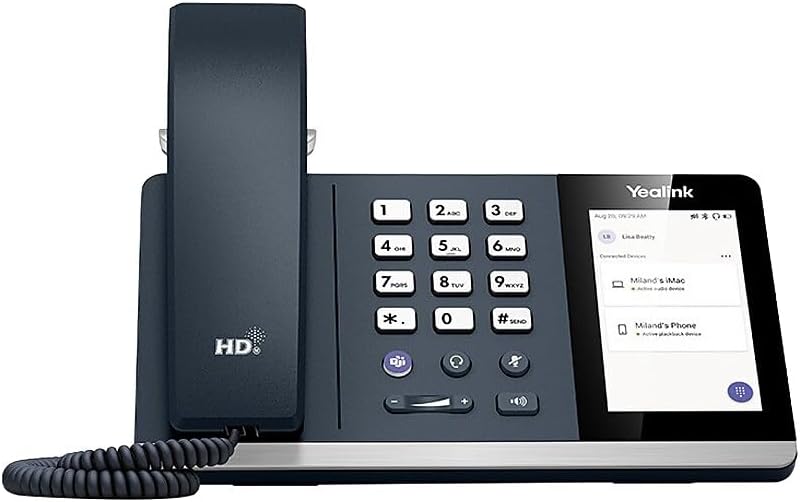
The Yealink MP54-TEAMS-PSU-E2 is a compact, purpose-built business phone for marketing teams that depend heavily on Microsoft Teams but do not need a large display for every routine call. Its supplied rating is 5.0, and the most convincing features are its four-inch capacitive touchscreen, Android 13 operating system, dedicated Teams positioning, and inclusion of a power adapter. It offers a practical middle ground between a compact desk phone and a larger executive-style communications terminal.
We may earn a commission when you buy through this link, at no additional cost to you.
The 480-by-800 touch display gives users a modern way to move through contacts, call controls, and Teams functions without relying exclusively on physical keys. Yealink Noise Proof Technology is especially relevant to marketing professionals who often take calls from shared offices, open workspaces, or busy client spaces. A magnetic handset adds familiar call handling for those who prefer to cradle the phone, while the touch interface gives quick access to digital workflows. PoE support and the included adapter simplify deployment because administrators can select the appropriate power method for the installation.
The principal compromise is display size. Marketing teams occasionally use desk phones to scan a dense contact list, follow a long chat thread, or consult information while a call is in progress, and the four-inch panel cannot provide as much visual space as the seven-inch MP56 or CCX 400. Buyers should also distinguish this bundle from the MP54-TEAMS-E2 listed later, which does not include a power adapter. Otherwise, the MP54-TEAMS-PSU-E2 combines a strong rating, modern controls, and a compact footprint effectively.
This is the most balanced recommendation for individual marketing managers, account executives, and small teams that use Teams as their primary calling platform. It suits buyers who value a clean touchscreen, effective voice features, and straightforward installation without wanting to occupy a large section of the desk. Choose it when a four-inch interface is sufficient and verified Teams, network, and headset requirements align with the stated specifications.
The MP54 uses a modest four-inch touchscreen that preserves desk space while still providing direct access to core calling functions. Its size is especially helpful for employees who alternate between a computer, notebook, and desk phone throughout the working day.
Yealink Noise Proof Technology adds value in offices where marketing teams collaborate in common areas or join client calls without a private room. The feature targets distraction at the source while retaining the familiar handset workflow.
We may earn a commission when you buy through this link, at no additional cost to you.
The Yealink SIP-T34W is a practical IP desk phone for marketing teams that want flexible line handling, wireless connectivity, and a conventional handset rather than a large Teams-focused touchscreen. It carries a supplied rating of 3.7 and supports as many as four SIP accounts, making it a useful option for people who manage several numbers, direct campaigns, handle sales support, or use a shared communication workflow.
We may earn a commission when you buy through this link, at no additional cost to you.
Its 2.4-inch, 320-by-240 color display provides clear status information, although it offers less room for complex information than the touch models in this guide. Built-in dual-band 2.4G/5G Wi-Fi adds deployment flexibility, while dual-port Gigabit Ethernet supports wired network arrangements. PoE support gives administrators another power option, and the inclusion of a power adapter makes the package more practical for a new installation. A USB 2.0 port supports wired USB or Bluetooth headsets, adding useful options for private calls and longer working sessions.
Its biggest limitation for this particular audience is that the supplied information does not identify a dedicated Microsoft Teams interface. That does not prevent it from serving a marketing team that uses SIP-based calling, but buyers who require a native Teams-tailored experience should confirm their communication platform and account setup first. The small display may also feel limited for users who want to view rich contact details or messages beside the active call.
The SIP-T34W is best for a technically independent marketer who values multiple accounts, Wi-Fi, and a complete desk-phone package. It may be especially appropriate for distributed teams, flexible workspaces, or administrators accustomed to SIP platforms. Teams-centric organizations should choose it only after confirming that their existing calling infrastructure aligns with the phone's SIP capabilities.
Support for up to four SIP accounts lets users organize direct lines, shared queues, or other business numbers in one place. This is valuable for marketing employees who alternate between internal communication, client follow-up, and campaign-related calling.
Dual Gigabit Ethernet ports and built-in dual-band Wi-Fi provide deployment options for permanent desks and more flexible arrangements. PoE and the included adapter make it easier to establish a suitable network and power configuration.
We may earn a commission when you buy through this link, at no additional cost to you.
The Yealink MP54-TEAMS-E2 is a polished Teams-focused desk phone with a supplied rating of 4.8. It shares the compact four-inch format of the MP54 bundle selected as the overall pick, but its defining procurement detail is important: a power adapter is not included. That makes this model more appropriate for an office already equipped with Power over Ethernet or for administrators who can supply the appropriate power solution separately.
We may earn a commission when you buy through this link, at no additional cost to you.
Android 13 provides a modern software foundation, while the 480-by-800 capacitive screen creates a dedicated space for Teams controls without taking over the desk. The magnetic handset gives the device a polished feel and maintains a familiar way to start and end calls. For marketers who spend substantial time in customer conversations, Yealink Noise Proof Technology is a meaningful addition that can reduce distracting background sound.
Buyers must account for the missing adapter when planning a new installation. An existing PoE network may eliminate the need for a local power supply, but deployments that rely on conventional power require separate planning. As with other compact devices, the four-inch display may be limiting for people who want to read lengthy messages, inspect complicated contact records, or view substantial information while remaining on a call.
This model is a strong choice for a marketing team with established network infrastructure, standardized deployment practices, and a preference for a small Teams interface. It offers the same core benefits as the MP54-TEAMS-PSU-E2 while giving administrators more control over the power arrangement. For a plug-and-ready desk, the included-adapter bundle is more convenient; for a fully managed office, this version can be the better fit.
The Teams-oriented configuration and dedicated touchscreen reduce the friction of moving between physical call controls and software-based communication. It is a practical fit for users who treat calling as a central daily activity rather than an occasional task.
PoE support can simplify cabling in offices with compatible switches and access points. However, teams without an established PoE environment should purchase the separate power solution before installation.
We may earn a commission when you buy through this link, at no additional cost to you.
The Poly CCX 400 offers a polished five-inch color touchscreen, Open SIP architecture, and broad collaboration-platform positioning. Its supplied rating of 3.4 is lower than those of the leading Yealink Teams models, but the product data identifies it as an entry-level business phone particularly suited to common areas. That makes it worth considering for reception, shared workspaces, and flexible marketing-team environments rather than dedicated executive desks.
We may earn a commission when you buy through this link, at no additional cost to you.
Poly Acoustic Fence is designed to eliminate distracting background noise at the source, while Poly HD Voice focuses on call clarity. Together, these features suit busy offices where ambient sound is likely to affect client conversations. USB-A, RJ9, and EHS connections provide multiple options for compatible Poly headsets, and the traditional handset offers a familiar alternative for users who do not need continuous touch interaction.
The phone's main advantages are its ergonomic touchscreen interface and provisioning and management support. Its 3.4 rating is the clearest reason to evaluate alternatives and read current customer feedback. The stated common-area positioning can also mean that the model does not provide every feature sought by a heavy daily caller. Marketing managers who require a dedicated Teams button, deeper platform integration, or a larger screen may prefer a more specialized handset.
The CCX 400 is a sensible candidate for a marketing team that values multi-platform flexibility, headset support, and noise management at a modest entry point. It can work especially well in shared areas, reception points, and flexible team spaces. For individual campaign managers who live in Teams, however, a purpose-built Yealink MP54 or MP56 may offer a more focused experience.
Poly Acoustic Fence targets distracting noise at its source, which is useful for shared marketing offices and common areas. The feature supports clearer conversations without requiring every user to rely on a separate headset.
USB-A, RJ9, and EHS ports support compatible Poly headsets, while the included handset serves users who prefer traditional call handling. This flexibility makes the phone adaptable to different desk habits and personal preferences.
We may earn a commission when you buy through this link, at no additional cost to you.
The Yealink Classic Gray Landline is positioned as a mid-level phone for professionals and managers with moderate calling demands. Its supplied rating is 4.2, and it focuses on a familiar ergonomic design, an adjustable display, and built-in Bluetooth and Wi-Fi. It may appeal to a marketing team that wants a straightforward desk phone without committing to a large touch display for every function.
We may earn a commission when you buy through this link, at no additional cost to you.
Physical controls and an adjustable display can make basic call handling intuitive for users who spend long periods on the telephone. Bluetooth and Wi-Fi expand the options for peripheral devices and network connectivity, although the supplied details do not specify headset ports, SIP account capacity, or a dedicated Teams interface. The product therefore fits best when users want essential wireless convenience rather than a full collaboration terminal.
Its main limitation is the absence of a stated large-screen Teams experience. Marketing professionals who spend the day moving between chats, shared documents, and calls may find a more specialized Android phone more cohesive. The unspecified technical details also make careful compatibility checking important, especially for organizations with strict voice, security, or provisioning standards.
This landline is most appropriate for a marketing manager whose daily needs center on reliable, comfortable desk calling with moderate call volume. It can serve reception, coordination, or administrative roles where a straightforward handset is preferred over a large screen. Teams-heavy users should verify compatibility, while general office users may find its simplicity and ergonomics particularly useful.
The ergonomic design and adjustable display are intended for professionals and managers who handle a moderate call load. It offers a more traditional desk experience than the touchscreen models in this collection.
Built-in Bluetooth and Wi-Fi provide essential connectivity while keeping the overall design straightforward. This can be useful for a team that values simple hardware over a software-heavy control surface.
We may earn a commission when you buy through this link, at no additional cost to you.
The Yealink Color-Screen Expansion Module is not a standalone phone but an add-on for compatible Yealink T5-series desk phones. Its supplied rating is 4.5, and its purpose is clear: give receptionists, administrative assistants, and high-volume users more visible call-management controls without replacing their base phone. For a marketing team, it can be valuable for shared reception, campaign coordination, or a desk that monitors many contacts.
We may earn a commission when you buy through this link, at no additional cost to you.
Sixty flexible buttons are divided across three pages of 20, with support for BLF, speed dial, call forwarding, transfer, call parking, and call pickup. The 4.3-inch color LCD makes line status, contact names, and active calls easier to identify at a glance. It connects directly to compatible Yealink models and requires no additional power supply, which keeps deployment relatively simple when the base phone is already in use.
Compatibility is the decisive issue. The listed models include the SIP-T58V, SIP-T58A, SIP-T56A, SIP-T54S, and SIP-T52S, and the module also works with Microsoft Teams after a firmware update. It cannot be purchased as a general-purpose phone for a team using unrelated hardware. The color display and numerous programmable controls may also be unnecessary for employees with modest call-management responsibilities.
The module is an excellent companion for a marketing operations desk that needs fast access to many lines, transfers, and shared contacts. It can reduce the need to open software menus for routine call actions. It is not the right standalone choice for a team without compatible Yealink T5 hardware, but for the right environment, it is a powerful way to expand call-management capacity.
Three pages of programmable keys make it easier to monitor and route multiple calls. Busy reception and coordination desks can surface important line states without repeatedly searching through a contact list.
Speed dial, forwarding, transfer, parking, and pickup functions can be assigned directly to keys. Marketing coordinators can therefore move through routine call-handling tasks with fewer steps and less visual searching.
We may earn a commission when you buy through this link, at no additional cost to you.
The Yealink MP55 E2 Teams IP Phone is a desktop-oriented Teams model designed for organizations using internet-based voice communication. The supplied data does not include a customer rating, so this review does not assign one; its evaluation therefore rests on the stated functions. It supports Wi-Fi and Bluetooth, uses a corded desktop format, and can be stand-mounted for a conventional office position.
We may earn a commission when you buy through this link, at no additional cost to you.
The listed features emphasize the practical advantages of VoIP. Audio signals travel over the internet, which can help organizations avoid reliance on traditional long-distance toll charges. Power and data can also pass through a single cable to compatible network devices, supporting cleaner and more scalable office deployments. The stand-mountable design is useful for a permanent marketing desk where a stable, familiar handset arrangement is preferred.
The supplied information is less detailed than for the other phones in this roundup. It does not state the display size, operating system, account capacity, audio features, headset ports, or whether a power adapter is included. That makes it particularly important for a buyer to verify the final package and account features with the seller. The corded form may also be less adaptable than a cordless arrangement for users who move around the office while talking.
The MP55 E2 Teams deserves consideration when a marketing team wants a dedicated Teams desk phone with familiar wired handling and built-in wireless options. It is particularly relevant for permanent offices that can take advantage of structured VoIP deployment. Because the available listing data is limited, purchase decisions should emphasize confirmation of display, power, platform, and accessory requirements rather than relying on unlisted features.
VoIP sends voice traffic over an internet connection, helping organizations reduce dependence on conventional long-distance charging. This can support a more unified approach to business communications when paired with compatible network infrastructure.
The corded design and stand-mountable form create a permanent, familiar calling station. It is a good match for employees who remain at one workstation and value a consistent handset arrangement.
We may earn a commission when you buy through this link, at no additional cost to you.
The Yealink MP56 IP Phone is a large-screen, corded-or-cordless business phone designed for users who want substantial visual space and direct Microsoft Teams access. Its supplied rating is 3.8, while the seven-inch, 800-by-480 capacitive touchscreen distinguishes it from smaller desk phones. It is a strong option for marketing managers who regularly navigate contacts, messages, and calling controls from one device.
We may earn a commission when you buy through this link, at no additional cost to you.
A dedicated Microsoft Teams button and a Teams-tailored user interface streamline access to the collaboration platform. The supplied data also notes firmware upgradability to Teams or Skype for Business editions, which is important for organizations managing platform transitions. Bluetooth 4.2, dual-band 2.4G/5G Wi-Fi, a USB Type-A port for a USB headset, dual Gigabit Ethernet ports, and PoE support make the device well connected for a desk phone.
The phone uses Android 9 rather than the Android 13 platform found in the newer MP54 and MP56 E2 variants, which is a meaningful consideration for administrators who prioritize the most recent platform generation. The supplied 3.8 rating also warrants attention. Its large display is excellent for visual workflows, but the device takes up more room and may feel excessive for a user who only needs basic calling and audio controls.
The original MP56 is best for a marketing professional who values a large display, a physical Teams shortcut, and broad connectivity in a corded or cordless arrangement. Teams-centric teams comparing it with the MP56-TEAMS-PSU-E2 should verify which platform, firmware, and accessory bundle best matches their current infrastructure. The newer model may be preferable when platform currency is a higher priority.
The seven-inch display provides room to view contacts, messages, and call controls together. It is especially helpful for managers who use the desk phone as a central communication dashboard rather than simply to dial numbers.
The dedicated Teams button and tailored interface reduce the number of steps required to reach common collaboration features. Teams users can benefit from a hardware-focused workflow without navigating the phone through a small display.
We may earn a commission when you buy through this link, at no additional cost to you.
The Yealink MP50-Teams is a compact Teams phone with a 4.0-inch, 480-by-800 capacitive touchscreen. Its supplied rating is 3.9, and its strongest differentiators include a dedicated Teams button, a Microsoft Teams-tailored interface, a three-port USB 3.0 hub, and support for both Bluetooth headsets and the BT50 dongle for a PC. It offers a useful set of connection features in a relatively small desk footprint.
We may earn a commission when you buy through this link, at no additional cost to you.
For marketing employees who alternate between headset and handset use, the Bluetooth headset support adds convenience. The USB hub can reduce cable clutter by providing multiple USB connections from one hub, although device compatibility should be confirmed. A full-duplex hands-free speakerphone with acoustic echo cancellation provides another way to manage calls, and Yealink Noise Proof Technology supports clearer voice communication in distracting surroundings.
The four-inch display is adequate for routine navigation but not as generous as the seven-inch MP56 screens. The 3.9 rating suggests that prospective buyers should consider current user feedback and their precise setup. The product data also does not identify the included power accessory or detailed account-management features, so buyers should verify those points before ordering for a larger rollout.
The MP50-Teams is most appropriate for a marketing employee who prioritizes Teams access, compact size, and headset flexibility over a large visual workspace. It can suit shared desks or hybrid workers who alternate between a PC and a desk phone. Teams-focused teams that want a newer operating system and more advanced device management should also compare it with the MP54 and MP56 E2 models.
Bluetooth headset support gives mobile employees a simple way to move between the desk phone and personal calls. The BT50 dongle option for a PC broadens compatibility for users who switch frequently between devices.
The three-port USB 3.0 hub can consolidate common desk connections behind the phone. This may improve cable management, but administrators should verify that planned accessories are compatible with the hub and phone configuration.
We may earn a commission when you buy through this link, at no additional cost to you.
The Yealink MP56-TEAMS-PSU-E2 is the premium visual choice in this collection, combining a seven-inch capacitive touchscreen with Android 13, PoE support, an included power adapter, and a magnetic handset. Its supplied rating is 5.0. It is especially relevant to marketing leaders, client-service managers, and remote employees who want a substantial desk display for navigating Teams and handling frequent calls.
We may earn a commission when you buy through this link, at no additional cost to you.
The large interface is the phone's defining advantage. It offers more room to display contact information, messages, call status, and collaboration controls, making it attractive for users who would otherwise keep Teams open on a computer. Yealink Noise Proof Technology targets distracting background sound, while the magnetic handset supplies a more premium physical calling experience. The included adapter and PoE support provide flexible installation paths for offices that can configure either method.
The seven-inch footprint takes more desk space than a four-inch Teams model, so it is unnecessary for users who handle only a few calls and do not benefit from visual information beside the handset. The product title lists the screen as 1024 by 8600, while the supplied about section states 1024 by 600. Buyers should confirm the intended display resolution on the current product page or manufacturer documentation, as this discrepancy makes the specification unsuitable for precise display planning without further checking.
This is the preferred model for a marketing professional who wants a large, current, Teams-oriented interface and values the supplied accessory bundle. It is less compelling for occasional callers or employees with very limited desk space, but it offers a refined combination of touch access, noise-focused audio, and flexible power options. Confirm platform accounts, network requirements, and the final display specification before deployment.
A seven-inch touch display offers enough visual space to keep more call and contact information in view. This helps users who manage several conversations, shared lines, or frequent follow-up tasks each day.
The magnetic handset and included power adapter create a polished, installation-ready package. PoE support adds flexibility for offices that prefer centralized network power over a local adapter.
We may earn a commission when you buy through this link, at no additional cost to you.
The right business phone depends on how the marketing team communicates, how much desk space is available, which calling platform is in use, and whether visual control or simple physical operation matters more.
Most marketing teams depend on Microsoft Teams for internal meetings, client calls, and channel-based collaboration, so a dedicated Teams interface can make daily work more direct. The Yealink MP54, MP56, and MP50 models are explicitly described as Teams-oriented, while the CCX 400 states compatibility with Teams and other platforms. Buyers should verify account type, deployment method, firmware, and current administrator requirements rather than assuming that every mention of Teams provides an identical experience.
Screen size determines how much information can remain visible while a call is active. The seven-inch MP56 models suit users who navigate contacts, messages, and collaboration tools, while the four-inch MP54 and MP50 offer a more compact footprint. The 2.4-inch SIP-T34W and 4.3-inch expansion module prioritize conventional call-management information. A larger display is useful, but it is only valuable when the user's workflow genuinely benefits from reading and selecting on-screen content.
Marketing calls often occur in open offices, shared studios, home workspaces, or other spaces with unpredictable background noise. Yealink Noise Proof Technology, Poly Acoustic Fence, Poly HD Voice, and the MP50's full-duplex hands-free speakerphone are all designed to support clearer conversations. No single feature replaces a quiet room, but good call-processing tools can help users remain intelligible and reduce the need to repeat themselves during client conversations.
A marketing team may use wired headsets, Bluetooth headsets, USB devices, or a computer connection depending on each employee's setup. The SIP-T34W includes a USB 2.0 port for wired USB or Bluetooth headsets, the MP50 supports a three-port USB 3.0 hub and Bluetooth headsets, and the CCX 400 provides USB-A, RJ9, and EHS connections. Compatibility should always be verified for the exact headset, dongle, and EHS solution being deployed.
A reliable business phone depends on both network access and steady power. PoE can simplify cabling by carrying power and data through one connection, but it requires compatible infrastructure. The MP56-TEAMS-PSU-E2, MP54-TEAMS-PSU-E2, and SIP-T34W include a power adapter, while the MP54-TEAMS-E2 explicitly does not. Teams in offices with established PoE can gain deployment flexibility, but teams without it should include the correct power accessory in their installation plan.
Built-in dual-band Wi-Fi appears on the SIP-T34W and original MP56, while the MP55 E2 also lists Wi-Fi and Bluetooth. Wireless support can reduce dependence on physical network outlets and make hot-desking easier, though it does not eliminate the need for reliable access-point coverage. A user who frequently walks around while talking should also verify cordless or mobile-handset support rather than assuming all desk phones offer the same freedom.
A marketing coordinator handling shared lines, transfers, and multiple contacts may need more controls than a general employee. The Yealink T5 Color Expansion Module provides 60 programmable keys across three pages, along with a color LCD and dedicated functions for forwarding, parking, transfer, and pickup. It is specifically for compatible T5-series phones and is most useful for receptionists, assistants, and contact-center-style desks rather than standard individual workstations.
An individual buyer and a company-wide rollout have different requirements. The CCX 400 highlights robust provisioning and management support, while the original MP56 supports Microsoft, Yealink, and U2 device-management platforms. Larger teams should consider centralized configuration, compatible headset standards, account provisioning, network readiness, and firmware support. A desk phone with excellent hardware can still create administrative friction if the platform cannot be deployed consistently.
Start by confirming that the phone, power source, network connection, and calling account are compatible with the organization's setup. Install the correct firmware and account configuration, sign into the required platform, and make a test call before adding contacts or sharing the device. If the model uses PoE, connect it to a compatible network port and verify that the phone receives power before troubleshooting any other connection.
Set up contacts, favorites, speed-dial entries, call-routing options, and platform notifications according to the user's role. For headset users, pair only the intended device, confirm microphone and speaker behavior, and test calls in both directions. Users who move between a handset and headset should learn how call control transfers so that customers are not left connected to an unintended device or left on hold.
Clean the phone gently with a soft, dry cloth and avoid liquids, harsh cleaners, and excessive moisture around the screen, ports, and handset. Keep the device away from direct heat, unstable surfaces, and excessive sunlight. Review active calls, software updates, accessory connections, and battery status for wireless peripherals regularly, and contact the organization's phone administrator when a shared device changes hands.
The Yealink MP54-TEAMS-PSU-E2 is the strongest balanced option for most Teams-focused marketing teams. It combines a four-inch touchscreen, Android 13, Yealink Noise Proof Technology, PoE, and an included power adapter. Its 5.0 supplied rating also supports the recommendation, although the larger MP56 may be preferable for users who want more visual space.
The Yealink MP56-TEAMS-PSU-E2 offers the most substantial dedicated display among the recommended models, with a seven-inch capacitive touchscreen and Android 13. It is well suited to users who frequently view contacts, messages, and collaboration controls while handling calls. The team should confirm desk space, final display specifications, account provisioning, and network requirements before standardizing it.
No. The MP56-TEAMS-PSU-E2, MP54-TEAMS-PSU-E2, and SIP-T34W explicitly include a power adapter, while the MP54-TEAMS-E2 does not. The remaining listings do not make every accessory detail equally clear, so buyers should inspect the current package contents before ordering. Organizations using PoE may need less local power equipment, but the network must support the required deployment.
The Poly CCX 400 is explicitly positioned for common areas and supports multiple headset connection methods, while the Yealink T5 Color Expansion Module is ideal for monitoring many lines, transfers, and shared contacts on compatible T5 phones. Reception-heavy teams should compare both approaches according to whether they prioritize a self-contained touchscreen or expanded programmable controls.
Several models support Bluetooth headsets, including the SIP-T34W, the original MP56, and the MP50-Teams. The CCX 400 supports compatible Poly headsets through its listed USB-A, RJ9, and EHS options, while the MP56-TEAMS-PSU-E2 uses a magnetic handset and does not have Bluetooth listed in the supplied details. Users should confirm the exact headset model and required dongle or adapter.
Start with the calling platform, account requirements, network readiness, and headset standards. Display size and audio features matter at the individual desk, but consistent provisioning and management determine whether a model will work well across a whole marketing team. Large deployments should also check firmware support, device-management compatibility, power infrastructure, and any security policies before purchasing.
No. A seven-inch screen is valuable when users regularly inspect contacts, messages, and Teams controls beside an active call. A four-inch model is more efficient for users who mainly need dialing, transfer controls, and quick access to platform features. Choose the size that supports the actual workflow while preserving useful desk space.
No. The Yealink Color-Screen Expansion Module requires a compatible Yealink T5-series phone and adds 60 programmable keys, a color LCD, and call-management features. It is an accessory for reception, assistant, and high-volume desks rather than a standalone communication terminal. Teams should verify their base phone model and firmware before considering it.
The Yealink MP54-TEAMS-PSU-E2 is the most balanced pick for most marketing teams, combining a compact four-inch touchscreen, Android 13, noise-focused audio, PoE, and an included adapter. The Yealink MP56-TEAMS-PSU-E2 is the premium visual alternative for users who need more screen space, while the Poly CCX 400 offers an entry-level, multi-platform option with a five-inch display and flexible headset connectivity.
The right choice should follow the team's actual communication pattern. Choose a dedicated Teams model for daily software-based calling, a multi-account SIP phone for flexible line handling, a noise-focused phone for shared environments, and an expansion module for reception or coordination desks that routinely monitor many contacts. Platform compatibility, power requirements, headset standards, and fleet management deserve as much attention as display size.
Before ordering, confirm the current package contents, final technical specifications, firmware, and service or provisioning support with the seller or manufacturer. Product listings can change, and some details in this guide differ between a product title and its accompanying feature information. Checking those details prevents an expensive mismatch and helps the marketing team build a communication setup that remains productive day after day.